Backup Verification & Restore Test Checklist Template
A green backup dashboard tells you the job finished. It does not tell you the data is readable, the application starts, or the restore fits inside the recovery time the business was promised.
This free backup verification checklist is for the infrastructure engineers, backup administrators and MSP technicians who own backups day to day. Each month you confirm last month’s jobs covered every system on the asset list, check the offsite and immutable copies, then restore a rotating sample of files, virtual machines, databases and SaaS data into an isolated network and prove the application works. Every test records measured restore time against RTO and restore point age against RPO. Quarterly tasks switch on for deeper tests, and a remediation phase appears only when a restore fails. The output is a signed restore test record per system, with evidence attached.
Routine Restore Testing vs a Disaster Recovery Audit
Backup software reports on the job, not on the recovery. A job can finish green while skipping a locked database file, or while writing to a repository whose encryption key only exists on the server being protected. Neither surfaces until someone tries to restore. ISO/IEC 27001:2022 treats this as a control in its own right: Annex A 8.13 requires backup copies of information, software and systems to be maintained and regularly tested in line with the organisation’s backup policy.
Restore testing is often confused with a disaster recovery audit, and the confusion is one reason it gets skipped. The Disaster Recovery Audit Checklist is an annual assessment of the whole recovery capability: plan, recovery site, failover, communications and compliance. This checklist is the routine test underneath it. When the audit asks whether restores have been tested, twelve monthly records answer the question.
Backup verification & restore test
Run by the backup owner every month
Scope: job history and coverage for every system, plus a rotating sample restored for real into an isolated network.
Cadence: monthly, with deeper tests each quarter.
Question it answers: can this backup be restored, intact, within its RTO and RPO?
Output: a restore test record per system, with measured times and evidence.
Disaster recovery audit
Run by IT management once a year
Scope: the DR plan, backup architecture, failover, escalation and regulatory requirements.
Cadence: annually, and after major infrastructure change.
Question it answers: would the organisation recover its IT from a site-level disaster?
Output: audit findings and a remediation plan, using restore test records as evidence.
Neither of these is a business continuity exercise. How the accounts team pays suppliers while the finance system is being restored is a question for the Business Continuity Plan Testing Checklist.
What the Backup Verification Checklist Covers
Six phases run every cycle, from choosing the restore sample to sign-off. Quarterly tasks appear on quarterly cycles, and a seventh phase switches on only when a restore fails.
Phase 1
Phase 1: Plan the Test Cycle
A rotation stops the same easy file server being restored every month. Every protected system should come up at least once a year, and tier-1 systems more often.
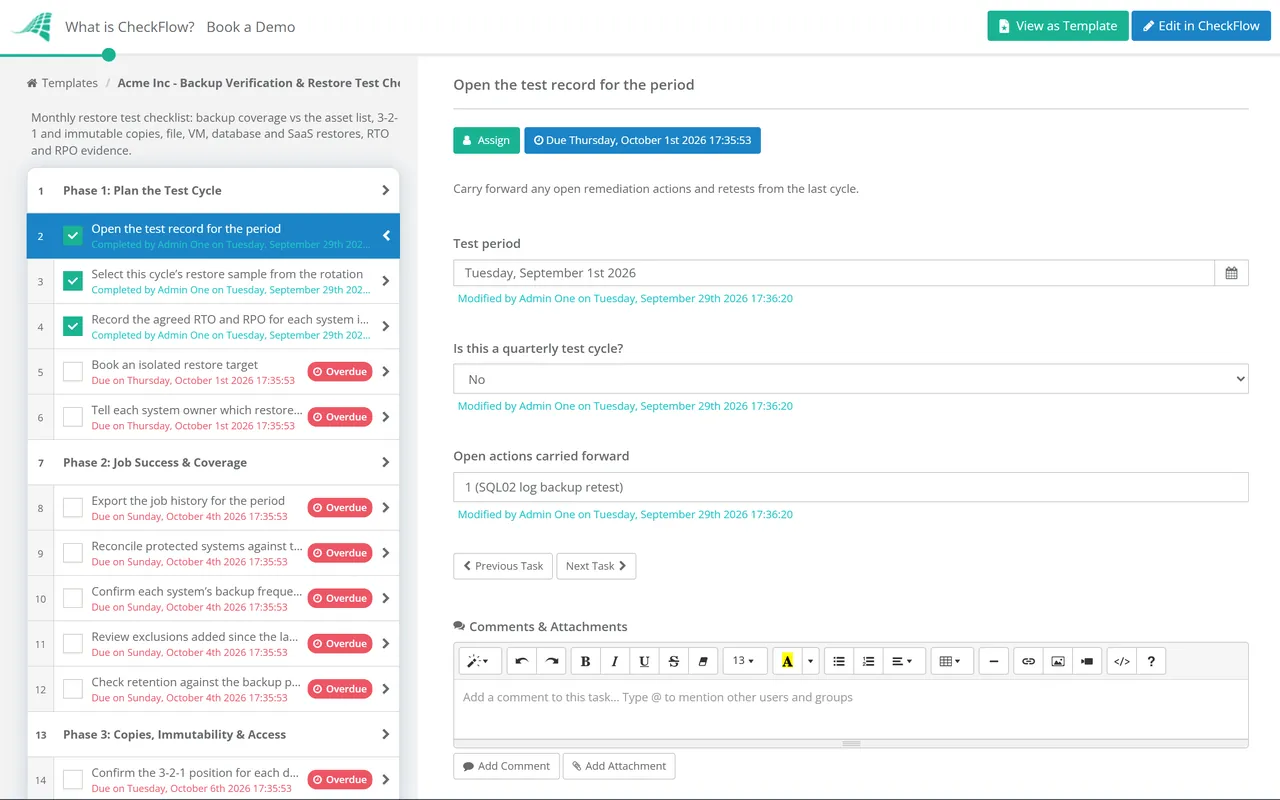
Open the test record for the period — carry forward any open remediation actions and retests from the last cycle
Select this cycle’s restore sample from the rotation — record which systems, and which restore type for each
Record the agreed RTO and RPO for each system in the sample — take them from the BIA or DR plan, not from memory
Book an isolated restore target — a sandbox network or spare host, so a restored server cannot clash with production names and addresses
Tell each system owner which restore is running and when — they confirm the application checks in Phase 5
Phase 2
Phase 2: Job Success & Coverage
Export the job history for the period — every failed, partial or warning job, with its cause and whether a later job covered the gap
Reconcile protected systems against the asset register — new servers, databases and SaaS tenants missing from backup; retired systems still being backed up
Confirm each system’s backup frequency can meet its RPO — a nightly job cannot deliver a one-hour RPO, however reliable it is
Review exclusions added since the last cycle — each has a reason and an approver, and hides nothing the business needs
Check retention against the backup policy — the oldest and newest restore points match what the policy promises
Phase 3
Phase 3: Copies, Immutability & Access
Confirm the 3-2-1 position for each data set — three copies, on two different types of storage, with one copy offsite
Check the immutable or offline copy — the lock or retention setting is active and the latest copy landed within the expected window
Check offsite replication lag — the offsite copy is recent enough to meet the RPO if the primary site is lost
Review who can delete or change backups — backup admin accounts are separate from the production domain and protected by MFA
Confirm encryption keys can be retrieved without production — keys and backup console credentials held only on the protected estate are lost with it
Phase 4
Phase 4: Run the Test Restores
The last two tasks are shown only when the cycle is marked as quarterly.
Restore a sample of files and folders to an alternate location — include at least one item from the oldest retained restore point
Restore at least one VM or server into the isolated network and boot it — confirm the operating system starts and its services run
Restore a database to a stated point in time — apply transaction logs up to that time and record the time used
Restore a sample of SaaS data from your backup service — for example a mailbox, a shared drive folder or a set of CRM records, not the platform’s own recycle bin
Record the start and end time of every restore — the clock starts when the restore is requested, not when the data starts copying
Restore a tier-1 system from the immutable or offsite copy — the copy you would depend on after ransomware or loss of the site
Restore a multi-tier application with its dependencies — database, application server and any identity or file share it needs, in the documented order
Phase 5
Phase 5: Integrity & Application Checks
Verify restored files against the source — compare file counts, sizes or hashes, and open a sample of documents
Run the database engine’s consistency check — for example DBCC CHECKDB on SQL Server, and compare row counts on key tables
Have the system owner run an application smoke test — log in, open recent records, run a report and confirm the data is as current as the restore point says
Check the restored system’s dependencies — service accounts, certificates, licence activation and connections to other systems
Scan the restored data for malware — a restore point taken after an intruder arrived can bring the problem back
Delete or lock down the restored test copies — they hold live data and must not outlive the test
Phase 6
Phase 6: Measure Against RTO & RPO, Then Sign Off
Sign-off is assigned to the backup owner by name, with the IT manager as reviewer. Answering “Yes” to the failure question opens Phase 7.
Record the measured restore time for each system — from restore request to the owner’s confirmation, compared with the RTO
Record the age of the restore point used — compared with the RPO, and with the worst case the backup schedule allows
Record a result for each system — pass, pass with issues, or fail
Attach the evidence — job reports, restore logs, hash or consistency check output and the owner’s confirmation
Update the restore runbook — any step, credential location or dependency that differed from the documented procedure
Confirm whether any restore failed or missed its RTO or RPO — then sign off the cycle
Phase 7 — Failed Tests Only
Phase 7: Remediate & Retest
Shown only when a restore failed or missed its RTO or RPO. A failing cycle cannot close until the retest is recorded.
Raise a remediation ticket or problem record for each failed system — with the system owner informed of the exposure
Classify the cause — job configuration, missing coverage, corrupt or missing restore point, dependency, runbook error or throughput too slow for the RTO
Agree an interim position with the system owner — extra backup frequency, a manual export, or a recorded risk acceptance until the fix lands
Fix the cause and re-run the same restore test — the item closes on a passing retest, not on the fix
Escalate any gap that no practical fix can close — the business owner either funds a different recovery method or formally revises the target
Record the failure and outcome for the next disaster recovery audit
Restore Test Rotation: What to Restore and How Often
No standard sets a single restore frequency. ISO/IEC 27001 asks for regular testing in line with your own policy, so the policy has to define “regular”. The matrix is a practical starting point for a mid-sized estate: scale the samples to your estate, and put every system in the rotation at least once a year.
Check or restore
Monthly
Quarterly
What it proves
Job history and coverage reconciliation
Every system
Every system
Everything that should be protected is protected
File and folder restore
Two or three systems
Data is complete and readable
VM or server boot in isolation
One system
One tier-1 system
The system starts and its services run
Database point-in-time restore
One database
Each tier-1 database in turn
The log chain is intact and the RPO holds
SaaS data restore
One item type
Each SaaS platform
The third-party backup of SaaS data works
Restore from the immutable or offsite copy
Not required
At least one tier-1 system
The copy you rely on after ransomware is usable
Multi-tier application restore
Not required
One application
Dependencies and restore order are documented correctly
Site failover or full DR test
Not in this checklist
Covered by the annual DR audit
NIST SP 800-34 Rev. 1 defines the recovery time objective as the maximum time a system resource can stay unavailable before the impact on the business processes it supports becomes unacceptable, and the recovery point objective as the point in time to which data can be recovered from the most recent backup. A restore test turns those into two measurements. Restore time runs from the request to the owner’s confirmation that the application works, because that is how the business experiences an outage. Restore point age is checked against the point you used and against the schedule’s worst case. Where the RTO cannot be met, NIST advises documenting the shortfall with a mitigation plan, which is what Phase 7 does.
Why Run Your Restore Tests in CheckFlow?
1
The rotation runs itself
A recurring schedule opens the test cycle on the first working day of each month and assigns it to the backup owner. Keep the backup register in a data set, so each cycle picks its sample from the list rather than from memory. One yes/no answer switches on the quarterly tasks.
2
Measured numbers, not ticks
Number fields capture restore time and restore point age, a dropdown records the result, and file uploads hold restore logs and hash output. The activity trail shows who ran each restore and when: the evidence an ISO 27001 auditor asks for under control 8.13.
3
A failed restore cannot close quietly
Conditional logic opens the remediation phase as soon as a restore is marked failed or over target. It is assigned to the system owner with a due date set from the test date, and the retest stays open until it passes. A webhook can open the service desk ticket.
Restore testing is one strand of a disaster recovery programme. Our disaster recovery checklist guide covers the rest: the business impact analysis, recovery tiers, the 3-2-1-1-0 rule and the full range of DR test types.
There is no universal number, so your backup policy has to set one. ISO/IEC 27001:2022 control 8.13 requires backups to be regularly tested in line with that policy, and auditors check you do what it says. A workable pattern is a monthly cycle with a small rotating sample, a deeper quarterly test of tier-1 systems and the immutable copy, and every protected system restored at least once a year. Add a test after any change to the backup platform or a critical application.
What is the difference between backup verification and a restore test?
+
Verification is a spectrum. At the lightest level you confirm the job completed. Next, the backup software checks the stored data is internally consistent. A restore test brings the data or system back, proves the application works and measures how long that took. Only the restore test tells you whether you can meet your RTO.
What is the 3-2-1 backup rule?
+
Keep three copies of important data, on two different types of storage, with one copy offsite. CISA and the UK National Cyber Security Centre both recommend it. Some vendors extend it to 3-2-1-1-0: Veeam adds one immutable or air-gapped copy that attackers cannot alter or delete, and zero errors when recovery is verified. Phase 3 checks the copies exist; Phase 4 proves they restore.
How do you measure RTO and RPO in a restore test?
+
For RTO, start the clock when the restore is requested and stop it when the system owner confirms the application works, then compare that with the agreed target. For RPO, record the timestamp of the restore point you used and how old it was, and check the backup schedule’s worst case: if backups run every 24 hours and take two hours, you could lose up to 26 hours of data. Test with realistic data volumes.
What should happen when a restore test fails?
+
Treat it as a finding. Tell the system owner, raise a ticket, classify the cause and agree an interim measure, then re-run the same test: the failure closes only when a retest passes. If no practical fix will meet the RTO or RPO, the business owner decides whether to fund a faster recovery method or accept a revised target, and that decision is recorded.
Is CheckFlow free for this template?
+
14-day free trial, no card required. The Business plan is $10 per user per month after the trial. Full details at checkflow.io/pricing.
Prove Your Backups Restore Before the Day You Need Them
Free trial — no credit card required.
Do you like cookies? 🍪 We use cookies to ensure you get the best experience on our website. Learn more