SSL/TLS Certificate Renewal Checklist Template

Certificates rarely expire because nobody knew the date. They expire on the load balancer nobody listed, the appliance that needs a manual upload, and the server where the new certificate went in without its intermediate.

This free SSL/TLS certificate renewal checklist keeps public and internal certificates renewed as validity periods shrink: 200 days since 15 March 2026, 100 days from March 2027 and 47 days from March 2029. Infrastructure teams, web teams and MSPs run it as a monthly expiry review. It covers the certificate inventory, ownership, ACME automation or a manual renewal, key and CSR generation, domain validation, installing the full chain on every endpoint, verification, CAA records and retiring the old certificate.

Use This Template Free See Live Example
No Credit Card Required

Three Ways a Certificate Gets Renewed

Every certificate in your estate renews in one of three ways, and each fails differently. Automation does not remove the need for a checklist. It moves the risk from forgetting a date to a renewal that fails silently, or a renewed file that never reaches the service using it.

Automated (ACME)

A client renews on schedule

How: Certbot, acme.sh, a web server module or an ingress controller requests and installs the certificate.

Fails when: port 80 is blocked, a DNS API token expires or a CAA record names another CA.

Your job: monitor renewals and expiry.
Platform-managed

The cloud service renews it

How: AWS Certificate Manager, Azure Front Door and similar services renew certificates they issued.

Fails when: someone deletes the validation CNAME or repoints the domain.

Your job: keep the DNS records in place.

Manual

A person renews it

How: new key and CSR, an order in the CA portal, validation, then installation by hand.

Fails when: an endpoint is missed or the chain is incomplete.

Your job: all of it, more often every year.

AWS documents that ACM renews a DNS-validated certificate automatically as long as the certificate is in use and its CNAME record stays in public DNS. Azure Front Door rotates its managed certificates when the domain’s CNAME points directly at the Front Door endpoint. Both are easy to break during a DNS tidy-up, which is why the validation records belong in the certificate table, and why record changes go through the DNS Change & Domain Renewal Checklist. In this checklist, platform-managed certificates follow the Automated path.

What the SSL/TLS Certificate Renewal Checklist Covers

Six phases take a renewal from inventory to retiring the old certificate. Phase 2 appears for automated renewals, Phases 3 and 4 for manual ones, and a failed verification adds a fix task before the run can close.

Phase 1

Phase 1: Inventory, Ownership & CAA

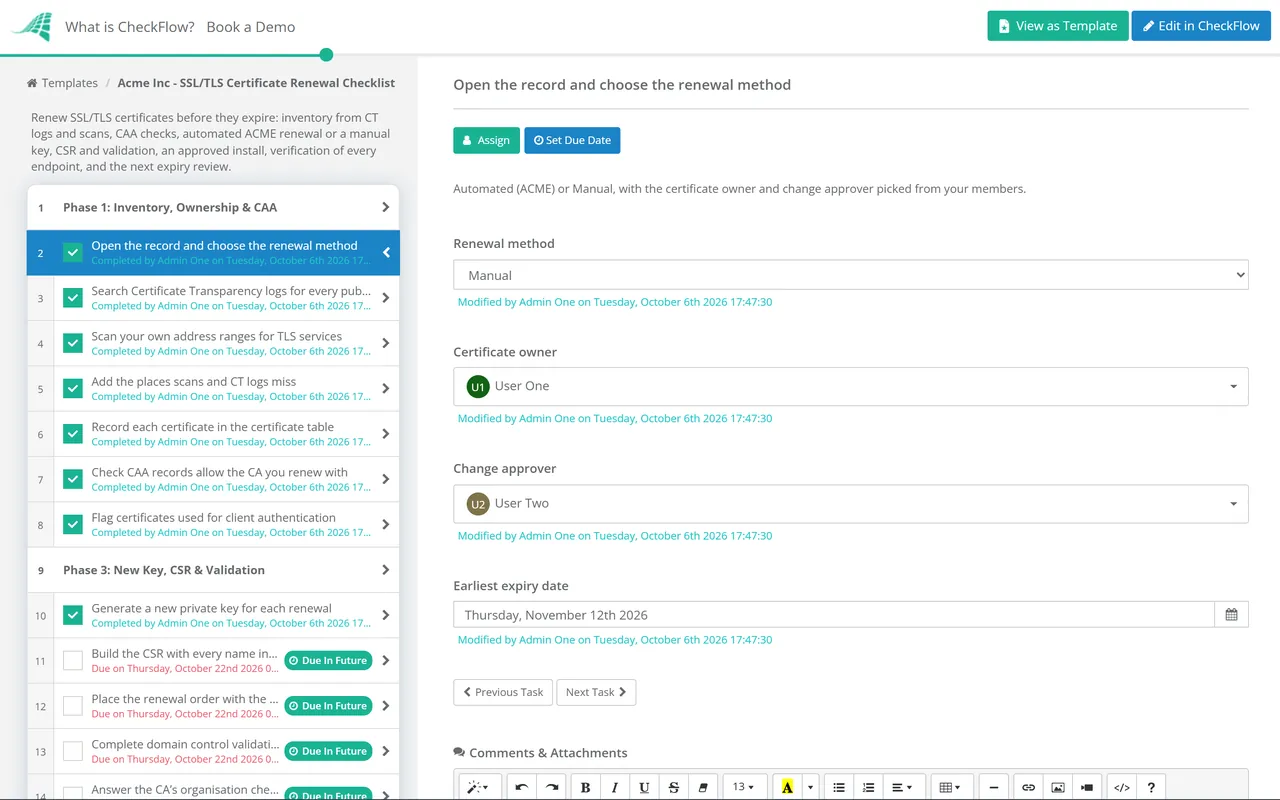
The renewal method chosen on the first task decides whether the automated phase or the two manual phases appear.

  • Open the record and choose the renewal method — Automated (ACME) or Manual, with the certificate owner and change approver picked from your members
  • Search Certificate Transparency logs for every public certificate on your domains — crt.sh with %.example.com lists certificates for every subdomain, including ones nobody remembers ordering
  • Scan your own address ranges for TLS services — port 443 and the rest: SMTP with STARTTLS, LDAPS on 636, VPN gateways and admin interfaces
  • Add the places scans and CT logs miss — load balancers, CDNs, appliances, Java keystores, and internal CA certificates, which are never publicly logged
  • Record each certificate in the certificate table — CN and SANs, where it is installed, expiry date, owner and renewal method
  • Check CAA records allow the CA you renew with — public CAs have had to check CAA before issuing since September 2017, and a missing entry blocks issuance
  • Flag certificates used for client authentication — new public TLS certificates no longer carry the clientAuth EKU, so mutual TLS needs a private CA or a dedicated client certificate
Phase 2 — Automated

Phase 2: Automated Renewal (ACME)

Tasks appear only when the renewal method is Automated (ACME).

  • Confirm the ACME client and version on each host — and that it supports ACME Renewal Information (RFC 9773), so the CA can tell it when to renew
  • Renew on a fraction of the lifetime, not a fixed day count — Let’s Encrypt advises renewing with a third left; a hard-coded 30 days renews far too often on 45-day certificates
  • Choose the challenge type for each name — HTTP-01 needs port 80 reachable, wildcards need DNS-01, and TLS-ALPN-01 works on port 443
  • Limit what the DNS-01 credentials can change — a token scoped to one zone, or a CNAME that delegates _acme-challenge to a validation-only zone
  • Make the deploy hook reload every service using the certificate — a renewed file on disk does nothing until the web server, proxy or mail server reloads
  • Run a test renewal against the CA’s staging environment — certbot renew --dry-run or your client’s equivalent
  • Alert on renewal failures, not just on expiry — Let’s Encrypt stopped sending expiry emails on 4 June 2025, so your own monitoring is the only warning
Phase 3 — Manual

Phase 3: New Key, CSR & Validation

Tasks appear only when the renewal method is Manual.

  • Generate a new private key for each renewal — RSA 2048-bit is the minimum public CAs accept; ECDSA P-256 is smaller and faster
  • Build the CSR with every name in the SAN list — browsers ignore the Common Name, so a name missing from the SANs fails even if it is the CN
  • Place the renewal order with the CA — and check the validity you will receive; since 15 March 2026 the maximum is 200 days
  • Complete domain control validation — DNS TXT, HTTP file or email; earlier validation can be reused for 200 days now, 100 from March 2027 and 10 from March 2029
  • Answer the CA’s organisation checks for OV and EV certificates — and allow for their lead time in the plan
  • Download the certificate with its intermediate chain — in the format each platform needs, such as PEM or PFX
  • Store the private key in your secrets vault — never in email, tickets or chat; record its location in the table
Phase 4 — Manual

Phase 4: Approval & Install

Tasks appear only for manual renewals. The approval on the second task halts the checklist until the approver decides.

  • Raise the change for the install window — listing every endpoint in the certificate table that carries this certificate
  • Approve the install — the named approver records approved or not approved, with the reason
  • Install on every endpoint in the table — servers, load balancers, CDN and appliances; a wildcard often lives in more places than expected
  • Install the intermediate chain with the leaf certificate — browsers can work around a missing intermediate; API clients, mobile apps and older devices often cannot
  • Convert formats where a platform needs it — PFX for Windows and IIS, PEM for most Linux services, a keystore for Java
  • Reload each service and keep the old files until verification passes — they are your rollback
Phase 5

Phase 5: Verify Every Endpoint

If the verification result is recorded as Fail, the fix task appears and the run cannot close until it is done.

  • Check each endpoint serves the new certificate and its chain — openssl s_client -connect host:443 -servername host -showcerts
  • Confirm the new expiry date and the names covered — pipe the output into openssl x509 -noout -enddate and check every SAN
  • Test from outside and inside the network — a load balancer and the server behind it can present different certificates
  • Test the clients that matter, not only a browser — API partners, mobile apps, mail servers and anything that pins a certificate
  • Record the verification result — pass, or fail with the endpoints still serving the old certificate or a broken chain
  • Fix the failed endpoints and verify them again — until every row in the table shows the new expiry
Phase 6

Phase 6: Retire, Record & Next Review

  • Remove the old certificate from every binding and keystore — an expired certificate left in place causes confusing failures later
  • Revoke the old certificate only if its key was exposed — or the system using it is gone; a routine renewal does not need revocation
  • Update expiry monitoring for each endpoint — alert while a third of the lifetime remains, so a failed renewal leaves time to act
  • Update the certificate table — new expiry, location, owner and renewal method for every row
  • List the certificates due in the next 60 days — the starting point for next month’s recurring expiry review
  • Sign off and close — the owner confirms every endpoint passed, with the verification output attached

Certificate Validity Dates to Plan Around

CA/Browser Forum ballot SC-081v3, approved on 11 April 2025, cuts the maximum life of a public TLS certificate in three steps, and cuts how long a CA may reuse an earlier domain validation alongside it. The renewal counts below are per certificate per year; multiply by the rows in your certificate table.

Issued on or after Maximum validity Validation reuse Renewals a year (minimum) Renewing with a third left
Before 15 March 2026398 days398 days11 to 2
15 March 2026 (now)200 days200 days2About 3
15 March 2027100 days100 days4About 6
15 March 202947 days10 days8About 12

The limits apply at issuance, so a 398-day certificate issued before 15 March 2026 stays valid until it expires. Through 2026 and into 2027 your table will hold a mix of old and new lifetimes, which is one more reason to review it monthly. With 10-day validation reuse from 2029, nearly every renewal will need fresh domain validation, and a manual email approval each month stops being workable. Ballot SC-088v3, in force since November 2025, adds a persistent DNS TXT method, known in ACME as DNS-PERSIST-01, that lets a standing record authorise one ACME account; Let’s Encrypt announced plans to support it in February 2026. Check whether your CA offers it yet.

Let’s Encrypt runs ahead of the schedule. Its default certificates last 90 days today. The optional tlsserver profile has issued 45-day certificates since 13 May 2026, and the default classic profile moves to 64 days with 10-day authorisation reuse on 10 February 2027, then to 45 days with 7-hour reuse on 16 February 2028. Its shortlived profile issues 6-day certificates. Let’s Encrypt also dropped OCSP URLs in 2025 in favour of CRLs, so anything that insists on OCSP stapling needs checking.

Why Run Certificate Renewals in CheckFlow?

1

Every certificate, every month

A table inside the inventory task lists each certificate with names, location, expiry, owner and method. A monthly recurring schedule opens the expiry review on the same day each month, assigned to the certificate owner with a due date, and a data set can hold your domains for every run to reuse.

2

The right steps for the method

The renewal method dropdown shows the ACME checks for automated certificates, or key generation, validation and install for manual ones. A manual install waits for the approver picked on the first task, because the checklist halts until they record their decision.

3

Proof that every endpoint changed

The verification result is a required dropdown: record Fail and the fix task appears. openssl output attaches to the task it proves, the audit trail shows who installed what and when, and tags keep each client’s certificates separate for MSPs.

CAA records, validation TXT records and ACME CNAMEs are DNS changes, made safely through the DNS Change & Domain Renewal Checklist. Expiry alerts and the test that proves they reach someone are part of the Monitoring & Alerting Setup Checklist.

Manual installs on production systems go through the IT Change Management Checklist. To see how a monthly review opens on schedule with its owner and due date already set, read about CheckFlow’s recurring checklist software.

Frequently Asked Questions

How long can an SSL/TLS certificate be valid in 2026?

+

A publicly trusted TLS certificate issued on or after 15 March 2026 can be valid for at most 200 days. The limit falls to 100 days for certificates issued from 15 March 2027 and to 47 days from 15 March 2029, under CA/Browser Forum ballot SC-081v3. Certificates issued earlier keep their original expiry. Private certificates from your own CA are not covered by these rules.

Do we have to automate certificate renewal?

+

No rule requires it, but the numbers push you there. At 47 days a certificate needs at least eight renewals a year, and about twelve if you renew with a sensible margin, each with its own install and check. Manual renewal stays workable for a few appliances that cannot run an ACME client. Keep those in the table, on the Manual path, and automate the rest.

What is a CAA record and can it block a renewal?

+

A CAA record, defined in RFC 8659, lists the certificate authorities allowed to issue for a domain. Public CAs must check it before issuing. If you switch CA, or someone adds a CAA record naming only one CA, renewals from any other CA fail. The issuewild tag controls wildcard certificates separately, and iodef gives an address for violation reports.

Why did a renewed certificate break mutual TLS?

+

Most likely because it no longer includes the TLS Client Authentication EKU. Chrome’s root program requires public hierarchies dedicated to server authentication from June 2026, so CAs have removed clientAuth from TLS certificates; Let’s Encrypt stopped issuing it entirely on 8 July 2026. Systems that used a public server certificate as a client certificate need a private CA or a dedicated client certificate.

How do I check that a server sends the full certificate chain?

+

Run openssl s_client -connect host:443 -servername host -showcerts. The output lists every certificate the server presents; you should see your certificate followed by the CA’s intermediate. The -servername option matters on any server hosting several sites, because without it you may be shown the default certificate instead of the one you renewed.

Is CheckFlow free for this template?

+

14-day free trial, no card required. The Business plan is $10 per user per month after the trial. Full details at checkflow.io/pricing.

Renew Every Certificate Before the Window Shrinks Again

Free trial — no credit card required.