Web Application Security Testing Checklist Template

Security bugs that reach production were usually testable before release. The round started too late, tested last release’s features with one admin account, and its findings were still in a chat thread when the release went out.

Last reviewed: October 2026

This free web application security testing checklist is for developers, QA engineers and security champions who test their own web application before a release. One run is one security test round of one application, based on the OWASP Web Security Testing Guide (WSTG) v4.2. It agrees the scope, environment, test accounts and test window and gets written approval to test, then works through the WSTG test areas: information gathering and configuration, identity, authentication, access control and sessions, input validation and file uploads, error handling, cryptography, business logic and client-side behaviour. API tests appear when the application has an API, and deeper tests when the release changes authentication or payments. Every finding is logged with a severity, an owner and a fix date and retested on the new build, and the security lead records the release decision before the round closes.

A Release Test Round Is Not a Penetration Test

Your own team knows the application, the code and what changed in this release. That makes an in-house test round the right place to check new features against the OWASP test areas, every release, before customers see them. An external penetration test brings outside testers for a fixed window, usually once a year or after a major change, and needs its own scoping, authorisation and remediation work, which the Penetration Test Checklist covers.

This checklist sits between code review and the release. Code review checks each change before it is merged. The Regression Testing Checklist checks the release did not break what already worked. This one checks the release did not open a security hole. Known vulnerabilities that scanners report in servers and components every month belong in the Vulnerability Management Checklist.

This checklist

The release security test round

Asks: does this release hold up against the OWASP test areas, as each role and through the API?

When: before every release that changes the application, run by developers, QA and a security champion.

Output: findings with owners, retested fixes and a recorded release decision.
Yearly or after major change

The external penetration test

Asks: what can a skilled outside tester break in a fixed window?

When: once a year, after a major change or when a customer or auditor asks for one, in the Penetration Test Checklist.

Output: a tester’s report, fixes with owners, a retest and an evidence pack.

Every pull request

The code review

Asks: is this change correct, tested and safe to merge?

When: on every pull request or merge request, in the Code Review Checklist.

Output: an approved change, merged under the team’s merge rules.

What the Web Application Security Testing Checklist Covers

Eight phases follow one security test round of one web application before a release. The API tests in Phase 6 appear only when the application has an API, and a change to authentication or payments adds a deeper test for each. When a critical or high finding is still open after the retest, a task appears to fix it or accept the risk, and the security lead records the release decision before the round closes.

  1. Phase 1

    Phase 1: Scope & Rules of Engagement

    6 tasks

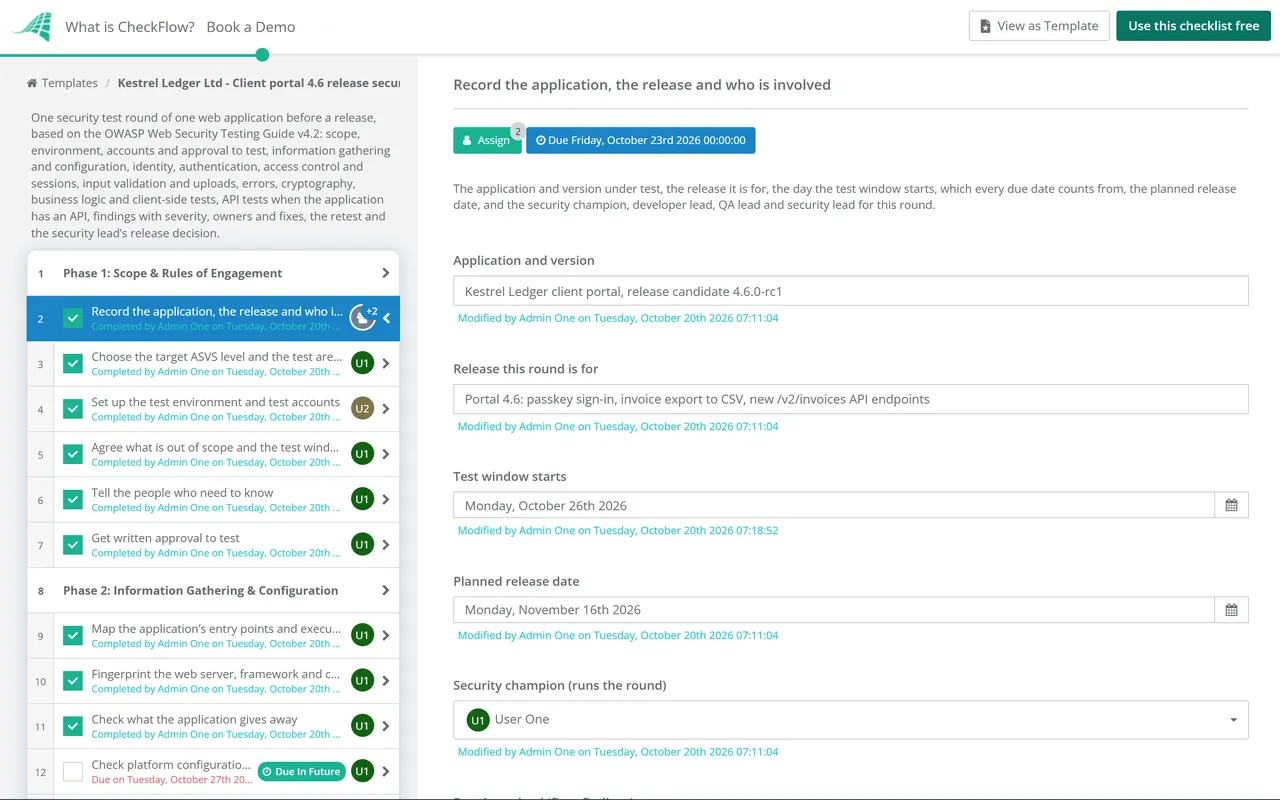
    Agree what will be tested, where, with which accounts and inside which window, and get written approval before any test traffic is sent. Answer the API and change questions first: they add the matching tests. Every due date counts from the day the test window starts.

    • Record the application, the release and who is involved — the application and version under test, the release it is for, the day the test window starts, which every due date counts from, the planned release date, and the security champion, developer lead, QA lead and security lead for this round
    • Choose the target ASVS level and the test areas — the OWASP ASVS level the application aims for, set from its risk, and the WSTG categories this round covers, focused on what the release adds or changes
    • Set up the test environment and test accounts — a production-like environment running the release candidate, at least one account per role and two accounts at the same role to test access between users, test data with no real personal data, and an expiry date on every account
    • Agree what is out of scope and the test window — production, third-party services, other customers’ data and load or denial-of-service tests unless agreed, with the window’s end date and the hours testing may run
    • Tell the people who need to know — operations, whoever watches the monitoring alerts and the hosting provider where its terms ask for notice, with a contact who can stop testing if the service is affected
    • Get written approval to test — from the application owner, covering the scope, environment, accounts and window above; no testing starts without it
  2. Phase 2

    Phase 2: Information Gathering & Configuration

    6 tasks

    Map the application before you test it, then check how it is deployed. Use the application as each role through an intercepting proxy. WSTG-INFO and WSTG-CONF cover these areas.

    • Map the application’s entry points and execution paths — every page, form, parameter, header, cookie and upload the release adds or changes, found by using the application as each role through an intercepting proxy (WSTG-INFO-06, -07)
    • Fingerprint the web server, framework and components — the server, frameworks and libraries in use and their versions, checked against the dependency list and known vulnerabilities (WSTG-INFO-02, -08, -09)
    • Check what the application gives away — page comments, metafiles such as robots.txt, error pages and search engine results that reveal paths, versions or internal names (WSTG-INFO-01, -03, -05)
    • Check platform configuration, HTTP methods and HSTS — default and sample files removed, only the HTTP methods the application needs, and Strict-Transport-Security on HTTPS responses (WSTG-CONF-02, -06, -07)
    • Look for exposed admin interfaces, backups and old files — admin consoles, backup copies, old versions and unreferenced files reachable from the web (WSTG-CONF-04, -05)
    • Check file permissions, cloud storage and subdomains — files and storage buckets readable only by those who need them, and no subdomain pointing at a service you no longer control (WSTG-CONF-09, -10, -11)
  3. Phase 3

    Phase 3: Identity, Authentication & Access Control

    6 tasks

    Broken access control is first in the OWASP Top 10:2025. Test every role with its own account, and test one user’s access to another user’s data. WSTG-IDNT, -ATHN, -ATHZ and -SESS cover these areas.

    • Test role definitions, registration and account provisioning — each role has only the access it needs, and sign-up or account creation cannot be used to gain a higher role (WSTG-IDNT-01 to -03)
    • Test login, lockout and account enumeration — credentials sent only over HTTPS, no default accounts, a lockout or throttle on repeated failures, and no way to tell which usernames exist (WSTG-ATHN-01 to -03, WSTG-IDNT-04)
    • Test password reset, password change and multi-factor authentication — a reset link that expires and works once, the current password needed to change it, and no route that skips the second factor (WSTG-ATHN-04, -09, -10)
    • Test authorisation between roles and between users — every function and record checked on the server: a lower role cannot reach admin functions, and one user cannot read or change another user’s records by changing an ID (WSTG-ATHZ-02 to -04)
    • Test session handling — cookies set with Secure, HttpOnly and SameSite, a new session ID after login, sessions that end at logout and after the timeout, and protection against cross-site request forgery (WSTG-SESS-01 to -03, -05 to -07)
    • Run deeper tests on the authentication changes — every changed sign-up, login, reset, multi-factor or single sign-on path tested with each role, including attempts to skip a step, and checked against the ASVS 5.0.0 chapters V6 Authentication, V7 Session Management and, for single sign-on, V10 OAuth and OIDC
  4. Phase 4

    Phase 4: Input Validation & File Uploads

    5 tasks

    Test every input the release adds or changes, on the server side, as each role. Record which areas you covered; the WSTG gives the method for each test. WSTG-INPV covers these areas, and WSTG-BUSL the file uploads.

    • Test for cross-site scripting — reflected and stored, in every field that is shown back to a user, including admin screens that display what users entered (WSTG-INPV-01, -02)
    • Test for SQL, NoSQL and other injection — every parameter that reaches a database, a directory, an XML parser, a template engine or an operating-system command (WSTG-INPV-05 to -12, -18)
    • Test for server-side request forgery — every feature that fetches an address or file a user supplies, such as imports, webhooks and link previews (WSTG-INPV-19)
    • Test HTTP parameter handling and host headers — duplicate parameters, unexpected HTTP methods and a changed Host header, including in the links the application emails (WSTG-INPV-03, -04, -17)
    • Test file uploads — file type, size and content checked on the server, uploads stored where they cannot run as code, and unexpected or malicious files refused (WSTG-BUSL-08, -09)
  5. Phase 5

    Phase 5: Errors, Cryptography, Business Logic & Client-Side

    6 tasks

    These are the areas automated scanners verify least. Business logic tests need someone who knows how each feature is meant to work. WSTG-ERRH, -CRYP, -BUSL and -CLNT cover these areas.

    • Test error handling — errors show a generic message with no stack trace, query or version, and the application fails safely when something unexpected happens (WSTG-ERRH-01, -02)
    • Test transport security and encryption — TLS on every connection with current protocols and ciphers, no sensitive data sent over unencrypted channels, and no weak encryption where the design uses it (WSTG-CRYP-01, -03, -04)
    • Test the business logic of the changed features — steps that cannot be skipped or repeated, limits that cannot be exceeded, prices, quantities and states that cannot be changed in the request, and timing that cannot be abused (WSTG-BUSL-01 to -07)
    • Test client-side behaviour — DOM-based cross-site scripting, client-side redirects, cross-origin resource sharing, clickjacking protection and what the browser stores (WSTG-CLNT-01, -04, -07, -09, -12)
    • Run deeper tests on the payment changes — amounts, currency and order totals checked on the server, payment steps that cannot be skipped or replayed, payment provider callbacks verified, and no card data stored or logged by the application
    • Check security logging — logins, failed logins, access denials and admin actions logged with enough detail to investigate, and no passwords, tokens or session IDs in the logs
  6. Phase 6

    Phase 6: API Tests

    5 tasks

    Shown when the application has an API. The OWASP API Security Top 10 (2023 edition) lists the commonest API risks; WSTG v4.2 has one API test, for GraphQL (WSTG-APIT-01).

    • List every API endpoint the release adds or changes — from the API description or the proxy log, with the method, the roles allowed to call it and the data it returns, so no endpoint is missed
    • Test object-level and property-level authorisation — one user cannot read or change another user’s object by changing its ID, or read or set properties their role should not see (API1:2023, API3:2023)
    • Test function-level authorisation and API authentication — admin and internal endpoints refuse ordinary users, and every endpoint needs a valid token or key that expires (API2:2023, API5:2023)
    • Test rate limits and resource use — limits on requests, page sizes, upload sizes and expensive operations, so one client cannot exhaust the service or automate a sensitive business flow (API4:2023, API6:2023)
    • Test GraphQL if the API uses it — introspection, query depth and batching limits, and authorisation on every field (WSTG-APIT-01)
  7. Phase 7

    Phase 7: Findings, Fixes & Retest

    6 tasks

    Log each finding as it is found, rate it, give it an owner and a fix date, and retest every fix on a new build. The task for critical or high findings appears only when one is still open after the retest.

    • Log each finding with its severity and evidence — a reference, title, affected URL or endpoint, WSTG test ID, severity (Critical, High, Medium, Low or Informational) and the steps to reproduce, with passwords and personal data masked
    • Agree the severity of each finding — how easy it is to exploit, the access it needs and its impact on this application, rated with one written scheme, so the release decision rests on agreed ratings
    • Assign an owner and a fix date to each finding — in the team’s issue tracker, with critical and high findings fixed before release unless the security lead accepts the risk in writing
    • Fix the findings and add tests that would catch them again — each fix reviewed like any other change, with an automated test added wherever one can catch the same flaw in a future build
    • Retest every fix on the new build — the original test repeated on the release candidate, with a finding closed only when it no longer reproduces
    • Decide how each open critical or high finding is handled — fix and retest it before release, or record a risk acceptance with the reason, a compensating control, an expiry date and who accepted it
  8. Phase 8

    Phase 8: Release Decision & Close

    5 tasks

    The security lead records the release decision. Nothing after that step can be completed until a decision is recorded.

    • Write the test summary — the scope and ASVS level, the WSTG areas covered and not covered, findings by severity and their status, and limits such as untested areas or missing accounts
    • Security lead records the release decision — Release, Release with accepted risks or Do not release, based on the summary, the open findings and any risk acceptances
    • Pass the decision to the release manager — the decision, the summary and any accepted risks attached to the release record, so the go/no-go has the security result
    • Remove test accounts and test data — every test account disabled, test data, tokens and keys deleted, and any temporary access or firewall changes made for the test removed
    • Carry the lessons into the next round — findings that keep coming back, tests to automate, changes to this checklist and training needs, with the date of the next round

The 12 OWASP WSTG v4.2 Test Categories

WSTG v4.2 splits active testing into 12 categories, and every test in them has an ID such as WSTG-ATHN-03. The table lists each category with the number of tests v4.2 has in it and where it sits in this checklist. A round covers the categories the release touches; a first round, or a major release, covers all of them. Use the guide itself for the method of each test, and record the IDs you covered in the test summary.

WSTG v4.2 category Test IDs Tests in v4.2 What it covers, for example Where in this checklist
Information GatheringWSTG-INFO10Entry points, execution paths, web server, framework and application fingerprintingPhase 2
Configuration and Deployment Management TestingWSTG-CONF11HTTP methods, HSTS, admin interfaces, old and backup files, file permissions, subdomain takeover, cloud storagePhase 2
Identity Management TestingWSTG-IDNT5Role definitions, registration, account provisioning, account enumerationPhase 3
Authentication TestingWSTG-ATHN10Encrypted credentials, default credentials, lockout, password reset and change, alternative channelsPhase 3
Authorization TestingWSTG-ATHZ4Directory traversal, bypassing authorisation, privilege escalation, insecure direct object referencesPhase 3
Session Management TestingWSTG-SESS9Cookie attributes, session fixation, cross-site request forgery, logout, session timeoutPhase 3
Input Validation TestingWSTG-INPV19Reflected and stored cross-site scripting, SQL and other injection, host header injection, server-side request forgeryPhase 4
Testing for Error HandlingWSTG-ERRH2Improper error handling, stack tracesPhase 5
Testing for Weak CryptographyWSTG-CRYP4Weak TLS, padding oracle, sensitive data over unencrypted channels, weak encryptionPhase 5
Business Logic TestingWSTG-BUSL9Data validation, forged requests, process timing, usage limits, workflow circumvention, file uploadsPhases 4 and 5
Client-side TestingWSTG-CLNT13DOM-based cross-site scripting, client-side redirects, cross-origin resource sharing, clickjacking, browser storagePhase 5
API TestingWSTG-APIT1GraphQLPhase 6

Versions. WSTG v4.2 is the current stable release. OWASP is developing version 5.0, and its draft renames some categories and adds others, so record the version you tested against. The API rows in this checklist also draw on the OWASP API Security Top 10 (2023 edition), because v4.2 has only the GraphQL test for APIs.

ASVS. The Application Security Verification Standard 5.0.0 (May 2025) is a list of security requirements to build and test against, in 17 chapters from V1 Encoding and Sanitization to V17 WebRTC, at three levels. The WSTG describes how to test; the ASVS describes what the application should do. OWASP does not certify applications against either.

Why Run Web Application Security Tests in CheckFlow?

1

Scope and approval before the first test

The first phase records the environment, the test accounts, what is out of scope and the test window, and the written approval to test sits on its task with who gave it. An answer about the API, or about changes to authentication and payments, adds the matching tests, so each round fits its release.

2

Every finding has an owner and a date

Each test area records Pass, Findings logged or Not tested. Findings go into one table with the WSTG test ID, severity, owner and fix date, and when a critical or high finding is still open after the retest, a task appears to fix it or record a risk acceptance. Rounds in progress show on the Reports Grid.

3

No release without a security decision

The security lead records Release, Release with accepted risks or Do not release, and nothing after that approval step can be completed until a decision is recorded. Start a round from the same template for each release, or on a recurring schedule for applications that ship on a fixed cycle.

CheckFlow does not scan or attack your application. Your team runs the tests with its own tools and the OWASP guides. CheckFlow makes sure each round has a scope and an approval, that every finding has an owner and a retest, and that the release decision is on record. Compliance checklist software shows how repeated reviews like this one are tracked.

Check each change before it merges with the Code Review Checklist, confirm the release did not break anything with the Regression Testing Checklist, and take the security decision into the go/no-go of the Software Release Management Checklist. Bring in outside testers with the Penetration Test Checklist.

AI generator

Didn’t find what you need? Describe it.

Describe the process in a sentence and the AI checklist generator drafts the phases and tasks for you.

Frequently Asked Questions

What is the OWASP Web Security Testing Guide?

A free OWASP Foundation guide to testing the security of web applications, written for developers and security professionals. Version 4.2 is the current stable release, and OWASP is developing version 5.0. Its active tests are split into 12 categories, from Information Gathering (WSTG-INFO) to API Testing (WSTG-APIT), and each test has an ID such as WSTG-ATHN-03, so a test summary can say exactly what was covered.

How is a security test round different from a penetration test?

This checklist is a round your own developers, QA engineers and security champion run before each release, focused on what changed. A penetration test is usually commissioned from an outside firm for a fixed window and needs its own scope, authorisation letter, report triage and retest. Many teams do both: a round for every release, and an outside test once a year or after a major change, run with the Penetration Test Checklist.

Which OWASP ASVS level should we test against?

ASVS 5.0.0 has three levels. Level 1 is the minimum, around 20% of the requirements. Level 2 is the level the standard says most applications should be striving for, about 70% of the requirements once Level 1 is included. Level 3 adds the final ~30%, for applications that need the highest assurance. The ASVS leaves the choice to you, based on your risks and how sensitive the application is: its own example puts an early-stage startup at Level 1 and online banking at Level 3.

What is in the OWASP Top 10:2025?

The ten risk categories of the current edition: A01 Broken Access Control, A02 Security Misconfiguration, A03 Software Supply Chain Failures, A04 Cryptographic Failures, A05 Injection, A06 Insecure Design, A07 Authentication Failures, A08 Software or Data Integrity Failures, A09 Security Logging and Alerting Failures and A10 Mishandling of Exceptional Conditions. It replaced the 2021 edition. Use the WSTG for how to test and the ASVS for the requirements to test against.

Can an automated scanner do this testing for us?

Not on its own. The ASVS says that dynamic and static testing tools, set up well in the build pipeline, can find some issues, but cannot fully verify many of the more complicated requirements, such as those for business logic and access control. Run your scanners in the pipeline, then test authorisation, business logic and the changed features by hand with an account for each role. The ASVS also encourages testing with access to the code and documentation rather than as a black box.

How should we rate the severity of findings?

Choose one scheme and write it down. The reporting chapter of the WSTG suggests Informational, Low, Medium, High and Critical, judged on how easy the issue is to exploit, the access it needs and its impact, and notes that some engagements require a CVSS score. Agree each rating before the release decision, because that decision usually turns on whether any critical or high finding is still open.

Who should take part in a test round?

The people who know the application: developers who can read the code and fix what is found, QA engineers who know the features and the test environment, and a security champion who runs the round. The application owner approves the testing, and a security lead records the release decision. The WSTG notes that teaching development and QA teams about common security issues lets an organisation treat security as part of their existing work.

Is CheckFlow free for this template?

14-day free trial, no card required. The Business plan is $10 per user per month after the trial. Full details at checkflow.io/pricing.

Put a Security Decision on Every Release

Free trial — no credit card required.

14-day free trial, no credit cardFull refund in your first 30 daysUS hosting, EU on request