Website Privacy & Cookie Compliance Checklist Template

The banner was set up at launch. Since then marketing has added three pixels through the tag manager, the chat widget sets cookies on page load, and ‘Reject all’ quietly stopped working after the redesign.

This free website privacy checklist is for privacy leads, DPOs and the web and marketing teams who own a site’s tags. It reviews one website every quarter or after a major release: a cookie and tag scan, the consent banner and its configuration, the privacy notice, forms, pixels and embedded tools, US opt-out links and Global Privacy Control, and children. Each review ends with dated scan evidence, a fix-and-retest record where needed and an approved, published notice.

Use This Template Free See Live Example
No Credit Card Required

Last reviewed: October 2026

One Website, Three Rulebooks

A website changes faster than any privacy policy. Every campaign tag, plug-in update and new widget can set a cookie before the visitor has chosen anything, and regulators test exactly that: they load the page in a clean browser and look at what fires. The annual GDPR compliance audit gives cookies one line; this review goes deep on one site, often enough to catch drift.

Europe works on consent first: nothing non-essential is stored on or read from the device until the visitor agrees. The US works on opt-out: tracking can run, but the visitor must be able to stop the sale or sharing of their data, and a browser signal counts as that request.

EU / EEA

ePrivacy Directive Article 5(3), read with the GDPR

Rule: consent before storing or reading information on the device, unless strictly necessary for a service the user asked for. It applies whether or not the data is personal.

Courts: in Planet49 (C-673/17, 1 October 2019) a pre-ticked box was not consent, and users must be told how long cookies last and which third parties get access.

Regulators: the EDPB’s cookie banner taskforce (January 2023) and its Guidelines 2/2023, final in October 2024, which bring pixels and URL tracking within the rule.


UK

PECR regulation 6, as amended by the Data (Use and Access) Act 2025

Rule: consent unless an exception in new Schedule A1 applies, in force from 5 February 2026. Instigating a third party’s cookie counts too.

Exceptions: strictly necessary, plus analytics to improve your own site and remembering a visitor’s display or feature preferences, if you explain them and offer a simple, free way to object.

Fines: up to £17.5 million or 4% of worldwide turnover since 5 February 2026. The regulator is the Information Commission, still known as the ICO.

California and US states

CCPA/CPRA and other state privacy laws

Rule: a business that sells or shares personal information needs a “Do Not Sell or Share My Personal Information” link, and ad pixels often count as sharing.

Signals: Global Privacy Control must be honoured as an opt-out in California, and since 1 January 2026 the site must show that it was.

Other states: Colorado has required opt-out signals to be honoured since 1 July 2024 and Connecticut since 1 January 2025.

Enforcement is aimed at the obvious failures. In January 2025 the ICO said it had assessed the top 200 UK websites, raised concerns with 134 of them and would work through the top 1,000. In September 2025 California, Colorado and Connecticut announced a joint sweep of businesses that ignore Global Privacy Control. The full Californian programme lives in the CCPA/CPRA Compliance Checklist.

What the Website Privacy & Cookie Compliance Checklist Covers

Six phases, one checklist per website per review. The jurisdictions you pick and the first scan’s result decide which phases appear.

Phase 1

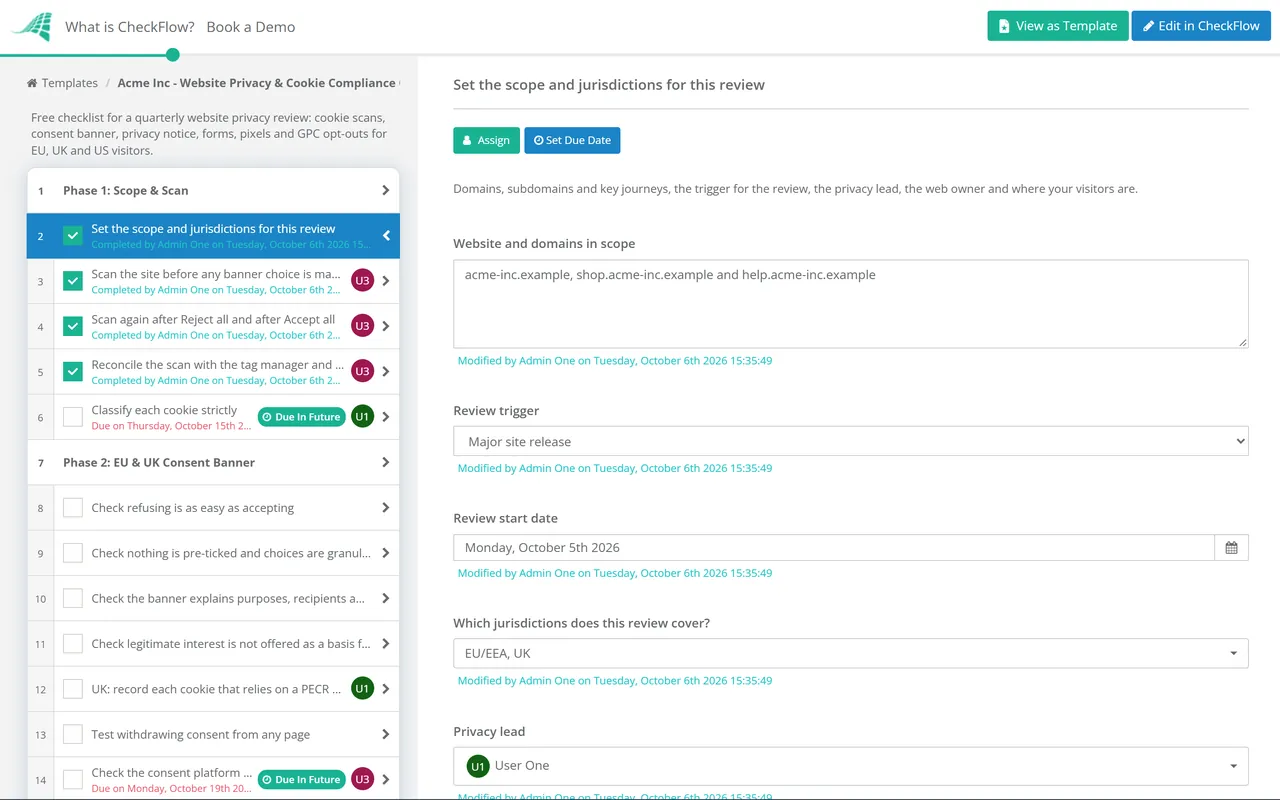
Phase 1: Scope & Scan

The jurisdictions chosen on the first task decide whether Phases 2 and 4 appear. The answer on the second task decides whether Phase 5 appears.

  • Set the scope and jurisdictions for this review — domains, subdomains and key journeys, the trigger for the review, the privacy lead, the web owner and where your visitors are
  • Scan the site before any banner choice is made — a clean browser from an EU or UK location where relevant; record every cookie, storage item and third-party request
  • Scan again after Reject all and after Accept all — after rejecting, only strictly necessary or exempt items remain; after accepting, the result matches the cookie list
  • Reconcile the scan with the tag manager and hard-coded scripts — every tag has an owner, a purpose and a consent category; remove tags nobody claims
  • Classify each cookie strictly — ‘strictly necessary’ means the service the visitor asked for fails without it; the EDPB taskforce found many mislabelled
Phase 2

Phase 2: EU & UK Consent Banner

Shown when the review covers EU/EEA or UK visitors. The exception task appears only when the UK is selected.

  • Check refusing is as easy as accepting — a Reject option on the same layer as Accept, just as visible, and never a link buried in a paragraph
  • Check nothing is pre-ticked and choices are granular — separate purposes such as analytics and advertising, each off until the visitor switches it on
  • Check the banner explains purposes, recipients and duration — the visitor learns who receives the data and how long cookies last before choosing
  • Check legitimate interest is not offered as a basis for cookies — the EDPB taskforce agreed it cannot justify placing or reading them
  • UK: record each cookie that relies on a PECR exception — statistical or appearance purposes only, explained clearly, with a simple and free way to object
  • Test withdrawing consent from any page — a footer link or icon reopens the settings, and withdrawing stops the tags, not just the banner
  • Check the consent platform passes choices to every tag — tag-manager triggers and Google Consent Mode or IAB TCF signals default to denied
Phase 3

Phase 3: Notice, Forms & Third-Party Code

  • Compare the privacy notice and cookie policy with the scan — every vendor, purpose and retention period found is described, and removed tools are taken out
  • Walk every form on the site — collect only the fields the purpose needs, give notice at the point of collection and leave marketing boxes unticked
  • Check pixels and session replay on sensitive pages — login, checkout, account, health and finance pages; mask inputs and keep form contents out of URLs
  • Check embedded content and widgets — video players, maps and chat tools often set cookies on page load; load them after consent or on click
  • Check the routes to exercise privacy rights — the request form or address works and messages reach the team that handles requests
  • Decide whether the site is likely to attract children — if so, apply the consent ages: 13 to 16 across the EU, 13 in the UK, and COPPA for under-13s in the US
Phase 4

Phase 4: US Opt-Outs & Preference Signals

Shown when the review covers California or other US states.

  • Decide whether any tag sells or shares personal information — in California, ad pixels used for cross-context behavioural advertising usually count as sharing
  • Check the Do Not Sell or Share link appears on every page — in the footer, leading to an opt-out that needs no account or identity check
  • Test Global Privacy Control in a GPC-enabled browser — selling and sharing tags stop, and the site shows the visitor that the signal was honoured
  • Check signal handling for each state law that applies to you — thresholds differ by state, so record which laws you meet and test against each
  • Compare the opt-out path with the opt-in path — saying no takes no more steps than saying yes; asymmetry was one ground for the agency’s 2025 Honda decision
Phase 5

Phase 5: Fix & Retest

Shown only when the first scan found non-essential cookies set before consent.

  • Trace each pre-consent cookie to its source — a hard-coded script, a tag-manager trigger, an embedded widget or a miscategorised cookie in the consent platform
  • Block each tag until the visitor consents — move it behind a consent trigger, or let the consent platform hold the script until a choice is made
  • Retest in a clean browser for each jurisdiction — repeat the three Phase 1 scans and attach the new reports
  • Record how long the issue ran and which vendors received data — the privacy lead decides on follow-up, such as asking a vendor to delete it
  • Add a consent check to the release process — a scan of the staging site before each release stops the same tag returning next sprint
Phase 6

Phase 6: Approve, Publish & Schedule

The approval is assigned to the privacy lead named in Phase 1.

  • Update the privacy notice and cookie policy — reflect the scan, the fixes and any new vendors, with a new version date
  • Privacy lead approves the updated notice — checks it against the scan and the banner wording, then records Approved or Not approved
  • Publish the update and archive the evidence — scan reports, banner screenshots and the old and new notice versions, kept together
  • Log remaining findings with an owner and a date — anything not fixed in this review is tracked to closure, not rediscovered next quarter
  • Set the next review — next quarter, or sooner if a redesign, a new consent platform or a new marketing tag is planned

Cookie and Website Privacy Rules Mapped to the Checklist

The table maps each rule a website review tests to its source, where it applies and the phase that records the evidence. National laws and regulator guidance add detail, such as the CNIL’s conditions for consent-free audience measurement in France, so treat the table as a starting point, not legal advice.

Requirement Source Applies to Evidenced in
Consent before storing or reading on the deviceePrivacy Directive Art. 5(3) and national lawsEU/EEAPhases 1, 2 and 5
No pre-ticked boxes; cookie duration and third-party access explainedCJEU, Planet49 (C-673/17)EU/EEAPhase 2
Reject alongside accept; no misleading design or legitimate interestEDPB cookie banner taskforce report, 17 January 2023EU/EEAPhase 2
Pixels, URL tracking and similar techniquesEDPB Guidelines 2/2023, version 2.0 of 7 October 2024EU/EEAPhases 1 and 3
Withdrawing consent as easy as giving itGDPR Art. 7(3)EU/EEA, UKPhase 2
Storage and access rule, including instigating itPECR reg. 6, substituted from 5 February 2026UKPhases 1 and 2
Strictly necessary, statistical and appearance exceptionsPECR Schedule A1UKPhase 2
Data minimisation and notice on formsGDPR Arts. 5(1)(c) and 13EU/EEA, UKPhase 3
Children’s consentGDPR Art. 8; COPPA RuleEU/EEA, UK, USPhase 3
Do Not Sell or Share linkCCPA, Cal. Civ. Code §1798.135CaliforniaPhase 4
Opt-out preference signalsCCPA regulations §7025; Colorado and Connecticut lawsUS statesPhase 4
Notice and evidence kept currentGDPR Art. 5(2) accountabilityEU/EEA, UKPhase 6

Two things were moving at the time of review. The Commission’s Digital Omnibus proposal of 19 November 2025 would move the cookie rules for personal data into the GDPR, require a single-click refusal, bar asking again for six months after a refusal, allow consent-free audience measurement for the site’s own use and require websites to accept automated browser signals. It was still at first reading without a Council mandate in September 2026, so Article 5(3) and national laws apply as they stand. In California, the agency’s Board asked staff in August 2026 to draft rules naming Global Privacy Control as a valid signal, and from 1 January 2027 browsers must offer an opt-out signal setting. Nothing on this page is legal advice.

Why Run Website Privacy Reviews in CheckFlow?

1

Only the rules this site faces

Tick EU/EEA, UK or US states on the first task and conditional logic shows the consent banner checks, the PECR exception task or the opt-out and GPC tests to match. A clean first scan hides the fix-and-retest phase.

2

Scan evidence on the task it proves

Scan reports, banner screenshots and GPC test results attach to the task they belong to, with who completed it and when.

3

Quarterly, and after every release

A quarterly schedule starts each review automatically, and you can start an extra run when a redesign ships. The updated notice cannot be published until the privacy lead approves it, and template versioning carries rule changes forward.

CheckFlow is not a cookie scanner, a consent management platform or a legal adviser. Your scanner finds the cookies and your consent platform shows the banner; CheckFlow runs the review around them, holds the evidence and tracks every fix to an owner. Run it on a recurring schedule alongside the rest of your privacy calendar in CheckFlow’s compliance checklist software.

The website is one part of a privacy programme. The GDPR Compliance Audit Checklist reviews the whole programme each year, and the CCPA/CPRA Compliance Checklist covers California beyond the site. Requests that arrive through your web form follow the DSAR Response Checklist. The banner must also work by keyboard, which the WCAG 2.2 Accessibility Audit Checklist tests, and a new tracking tool such as session replay may need a DPIA first.

Frequently Asked Questions

Do analytics cookies need consent?

+

In the EU, generally yes, unless a national regulator allows a narrow exemption. The CNIL, for example, accepts audience measurement without consent only where it produces anonymous statistics for the publisher alone. In the UK, since 5 February 2026 analytics used only to improve your own site or service can run without consent if you explain it and offer a free way to object. The ICO’s April 2026 guidance excludes advertising measurement, profiling and cross-site tracking.

Does a cookie banner need a ‘Reject all’ button?

+

In practice, yes. In the EDPB taskforce report, most European authorities agreed that a banner offering Accept without a reject option on the same layer does not obtain valid consent, and that a reject link hidden in text can also fail. The ICO expects accept and reject to be equally easy. A visible ‘Reject all’ next to ‘Accept all’ is the safest design.

What is Global Privacy Control and do we have to honour it?

+

GPC is a browser setting that tells every site the visitor wants to opt out of the sale or sharing of their data. California requires businesses that sell or share to treat it as a valid opt-out, and Colorado and Connecticut require opt-out signals to be honoured too. Test it with a GPC-enabled browser and check that advertising tags actually stop.

How often should a website cookie audit be done?

+

No law sets a frequency. Quarterly suits most marketing sites, plus a run after any redesign, new consent platform or new tag. A busy e-commerce site with weekly releases is better served by a scan in every release, with this checklist each quarter.

What are the UK fines for cookie breaches now?

+

Since 5 February 2026, PECR breaches carry the UK GDPR’s higher maximum: £17.5 million or 4% of total worldwide annual turnover, whichever is higher. The previous cap was £500,000.

Will the EU Digital Omnibus get rid of cookie banners?

+

Not soon, and not entirely. The proposal would exempt some uses, such as audience measurement for the site’s own use, and push towards browser-level signals, but advertising cookies would still need consent. It was not law at the time of review and could change substantially in negotiation, so keep reviewing against Article 5(3) as it stands.

Is CheckFlow free for this template?

+

14-day free trial, no card required. The Business plan is $10 per user per month after the trial. Full details at checkflow.io/pricing.

Know What Your Website Sets Before a Regulator Checks

Free trial — no credit card required.