The monthly run
Who: the site maintainer, in-house or at the agency.
When: the same week each month, on a fixed schedule.
Output: a backed-up, updated, scanned site and a client report.
Covered by: Phases 1–5 and 7.
Last reviewed: October 2026
No Credit Card Required
Printed from checkflow.io/templates/marketing/wordpress-maintenance-checklist
This free WordPress maintenance checklist is a monthly routine for the person who looks after the site, whether that is an in-house marketer or an agency running dozens of client sites. It covers a tested backup, core, plugin and theme updates applied on staging first, a security review, performance and uptime checks, content and SEO hygiene, and a client report with sign-off. Every third month a quarterly deep check switches on, covering PHP upgrade planning, a full user audit and a restore from the offsite copy. It runs on a recurring schedule, so each month’s checklist appears with the work already assigned.
The risk sits in plugins, not core. Patchstack’s State of WordPress Security in 2026 report counted 11,334 new vulnerabilities in the WordPress ecosystem during 2025. 91% were in plugins and 9% in themes; WordPress core had six, all low priority. Nearly half (46%) had no fix from the developer by the time they were disclosed, and for the heavily exploited flaws the median time from disclosure to mass exploitation was about five hours. A site with thirty plugins is really thirty small software suppliers, and the monthly checklist is how you keep track of all of them.
Updates need a test run. Since WordPress 5.5, administrators can switch on automatic updates plugin by plugin and theme by theme, and by default WordPress checks for them twice a day. That is the right setting for small, well-maintained plugins and for security releases you cannot wait a month for. It is the wrong setting for a page builder, a shop or a membership plugin, where an update can change layouts or checkout behaviour. Those belong on staging first: refresh staging from production, update there, click through the journeys that earn money, then repeat on the live site.
Only the latest version is supported. WordPress 7.1 “Mary Lou” was released on 19 August 2026 and 7.1.2, a security release, followed on 22 September 2026. WordPress.org officially supports only the latest version. Security fixes are backported to older branches as a courtesy, currently as far back as 4.7, but backports are not a plan. The PHP underneath matters as much: WordPress.org recommends PHP 8.3 or greater, and PHP 8.2 stops receiving security fixes on 31 December 2026.
A backup you have not restored is a hope. Backup jobs fail quietly, storage fills up, and some tools back up the files but not the database. The monthly run checks the backup log and takes a fresh copy before anything is updated. The quarterly run goes further and restores the offsite copy to a test environment, because that is the only way to know it works.
Performance drifts between redesigns. A new slider, a chat widget or a batch of uncompressed photos can undo last year’s speed work without anyone noticing. Google’s Core Web Vitals give a fixed yardstick: at the 75th percentile of real visits, a good page has Largest Contentful Paint within 2.5 seconds, Interaction to Next Paint within 200 milliseconds and Cumulative Layout Shift of 0.1 or less. Checking the same templates every month turns a slow decline into a line item you can fix while it is small.
Agencies need proof as well as work. If you look after client sites, the client is paying for something they never see. Run one checklist per site from the same template, and the month ends with a short report the client approves: what was updated, what was fixed, what needs a decision. That record also settles the “did anyone update the plugins?” question when something goes wrong. With a portfolio of sites, stagger the schedules across the month so each maintainer handles a few sites a day rather than all of them in the first week.
Who: the site maintainer, in-house or at the agency.
When: the same week each month, on a fixed schedule.
Output: a backed-up, updated, scanned site and a client report.
Covered by: Phases 1–5 and 7.
Who: the maintainer, with the account lead for agency sites.
When: when “Quarterly run?” is set to Yes at the start.
Output: a restore test, a user audit and a PHP and plugin plan.
Covered by: Phase 6.
Six phases run every month. The quarterly deep check appears only when the run is marked as quarterly.
Shown only when “Quarterly run?” is set to Yes in Phase 1.
Record the PHP version in Phase 1 every month, then compare it with this table. WordPress still runs on PHP 7.4, but that branch is long out of support. A host that has not moved you off 8.2 by December 2026 is about to leave the site on unsupported software. Ask the host when your account will move, and note the date on the task.
| PHP version | Status in October 2026 | Security fixes until | What to do |
|---|---|---|---|
| 8.1 and older | End of life | Ended | Upgrade now; test on staging first |
| 8.2 | Security fixes only | 31 Dec 2026 | Schedule the upgrade this quarter |
| 8.3 | Security fixes only | 31 Dec 2027 | Meets the WordPress.org recommendation; plan the next move for 2027 |
| 8.4 | Active support until 31 Dec 2026 | 31 Dec 2028 | A sound target if your plugins support it |
| 8.5 | Active support until 31 Dec 2027 | 31 Dec 2029 | Check plugin and theme compatibility before switching |
Dates are from php.net’s supported versions page. WordPress.org also recommends MySQL 8.0 or MariaDB 10.11 or later, so check the database server in the same quarterly review. Change PHP on staging first, run the Phase 2 journey tests, and watch the error log for deprecation warnings from older plugins.
What runs more often than monthly. Some checks cannot wait four weeks. Apply security releases for plugins you actually run as soon as they are published. On sites that take orders or leads, glance at the backup log and uptime alerts weekly and submit the main form, because a broken form costs more each day it goes unnoticed. Add these as a short weekly checklist on its own schedule rather than stretching the monthly one.
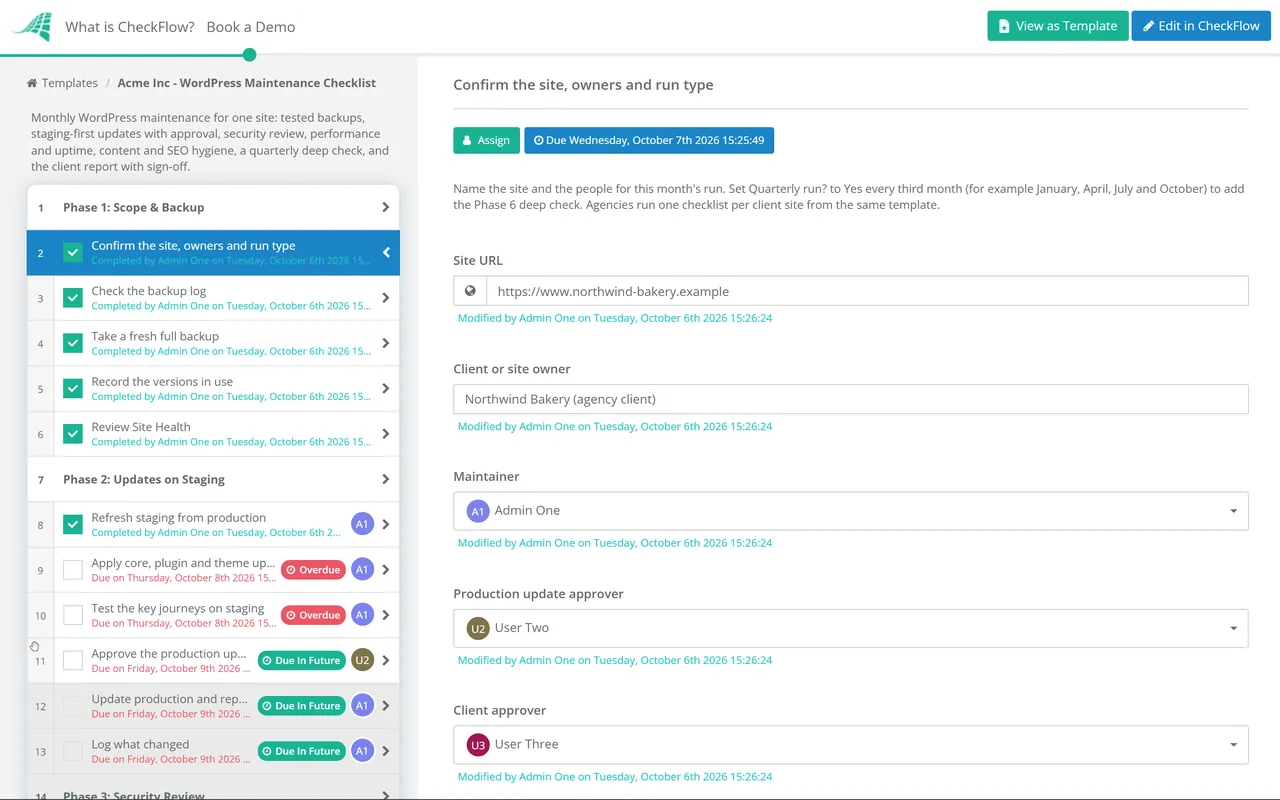
Set a monthly schedule for each site from the one template. Each run arrives with the maintainer assigned and due dates set, and agencies see every client site’s progress in one list instead of a spreadsheet of ticks.
The production update sits behind an approval. If the staging test fails, the approver marks it Not approved and the checklist halts, so nobody pushes a broken plugin to the live site on a Friday afternoon.
Versions, scan results and fixes are recorded on the tasks, and the quarterly phase switches itself on when the run is marked as quarterly. The client’s sign-off sits on the same record as the work it approves.
Agencies can run every client site from one template. CheckFlow for client work covers onboarding new clients, recurring maintenance and approvals, and our marketing agency client onboarding guide shows how to set expectations about maintenance from day one.
Hosting servers and office machines too? The Patch Management Checklist and Backup Verification Checklist apply the same discipline beyond WordPress, and the Website Launch Checklist covers a new site before it enters this routine.
Describe the process in a sentence and the AI checklist generator drafts the phases and tasks for you.
Monthly is a sensible baseline for the full routine, with a deeper review every quarter. Security releases are the exception: heavily exploited plugin flaws can be attacked within hours of disclosure, so apply a security fix for a plugin you run as soon as it lands rather than waiting for the monthly run. Busy shops and membership sites may want a lighter weekly check of backups, uptime and forms on top.
For some of them. WordPress has let administrators enable auto-updates plugin by plugin and theme by theme since version 5.5, and it emails the site owner after each attempt. Small, well-maintained plugins are good candidates. Page builders, ecommerce, membership and form plugins are better updated on staging first, where you can test the journeys they affect. Whatever you choose, keep the monthly check: auto-updates rely on WordPress’s scheduled tasks running, and Site Health flags it when they are not.
WordPress.org recommends PHP 8.3 or greater. PHP 8.2 receives security fixes only until 31 December 2026, and every version from 8.1 down is already end of life, so a site on any of those should be scheduled for an upgrade now. Test the new version on staging first, because older plugins are the usual source of compatibility problems.
For any site that takes orders, bookings or leads, yes. If your host offers staging, use it; if not, a copy on a subdomain works. Refresh it from production before each run so you test against current content and settings, and keep it out of search results with the “Discourage search engines” setting or password protection. Then make sure that setting is off on the live site, which is why Phase 5 checks it.
Keep it to one page: the updates applied with versions, anything the vulnerability scan found and what was done about it, the backup and restore status, uptime and speed for the month, form test results, and the decisions you need from the client, such as a plugin replacement or a PHP upgrade. Ask the client to approve it each month, so there is a record of what they were told and when.
Restore it. Each quarter, take the offsite copy, restore files and database to a test environment, and check that pages load, images appear, logins work and recent orders or form entries are present. Time the restore, because that is roughly how long the live site would be down. Monthly, check that every scheduled job completed and that both files and database were included, since a backup that skips the database looks fine until you need it.
14-day free trial, no card required. The Business plan is $10 per user per month after the trial. Full details at checkflow.io/pricing.
14-day free trial, no credit cardFull refund in your first 30 daysUS hosting, EU on request