Discovery Call Checklist Template

Prepare, run and follow up one first sales call: research the account and the person, ask about the problem, the decision and the timing, book the next step before the call ends, and have your sales manager review the qualify or disqualify decision.

Last reviewed: November 2026

Printed from checkflow.io/templates/sales/discovery-call-checklist

This free discovery call checklist is for account executives, business development reps and sales managers running the first call with a new prospect. One run covers one call, planned around its date and time. The rep checks the CRM for any history with the account, researches the company and the person, writes their guesses about the prospect’s problems as questions to test, and sends a short agenda. On the call the rep asks about the prospect’s situation, the problem and its impact, how they will decide, the people and the timing, and budget where it comes up, and books the next step before the call ends. The same day the rep writes up the CRM notes, recommends qualify or disqualify against the team’s criteria and sends the follow-up email. The sales manager reviews the decision: qualified opportunities move forward, and disqualified ones are closed with their reason.

The First Qualification Call, Not the Pitch or the Call Log

A discovery call, in this template, is the first qualification call with a new prospect, owned by the rep who runs it. One run covers one call: the CRM check and the research, a short agenda, the questions on the call, a next step booked before it ends, the notes, the follow-up email the same day and a qualify or disqualify decision that the sales manager reviews. It ends with the opportunity moved forward or closed with its reason.

The demo and the pitch that follow a qualified call have their own Sales Pitch Checklist, and logging every call a rep makes, of any kind, is the job of the Sales Call Tracker Checklist. Once the buyer is evaluating, the Mutual Action Plan takes the deal to signature.

This checklist

One first call, qualified or not

Covers: the CRM check, research on the account and the person, the agenda, the call, the next step, the CRM notes, the follow-up email and the qualify or disqualify decision.

Planned around: the call’s date and time.

Ends with: the sales manager’s decision, then the opportunity moved forward or closed with its reason.
The next meeting

Sales Pitch

Covers: preparing and giving the pitch or demo, the value proposition, objections and closing on the next step.

Starts: once the prospect has qualified; it opens with a short round of discovery questions before the pitch. Sales Pitch Checklist.

Every call

Sales Call Tracker

Covers: setting up, making and logging any sales call, with a common set of call outcomes and a daily activity summary.

Runs: every day, for every call a rep makes. Sales Call Tracker Checklist.

What the Discovery Call Checklist Covers

Seven phases take one first call from the day it is booked to the sales manager’s decision and what follows it. The first task records the call’s date and time, which sets every due date, and the rep and the sales manager. Planning to record the call adds a task at the start of the call and a note on the rules where the prospect is. The sales manager’s review is the gate: Qualified shows the tasks to move the opportunity forward, Disqualified the tasks to close it out, and More information needed adds a task for the rep before the review.

  1. Phase 1

    Phase 1: Set Up the Call

    2 tasks

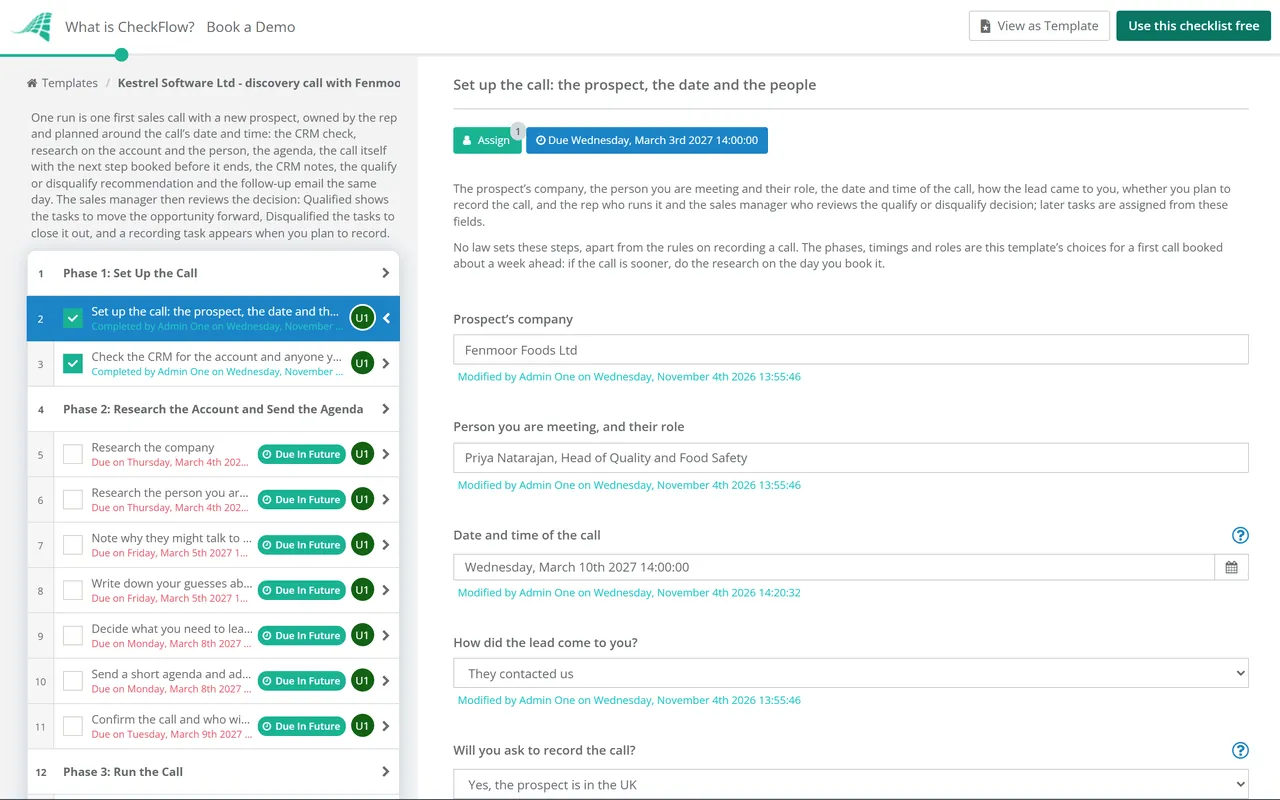
    Owned by the rep who runs the call, on the day it is booked. Enter the call’s date and time on the first task: the research and the agenda count back from it in working days, and the write-up, the manager’s review and what follows count forward from it. Check the CRM before anything else, so you know whether you already have a history with the account.

    • Set up the call: the prospect, the date and the people — the prospect’s company, the person you are meeting and their role, the date and time of the call, how the lead came to you, whether you plan to record the call, and the rep who runs it and the sales manager who reviews the qualify or disqualify decision; later tasks are assigned from these fields
    • Check the CRM for the account and anyone you already know there — open deals, past or current customers, earlier calls and emails, and who owns the account, so you do not treat a customer as a stranger or work an account another rep already owns
  2. Phase 2

    Phase 2: Research the Account and Send the Agenda

    7 tasks

    Keep the research to what will change the conversation: what the company does, what has changed there, who you are meeting and why they might talk to you now. Write your guesses about their problems as questions to test, decide the next step you will ask for, then send a short agenda and confirm the call the day before.

    • Research the company — what it sells and to whom, its size and locations, recent news, results, hires and job adverts, and anything that suggests a change in the area you sell into
    • Research the person you are meeting — their role and how long they have held it, who they report to, the team they run, and anything they have said in public about the work
    • Note why they might talk to you now — the trigger for the call: the enquiry they sent and what they asked for, a new role, growth, a change in the rules they work under, or a problem you have seen at similar organisations
    • Write down your guesses about their problems, as questions to test — two or three problems they may have, the question you will ask to test each one, and what you would hear if the guess is wrong; the call is for testing the guesses, not for presenting them
    • Decide what you need to learn and the next step you will ask for — what you must find out to qualify or disqualify the prospect against your team’s criteria, and the next step you will propose if there is a fit, such as a demo with their team or a call with the person who decides
    • Send a short agenda and add it to the invite — the purpose of the call, how long it will take, three or four points (their situation, what is not working, how they would decide, and next steps), and a question asking whether anyone else should join
    • Confirm the call and who will attend — check the time still works, who will join from their side and from yours, and the video link or phone number; add anyone new to the CRM as a contact with their role
  3. Phase 3

    Phase 3: Run the Call

    7 tasks

    Most of the call is questions and listening. Cover the areas below in whatever order the conversation takes, write down the prospect’s own words, and do not end the call without an agreed next step, even when the step is to stop.

    • Open the call and agree the agenda and the time — thank them, check how long they have, run through the agenda and ask what they want to get from the call
    • Say the call is recorded and why, and do not record if anyone objects — before you start recording, tell everyone on the call that you would like to record it and why, ask whether they agree, and note the answer; if anyone objects, take notes instead
    • Ask about their situation: how the work is done today and the tools they use — how the work is done now, who does it, the tools, spreadsheets or suppliers they use, and what they have already tried
    • Ask what is not working and what it costs them — the problem in their own words, how often it happens, and its impact in time, money, risk or customers; ask what happens if nothing changes
    • Ask how they will decide: the process, the people and the timing — who else is affected or involved, who signs off, the steps a purchase goes through (such as security, legal or procurement), and whether there is a date the change must happen by, and why
    • Ask about budget where it is raised — whether money is set aside or would have to be found, roughly how much, and who holds it; if they are not ready to discuss it, note that and come back to it at the next step
    • Agree the next step and book it before the call ends — if there is a fit, a dated meeting in both calendars with who will attend and what it is for; if there is not, say so and agree whether and when to check back
  4. Phase 4

    Phase 4: Write Up and Follow Up

    3 tasks

    Do this straight after the call, while you remember what was said, and send the follow-up email the same day. The notes, the criteria table and your recommendation are what the sales manager reviews, so write them for someone who was not on the call.

    • Write up the call in the CRM — the situation, the problem and its impact, how they will decide, the people and the timing, budget if it came up, and the next step, in the prospect’s words where you can; add anyone new as a contact with their role
    • Record whether you would qualify or disqualify the prospect, and why — go through your criteria one by one, write what you heard for each and whether it is met, not met or not known yet, then give your recommendation and the reason
    • Send the follow-up email the same day — thank them, sum up what you heard in their words, confirm the next step with its date and who will attend, and send anything you promised; if it is not a fit, say so politely and say when you will check back if they agreed to that
  5. Phase 5

    Phase 5: The Sales Manager’s Review

    2 tasks

    The sales manager reads the notes, the criteria table and the rep’s recommendation, and decides whether the opportunity moves forward or is closed. Nothing after the review can be completed until it is done. More information needed leaves the review open and adds a task before it for the rep.

    • Find out what the sales manager asked for — answer the manager’s questions from your notes, or with a short call or email to the prospect, and add the answers to the CRM notes and the criteria table
    • Review the call and decide: qualified or disqualified — read the CRM notes, the criteria table and the recommendation, check the reason against your team’s criteria, and choose Qualified to move the opportunity forward, Disqualified to close it, or More information needed to send questions back to the rep
  6. Phase 6

    Phase 6: Move the Qualified Opportunity Forward

    3 tasks

    Applies only when the sales manager’s decision is Qualified. Move the opportunity to its next stage and prepare the next step with what you learned on the call.

    • Create the opportunity, or move it to its next stage, in the CRM — at the stage your pipeline uses after a qualified first call, with the contacts and their roles, and an expected close date and value if you have them; if you told the prospect it was not a fit, contact them again before you do this
    • Brief anyone joining the next step — a colleague who will run a demo or answer technical questions gets the notes, the problem in the prospect’s words and what the next step is for
    • Prepare the next step around what the prospect told you — the agenda for the booked meeting, built on their problem and its impact, the questions still open, and for a demo the parts that answer what they said
  7. Phase 7

    Phase 7: Close Out a Disqualified Opportunity

    4 tasks

    Applies only when the sales manager’s decision is Disqualified. Close the record with its reason, tell the prospect if they are still expecting a next step, keep any check-back they agreed to, and tell whoever sourced the lead why it did not qualify.

    • Close the lead or opportunity in the CRM with the reason — using the reasons your CRM keeps for a disqualified or lost record, so your team can see later why leads did not go forward
    • Tell the prospect, and cancel any meeting already booked — if the call or the follow-up email left them expecting a next step, let them know politely and cancel the meeting; mark this task not applicable if the follow-up email already said it was not a fit
    • Set a reminder to check back, if the prospect agreed to one — a dated reminder for the rep, in the CRM or as a CheckFlow task, with what to ask about; a check-back is a personal follow-up, not a reason to add them to a marketing list
    • Tell whoever sourced the lead why it did not qualify — the marketing team, a business development rep or a partner, so the next leads fit better; mark this task not applicable if you found the lead yourself

What to Find Out, and the Rules on Recording the Call

What to find out on the call

These are the areas the call tasks in Phase 3 cover, and the criteria table in Phase 4 uses the same headings. Cover them in whatever order the conversation takes. They overlap with named frameworks such as BANT or MEDDICC, but you do not need one to use them.

Area What to ask about What it tells you for the decision
Their situationHow the work is done today, by whom, with which tools or suppliers, and what they have triedWhether what you sell fits the way they work
The problem and its impactWhat is not working, how often, and what it costs in time, money, risk or customersWhether the problem is big enough for them to act on
How they decideWho signs off, and the steps a purchase goes through, such as security, legal or procurementWho else you need to meet, and how long a decision may take
The peopleWho else is affected or involved, and their rolesWhether you are talking to the right people
The timingWhether there is a date the change must happen by, and whyWhether there is a reason to act now
Budget, where it is raisedWhether money is set aside or would have to be found, and who holds itWhether a purchase is possible, now or later

Recording the call, by where the people on the call are

The first task asks whether you plan to record the call and where the prospect is (the rules where your own team is apply too). Any Yes adds a line to the agenda and a task at the start of the call, with the note for that country. This is a summary for planning, not legal advice.

Where the people on the call are What the source says Source, as read on 4 November 2026
United KingdomTell the people on the call that you are recording it and why; the rest of your privacy information can be given another way, such as a link to your privacy notice. The guidance is under review after the Data (Use and Access) Act 2025The ICO’s guidance on monitoring workers, “Can we monitor telephone calls?”
United StatesUnder federal law it is not unlawful for a party to a call to record it, or for anyone to record it with one party’s prior consent, unless it is done to commit a crime or a tort. Some states’ laws need the agreement of everyone on the call18 U.S.C. 2511(2)(d); check each state’s law with your legal team
Other countriesCheck the recording and data protection rules where each person on the call isYour organisation’s policy and legal advice
Every recorded callAsk everyone at the start, say why, and take notes instead if anyone objectsThis template’s choice

Why Run Your Discovery Calls in CheckFlow?

1

A second view on every qualify or disqualify decision

The review is assigned to the sales manager alone, and the checklist halts there: nothing after it can be completed until the manager decides. Qualified shows the tasks to move the opportunity forward, Disqualified the tasks to close it with its reason, and More information needed sends questions back to the rep. See how approvals that halt a checklist work.

2

A disqualified prospect leaves no loose ends

On Disqualified the next-step tasks stay hidden, and the rep closes the record with its reason, tells the prospect if they still expect a meeting, keeps any check-back they agreed to and tells whoever sourced the lead why it did not qualify.

3

One date moves the whole call

Due dates count from the call’s date and time, so when the call moves, one change on the first task moves the research, the agenda, the write-up and the review. Overdue alerts go to the people assigned, and the Reports Grid lists every call with its answers, while Analytics shows where tasks are waiting.

CheckFlow does not replace your CRM: the accounts, contacts and opportunities live there. CheckFlow makes sure every first call gets the same preparation and the same questions, with a due date for each step, the sales manager’s review of the decision and a record of who did what and when. See how a checklist runs.

Prepare the demo with the Sales Pitch Checklist, keep in touch after the call with the Sales Follow-Up Checklist and define your stages with the Sales Pipeline Stages Checklist. Managers who review calls with their reps can use the Sales Coaching Checklist.

AI generator

Didn’t find what you need? Describe it.

Describe the process in a sentence and the AI checklist generator drafts the phases and tasks for you.

Frequently Asked Questions

What should a discovery call checklist include?

A check of the CRM for any history with the account, research on the company and the person, your guesses about their problems written as questions, a short agenda, and on the call their situation, the problem and its impact, how they will decide, the people and the timing, and budget where it comes up. Then a next step booked before the call ends, CRM notes, a qualify or disqualify decision with the reason and a follow-up email the same day.

What questions should you ask on a discovery call?

Questions that let the prospect describe their situation, rather than questions that lead to your product. Ask how the work is done today, what is not working and what it costs them, what happens if nothing changes, who else is involved and who signs off, whether there is a date they must act by, and, where it is raised, whether there is budget. Write their answers in their own words.

What is the difference between a discovery call and a demo?

A discovery call is for finding out whether there is a problem worth solving and a way to buy, so the rep mostly asks questions. A demo shows how the product answers what the prospect said on that call. In this template the demo is the next step a qualified call books, and the Sales Pitch Checklist covers preparing and giving it.

How do you decide whether to qualify or disqualify a prospect?

Against criteria your team agrees in advance. In this template the rep fills in a table after the call: the problem and its impact, how they decide, the people, the timing, budget and fit with what you sell, each marked met, not met or not known. The rep recommends qualify, disqualify as not a fit or disqualify as not now, with the reason, and the sales manager decides.

Why should a sales manager review a disqualified opportunity?

A second view catches a prospect closed too early, such as one who cannot buy now but would later, and a reason that keeps coming up may say something about where the leads come from. In this template the sales manager reviews every decision. Disqualified shows the close-out tasks, which keep any check-back the prospect agreed to and tell whoever sourced the lead why it did not qualify.

Can you record a discovery call?

Often you can, but the rules depend on where people are. In the UK, the ICO’s guidance says you must tell the people on the call that you are recording it and why. In the US, federal law does not forbid a party to a call from recording it, but some states’ laws need the agreement of everyone on the call. This template asks everyone at the start and takes notes instead if anyone objects.

What should a follow-up email after a discovery call say?

Thank them, sum up what you heard in their own words, confirm the next step with its date and who will attend, and send anything you promised. If it is not a fit, say so politely and say when you will check back if they agreed to that. This template asks for the email the same day as the call, after the CRM notes.

When should you book the next step after a discovery call?

Before the call ends, while everyone is still there and can check their calendars. In this template the last task on the call asks what was agreed: a next meeting booked, a date to check back, or no next step. The follow-up email confirms it in writing the same day, and the sales manager’s review decides whether the opportunity moves forward.

Is CheckFlow free for this template?

14-day free trial, no card required. The Business plan is $10 per user per month after the trial. Full details at checkflow.io/pricing.

Run Every First Call the Same Way

Free trial — no credit card required.

14-day free trial, no credit cardFull refund in your first 30 daysUS hosting, EU on request