Sprint Retrospective Checklist Template

Retrospectives go stale in familiar ways: the same complaints every sprint, actions nobody owns, and last time’s list never mentioned again.

Last reviewed: October 2026

This free sprint retrospective checklist is for Scrum Masters, facilitators and agile teams. One run is one retrospective at the end of one sprint. The facilitator books it inside its timebox, picks a format and sets up the room or online board, and the Scrum Master checks whether last time’s actions were done. Before the meeting the team gathers the sprint facts and adds its observations, anonymously if it prefers. In the meeting it groups them into themes, looks for causes rather than blame and agrees a few specific actions, each with an owner and a check. The Scrum Master confirms the record, the team shares it, and the actions are tracked to done before the next retrospective. It follows the Sprint Review Checklist and closes the sprint.

A Retrospective Looks at How the Team Works

A sprint retrospective is the Scrum Team’s own look at how the last sprint went: how people worked together, the process, the tools and the Definition of Done. It ends with a few changes the team will make next sprint. It is not a status meeting and not a hunt for someone to blame, and this template follows its actions through until the team meets again.

This checklist runs one retrospective at the end of one sprint, from choosing the format to checking the actions worked, and is built to run again every sprint. The sprint’s other events have their own checklists: the Sprint Planning Checklist starts the sprint, and the review below shows its result to stakeholders.

This checklist

The sprint retrospective

Asks: how did we work this sprint, and what will we change?

Who: the Scrum Team, with no one else unless the team invites them.

Output: a confirmed record and one to three owned actions, followed through to the next retrospective.
Just before

The sprint review

Asks: what did we build, and what should come next for the product?

Who: the Scrum Team and stakeholders, in the Sprint Review Checklist.

Output: feedback and an updated Product Backlog. Its last phases include a short retrospective; use this checklist to run one in full.

After an incident

The incident postmortem

Asks: what happened in one incident, why, and how do we stop it happening again?

Who: the people involved in the incident, who may come from several teams, in the Incident Postmortem Template.

Output: a timeline, contributing factors and follow-up actions. A retrospective may mention an incident, but it looks at the whole sprint.

What the Sprint Retrospective Checklist Covers

Eight phases follow one retrospective, from preparing it to the actions being done before the next one. A remote or hybrid meeting adds a check of the online board, anonymous input adds a way to collect it, a missed sprint goal adds a look at why, unfinished actions from last time get a decision, a sensitive issue gets a private follow-up, and an improvement for the next Sprint Backlog gets a task at Sprint Planning. The Scrum Master’s confirmation of the record is the gate: nothing after it can be completed until it is done.

  1. Phase 1

    Phase 1: Prepare the Retrospective

    7 tasks

    Start this checklist a few days before the sprint ends. Enter the retrospective date and the next retrospective date on the first task: preparation counts back from the retrospective date, the meeting tasks fall on it, the record and sharing count forward from it, and the follow-through counts back from the next retrospective date.

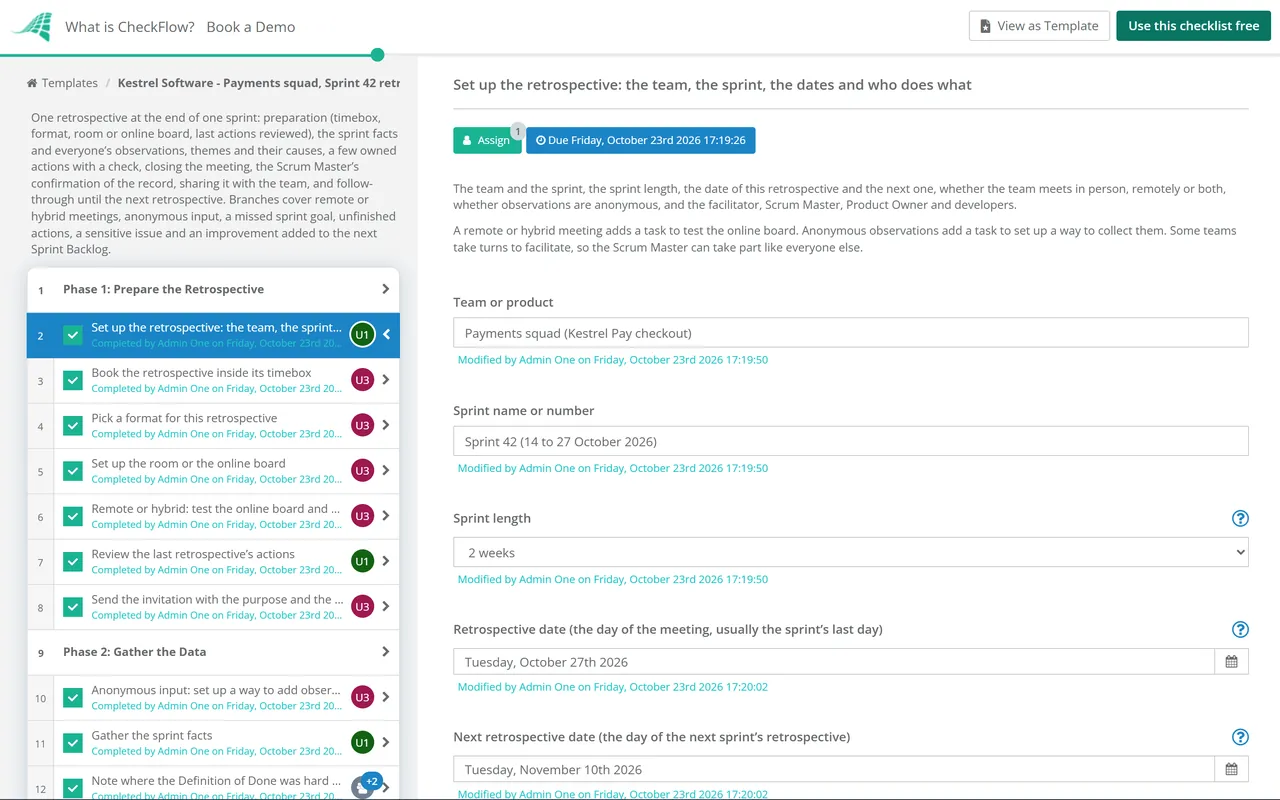
    • Set up the retrospective: the team, the sprint, the dates and who does what — the team and the sprint, the sprint length, the date of this retrospective and the next one, whether the team meets in person, remotely or both, whether observations are anonymous, and the facilitator, Scrum Master, Product Owner and developers
    • Book the retrospective inside its timebox — after the Sprint Review and before the sprint ends, for at most three hours for a one-month sprint and usually less for a shorter one, with the whole Scrum Team invited and nobody else unless the team asks
    • Pick a format for this retrospective — one that suits what the team needs this time, for example start, stop, continue; what went well, what did not and what to try; or a timeline of the sprint; changing the format now and then keeps the conversation fresh
    • Set up the room or the online board — a private room with wall space and sticky notes, or an online board with the format’s columns ready, a space for the sprint facts and a space for the actions
    • Remote or hybrid: test the online board and how everyone takes part — the board link in the invitation, everyone able to add and move notes, sound and cameras checked, and a plan so people on the call are heard as much as people in the room
    • Review the last retrospective’s actions — each action from last time marked done, partly done or not done, and whether it made the difference the team hoped for
    • Send the invitation with the purpose and the format — the date and time, the format, the board link if the team meets online, and a reminder that the retrospective is about how the team works, not about blaming anyone
  2. Phase 2

    Phase 2: Gather the Data

    5 tasks

    Collect the facts of the sprint and each person’s observations before the meeting, so the time together goes on understanding them rather than remembering them. Anonymous observations, chosen on the first task, add a task to set up how they are collected.

    • Anonymous input: set up a way to add observations without names — a form or a board setting that hides names, opened a few days before the meeting, and a promise that the facilitator will not try to work out who wrote what
    • Gather the sprint facts — the sprint goal and whether it was met, what was completed and what was not, incidents, interruptions and unplanned work, and any change to the team, its tools or its priorities during the sprint
    • Note where the Definition of Done was hard to meet — any item that did not meet done, and any part of the Definition of Done that was skipped, unclear or out of date this sprint
    • Each person adds their observations — what helped, what got in the way and what puzzled them, one point per note, written before the meeting or in its first few minutes, about the work and the way of working rather than about individuals
    • Read the observations and prepare the board — every note on the board, obvious duplicates put side by side, the sprint facts at the top, and nothing removed or reworded
  3. Phase 3

    Phase 3: Set the Stage & Generate Insights

    7 tasks

    In the meeting, on the retrospective date. Start from the same facts, group what people noticed into themes, choose the few that matter most and look for causes in the work and the system, not in people. A sprint goal that was partly met or missed adds a task to look at why.

    • Open the retrospective and set the stage — the purpose and the timebox, the format, and how the team works together in this meeting: everyone’s view counts, one conversation at a time, and the conversation is about the work, not about blame
    • Walk through the sprint facts and the last actions — the goal outcome, the main events of the sprint and how last time’s actions went, briefly, so everyone starts from the same picture
    • Read out the observations and group them into themes — duplicates merged, similar notes clustered and each theme named, with anyone able to say a note sits in the wrong group
    • Choose the few themes that matter most — by a quick vote or discussion, usually two or three, favouring the ones the team can do something about
    • Look for the causes of each chosen theme — ask why it happened and what in the process, the tools or the situation made it likely, until the team reaches something it can change; causes, not blame
    • Goal not met: look at why the sprint goal was missed — whether the goal was too big, unclear or changed during the sprint, what interrupted the work, and what the team learned too late, recorded as facts about the sprint, not about people
    • Note what went well and should continue — what helped this sprint, so the team keeps doing it on purpose rather than by chance
  4. Phase 4

    Phase 4: Decide the Actions

    5 tasks

    A few specific improvements, each with an owner, a date and a way to check it worked. Actions from the last retrospective that were not done get a decision, and the most impactful improvement can go into the next Sprint Backlog.

    • Agree a small number of specific improvements — one to three changes the team will make in the next sprint, each written so anyone could tell whether it happened, rather than a general wish to do better
    • Give each action an owner, a date and a check — one owner, a date in the next sprint, and how the team will know whether the change helped
    • Unfinished actions: decide whether to keep, change or drop each one — for each action from last time that was not done: keep it with a new date, change it so it can be done, or drop it with the reason, so old actions do not pile up unspoken
    • Decide whether an improvement goes into the next Sprint Backlog — the most impactful improvement can be planned alongside the sprint’s other work, so it gets time rather than waiting for a quiet moment
    • Agree anything that needs help from outside the team — impediments the team cannot remove on its own, who will raise each one and with whom, so they are not left as a complaint on the board
  5. Phase 5

    Phase 5: Close the Meeting

    4 tasks

    Agree what goes in the record, check how the retrospective itself went and finish within the timebox. A sensitive issue raised in the meeting adds a private follow-up for the facilitator and stays out of the shared record.

    • Read back the actions and agree the record — the themes, the causes, the actions with their owners and dates, and what the shared record will say, agreed before anyone leaves
    • Agree what stays out of the shared record — personal matters and anything said in confidence stay out; facts and decisions go in, without who said what
    • Check how the retrospective itself went — a quick round or a show of fingers on whether the time was useful, and one thing to change about the next retrospective
    • Close on time and thank the team — finish within the timebox; anything unfinished goes to the next retrospective or a separate conversation with the people who need to be in it
  6. Phase 6

    Phase 6: Confirm the Record & Actions

    4 tasks

    The facilitator writes up the record the same day and the Scrum Master confirms it by the next working day. That confirmation is the gate: nothing in Phases 7 and 8 can be completed until it is done.

    • Write up the retrospective record — the date, who took part, the sprint facts, the themes and causes, the actions with owners, dates and checks, and the feedback on the meeting itself, with no names against comments
    • Sensitive issue: the facilitator follows up privately — a private conversation with the people involved by the next working day, the next steps agreed with them, and a manager or HR involved only where your organisation’s policy says so; nothing about it goes in the shared record
    • Check every action has an owner, a date and a check — any vague action rewritten with its owner before the record is shared, and no more actions than the team can do in one sprint
    • Scrum Master confirms the record and the actions — the record matches what the team agreed, every action is specific and owned, and nothing private is in it; nothing after this task can be completed until it is done
  7. Phase 7

    Phase 7: Share the Record

    4 tasks

    Share the record with the whole team. Outside the team, share it only if the team agrees, and never who said what. These tasks count from the retrospective date.

    • Share the record with the Scrum Team — in the team’s usual place, such as the wiki, the shared drive or the team channel, on the day it is confirmed
    • Raise the agreed impediments with the people who can remove them — each impediment from Phase 4 taken to the manager, team or supplier who can act on it, with what the team needs and by when
    • Update the working agreement or the Definition of Done if an action changes them — the changed wording written into the document the team works from, so the improvement lasts beyond the next sprint; mark not applicable if nothing changes
    • Share a summary outside the team only if the team agrees — the actions and any help needed, for a manager or another team, with the team’s agreement and without who said what; mark not applicable if the team keeps it within the team
  8. Phase 8

    Phase 8: Follow Through in the Next Sprint

    6 tasks

    Actions only count when they are done. The first two tasks count from the retrospective date; the rest count back from the next retrospective date, so the results are ready when the team meets again.

    • Sprint Backlog: add the improvement at Sprint Planning — the Product Owner or the developers add the agreed improvement to the next Sprint Backlog at Sprint Planning, so it is planned and sized like the sprint’s other work
    • Put each action where the team tracks its work — on the sprint board or task list beside the sprint’s other work, with its owner and date, so it is seen at every Daily Scrum
    • Check progress on each action during the sprint — at a Daily Scrum or in a quick check: on track, stuck or done, and help offered where an action is stuck
    • Book the next retrospective and start its checklist — the date in everyone’s calendar, a facilitator chosen, and the next run of this checklist started so its first task lists these actions
    • Owners complete their actions — each owner finishes their action by its date, or says early if it will slip so the team can help or change it
    • Record the result of each action for the next retrospective — done or not, and whether the check showed it helped, ready for the review of last actions at the start of the next retrospective

Retrospective Timing and Formats at a Glance

How the checklist times one retrospective

Two dates on the first task drive every due date: the retrospective date and the next retrospective date. A due date that falls on a weekend moves to a working day.

Stage What happens Counted from Where in the checklist
Two or three days beforeTimebox booked, format chosen, room or board set up, last actions reviewed, invitation sentRetrospective date, counted backPhase 1
Up to the day beforeAnonymous input set up if chosen, sprint facts gathered, everyone’s observations added, board preparedRetrospective date, counted backPhase 2
The meetingStage set, themes and causes, actions with owners and checks, the meeting closedRetrospective datePhases 3 to 5
The same day and the nextRecord written up and confirmed by the Scrum Master (the gate), shared with the teamRetrospective datePhases 6 and 7
Sprint PlanningActions on the board; an improvement added to the Sprint Backlog if the team chose toRetrospective datePhase 8
During the next sprintProgress checked, actions completed, results recordedNext retrospective date, counted backPhase 8

Retrospective formats: a few examples

Any format works if it gets everyone’s view on the table and ends in actions. These are examples, not a ranking; change the format now and then so the conversation does not go stale.

Format What the board asks Useful when
Start, stop, continueWhat should we start doing, stop doing and keep doing?You want actions quickly from a short meeting
Went well, did not go well, try nextWhat helped, what got in the way, and what will we try?A general look at the sprint
Timeline of the sprintWhat happened when, and how did it feel at the time?A long or eventful sprint, or a missed sprint goal
One themeOne question the team agreed in advance, such as handovers or testingA problem has come up in several retrospectives

What the Scrum Guide says. The Scrum Guide (November 2020 edition, read 23 October 2026) says: “The purpose of the Sprint Retrospective is to plan ways to increase quality and effectiveness.” It adds that the Sprint Retrospective concludes the Sprint, is timeboxed to a maximum of three hours for a one-month Sprint and is usually shorter for shorter Sprints, and that “the most impactful improvements are addressed as soon as possible. They may even be added to the Sprint Backlog for the next Sprint.” The preparation, formats, anonymous input and follow-through in this checklist are this template’s choices, not requirements of the guide.

Why Run Sprint Retrospectives in CheckFlow?

1

A retrospective every sprint

A recurring schedule can start a retrospective checklist on the sprint’s rhythm. On the first task the Scrum Master enters this retrospective’s date and the next one’s, and names the facilitator, Product Owner and developers, which assigns every task. Preparation counts back from the retrospective date, the record counts forward from it, and the follow-through counts back from the next retrospective date. Overdue alerts go to the people assigned, so actions do not fade between sprints.

2

The right steps for each sprint

A few answers shape each run. A remote or hybrid meeting adds a check of the online board, anonymous input adds a way to collect it, and a missed sprint goal adds a look at why. Unfinished actions from last time get a keep, change or drop decision. A sensitive issue gets a private follow-up and stays out of the record, and an improvement for the Sprint Backlog gets a task at Sprint Planning.

3

Actions confirmed and followed through

The Scrum Master’s confirmation of the record is a gate: sharing and follow-through cannot be ticked off until every action has an owner, a date and a check. The Reports Grid lists every retrospective with its answers, and Analytics shows completion rates and overdue work, so the team can see whether actions are getting done. See how approval steps work.

CheckFlow does not run the conversation, vote on themes or decide what the team should change. The team does that in the room. CheckFlow makes sure the retrospective is prepared, every action has an owner and a date, the record is confirmed and the actions are checked before the next one. Workflow software shows how a process like this runs from a template every time.

Plan the next sprint with the Sprint Planning Checklist, and see our guide to sprint planning for how retrospective actions feed it. Show the sprint’s result to stakeholders with the Sprint Review Checklist. At the end of a whole project, capture lessons with the Project Closeout Checklist, and for a larger improvement than one sprint can hold, run a Kaizen Event Checklist. A remote team can also use the Virtual Meeting Best Practices Checklist.

AI generator

Didn’t find what you need? Describe it.

Describe the process in a sentence and the AI checklist generator drafts the phases and tasks for you.

Frequently Asked Questions

What should a sprint retrospective checklist include?

Everything one retrospective needs, from preparation to follow-through: the timebox and format, the room or online board, a review of the last retrospective’s actions, the sprint facts and everyone’s observations, themes and their causes, a few specific actions with owners, dates and a check, closing the meeting, a confirmed record, sharing it with the team, and checking the actions are done before the next retrospective. This template adds steps for remote or hybrid teams, anonymous input, a missed sprint goal, unfinished actions, sensitive issues and improvements added to the Sprint Backlog.

What does the Scrum Guide say about the Sprint Retrospective?

The 2020 Scrum Guide says its purpose is “to plan ways to increase quality and effectiveness”. The Sprint Retrospective concludes the Sprint, and it is timeboxed to a maximum of three hours for a one-month Sprint, usually shorter for shorter Sprints. The guide also says the most impactful improvements are addressed as soon as possible and may even be added to the Sprint Backlog for the next Sprint. It does not prescribe a format.

How long should a sprint retrospective take?

The Scrum Guide sets only a maximum: three hours for a one-month sprint, usually shorter for shorter sprints. Within that, book the time the team needs to get through its themes and agree actions. This template gathers the sprint facts and everyone’s observations before the meeting, so more of the meeting goes on themes and actions. If the team regularly runs out of time, choose fewer themes rather than a longer meeting.

Who should attend a sprint retrospective?

The Scrum Team: the developers, the Product Owner and the Scrum Master. Others come only if the team invites them, so the team can speak openly about how it works. The Scrum Master can facilitate, or the team can take turns so the Scrum Master takes part like everyone else. This template asks for a facilitator and a Scrum Master separately, so either way works.

What is the difference between a sprint review and a sprint retrospective?

The sprint review looks at the product: the team shows stakeholders what it built and the Product Backlog is updated with their feedback. The retrospective looks at the team: how the sprint went for the people, the process and the tools, and what to change. The review comes first and the retrospective closes the sprint. Use the Sprint Review Checklist for the first and this checklist for the second.

Which retrospective format should we use?

Any format that gets everyone’s view and ends in actions. Examples include start, stop, continue; what went well, what did not and what to try; and a timeline of the sprint. The format table on this page suggests a timeline after an eventful sprint or a missed goal, and a single agreed theme when the same problem keeps coming back. This template suggests changing the format now and then.

How do you make sure retrospective actions get done?

Agree only one to three actions, each specific enough that anyone could tell whether it happened, with one owner, a date and a check. Put them on the sprint board beside the other work, add the most impactful one to the next Sprint Backlog if the team chooses, check progress during the sprint, and start the next retrospective by reviewing them. This template assigns each of those steps and dates them before the next retrospective.

How do you keep a retrospective safe for honest input?

Keep the conversation on the work and the system, not on people, and keep the audience to the team. Offer anonymous notes if the team prefers them, and leave out of the shared record who said what. If something sensitive comes up, such as a personal matter or a conflict, the facilitator follows it up privately and it stays out of the record; involve a manager or HR only as your organisation’s policy says.

Is CheckFlow free for this template?

14-day free trial, no card required. The Business plan is $10 per user per month after the trial. Full details at checkflow.io/pricing.

Turn Every Retrospective Into Changes That Stick

Free trial — no credit card required.

14-day free trial, no credit cardFull refund in your first 30 daysUS hosting, EU on request