
Asks who got it wrong
Typical line: “The engineer ran the migration against production without checking.”
Ends with: a name, a warning and a reminder to be more careful.
Next incident: responders share less, and the same gap is still there.
No Credit Card Required
A postmortem turns one bad day into changes that make the next one less likely. This free incident postmortem template is for SRE teams, platform and infrastructure engineers, IT operations managers and MSPs who run reviews after significant incidents and want every one to end with finished work rather than a document. It starts with a decision on whether the incident needs a review at all, then walks the owner through freezing the evidence, rebuilding the timeline, drafting the write-up, running a facilitated blameless meeting and publishing the result. The last two phases are the ones most teams skip: tracking every action to a verified close, with a hand-off to change management or problem management when the fix needs one.
Google’s Site Reliability Engineering book describes a postmortem as a written record of an incident, its impact, the actions taken to mitigate or resolve it, its causes and the follow-up actions to stop it happening again. A blameless postmortem assumes that everyone involved acted in good faith and made reasonable decisions with the information they had at the time. The review looks for the conditions that made a mistake possible, because a system can be changed and a person’s fallibility cannot. It is not a way of avoiding accountability. People who expect to be blamed leave details out, and the review loses the facts it needs most.
The same book recommends agreeing postmortem criteria before an incident happens, so nobody has to argue about whether one is needed. Its example triggers are user-visible downtime or degradation beyond a threshold, any data loss, on-call intervention such as a rollback or rerouting traffic, a resolution time above a threshold, and a monitoring failure that meant the incident was found by hand. Any stakeholder can also ask for one.
This template picks up where live response ends. Phase 6 of the Incident Management Checklist is a short post-incident review held while the team is still close to the event. This is the full version: the written review, the facilitated meeting and the weeks of action tracking that follow. It covers one incident. When the review finds an underlying cause that also sits behind other incidents, it hands that cause to problem management, which traces it across every incident it produces.
Typical line: “The engineer ran the migration against production without checking.”
Ends with: a name, a warning and a reminder to be more careful.
Next incident: responders share less, and the same gap is still there.
Typical line: “The migration tool defaulted to the production connection, and nothing prompted for confirmation.”
Ends with: owned actions such as a confirmation prompt, a safer default and a dry-run mode.
Next incident: the gap is closed for everyone, not just the person involved.
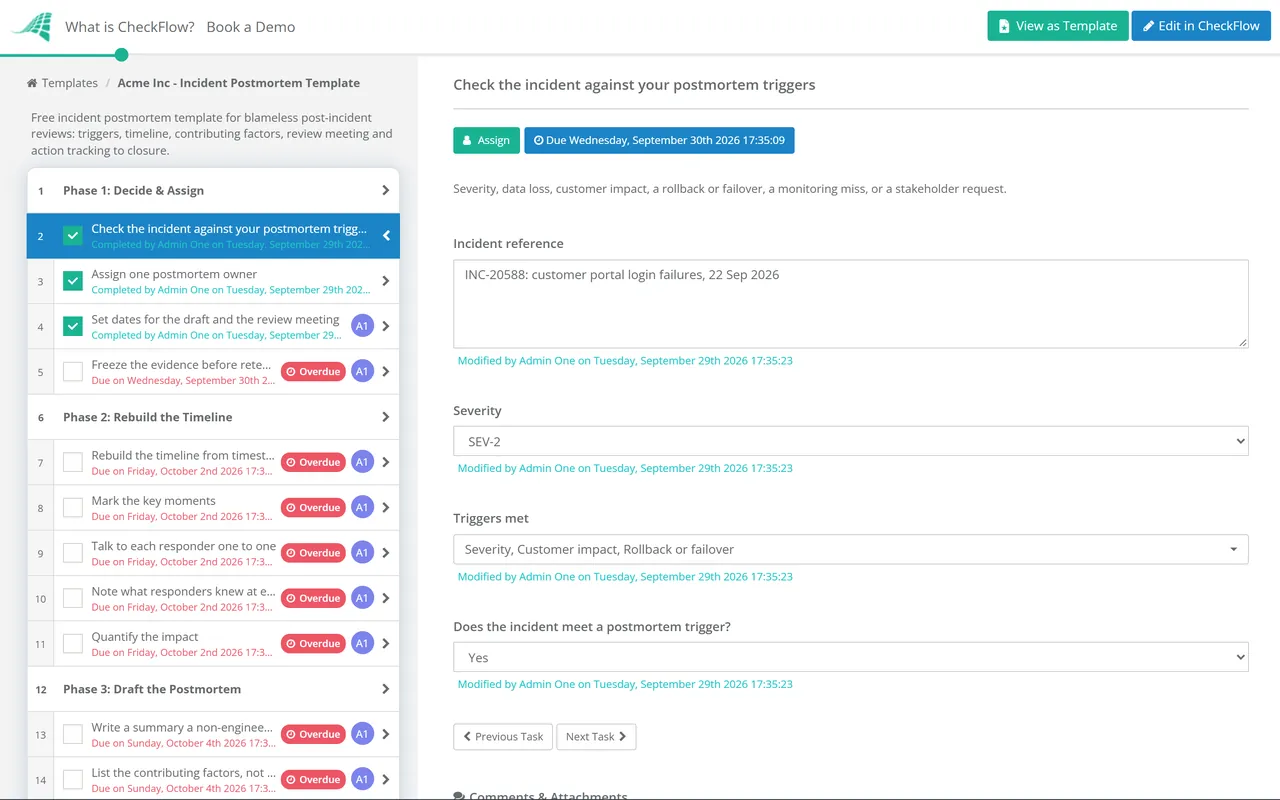
Seven phases take one incident from the review decision to closed actions. Answers on the checklist decide whether the review runs at all, whether customers get a report and whether change or problem records are raised.
If no trigger applies, task 5 is the only task shown and the rest of the checklist is hidden.
The facilitator should be someone who was not in the incident and does not manage the people who were.
Task 4 appears only when the checklist records that customers were affected.
Task 2 appears when an action changes production. Task 3 appears when the review asked for a problem record.
This phase is due when the last action’s due date passes, not when the meeting ends.
The checklist runs the process. The document is what people read later, often months later, when a similar alert fires. These are the sections Phase 3 asks the owner to write, with the mistake that most often weakens each one.
| Section | What goes in it | Common mistake |
|---|---|---|
| Summary | What broke, for how long, who noticed and what fixed it | Written for the team that was there, so nobody else can follow it |
| Impact | Users, customers, requests, data and SLAs affected, with numbers | “Some users were affected” with no figures behind it |
| Timeline | Timestamped events from the first signal to full recovery | Rebuilt from memory, so the times drift and gaps disappear |
| Contributing factors | The trigger and the conditions that let it cause an outage | Stopping at the trigger, such as “bad deploy”, and ignoring why it reached production |
| What went well | Detection, tools and decisions that shortened the incident | Left out, so good practice is never reinforced |
| Where we got lucky | Things that helped by chance, such as low traffic or the right person being online | Counted as resilience when it was chance |
| Action items | Specific changes, each with an owner, priority, due date and tracker link | Vague actions with no owner, never checked again |
A webhook or the REST API can start the postmortem checklist when a qualifying incident is resolved in your incident tool, or you can connect it through Zapier. The owner is assigned straight away and the evidence-freeze task is due that day.
Dynamic due dates are set from the review date, and each action is assigned to a named person. Actions are captured in a table inside the task, with owner, priority and tracker link, and the weekly review task keeps them visible until every row is closed.
Conditional logic hides the customer report when no customer was affected and adds change and problem hand-offs only when the review calls for them. Chat exports and timelines are attached to the task they support, and the activity trail records who signed off and when.
Many postmortem actions end in a runbook. Our IT runbook template guide covers how to write one that responders actually follow, and Phase 7 above makes sure the runbooks an incident exposed are updated before the postmortem closes.
Actions that change production go through change control. CheckFlow’s change management checklist software shows how each change carries its own approvals and evidence, and the IT Change Management Checklist is the template to start from Phase 6.
Incident Management Checklist
Problem Management Checklist
On-Call Handover Checklist
IT Change Management Checklist
Business Continuity Plan Testing Checklist
Describe the process in a sentence and the AI checklist generator drafts the phases and tasks for you.
It is a written review of an incident that looks for the systemic causes of what went wrong rather than a person to hold responsible. It assumes everyone acted in good faith with the information they had, and asks why the system let a reasonable action cause an outage. The practice is closely associated with Google’s Site Reliability Engineering teams. The point is practical: people who fear blame hold back the details a review needs to find the real gaps.
Whenever an incident meets triggers you agreed in advance. Typical triggers are user-visible downtime or degradation beyond a threshold, any data loss, on-call intervention such as a rollback, a resolution time above a threshold, and a monitoring failure. You can also simply require one for every SEV-1 and SEV-2. Anyone should be able to request a postmortem for an incident below the line, and a review of a near miss is often cheaper than a review of the outage it predicted.
A summary, the impact in numbers, a timestamped timeline, the contributing factors, what went well, where the team got lucky, and action items with an owner, priority and due date each. The table above describes each section and the mistake that most often weakens it. Keep the document factual and written in terms of roles and systems rather than named individuals.
Freeze the evidence the same day, because chat history and logs expire and memories fade fast. The draft and meeting can follow within a week or two, once the team has recovered and the timeline has been rebuilt properly. Set the targets in your policy and track them, so that a busy week does not quietly turn into a review that never happens.
A postmortem reviews one incident end to end: what happened, how the response went and what should change. Root cause analysis is one technique used inside it, and complex incidents rarely have a single root cause anyway. When the underlying cause is unconfirmed or links several incidents, the investigation moves into a problem record, where it can run for weeks without holding up the postmortem.
Give every action one named owner, a priority and a due date before the meeting ends, and keep the postmortem open until every action is complete or formally declined with a reason. Review open actions weekly, escalate overdue ones to the service owner, and check the fix works before closing. A postmortem with open actions is still an open risk.
14-day free trial, no card required. The Business plan is $10 per user per month after the trial. Full details at checkflow.io/pricing.
14-day free trial, no credit cardFull refund in your first 30 daysUS or EU hosting