
One feature, spec to customers
Covers: the specification, code review, QA of the feature and its release notes.
Owner: the product manager and the feature team.
Unit: one feature or improvement.
Last reviewed: October 2026
No Credit Card Required
Printed from checkflow.io/templates/product-development-launch/software-release-checklist
A versioned release bundles weeks of work from several teams into one number, and every change in it has to be frozen, built, tested, described and approved together. This free software release management checklist gives release managers, engineering leads and QA teams one run per version, such as 4.2, from scope freeze to the post-release review. It plans the scope and calendar, freezes the code and cuts a release branch, builds numbered release candidates, runs regression testing and collects sign-offs, and prepares release notes and customer communications. A go/no-go approval halts the checklist until the approver decides. The deploy runs through the Production Deployment & Rollback Checklist, and this one records what happens around it: tagging, publishing, monitoring and triage. A hotfix phase appears only when a defect found after the release needs a patch version, and the run ends with a retrospective and the release metrics. Every due date counts from the planned release date.
Release management sits above two smaller jobs. A feature release takes one change from specification to customers. A deployment puts one build into production and decides whether to roll it back. A software release groups many features and fixes into a version that is frozen, tested and approved as one unit, then shipped through a deployment and supported afterwards.
Teams that run all three from one production release checklist either bury the deployer in release notes or lose track of which build was tested. Keep them separate and link them: this checklist owns the version, the Feature Release Process Checklist owns each feature, and the Production Deployment & Rollback Checklist owns deploy day.
Covers: the specification, code review, QA of the feature and its release notes.
Owner: the product manager and the feature team.
Unit: one feature or improvement.
Covers: scope and code freeze, release candidates, regression, sign-offs, release notes, the go/no-go, monitoring and the retrospective.
Owner: the release manager.
Unit: one version, such as 4.2.0, and any hotfix that follows it.
Covers: the artefact, migrations, deploy strategy, verification and the rollback decision.
Owner: the deployer and the on-call engineer.
Unit: one deploy of one build.
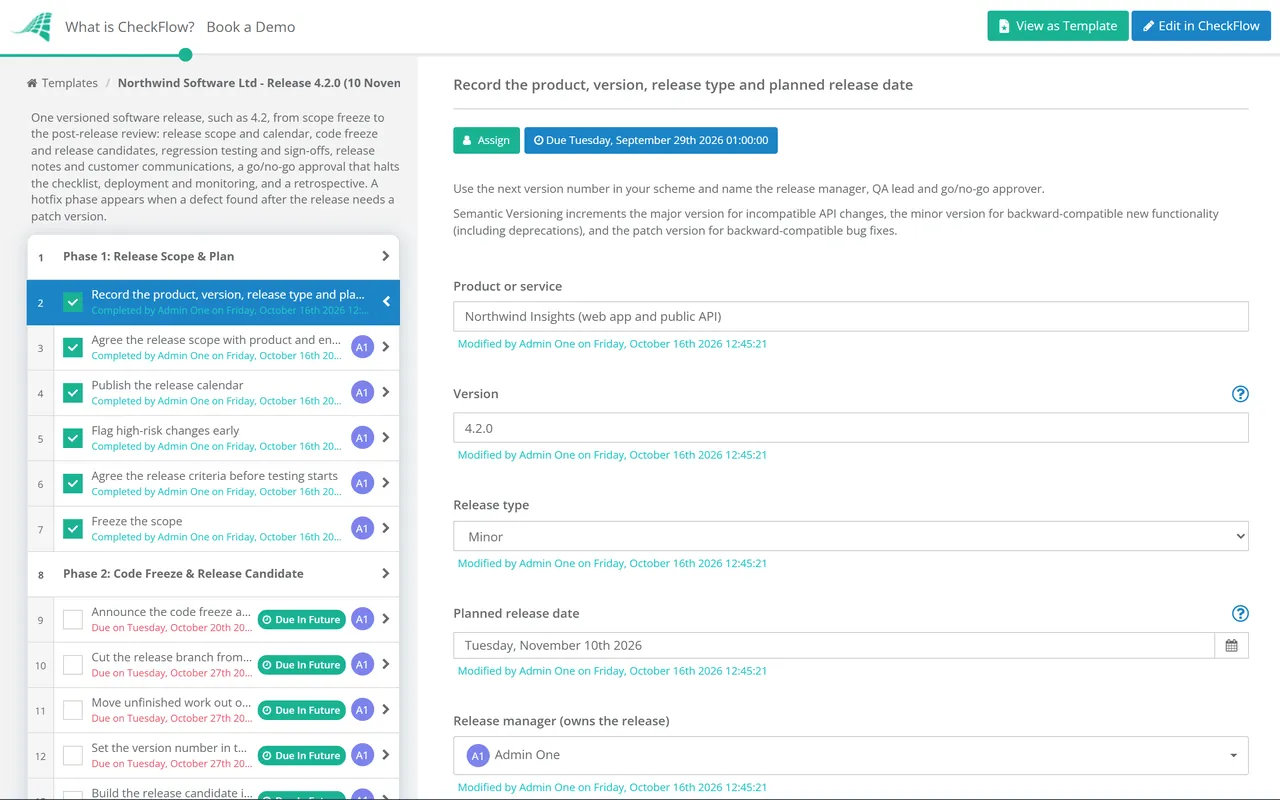
Eight phases take one version from scope freeze to review. The go/no-go at the end of Phase 5 halts the checklist until the approver decides, Phase 7 appears only when a defect found after the release needs a hotfix, and every due date counts from the planned release date.
Fill in the first task before anything else. The planned release date sets every due date in the checklist, and the approver named there makes the go/no-go decision.
After the code freeze, the release branch takes only fixes for defects in this release, and every change reaches testing through a new release candidate.
Test the numbered candidate you intend to ship. When a fix produces a new candidate, re-run the tests its change could affect.
The breaking changes task appears only when the first phase records breaking changes or deprecations.
The approver named on the first task records the decision on the last task. The checklist halts there, and nothing after it can be completed until they decide.
Deploy-day steps, the deploy strategy and the rollback decision live in the Production Deployment & Rollback Checklist. This phase records the release around the deploy.
Shown only when a defect found after the release needs a hotfix. A hotfix is a patch version, such as 4.2.1, built from the release tag rather than from main.
The checklist’s due dates follow this timeline, counted in calendar days from the planned release date on the first task. Change that date and every milestone moves with it. The offsets suit a release every month or two. For a shorter cycle, close the gaps, but keep regression on a frozen candidate and the go/no-go before the deploy.
| Milestone | When | Owner | Done when |
|---|---|---|---|
| Scope agreed and calendar published | 6 weeks before | Release manager and product | The version’s tickets sit under one fix version and every milestone has a date |
| Scope freeze | 4 weeks before | Release manager | New work goes to the next version unless the release manager approves it |
| Code freeze and branch cut | 2 weeks before | Release manager and engineering | The release branch exists and takes only fixes for this release |
| First release candidate | 13 days before | Engineering | A numbered candidate is built once in CI and deployed to staging |
| Regression and sign-offs | 11 to 4 days before | QA lead | The full suite has run on the candidate and QA, product and security have signed off |
| Release notes and comms ready | 3 days before | Release manager, product and support | Notes reviewed, support briefed and customer messages scheduled |
| Go/no-go | 2 days before | Go/no-go approver | Approved, approved with conditions or not approved, with the reason |
| Release | Release day | Deployer, through the deployment checklist | Deployed, tagged, notes published and customers told |
| Monitoring and triage | Up to 3 days after | Release manager and on-call | Post-release defects triaged and any hotfix decided |
| Retrospective and metrics | 10 days after | Release manager | Actions have owners and the release metrics are recorded |
Number the version before you build it. Semantic Versioning 2.0.0 increments the major version for incompatible API changes, the minor version for backward-compatible new functionality (and whenever part of the public API is marked as deprecated), and the patch version for backward-compatible bug fixes. Release candidates take a pre-release label after a hyphen, such as 4.2.0-rc.1, which the specification ranks below 4.2.0.
The specification also says that once a version is released, its contents must not be modified: any change ships as a new version. That is why a defect found after 4.2.0 goes out as 4.2.1 through the hotfix phase, built from the release tag, rather than as a quiet rebuild of 4.2.0.
Each task’s due date counts from the planned release date on the first task. When the release slips a week, change that one date and the freeze, the regression window and the go/no-go move with it. Every release in progress shows on the Reports Grid, and the Tasks Grid lists each person’s release tasks by due date.
The approver named on the first task records Approved, Approved with conditions or Not approved, and the checklist halts until they do. Tagging, publishing and customer emails cannot be ticked off before the decision, and the decision records who made it and when.
Scope, candidates, defects, sign-offs and the criteria check are captured in fields and tables inside the tasks, with the date each step was completed and by whom. When a post-incident review asks which build was tested and who approved it, the answer is in one checklist.
A go/no-go is an approval step with a halt. CheckFlow’s approval software shows how approvals, decisions and halts work across a template.
The deploy itself runs through the Production Deployment & Rollback Checklist, and each feature in the version through the Feature Release Process Checklist. Changes reach the release branch through the Code Review Checklist, and defects found in regression are worked through the Bug Tracking & Resolution Checklist.
Production Deployment & Rollback Checklist
Web Application Security Testing Checklist

Mobile App Release Checklist
Regression Testing Checklist
Production Readiness Review Checklist
Describe the process in a sentence and the AI checklist generator drafts the phases and tasks for you.
A software release checklist covers one version from scope to review: the release scope, owner and calendar; the code freeze and release branch; numbered release candidates built in CI; regression testing, defect triage and sign-offs from QA, product and security; release notes, documentation and customer communications; a go/no-go decision against criteria agreed in advance; the deployment; monitoring after release; and a retrospective with the release metrics. Add a hotfix path for defects that cannot wait, and keep the deploy-day steps in a separate deployment checklist.
Release management is the whole life of a version: deciding what goes in, freezing it, testing it as one unit, describing it to customers, approving it and reviewing how it went. Deployment is the technical step of putting a build into production and checking it, with a plan to roll back. One release usually has one main deployment, and more if a hotfix follows. CheckFlow keeps them as two templates: this one and the Production Deployment & Rollback Checklist.
Release readiness criteria, also called release criteria or exit criteria, are the conditions a version must meet before the go/no-go approves it. Typical ones are no open critical or high-severity defects, regression passed on the candidate being shipped, performance within the agreed budget, security and dependency scans clear, release notes and documentation ready, support briefed and a rollback plan in place. Agree them when the scope is set, not on the day of the decision, so schedule pressure cannot quietly change them.
Long enough to run your full regression on a stable release candidate, fix what it finds and retest. This template puts the code freeze two weeks before the release date, which suits a release every month or two; teams with strong automated tests and frequent releases often need far less. A freeze does not stop development: work carries on in the main branch, and only fixes for this release go into the release branch, each one through a new candidate.
A release candidate is a build you intend to ship unless testing finds a problem. It is built once in CI from the release branch and given a pre-release version such as 4.2.0-rc.1, which Semantic Versioning ranks below 4.2.0. If a defect is fixed, a new candidate (rc.2) is built and tested. The candidate that passes the go/no-go is the exact artefact that goes to production, so it is never rebuilt for the deploy.
When a defect in production is causing harm now, such as lost or corrupted data, a security problem or a broken core journey for many customers, and no feature flag or workaround can contain it. Everything else waits for the next planned version. A hotfix should be a patch version built from the release tag, with targeted testing of the fix and the areas around it, an approval, and the fix merged back into main so the next release does not bring the defect back.
Many teams use Semantic Versioning: MAJOR.MINOR.PATCH. The specification increments the major version for incompatible API changes, the minor version for backward-compatible new functionality or deprecations, and the patch version for backward-compatible bug fixes. It also says a released version must not be changed: any modification ships as a new version. Whichever scheme you use, record the version on the first task so the branch, tag, release notes and tickets all carry the same number.
14-day free trial, no card required. The Business plan is $10 per user per month after the trial. Full details at checkflow.io/pricing.
14-day free trial, no credit cardFull refund in your first 30 daysUS hosting, EU on request