Mobile App Release Checklist Template

Take one iOS, Android or two-store release from version numbers and device testing through TestFlight or Play testing, privacy forms and store review to a phased or staged rollout. The release approver decides go or no-go before submission.

Last reviewed: November 2026

Printed from checkflow.io/templates/product-development-launch/mobile-app-release-checklist

This free mobile app release checklist is for mobile leads, app developers, QA teams and product managers shipping one version of an app to the App Store, Google Play or both. One run covers one release, counted back from the planned release date. It sets the version and build numbers, cuts the release branch and sets the feature flags, runs regression on real devices and OS versions, and puts the build through TestFlight or Google Play testing with crash and performance checks against your release criteria. The store listing, screenshots and What’s New text are updated, the App Store privacy details and Google Play Data safety form match the build and its SDKs, and the age rating answers are reviewed. The review notes and a working test account go in before the release approver decides go or no-go. The build is submitted, any rejection is fixed, and the update rolls out in phases or stages while crashes and reviews are watched, with a pause and a fix if it goes wrong. It ends with replies to store reviews and a retrospective.

One App Version, Through the App Store and Google Play

A mobile app release, in this template, is one version of one app going to the App Store, Google Play or both: the build, the tests on real devices, the beta, the store listing and privacy declarations, the store review and a gradual rollout to users. What makes it different from a web release is the store in the middle. Each store reviews the build before users can get it, its listing and privacy answers are part of the release, and a bad build cannot simply be rolled back: Apple lets you pause a phased release and Google lets you halt a staged rollout, but the fix goes out as a new build (Apple: phased release, Google: staged rollouts).

For releases without a store, the Software Release Management Checklist runs a versioned release train with its code freeze and go/no-go, and the Feature Release Process Checklist takes one feature through QA and staging. A back-end change the app depends on follows the Production Deployment & Rollback Checklist, a new service is checked once with the Production Readiness Review Checklist, and feedback beyond the store reviews belongs to the User Feedback Collection Checklist.

This template

One app version, through the stores

Covers: version and build numbers, the release branch and flags, regression on real devices, TestFlight and Google Play testing, the store listing, privacy details and Data safety form, age ratings, review access, submission, rejections and a phased or staged rollout.

Planned around: the planned release date.

Ends with: replies to store reviews and the release retrospective.
Web releases

Software Release Management

Covers: a versioned release train: scope, code freeze, release candidates, regression sign-offs, release notes, a go/no-go and the deploy.

Use it: for software that ships without a store review. Software Release Management Checklist.

One feature

Feature Release Process

Covers: one feature from its specification sign-off through code review, QA in staging and a go/no-go to production monitoring.

Use it: for each feature that later ships inside a mobile release. Feature Release Process Checklist.

What the Mobile App Release Checklist Covers

Nine phases take one release from planning to the retrospective. The first task records the planned release date, which sets every due date, the people involved, and which stores the release goes to and whether it is the app’s first release there, so only those stores’ tasks appear. An update adds the upgrade test and the phased release or staged rollout; a first release adds the store set-up and, for a new personal Google Play account, production access. An app new on one store and already on the other gets each store’s own tasks. The go or no-go for submission in Phase 6 halts the checklist until the release approver decides.

  1. Phase 1

    Phase 1: Plan the Release

    5 tasks

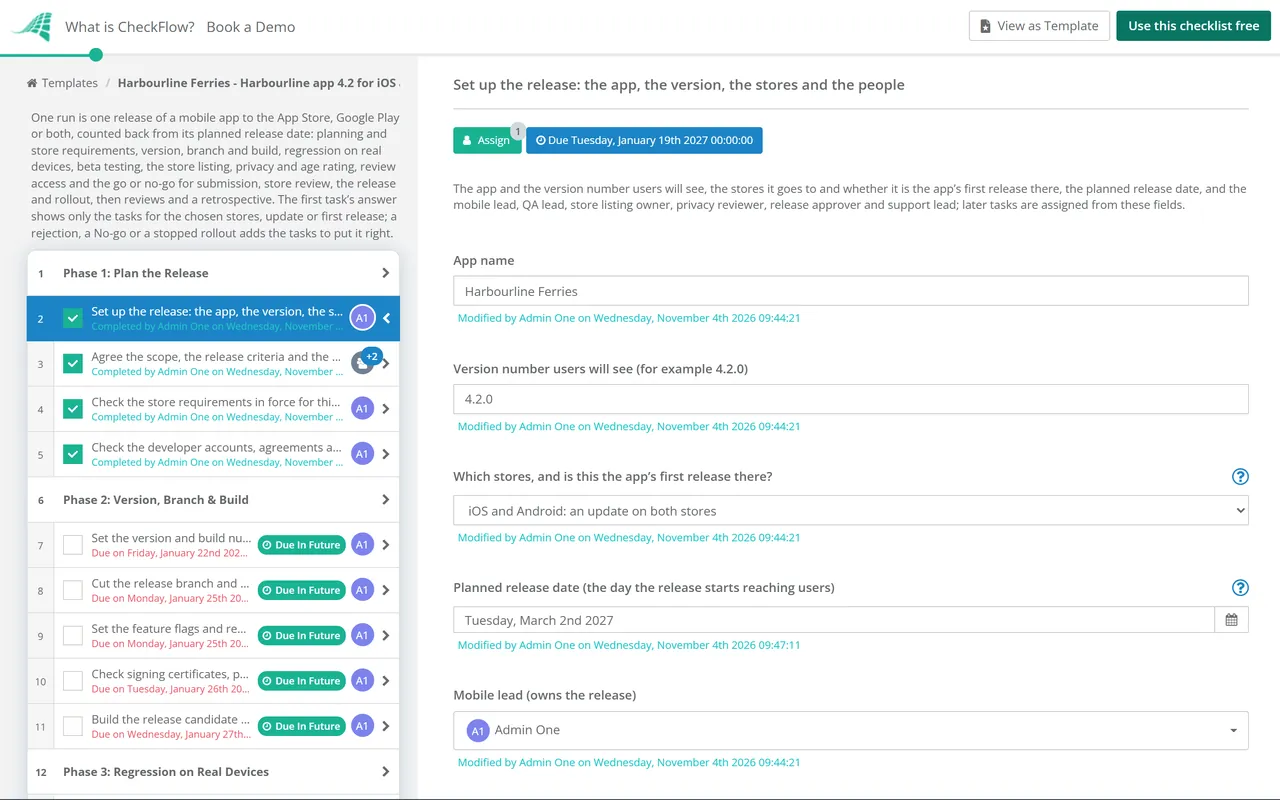
    Owned by the mobile lead. Enter the planned release date on the first task: every due date counts back from it in working days, and the rollout and follow-up tasks count forward. Choose the stores this release goes to, and whether it is the app’s first release there, so the checklist shows only the tasks for those stores.

    • Set up the release: the app, the version, the stores and the people — the app and the version number users will see, the stores it goes to and whether it is the app’s first release there, the planned release date, and the mobile lead, QA lead, store listing owner, privacy reviewer, release approver and support lead; later tasks are assigned from these fields
    • Create the app in each store it is new to — the app record in App Store Connect and the app in Play Console, with the name, bundle ID or package name, default language and category, so builds, testers, the listing and the privacy answers have somewhere to go
    • Agree the scope, the release criteria and the key dates — the features and fixes in this release and what is left out, the criteria the build must meet before it is submitted (for example crash-free sessions and start-up time on the beta), and the dates for the code freeze and the submission
    • Check the store requirements in force for this release — the build tools and target versions each store requires on the day you submit, and any change to the App Review Guidelines or Google Play policy since your last release
    • Check the developer accounts, agreements and trader status — the Apple Developer Program membership and the Play Console account are active, the latest agreements are signed, the people who upload and submit have the roles they need, and the trader status each store asks for is declared
  2. Phase 2

    Phase 2: Version, Branch & Build

    5 tasks

    The mobile lead fixes what is being built. Set the version and build numbers, cut the release branch at the code freeze, decide the feature flags, check signing, and upload the release candidate to each store.

    • Set the version and build numbers — the version number users see and a new build number for each platform, recorded so QA, the stores and support all refer to the same build
    • Cut the release branch and freeze the code — the release branch taken from the agreed commit on the code freeze date, with only fixes for this release merged into it from then on
    • Set the feature flags and remote settings for this release — which features ship turned on, off or to a share of users, who can change each flag, and which flags let you turn a feature off without a new store release
    • Check signing certificates, profiles and keys — the Apple distribution certificate and provisioning profiles, and the key used to sign Android uploads, are valid past the release date and can be reached by more than one person, so the release does not stop on an expired certificate or a missing key
    • Build the release candidate and upload it to each store — the release candidate built from the release branch and uploaded to App Store Connect and to Play Console, with the export compliance (encryption) questions answered for the iOS build
  3. Phase 3

    Phase 3: Regression on Real Devices

    5 tasks

    The QA lead tests the release candidate on the devices and OS versions your users have. Apple’s guidelines ask for an app to be tested on-device for bugs and stability before it is submitted (2.1). Bugs found here are fixed on the release branch or deferred, and each fix means a new build.

    • Agree the device and OS version matrix — the phones and tablets, OS versions, screen sizes and the oldest supported OS for each platform, chosen from your own usage figures, with a tester for each
    • Run the regression suite on real devices — the core journeys, sign-in, payments and anything this release touched, run on each device in the matrix, with every failure logged against the build number
    • Test the upgrade from the version on the store — install the version users have now, sign in and use it, then update to the release candidate and check that data, settings and the signed-in session carry across
    • Check permissions, offline use, interruptions and accessibility — permission prompts and their wording, no network and a poor network, calls and notifications arriving mid-task, rotation, dark mode, large text, and VoiceOver and TalkBack on the main screens
    • Triage the bugs found and fix or defer each one — each bug gets a severity, an owner and a decision: fixed in this release with a new build and a re-test, or deferred to a later release with the reason recorded
  4. Phase 4

    Phase 4: Beta Testing

    6 tasks

    The build goes to testers through TestFlight and Google Play’s testing tracks. The mobile lead collects feedback and crash reports, and the QA lead checks the beta against the release criteria before the final build is chosen.

    • Distribute the build to testers on TestFlight — the build added to internal and external tester groups, with the test information filled in: what to test and where feedback goes
    • Release the build to Google Play internal or closed testing — the app bundle released to an internal test for the team and, for a wider group, a closed test, with the testers’ list and the feedback channel set
    • Collect beta feedback and crash reports — tester feedback, crash reports and screenshots from TestFlight, Play Console and your crash reporting tool, each logged and triaged with the bugs from regression
    • Check the beta against the release criteria — crash-free sessions or users, start-up time, ANRs on Android and any other measure in your criteria, for the build you plan to submit
    • Confirm the final build for submission — the build number that will be submitted to each store, with every fix since regression re-tested on it and the SDK list and privacy answers checked again if anything changed; any later fix means a new build and another check
    • Apply for production access after the closed test (new personal Play accounts) — for a personal Play Console account created after 13 November 2023: a closed test with at least 12 testers who have been opted in for the last 14 days, then the application for production access in Play Console
  5. Phase 5

    Phase 5: Store Listing, Privacy & Age Rating

    9 tasks

    The store listing owner updates what people see on each store, and the privacy reviewer makes the privacy declarations match what this build collects, including its third-party SDKs. The age rating answers are reviewed for anything this release changes.

    • List the third-party SDKs in this build and the data each collects — every analytics, advertising, crash reporting, payment and sign-in SDK in the build, what data each collects or shares and why, checked against each provider’s own disclosure
    • Update the store listing text — the name, subtitle or short description, full description and keywords on each store, checked against what this release does
    • Update screenshots and app previews — new screenshots and previews for each device size where this release changes what people see, showing the app in use
    • Write the What’s New text and release notes — what changed in this release in plain words, the same facts on both stores, with every significant new feature or change named
    • Update the App Store privacy details — the App Privacy answers in App Store Connect checked against the SDK list and this build, then published, so the product page shows what the app collects and how it is used
    • Update the Google Play Data safety form — the Data safety form on the App content page checked against the SDK list and this build: what is collected and shared, why, and the security practices
    • Check the privacy policy link and in-app account deletion — the privacy policy link in each store’s listing and inside the app, and, if people can create an account in the app, a way to delete it from inside the app
    • Review the App Store age rating answers — the age rating questions in App Store Connect answered again where this release adds content or features they ask about
    • Review the Google Play content rating questionnaire — the IARC content rating questionnaire in Play Console submitted again if this release changes content or features it asks about
  6. Phase 6

    Phase 6: Review Access & Go or No-Go

    6 tasks

    Each store’s reviewers need to reach every part of the app. The mobile lead writes the review notes, the QA lead tests the review account from a clean install and checks every release criterion, and the release approver alone decides go or no-go. The checklist halts at the decision: nothing in submission or rollout can be completed until it is done.

    • Write the App Review notes and set up the demo account — the App Review information in App Store Connect: contact details, a demo account or demo mode with sample data, and notes that explain non-obvious features, in-app purchases and anything that needs other hardware
    • Fill in the Google Play app access instructions — the sign-in details and instructions on the App access page, for a reusable account that reaches every feature, including anything behind a subscription paywall
    • Test the review account from a clean install — sign in with the review account on a fresh install, from outside your office network, and reach every feature named in the review notes, so the review is not held up by a locked or expired account
    • Check every release criterion for the go or no-go — each criterion agreed in Phase 1 with its evidence and whether it is met, plus the open bugs, the listing, privacy and rating work, and the review access
    • No-go: fix what stops the submission — fix each point the release approver named, build and re-test if the code changed, and move the planned release date if needed, then ask the approver for a new decision
    • Decide go or no-go for submission — the release approver alone looks at the release criteria, the open bugs, the store listing and privacy work and the review access, and decides whether this build is submitted
  7. Phase 7

    Phase 7: Submission & Store Review

    7 tasks

    The mobile lead submits the approved build to each store, held for the planned release date unless you choose automatic release. Each review outcome is recorded, and a rejection adds a task to fix it and submit again. The days allowed for review here are this template’s choice, not a store’s figure.

    • Submit the version to App Review — the final build selected for the version, the release option set so the version waits for the planned date, phased release turned on for an update, and the version added for review and submitted
    • Send the production release to Google Play review — a production release with the final app bundle and release notes, the staged rollout percentage set for an update, and managed publishing on so the approved release is published on the planned date
    • Record the App Review outcome — the result of the review, any message from App Review and the build approved
    • Record the Google Play review outcome — the publishing status in Play Console after review, any issue shown on the Policy status page and the release approved
    • Resolve the App Review rejection and submit again — read the guideline App Review cites, reply in App Store Connect with any explanation or screenshots, fix the build or the metadata, and submit again
    • Fix the Google Play rejection and send the release again — read Google’s email and the Policy status page, fix every issue named, and send the changes for review again
    • Brief support and prepare the release announcement — the support team told what changed and the known issues, help articles and saved replies updated, and any in-app message, email or post about the release ready for the release date
  8. Phase 8

    Phase 8: Release & Rollout

    8 tasks

    On the planned release date the approved versions go live: an update in phases on the App Store and as a staged rollout on Google Play, a first release to everyone. The mobile lead watches crashes and reviews, and decides with the release approver whether the rollout carries on or stops for a fix.

    • Release the version on the App Store — the version released from Pending Developer Release on the planned date, or released automatically, with the phased release running for an update
    • Publish the release on Google Play — the approved changes published from the Publishing overview on the planned date, with the staged rollout at its starting percentage for an update, or to everyone for a first release
    • Monitor crashes, ANRs and reviews in the first days — crash-free rates, new crash clusters, ANRs on Android, sign-in and payment errors, and new ratings and reviews, checked each day against the release criteria
    • Decide whether the rollout carries on or stops for a fix — the mobile lead and the release approver decide from the crash and review figures whether the release carries on to all users or stops reaching more users while a fix is made
    • Pause the phased release or halt the staged rollout — stop the release reaching more users: pause the phased release in App Store Connect, halt the staged rollout in Play Console, and tell support what users may see
    • Ship the fix as a new build and resume the rollout — fix the cause on the release branch, build it with a new build number, re-test it, submit it for review, and roll it out in place of the stopped version
    • Let the phased release reach all users — the phased release followed to 100% on its seventh day, or released to all users sooner once the figures are good
    • Increase the staged rollout to 100% — the rollout percentage raised in steps you choose while the figures stay within the criteria, until the update reaches all users
  9. Phase 9

    Phase 9: Reviews & Retrospective

    5 tasks

    Once the release has reached everyone, the support lead replies to store reviews about it, any Google Play listing changes go live, the beta builds are expired, and the team looks back at the release.

    • Reply to store reviews about the release — public replies to reviews that report a problem with this release or ask a question, with the fix or a workaround and a way to contact support
    • Publish the Google Play listing changes once the rollout is at 100% — screenshots and descriptions that show the new features, published after the update has reached every user
    • Expire the beta builds and close the release branch — the TestFlight builds expired, the testing tracks updated, and the release branch merged back and tagged with the version and build numbers
    • Record the release results — crash-free rates, the share of users on the new version, the rating trend and support contacts since the release, against the release criteria
    • Hold the release retrospective and update this checklist — what went well, what slowed the release (review, rejections, late bugs, signing), and the changes to the release criteria, the offsets or this checklist for the next release

What Each Store Asks For, and What Each Answer Shows

What each store asks for, and where it is in this template

As read on Apple’s and Google’s help pages on 3 November 2026 (Apple: Upcoming Requirements, Google: target API level, TestFlight, Google: testing requirements). Store rules change often: check each store’s pages on the day you release.

Step App Store (Apple) Google Play Phase
Build requirementsBuilt with Xcode 26 or later and an iOS 26 SDK (since 28 April 2026); iOS apps must target iOS 13 or later (since 9 September 2026)New apps and app updates must target Android 16, API level 36 (from 31 August 2026; extensions could be requested to 1 November 2026)1
Trader statusDeclared in App Store Connect for the EU Digital Services Act; apps without it are removed from the App Store in the EUEvery account declares trader or non-trader under EEA and UK laws by 1 February 20271
Beta testingTestFlight: up to 100 internal and 10,000 external testers; the first build for external testers goes to App Review; builds last up to 90 daysInternal, closed and open testing tracks; a new personal account needs a closed test with at least 12 testers opted in for 14 days before production access4 and 6
Privacy declarationApp privacy details in App Store Connect, including third-party partners’ practicesData safety form, required for apps on closed, open and production tracks, even with no data collected5
Account deletionIn the app, if the app supports account creation (guideline 5.1.1)In the app and through a web link, if the app lets people create an account5
Age ratingAge rating questions in App Store Connect, answered under Apple’s updated age rating system (due since 31 January 2026)IARC content rating questionnaire, submitted again when content changes5
Access for the reviewerA demo account or full demo mode, back-end services live, and notes for non-obvious features (guideline 2.1)Sign-in details on the App access page: always accessible, reusable, valid anywhere and in English6
Gradual releasePhased release over 7 days for version updates (1%, 2%, 5%, 10%, 20%, 50%, 100%); pause for up to 30 days in totalStaged rollout for updates only; the percentage is raised by hand; halting stops new users receiving it7 and 8
Replies to reviewsOne public response per review, which may take up to 24 hours to appearOne public reply per review; the user gets a push notification and an email9

What each answer on the first task shows

Every answer shows the shared tasks: planning, build, regression, beta, listing, privacy, the go or no-go, monitoring, reviews and the retrospective.

Answer on the first task What the checklist adds
iOS only, an updateThe App Store tasks, the upgrade test and the phased release
Android only, an updateThe Google Play tasks, the upgrade test, the staged rollout and the listing changes after 100%
iOS and Android, an updateBoth stores’ tasks, the upgrade test, the phased release, the staged rollout and the listing changes after 100%
iOS only, a first releaseThe App Store tasks and the store set-up
Android only, a first releaseThe Google Play tasks, the store set-up and production access for a new personal account
iOS and Android, a first releaseBoth stores’ tasks, the store set-up and production access for a new personal account
iOS and Android, new on the App Store and an update on Google PlayBoth stores’ tasks, the store set-up, the upgrade test, the staged rollout and the listing changes after 100%
iOS and Android, new on Google Play and an update on the App StoreBoth stores’ tasks, the store set-up, production access for a new personal account, the upgrade test and the phased release

Why Run Mobile App Releases in CheckFlow?

1

No submission before the go or no-go

The go or no-go is assigned to the release approver alone, and the checklist halts there: the submission and rollout tasks cannot be completed until the approver completes it. No-go adds a task before the decision to fix what stops the submission, so the approver can decide again once it is fixed.

2

One release date moves the whole plan

Due dates count back from the planned release date in working days, so when the date moves after a rejection or a late bug, one change on the first task moves every step. Overdue alerts go to the people assigned, and the Reports Grid lists every release in progress with its answers, while Analytics shows where releases slow down.

3

Only the stores you release to

One answer on the first task says which stores the release goes to and whether it is the app’s first release there. An iOS-only update never shows the Data safety form, and a first release never shows a phased release it cannot use. A rejection adds the task to fix it, and a stopped rollout adds the pause and the fix.

CheckFlow does not build, sign or upload your app, and it does not connect to App Store Connect or Play Console: the builds, testers, listings and rollouts stay there. CheckFlow makes sure every release gets the same checks in the same order, with an owner and a due date for each step, a recorded go or no-go before submission and a record of who did what and when.

Test each cycle with the QA Testing Checklist, follow each bug with the Bug Tracking & Resolution Checklist, and run the back end the app relies on through the Production Deployment & Rollback Checklist.

AI generator

Didn’t find what you need? Describe it.

Describe the process in a sentence and the AI checklist generator drafts the phases and tasks for you.

Frequently Asked Questions

What should a mobile app release checklist include?

The version and build numbers, the release branch and feature flags, regression on real devices and OS versions, a beta through TestFlight or Google Play testing, crash and performance checks against your release criteria, the store listing, screenshots and What’s New text, the privacy declarations and age rating, review notes with a working test account, the go or no-go, submission and any rejection, a phased or staged rollout with monitoring, replies to reviews and a retrospective. This template covers each in nine phases.

What do you need before submitting an app to the App Store?

A build made with the Xcode version and SDK Apple currently requires, the app tested on devices, the version’s metadata and screenshots, the app privacy details, the age rating answers, a privacy policy link, a declared EU trader status, and App Review information with a demo account if the app has a login, with the back end turned on. Apple’s guideline 2.1 asks for submissions to be final versions with all metadata and working links (App Review Guidelines).

What is the difference between a phased release and a staged rollout?

Both release an update to a share of users first, and both are for updates only. Apple’s phased release runs over 7 days for users with automatic updates and can be paused for up to 30 days in total (Apple). Google Play’s staged rollout goes to the percentage you choose, which you raise by hand, and can be halted (Google). A first release goes to everyone on both stores.

What happens if Apple or Google rejects the app?

The version does not reach users until the issue is fixed and the store reviews it again. Apple lets you reply to App Review with explanations and attachments, and a metadata rejection can go back with the same build (Apple). Google says a rejected update leaves the previous version available, and not to resubmit until every violation is fixed (Google). Both describe an appeal. In this template, a rejection adds a task to fix it and resubmit.

How is the Google Play Data safety form different from App Store privacy details?

Both tell people on the store what data the app collects and how it is used, and both must include data collected by third-party SDKs. Apple’s app privacy details are answered in App Store Connect and shown on the product page. Google’s Data safety form is completed in Play Console, reviewed as part of app review, and needed even when an app collects no data. This template has one task for each and an SDK list both rely on.

Do new Google Play developer accounts have to run a closed test first?

Personal accounts created after 13 November 2023 do. Google requires a closed test with at least 12 testers who have been opted in continuously for the last 14 days before you can apply for production access (Play Console Help). Google’s requirement is written for personal accounts created after that date; it does not name organisation accounts. In this template the step appears for a first Google Play release; mark it not applicable if your account is not covered.

How do you stop a bad mobile release after it goes out?

Turn the feature off with a flag if you can, which needs no store review. Otherwise pause Apple’s phased release in App Store Connect and halt the staged rollout in Play Console, so no more users receive the version. Users who already have it keep it, so the fix goes out as a new build that passes review again. In this template, Stop on the rollout decision adds the pause and the fix tasks.

Who should own a mobile app release?

In this template the mobile lead owns the release from planning to the retrospective. A QA lead runs the regression and the beta checks, a store listing owner looks after the text, screenshots and age rating answers, a privacy reviewer keeps the privacy declarations accurate, a support lead briefs support and replies to store reviews, and a release approver alone decides go or no-go for submission. One person can hold several of these roles.

Is CheckFlow free for this template?

14-day free trial, no card required. The Business plan is $10 per user per month after the trial. Full details at checkflow.io/pricing.

Ship Every App Release Through the Same Checks

Free trial — no credit card required.

14-day free trial, no credit cardFull refund in your first 30 daysUS hosting, EU on request