A bug report without steps to reproduce is a wish. A bug fixed without QA verification is an assumption. A bug backlog without triage is a place where critical issues hide behind minor ones.
Every software product has bugs. The question is not whether they exist but how quickly and reliably they are found, understood, fixed, and confirmed resolved. Teams that lack a structured bug tracking process work through defects reactively — the loudest complaint gets fixed first, bug reports arrive without the context needed to reproduce them, fixes are deployed without systematic verification, and the backlog grows into an unmanageable collection of varying severity issues that no one can prioritise objectively. Teams that do have a structured process move through the bug lifecycle consistently: every report captures the context needed to reproduce it, every bug gets triaged by severity and priority, every fix is verified by someone other than the developer who wrote it, and the backlog reflects an honest picture of the product’s current quality state. A structured bug tracking and resolution process is not a bureaucratic overhead — it is the mechanism by which a software team converts the inevitable output of development into a product that customers can trust. This free checklist gives product managers, developers, QA engineers, and engineering managers a structured framework for the full bug tracking and resolution lifecycle.
Bug Severity vs Priority — the Distinction That Determines What Gets Fixed First
Severity (impact on functionality)
S1 — Critical
Core functionality broken; data loss risk; security vulnerability. The product cannot be used as intended for a material portion of users.
S2 — High
Significant feature impaired; no workaround or only a painful workaround available.
S3 — Medium
Feature works but with problems; a workaround exists.
S4 — Low
Minor inconvenience; cosmetic or edge case; workaround is straightforward.
Priority (urgency of fix)
P1 — Fix immediately
Customer-facing, in production, no workaround.
P2 — Fix this sprint
Customer-facing, blocking significant use cases or significant customer cohort.
P3 — Fix when capacity allows
Non-blocking; fix before next major release.
P4 — Backlog
Nice to fix; may never be prioritised above higher severity items.
Severity and priority are not the same. A cosmetic rendering bug on the CEO demo screen may be S4 severity but P1 priority. A complex data migration edge case may be S2 severity but P3 priority because it affects 0.1% of users. Both dimensions must be assessed independently.
What the Bug Tracking & Resolution Checklist Covers
This checklist covers the full defect lifecycle in six phases — from bug report intake through triage, reproduction, fix, verification, and backlog management.
Phase 1
Phase 1: Bug Report Intake & Capture
A bug report that cannot be reproduced cannot be fixed. The cost of a thorough report is minutes for the reporter; the cost of an incomplete report is hours of back-and-forth and speculation for the developer.
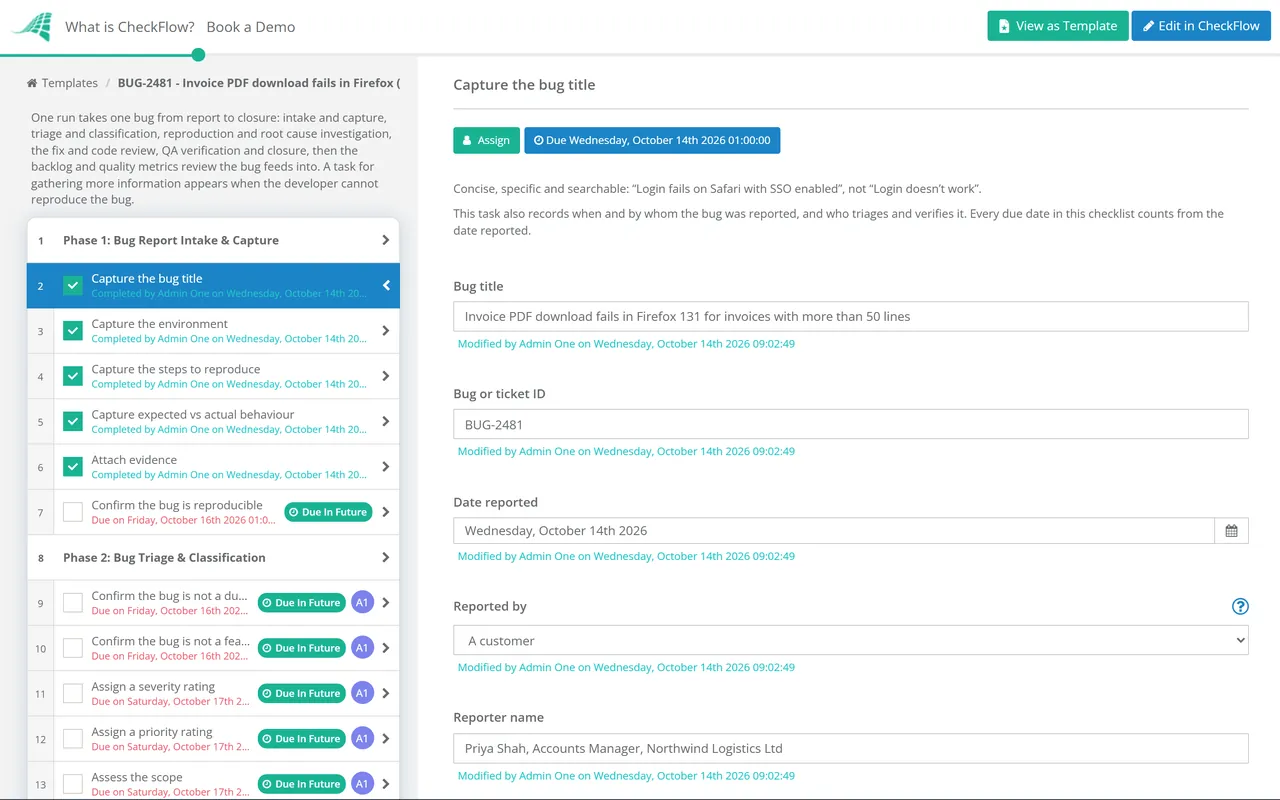
Capture the bug title — concise, specific, and searchable; “Login fails on Safari with SSO enabled” not “Login doesn’t work”
Capture the environment — browser and version, operating system, device type, application version or build number; every field required
Capture the steps to reproduce — numbered, specific, starting from a known state; the exact actions that produce the bug every time
Capture expected vs actual behaviour — what should happen vs what actually happens; both fields required
Attach evidence — screenshot, screen recording, error message text, console log output; at minimum a screenshot for visual bugs; console logs for technical errors
Confirm the bug is reproducible — by the reporter; bugs that occur only once require additional investigation notes
Phase 2
Phase 2: Bug Triage & Classification
Bug triage should happen on a regular cadence — daily for active development teams; before every release. An untriaged bug backlog is a backlog where the most critical issues are equally invisible as the most minor ones.
Confirm the bug is not a duplicate — search existing open bugs before triaging a new one; duplicates linked and closed
Confirm the bug is not a feature request — behaviour that does not match the specification is a bug; behaviour that does match but that the user dislikes is a feature request
Assign a severity rating — S1 to S4; based on functional impact and user exposure
Assign a priority rating — P1 to P4; based on urgency, customer impact, and business context
Assess the scope — how many users are affected? Is it in production or pre-production? Does a workaround exist?
Assign to the relevant team member or squad — based on the affected feature area and workload
Phase 3
Phase 3: Reproduction & Root Cause Investigation
Reproduce the bug — following the exact steps to reproduce from the report; in the same environment as the reporter
If not reproducible — request additional information from the reporter; check logs for the relevant user/session; mark as “needs more information” not “closed” until exhausted
Investigate the root cause — not just the surface symptom; the code path or configuration that produces the failure
Assess for related bugs — does this root cause likely produce other symptoms? Check for related open issues; consider a broader fix
Document the root cause — in the bug ticket; this is the institutional knowledge that prevents recurrence
Phase 4
Phase 4: Bug Fix Implementation
Implement the fix — in a dedicated branch or feature flag; not directly on main/production
Write or update automated tests — that specifically cover the reproduction case; a bug without a regression test is likely to return
Code review — by a team member who was not the fix author; the fix may introduce regressions elsewhere; review required before merge
Update the ticket — with the fix description, the branch/PR reference, and confirmation of test coverage
Deploy to staging — before production; the fix must be verified in a staging environment
Phase 5
Phase 5: QA Verification & Closure
A bug fixed without independent verification is not fixed — it is fixed by the person who made the fix. Developer confidence in a fix is not a substitute for independent reproduction testing.
QA verification — by someone other than the developer who fixed it; following the original steps to reproduce; confirming the bug no longer occurs
Regression testing — confirm the fix has not introduced new issues in related areas; automated regression suite passing
Verify in the same environment — as the original report; browser/OS/device specified
Document the verification — who verified, when, and the result; in the ticket
Close the bug — only after verified resolution; with version/build where the fix will be in production
Notify the original reporter — especially for customer-reported bugs; closing the loop builds trust
Phase 6
Phase 6: Bug Backlog Management & Quality Metrics
Review the open bug backlog weekly — or before each sprint planning; reprioritise based on current context
Review and close stale bugs — bugs open for more than 90 days with no activity; assess whether still valid and reproducible
Track bug introduction rate — new bugs per sprint vs bugs resolved; a growing backlog signals a quality problem that testing is not addressing
Track mean time to resolution — by severity; P1/P2 bugs should be resolved within defined SLAs
Review bug distribution by area — which features or modules generate the most bugs? May indicate areas requiring refactoring or additional test coverage
The Bug Report That Can Be Fixed vs the One That Cannot
Incomplete (Unfixable)
“Checkout is broken”
Description: “Can’t complete a purchase, tried multiple times”
Steps: “Go to checkout and it doesn’t work”
Environment: Not provided
Attachments: None
Complete (Fixable)
“Payment step 3 fails with Amex cards on iOS Safari 16.3”
Description: After entering valid Amex card details and clicking Pay, the spinner runs for 30 seconds and then shows error: ‘Unable to process payment’ with error code 4002. Visa cards work correctly in same flow.
Steps to reproduce:
Sign in as test@example.com
Add item to cart
Proceed to checkout
Enter shipping details
On payment step, enter Amex card [4111…] expiry 12/26 CVC 123
Click Pay Now
Expected: Payment processes successfully, redirect to confirmation page
Actual: Spinner for 30s, then “Unable to process payment” error
Environment: iPhone 14, iOS 16.3.1, Safari 16.3; Production environment
Attachments: Screenshot attached; console log showing 500 error from payments API
Why Use CheckFlow for Bug Tracking & Resolution?
1
A structured intake that captures everything needed to reproduce the bug
Bug reports that arrive through Slack, email, or a Notion comment are missing the structured context that makes them reproducible. CheckFlow’s bug intake checklist requires every field — environment, steps to reproduce, expected vs actual, and evidence — before the report can be submitted. The developer who receives the ticket can start work immediately.
2
Triage that happens on a schedule — not whenever someone remembers
Bug backlogs that are never formally triaged produce the situation where a P1 customer-blocking issue shares a queue with a cosmetic typo noticed six months ago. CheckFlow’s recurring triage review schedules the backlog review before every sprint and before every release — ensuring the most critical issues are visible and assigned.
3
Verified closure — not developer closure
Bugs that are closed by the developer who fixed them — without independent verification — generate the recurring “this was fixed but is still happening” customer experience. CheckFlow’s verification phase requires QA sign-off before a bug can be marked resolved. The closure is the evidence that the fix works.
Bug fixing is a prerequisite for every feature release. CheckFlow’s Feature Release Process Checklist covers the full release workflow where bug fixes and features are verified before deployment. See the Feature Release Process Checklist →
Significant production bugs often generate support incidents. CheckFlow’s IT Incident Management Checklist covers the incident response process for customer-impacting issues. See the Incident Management Checklist →
What should a bug tracking and resolution process include?
+
A bug tracking and resolution process covers six phases: bug report intake (concise title, environment details, numbered steps to reproduce, expected vs actual behaviour, and evidence attachments), triage and classification (duplicate check, severity rating S1–S4, priority rating P1–P4, scope assessment, assignment), reproduction and root cause investigation (following exact reproduction steps, root cause documentation, related bug assessment), bug fix implementation (dedicated branch, regression test coverage, code review, staging deployment), QA verification and closure (independent verification by someone other than the fix author, regression testing, closure with fix version noted, reporter notification), and backlog management (weekly triage review, stale bug review, quality metrics tracking).
What is the difference between bug severity and priority?
+
Bug severity describes the functional impact of the defect — how badly it affects the product’s ability to work as intended. S1 (critical) bugs break core functionality or create data loss or security risks. S4 (low) bugs are cosmetic or edge cases with easy workarounds. Bug priority describes the urgency with which the bug should be fixed — which factors in customer impact, business context, and resource constraints. A P1 bug needs fixing immediately regardless of other work; a P4 bug may never be prioritised above higher severity items. Severity and priority are assessed independently: a cosmetic bug on the CEO’s demo environment may be S4 severity but P1 priority because of the immediate business context.
What makes a bug report reproducible?
+
A reproducible bug report must contain: a specific, descriptive title that includes the key symptom and context; the exact environment (browser and version, OS and version, device, application version or build number); numbered steps to reproduce starting from a known state, precise enough that any developer can follow them and produce the same result; a clear statement of expected behaviour (what should happen) and actual behaviour (what does happen); and evidence (screenshot, screen recording, error message text, or console log output). A bug report missing any of these elements will either be returned to the reporter for more information or result in time wasted by the developer trying to reproduce it without sufficient context.
Who should verify that a bug has been fixed?
+
Bug verification should be performed by someone other than the developer who implemented the fix — typically a QA engineer, another developer, or in small teams, a product manager. The reason for independent verification is that developers who fix bugs are inherently likely to test their fixes in the way they expect them to work, rather than the way the original reporter encountered the issue. Independent verification using the exact original steps to reproduce catches both incomplete fixes (the bug still occurs via the original path) and regressions (the fix resolved the original bug but introduced a new one).
Is CheckFlow free for this template?
+
14-day free trial, no card required. The Business plan is $10 per user per month after the trial. Full details at checkflow.io/pricing.
Track Every Bug From Report to Verified Resolution — With a Record of Each Step
Free trial — no credit card required.
Do you like cookies? 🍪 We use cookies to ensure you get the best experience on our website. Learn more