Product Sunset Checklist Template

Retiring a product, plan or feature? Review the usage and the revenue, get the decision approved, tell customers in waves, track every account’s move and switch it off with the data handled.

Last reviewed: November 2026

Printed from checkflow.io/templates/product-development-launch/product-sunset-checklist

This free product sunset checklist is for product managers retiring a product, a plan or a feature that customers use, with a sunset group from engineering, support, sales and success, finance and legal. One run covers one sunset and counts from two dates, the decision date and the planned shutdown date, at least 14 weeks apart. It reviews usage, revenue and cost, chooses the replacement or exit path, checks the contracts and any consumer rules, and drafts the end of sale, end of support, read-only and shutdown dates before the approver decides. Support and sales are briefed before the first notice, every account’s migration is tracked through the reminders and the final notice, and after the switch-off, billing stops, customer data is deleted or returned, what is kept is recorded and the outcome is reviewed. Short UK, EU and US notes appear where the notice or data rules differ.

Retiring a Product, Not a Customer or a Company

A product sunset, in this template, retires something customers use and pay for: a whole product, a plan or edition, or a feature, add-on or integration. The product manager runs it with a sunset group from product, engineering, support, sales and success, finance and legal, from the usage, revenue and cost review through the approver’s decision, the notices, the migration of every account and the switch-off, to the data deletion and the post-sunset review. ProductPlan’s 10-step end-of-life checklist splits the same work into deciding, getting buy-in, and planning and communicating; GOV.UK’s guidance on retiring a government service adds what users need to be told.

The other end of the life cycle is the Product Launch Checklist and, for one new feature, the Feature Release Process Checklist. One customer who asks to cancel is the Customer Offboarding & Cancellation Checklist, and closing the whole company is the Business Closure Checklist. The servers and data behind a retired product have their own checklists: the Server Decommissioning Checklist and the Data Migration Checklist.

This template

One product, plan or feature

Covers: the usage, revenue and cost review, the replacement or exit path, contract terms, the decision, briefings, customer notices in waves, the end of sale, migration by account, the switch-off, and data deletion and retention.

Planned around: the decision date and the planned shutdown date.

Ends with: the post-sunset review.

One customer

Customer Offboarding & Cancellation

Covers: one customer who has asked to cancel: the contract, the final invoice, their data and every login and integration switched off.

Use it: when the customer leaves and the product stays. Customer Offboarding & Cancellation Checklist.

The whole company

Business Closure

Covers: closing a company: the decision to close, staff, creditors, tax and dissolution.

Use it: when the business itself stops trading. Business Closure Checklist.

What the Product Sunset Checklist Covers

Nine phases take one product, plan or feature from the first look at its usage to the review after it is switched off. The first task records two dates: the decision date, which the review, the plan, the briefings, the first notice, the end of sale and the start of migration tracking count from, and the planned shutdown date, which the reminders, switch-off, data and review tasks count from. It also asks what is being retired, where its customers are, whether consumers buy it and whether it has an API, and each answer adds the tasks or notes that case needs. The sunset decision in Phase 4 halts the checklist until the approver decides.

  1. Phase 1

    Phase 1: Set Up the Sunset

    2 tasks

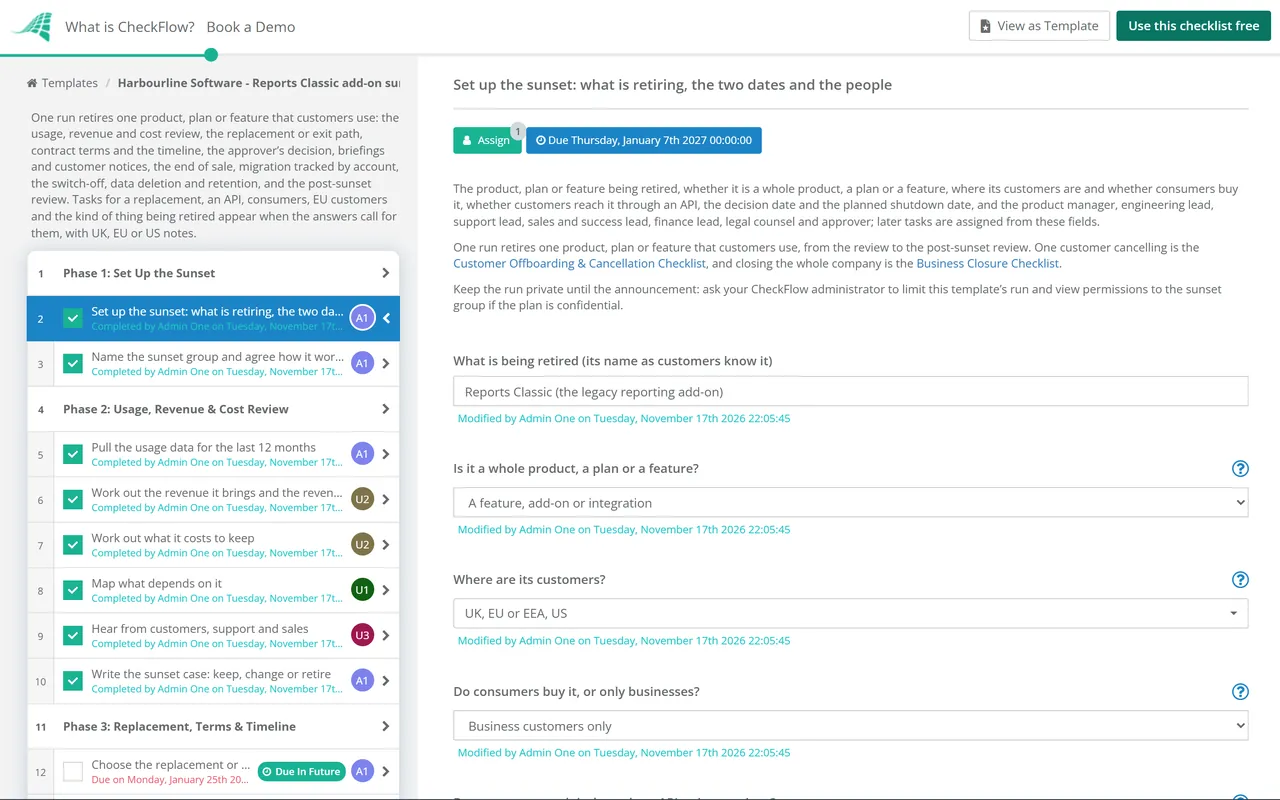
    Owned by the product manager. Enter two dates on the first task: the decision date, which the review and the notices count from, and the planned shutdown date, which the reminders, switch-off and data tasks count from. Say what is being retired and who its customers are, and name the sunset group.

    • Set up the sunset: what is retiring, the two dates and the people — the product, plan or feature being retired, whether it is a whole product, a plan or a feature, where its customers are and whether consumers buy it, whether customers reach it through an API, the decision date and the planned shutdown date, and the product manager, engineering lead, support lead, sales and success lead, finance lead, legal counsel and approver; later tasks are assigned from these fields
    • Name the sunset group and agree how it works — who from product, engineering, support, sales and success, finance and legal takes part, how often the group meets, where decisions are recorded, and who may talk about the plan before it is announced
  2. Phase 2

    Phase 2: Usage, Revenue & Cost Review

    6 tasks

    Gather the facts before anyone argues for or against. The review looks at who uses it, what it earns, what it costs to keep and what depends on it, and ends with the product manager’s case for keeping, changing or retiring it.

    • Pull the usage data for the last 12 months — active accounts and users, how often they use it, the trend, the largest and most active accounts, and whether new customers still start using it
    • Work out the revenue it brings and the revenue at risk — what it earns on its own and as part of larger contracts, the accounts that pay for it, prepaid and multi-year terms, and the revenue that could be lost if those customers leave rather than move
    • Work out what it costs to keep — engineering and maintenance time, hosting, third-party licences, security fixes, support tickets and the time sales and success spend on it, set against what that effort could do elsewhere
    • Map what depends on it — integrations, APIs and webhooks, other products and plans that include it, internal systems and reports, data other features read, and contracts or partners that name it
    • Hear from customers, support and sales — what a sample of customers use it for and what they would need instead, the support tickets about it, and what sales and success hear in deals and renewals
    • Write the sunset case: keep, change or retire — the facts from this phase, the options (keep as it is, change or reprice it, retire it), the product manager’s recommendation and the main risks
  3. Phase 3

    Phase 3: Replacement, Terms & Timeline

    10 tasks

    Build the plan the approver decides on: where customers go, what the contracts and the law allow, what the sunset costs, the four dates and the notices. Nothing is announced yet.

    • Choose the replacement or the exit path — whether customers move to a product or plan you offer, or export their data and stop using it, and why
    • Map what the replacement covers and the gaps — each thing customers do today, where it lives in the replacement, what is missing or works differently, and whether a gap is closed before the shutdown or explained to customers
    • Plan the exit route for customers who leave — how customers export their data and in what formats, what they can use instead, and what happens to anything they prepaid
    • Set the migration offer — the price customers pay on the replacement, any credit, discount or free period, migration help, and how long the offer lasts, agreed with finance
    • Check the contracts and terms for notice, refunds and commitments — what your terms of service and customer contracts say about changing or ending the service and the notice to give, fixed terms that run past the shutdown, service levels, committed roadmap items, and the data processing agreements
    • Check the consumer rules for changing or ending the service — what your consumer terms allow, the notice consumers get, their right to end the contract and get money back for time they paid for and will not get, and how they get their content out
    • Check the EU Data Act switching and export terms — whether the product is a data processing service under the EU Data Act, and if so that customers who ask to switch or export can do so within the contract’s periods before the shutdown
    • Work out refunds, credits and the cost of the sunset — refunds or credits for prepaid time after the shutdown as the contracts say, migration credits, the engineering and support time the sunset takes, and the effect on revenue
    • Draft the timeline: end of sale, end of support, read-only and shutdown — the end-of-sale date (no new customers), the end-of-support date (no more fixes except as agreed), the start of any read-only period (customers can see and export but not change data), and the shutdown date, with the reasons for each gap
    • Plan the notice waves and the messages — who is told and when (account owners and administrators, billing contacts, users in the product, API users, partners), the first notice, the reminders and the final notice, and the words for each
  4. Phase 4

    Phase 4: The Sunset Decision

    4 tasks

    The approver decides on the case and the plan. Only the approver named on the first task can complete the decision, and nothing after it can be completed until they do.

    • Send the decision pack to the approver — the sunset case, the replacement or exit path, the contract and consumer findings, the cost, the timeline and the notice plan, sent with time to read before the decision date
    • Rework the proposal the approver sent back — the changes or further work the approver asked for done, and the proposal sent again; then change the decision date on the first task to the new decision day, and the approver changes the decision and completes it
    • Record the decision to keep it and close this run — the reasons for keeping it, anything to change instead, and the sunset group told; then archive this checklist (the decision stays open, so the tasks after it cannot be completed)
    • Decide whether to retire it — the approver decides on the case, the path, the cost and the timeline: approved, approved with changes, not yet, or keep it, with the reasons
  5. Phase 5

    Phase 5: Briefings, First Notice & End of Sale

    12 tasks

    Brief the teams before customers hear, publish the sunset page, send the first notice and set up the end of sale. These tasks count forward from the decision date.

    • Make the changes the approver asked for — each change named at the decision made to the plan, dates or offer before the notices go out
    • Brief support before customers hear — the timeline, the reasons, the replacement or exit path, the offer, saved replies and a help article, and when to hand a question to success or the product manager
    • Brief sales and success and set the rules for deals and renewals — the talk track, what to say to accounts in a deal or a renewal, no new contracts or renewals that run past the shutdown, and who owns each large account’s conversation
    • Publish the sunset page and the timeline — a public or customer help page with what is retiring and why, the four dates, what customers need to do, the replacement or exit route, what happens to their data, and who to contact
    • Send the first notice to every affected customer — the first wave to every account’s administrators and billing contacts, with the largest accounts told first by their account owner, and a record of who was sent what
    • Announce the API and integration deprecation — a notice to API users and integration owners with the dates and the replacement endpoints, deprecation and sunset dates in the developer docs and changelog, and the response headers set if you use them
    • Show the notice inside the product — a banner or message where customers use it, a label on its documentation, and a link to the sunset page
    • Tell partners, resellers and integration owners — every partner who sells, implements or integrates with it, the dates, what they tell their own customers, and any partner agreements that need notice
    • Set up the end of sale in billing, quotes and the website — the changes that take it off sale set up for the end-of-sale date: no new sign-ups, upgrades or quotes from that day, and billing, the price list and the sales tools changed to match
    • Take the product off the website, price list and app stores — the product pages, sign-up, price list, marketplace and app store listings changed or removed on the end-of-sale date, with the old pages pointing to the sunset page
    • Close the plan in billing and choose each customer’s new plan — the plan closed to new customers, the plan each existing customer moves to and at what price, and when the change takes effect on their bill
    • Remove the feature’s entry points for new users — the feature hidden from accounts that do not use it, its menus, prompts and onboarding removed, and the documentation marked as retiring
  6. Phase 6

    Phase 6: Migration & Reminders

    8 tasks

    Track every account until it has moved or exported its data, send the reminders and the final notice, end support and start any read-only period. Tracking and migration help start a few weeks after the decision date; the rest count back from the planned shutdown date.

    • Track every account’s migration — one row per account: its owner, where it stands (not started, moving, moved, exporting, leaving), whether its data is out and the last contact, started after the end of sale and updated each week until the shutdown
    • Help accounts move to the replacement — migration help, tools or guides, the offer applied, and the accounts that need more help taken through it one by one
    • Send the reminder to accounts that have not moved — a second notice to every account that has not moved or exported its data, with the dates, what happens at the shutdown and how to get help
    • Reach the accounts that have not replied — calls or meetings with accounts that have not acted, especially the largest and those with integrations, and any exception asked for taken to the approver
    • End support on the end-of-support date — fixes stopped except those agreed (for example security fixes), support answers limited to the sunset and the move, and the support policy page updated
    • Send the final notice — the last notice to every account still using it, with the shutdown date, what stops working, the last day to export data and what happens to the data after
    • Start read-only and check that exports work — changes switched off, viewing and export left on, an export tested on a large account, and support ready for export questions; mark this task not applicable if there is no read-only period
    • Check the remaining API traffic and contact the callers — calls still reaching the retiring endpoints, which accounts or keys make them, and each caller contacted with the shutdown date
  7. Phase 7

    Phase 7: The Switch-Off

    4 tasks

    Check the accounts one last time, switch it off on the planned date, stop billing and point every old address to the sunset page.

    • Confirm the switch-off is ready — the accounts still using it and each one told, exceptions the approver agreed, the switch-off steps and who runs them, how to undo it if something else breaks, and the time it happens
    • Switch it off and redirect the old addresses — the product, plan or feature turned off as planned, old pages, links and sign-in addresses pointing to a page that says it has retired, and a check that nothing else broke
    • Stop billing and issue refunds or credits — charges for it removed from every account, final invoices raised, and refunds or credits paid as the contracts and the offer say
    • Update the website, help centre, docs and status page — the sunset page changed to say it has retired, help articles and docs archived or redirected, and any status page or changelog entry posted
  8. Phase 8

    Phase 8: Data Export, Deletion & Retention

    4 tasks

    Answer late export requests, then delete or return customer data as the contracts say, record what is kept and why, and remove the code and infrastructure.

    • Answer late export requests during the retrieval period — requests from customers who missed the export, handled within the retrieval period you promised, and each one recorded
    • Delete or return customer data as the contracts say — customer data deleted or returned at the end of the retrieval period as each contract and data processing agreement says, backups put beyond use until they are overwritten on their schedule, and a deletion record kept
    • Record what is kept, why and for how long — the data you keep after the shutdown (invoices, contracts, support records, logs), the reason and the retention period for each, and the date it is deleted
    • Remove the code, infrastructure and third-party services — feature flags and code paths removed, servers, databases and storage shut down after the deletion, licences and subscriptions cancelled, monitoring, keys and secrets removed
  9. Phase 9

    Phase 9: Post-Sunset Review

    3 tasks

    Measure what happened against the case, learn from it and file the record.

    • Measure the outcome against the case — accounts that moved, left or were lost, revenue kept and lost, refunds and credits paid, and the cost saved, compared with the sunset case
    • Hold the post-sunset review — what went well, what customers found hard, complaints and support volume, and what to do differently next time, with actions and owners
    • Close the run and file the record — the decision, notices, migration list, deletion record and review filed together, the roadmap and product catalogue updated, and the sunset group closed

Sunset Dates and the Rules That Differ by Region

The dates of a sunset

The first task records the decision date and the planned shutdown date, and every due date counts from one of them. The other milestones are recorded in Phase 3 and set in Phases 5 and 6.

Date What it means in this template Where in the checklist
Decision dateThe approver decides on the case and the plan. The review and the plan count back from it; the briefings, the first notice, the end of sale and the start of migration tracking count forward.Phases 1 to 6
End of saleNo new customers, upgrades or quotes. Existing customers keep using it.Proposed in Phase 3, set up in Phase 5
End of supportFixes stop, except any agreed (such as security fixes), and support answers questions about the move.Phase 6
Read-only (optional)Customers can view and export their data but not change it.Phase 6
ShutdownIt stops working for customers, and old addresses point to a page saying it has retired. The reminders, end of support and read-only period count back from it; the data deletion and the review count forward.Phases 6 to 9

Notice and data rules that differ by region

The regions ticked on the first task show short notes on the contract and data tasks, and these are the rules they draw on.

Rule Where What it says Source
Ending a consumer contractUKA term that lets the trader end a contract of indeterminate duration without reasonable notice, except where there are serious grounds, may be unfair.Consumer Rights Act 2015, Sch 2 para 8
Ending a consumer contractEUA term that lets the trader end a contract of indeterminate duration without reasonable notice, except where there are serious grounds, may be unfair.Directive 93/13/EEC, Annex 1(g)
Changing a consumer serviceUKA term that lets the trader change the characteristics of the digital content or services without a valid reason may be unfair.Consumer Rights Act 2015, Sch 2 para 13
Changing a consumer digital serviceEUA change to the service, such as removing a feature, needs a contract term with a valid reason, no extra cost and clear information. With more than a minor negative effect: notice reasonably in advance on a durable medium, and the right to end the contract free of charge within 30 days.Directive (EU) 2019/770, Art 19
Switching and export for cloud and SaaSEUThe contract must let customers switch or export: a notice period of no more than two months, up to 30 calendar days to move, at least 30 calendar days to retrieve data, then erasure. No switching charges from 12 January 2027.Regulation (EU) 2023/2854 (Data Act), Arts 25 and 29
Personal data you process for customersUK and EUThe contract must say the processor deletes or returns the personal data, at the customer’s choice, after the service ends, and deletes copies unless the law requires storage.UK GDPR and GDPR, Art 28(3)(g)
Keeping personal dataUKDo not keep personal data longer than you need it, and have a policy setting standard retention periods wherever possible. The ICO says this guidance is under review after the Data (Use and Access) Act 2025.ICO, storage limitation
Deleting consumers’ dataUS (California)Consumers can ask a business to delete personal information collected from them, with some exceptions, and the business tells its service providers to do the same.CCPA, California Attorney General

Where this comes from. Read on 17 November 2026: the Consumer Rights Act 2015, Schedule 2 and UK GDPR Article 28 on legislation.gov.uk; the Unfair Contract Terms Directive 93/13/EEC, the Digital Content Directive, the Data Act (in force, not amended, with changes proposed by the Commission in COM(2025) 837) and the GDPR on EUR-Lex; the ICO’s storage limitation guidance; and the California Attorney General’s CCPA page (updated 28 August 2026). For a product that businesses buy, the contract sets the notice; the consumer rules apply only where consumers buy it. The four dates in the first table are this template’s practice, not a legal requirement. This is not legal advice.

Why Run Product Sunsets in CheckFlow?

1

No notice before the decision

The sunset decision is assigned to the approver alone, and the checklist halts there: the briefings and notices cannot be completed until the approver decides. Approved with changes adds a task to make them. Not yet or Not approved shows a task before the decision, to rework the proposal or record why the product stays.

2

Two dates move the whole plan

The review and the first notice count from the decision date, and the reminders, switch-off and data tasks from the planned shutdown date, in working days. Change either date on the first task and the tasks that count from it move. Overdue alerts go to the people assigned, and the Reports Grid lists every sunset in progress with its answers.

3

Every account tracked to the end

A table on the migration task holds one row per account, with its owner, status, data export and last contact. Reminders and the final notice go to the accounts still on it, and the switch-off waits for a last check of who is left.

CheckFlow does not send your customer notices, change your billing or delete data: those stay in your email, billing and product systems. CheckFlow makes sure each step of the sunset happens in order, by the person named for it, with a record of who did what and when.

Handle renewals during the sunset with the Customer Renewal Checklist, accounts that may leave with the At-Risk Customer (Churn Prevention) Checklist, and the retention review with the Data Retention & Disposal Review Checklist.

AI generator

Didn’t find what you need? Describe it.

Describe the process in a sentence and the AI checklist generator drafts the phases and tasks for you.

Frequently Asked Questions

What should a product sunset checklist include?

A review of usage, revenue and cost, the replacement or exit path, a check of contracts and any consumer rules, a timeline with an end of sale, an end of support and a shutdown date, and an approved decision. Then briefings for support and sales, customer notices in waves, the end of sale, migration tracked account by account, the switch-off, billing stopped, customer data deleted or returned, a record of what is kept, and a review of the outcome.

How much notice should customers get before a product is retired?

For businesses, the contract sets it, so check your terms first. In the EU and the UK, a consumer term letting a trader end an open-ended contract without reasonable notice may be unfair (Directive 93/13/EEC, Annex 1(g); Consumer Rights Act 2015, Sch 2 para 8). In the EU, removing a feature with more than a minor negative effect needs notice reasonably in advance under the Digital Content Directive. This template needs at least 14 weeks between the decision and the shutdown; GOV.UK notes that API users may need long lead times.

What is the difference between end of sale, end of support and end of life?

In this template, end of sale is the date no new customers, upgrades or quotes are accepted; existing customers keep using it. End of support is when fixes stop, apart from any agreed, such as security fixes. The shutdown, sometimes called end of life, is when it stops working. A read-only period before the shutdown lets customers view and export data but not change it. Companies use these terms differently, so define each one in your notice.

Does a feature sunset checklist differ from retiring a whole product?

The steps are the same, at a smaller scale. When the first task says a feature is retiring, a task is added to hide its menus and prompts from accounts that do not use it and to mark its documentation as retiring. The usage review shows which accounts rely on it, the migration table tracks them, and the notices go to those accounts rather than every customer. A retiring plan instead adds a task to map each customer to a new plan.

What happens to customer data when a product is discontinued?

Customers get time to export it, then it is deleted or returned as the contracts say. Where you process personal data for them, Article 28(3)(g) of the UK GDPR and the GDPR requires the contract to say you delete or return it at their choice and delete copies unless the law requires you to keep them. The ICO’s storage limitation guidance says not to keep personal data longer than you need it. This template records what is kept, why and until when.

Does the EU Data Act apply when a SaaS product is retired?

It does not set a notice period for retiring a product, but where the product is a data processing service, the contract must let customers switch or export their data: no more than two months’ notice to start, up to 30 calendar days to move and at least 30 days to retrieve data (Regulation (EU) 2023/2854, Article 25). Plan the shutdown so a customer who asks to switch can finish. From 12 January 2027 switching charges are not allowed.

How do you decide whether to sunset a product?

Look at the facts first: who uses it and how often, what it earns, what it costs to keep, and what depends on it. ProductPlan’s end-of-life checklist adds the value of moving those people to other work. This template ends the review with the product manager’s case for keeping, changing or retiring it, and the approver decides on that case and the full plan before anything is announced.

How do you tell customers a product is being retired?

Brief support and sales first, then send the first notice to every account’s administrators and billing contacts, with the largest accounts told by their account owner. GOV.UK’s guidance on retiring a service says to tell users what is changing and why, what they need to do and what will happen to their data. This template follows with an in-product notice, a reminder, calls to accounts that have not replied and a final notice.

How should an API be retired?

Tell API users as early as you can: GOV.UK notes they may need long lead times to change their software. Put the deprecation and sunset dates in the developer docs and changelog, and consider the Deprecation header (RFC 9745) and the Sunset header (RFC 8594) on responses. Before the switch-off, this template checks which accounts still call the retiring endpoints and contacts each one.

Is CheckFlow free for this template?

14-day free trial, no card required. The Business plan is $10 per user per month after the trial. Full details at checkflow.io/pricing.

Retire Products Without Losing Track of a Customer

Free trial — no credit card required.

14-day free trial, no credit cardFull refund in your first 30 daysUS hosting, EU on request