At-Risk Customer (Churn Prevention) Checklist Template

Support knew about the escalations. Finance knew the invoice was six weeks late. The CSM had noticed the champion’s emails bouncing. Nobody put it together until the customer asked how much notice they needed to give.

Last reviewed: October 2026

This free churn prevention checklist is for customer success managers, account managers and the CS leads who oversee them, in B2B and SaaS companies. One run handles one customer account flagged as at risk, at any point in the term. You record the signals that raised the flag, such as a drop in usage, a champion who has left, support escalations, unpaid invoices, low survey scores or a hint at cancelling, and each one adds a task to investigate it. You then confirm the risk and its root cause with the customer, bring in an executive for larger accounts, and write a save plan with owners, dates and success measures. The CS lead approves the plan and any discount or concession, with finance where it is above the limit, before the customer sees it. Progress reviews follow, and the outcome, saved, downgraded or churned, adds its own next steps: a saved account goes back to the renewal, and a customer who leaves goes to offboarding.

Most Churn Shows Up Before the Customer Says So

Churn is a customer deciding to leave, or to pay you less. In B2B and SaaS it rarely arrives without warning. Usage falls, the champion who bought the product moves on, tickets pile up, an invoice goes unpaid or a survey comes back low. The trouble is that support, finance and the customer success manager each see a different signal, and nobody puts them together until the customer asks how much notice they need to give.

This checklist runs one account from the day it is flagged at risk, at any point in the term, to a recorded outcome: saved, downgraded or churned. It is about the risk of losing the customer, not about fixing one urgent issue, and it is not tied to the renewal date. The customer renewal checklist has its own short save plan for a renewal rated at risk; use this one when the risk appears earlier, or when it needs more than a few tasks inside the renewal. One urgent issue that needs fixing now is an escalation: run it with the Customer Escalation Checklist, and open an at-risk case here if the escalation puts the account at risk.

The programme

Decide how at-risk accounts are handled

When: when you set up or review customer success.

Covers: segments, health scoring, the at-risk playbook, renewal and churn reporting across the whole book.

Output: the rules every at-risk case follows. The Customer Success Strategy Checklist.

One at-risk account

Keep a customer who may leave

When: the day an account is flagged at risk, at any point in the term.

Covers: the signals, the root cause confirmed with the customer, executive outreach, an approved save plan, progress reviews and the outcome.

Output: a saved, downgraded or churned account, with the reason recorded. This checklist.

One renewal

Renew the contract for another term

When: from 120 days before the renewal date.

Covers: notice terms, licences against use, the renewal strategy, an approved quote, negotiation, signature and billing.

Output: a signed renewal or a recorded loss. The Customer Renewal Checklist.

What the At-Risk Customer (Churn Prevention) Checklist Covers

Eight phases take one at-risk account from the day it is flagged to the lessons review. Each signal ticked on the first task adds its own investigation task, strategic and mid-market accounts add executive outreach, and an account that turns out not to be at risk adds a task to close the case. A concession above the limit adds a finance review, and the CS lead’s approval of the save plan is the gate: nothing after it can be completed until it is given. The outcome, saved, downgraded or churned, adds its own next steps.

  1. Phase 1

    Phase 1: Open the At-Risk Case

    5 tasks

    Open a case the day an account is flagged at risk, at any point in the term. Enter the date it was flagged and the date you will judge the outcome: every due date counts in business days from one of them.

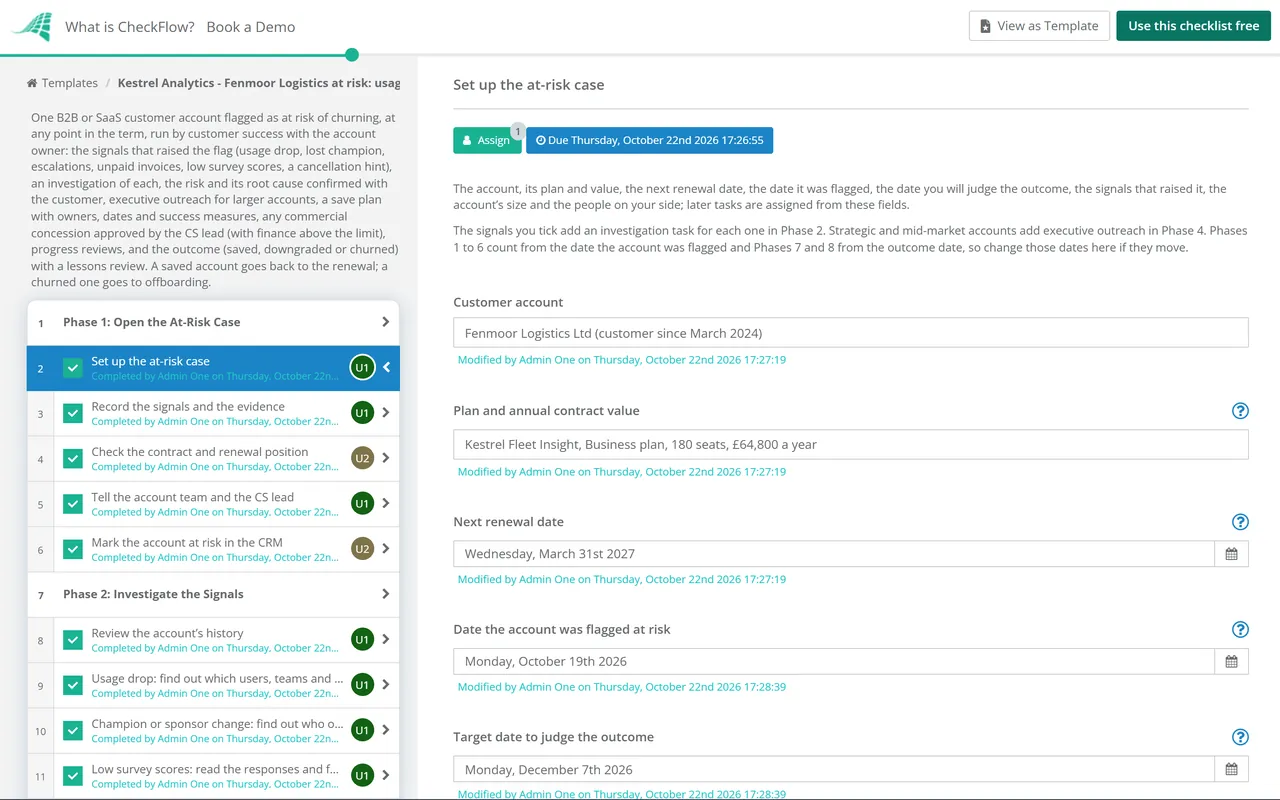
    • Set up the at-risk case — the account, its plan and value, the next renewal date, the date it was flagged, the date you will judge the outcome, the signals that raised it, the account’s size and the people on your side; later tasks are assigned from these fields
    • Record the signals and the evidence — each warning sign, where it was seen, since when and the evidence, such as a usage report, a ticket, an invoice or a survey comment
    • Check the contract and renewal position — the term, the renewal date, the notice period and the last date the customer can give notice, what they pay, any discount and when it ends, and any open commercial question
    • Tell the account team and the CS lead — the account owner, support and finance told that the account is at risk and why, so nobody contacts the customer with a different message, and the CS lead briefed
    • Mark the account at risk in the CRM — the risk flag, the reason and the date in the CRM, and the renewal forecast updated if the renewal is now in doubt
  2. Phase 2

    Phase 2: Investigate the Signals

    9 tasks

    Find out what lies behind each signal before you speak to the customer. Each signal ticked on the first task adds its own task here, assigned to the person who can see the facts.

    • Review the account’s history — the health score over the last two or three quarters, the goals in the success plan or the last QBR and how the customer did against them, and recent calls, emails and meetings
    • Usage drop: find out which users, teams and features stopped — active users against licences, the teams and features where use fell, when it started and whether work has moved to another tool or process
    • Champion or sponsor change: find out who owns the decision now — who has left or changed role, who has taken over the budget and the day-to-day use, and whether the new people know what the product does for them
    • Escalations: review the open escalations with support — every open escalation and repeated ticket, its status, what has been promised and by when, and whether the customer believes it will be fixed
    • Unpaid invoices: check the overdue and disputed invoices with finance — which invoices are overdue or disputed, the reason given, whether it is a process problem such as a missing purchase order or a sign the customer is leaving, and any reminders or holds already in place
    • Low survey scores: read the responses and follow them up — who gave the low scores, their comments, and a personal reply to each person that thanks them and asks what would make it better
    • Cancellation hint: check the notice terms and how the hint was given — who said what and when, whether formal notice has been given or only asked about, the last date notice can be given and what the contract requires for it
    • Map the people on the customer’s side — the sponsor who owns the budget, the champion, the main users, procurement and anyone new, with their view of you and when you last spoke
    • Write up the internal view of the risk — what the signals add up to, the likely causes, what you do not know yet and the questions to ask the customer
  3. Phase 3

    Phase 3: Confirm the Risk & Root Cause

    6 tasks

    Ask the customer before you decide anything. The signals show that something is wrong; only the customer can tell you why. An account that turns out not to be at risk adds a task to close the case.

    • Book a conversation with the champion or sponsor — a call or meeting with the person who owns the decision, framed as a review of how things are going rather than a sales call
    • Prepare for the conversation — what you have seen and will share openly, the questions to ask, who joins from your side and what you will not promise on the call
    • Hold the risk conversation — the customer’s view of what has changed, what is not working, what success looks like for them now and what would make them stay
    • Confirm the root cause — the main cause and any others, each with the evidence from the signals and the conversation
    • Decide whether the risk is confirmed — confirmed at risk, with how likely the customer is to leave or cut back, or not at risk after all; not at risk adds a task to close the case
    • Not at risk: record why and close the case — what explained the signals, the CRM risk flag removed, anything to watch at the next QBR, and the rest of this checklist marked not applicable; if the answer was wrong, change it and this task disappears
  4. Phase 4 — Larger accounts

    Phase 4: Executive Outreach (Larger Accounts)

    3 tasks

    Applies to strategic and mid-market accounts, chosen on the first task. An executive on your side speaks to the customer’s sponsor before the save plan is final, so the plan has support at the level that decides.

    • Brief your executive — the account, the signals, the root cause, what the customer said, what you want from the call and what the executive should not offer
    • Hold the executive call with the customer’s sponsor — your executive acknowledges the problem, listens to the sponsor’s priorities and commits to the steps you can deliver
    • Record what the executives agreed — every commitment made on both sides, with owners and dates, ready to go into the save plan
  5. Phase 5

    Phase 5: Save Plan & Approval

    6 tasks

    Build the plan around the root cause, not around a discount. The CS lead approves the plan and any concession before it goes to the customer; nothing after the approval can be completed until it is given. A concession above the limit adds a finance review first.

    • Write the save plan — one or more actions for each cause, with an owner and a date, and the help you will give, such as training, a fresh onboarding for new users, a fix or workaround, or a named contact in support
    • Agree how you will know the plan has worked — two to four measures the customer would recognise, where they are now and the target by the outcome date, such as active users, a named new champion, escalations closed or invoices paid
    • Choose the commercial options, if any — whether the plan needs a commercial concession, such as a discount, extra services, extended payment terms or a move to a smaller plan, and whether it is within the account owner’s limit
    • Above the limit: finance reviews the concession — the cost of the concession over the term, how long it lasts, any conditions such as a longer term or a case study, and whether finance supports it
    • CS lead approves the save plan and any concession — the CS lead approves the actions, owners, dates and success measures, and any concession within what finance supports; nothing goes to the customer until it is approved
    • Agree the save plan with the customer — the plan shared with the sponsor and champion, the actions on their side agreed, the success measures confirmed and the dates you will check in
  6. Phase 6

    Phase 6: Run & Track the Save Plan

    7 tasks

    Work the plan and check it every week or two. Review progress with the CS lead and with the customer, and escalate any action that is blocked rather than letting it slip past the outcome date.

    • Start the actions in the plan — every action owner told what they own and by when, training and sessions booked, and fixes raised with product or support
    • Chase the actions owned by support and product — fixes, workarounds and answers the customer is waiting on, with a date for each and an update the CSM can pass on
    • Hold the first progress review — each action done, on track or late, the success measures so far, and any change to the plan
    • Check in with the customer — a call with the champion on how it feels from their side, whether the actions are making a difference and anything new
    • Escalate any blocked actions to the CS lead — actions that are late or stuck, what is blocking them and what you need, such as a decision, a resource or an executive call
    • Hold the second progress review — the actions and measures again, whether the account is on course to be saved by the outcome date, and whether the outcome date should move
    • Update the health score and the CRM — the latest signals, the health score and the risk notes in the CRM, ready for the outcome decision
  7. Phase 7

    Phase 7: Record the Outcome

    8 tasks

    On the outcome date, judge the plan against the measures and record one of three outcomes: saved, downgraded or churned. Each adds its own next steps. A saved account feeds the renewal; a customer who is leaving goes to offboarding.

    • Review the result against the success measures — each measure against its target, the actions completed, and what the customer has said about staying
    • Record the outcome — saved, downgraded or churned, with the date the customer confirmed it; each outcome adds its own tasks
    • Saved: hand the account back to the renewal — the risk, the cause and what fixed it added to the success plan and the renewal record, the renewal checklist started if the renewal is within 120 days, and the next QBR booked
    • Downgraded: process the change to the order — the signed amendment or order form, the new products, seats and price in billing from the agreed date, and licences reduced in the product
    • Downgraded: agree the plan for the smaller account — goals for the smaller account, the users and teams who still use the product, and what would show it is time to grow again
    • Churned: confirm the cancellation in writing — the notice received and its date, whether it meets the contract, the date the service ends, and the CRM and forecast updated
    • Churned: hand the account to offboarding — start the customer offboarding and cancellation checklist with the end date, data export, final invoice and access removal, and leave the door open with the sponsor
    • Close the risk flag in the CRM — the outcome, the value kept or lost, and the risk flag closed or, for a churned account, the account marked as leaving
  8. Phase 8

    Phase 8: Lessons Review & Close

    5 tasks

    Review every case, saved or not. The point is to see the next at-risk account sooner and to fix the causes that repeat across accounts.

    • Record the reason for the outcome — the main reason the customer stayed, cut back or left, whether the loss could have been prevented, and what made the difference
    • Hold the lessons review with the CS lead — which signal came first and how early, how long each step took, what worked, what did not and what to do sooner next time
    • Update the at-risk playbook and the health score signals — changes to the warning signs you watch, the health score, the save plan actions and the limits for concessions
    • Share product and service feedback — product gaps, service problems and pricing feedback from the case passed to the teams who own them
    • Close the case — every task complete or marked not applicable, and the case closed with the outcome and the reason recorded

Churn Warning Signs and What to Do First

The usual warning signs, where to find them, what to ask the customer and the first step to take. The first six match the choices on the checklist’s first task, and each one ticked adds its own investigation task. A signal is a reason to ask, not proof: the cause is confirmed with the customer in Phase 3.

Signal Where to look What it can mean Ask the customer First step
Product usage has droppedProduct admin reports, logins and activityPeople stopped getting value, or the work moved to another toolWhat changed in how your team works?Find which users, teams and features stopped, and talk to them
Champion or sponsor has leftBounced emails, user lists, the customer’s announcementsNobody on their side argues for youWho owns this now, and what do they need?Meet the new owner early; for larger accounts, arrange executive outreach
Support escalations or repeated ticketsThe help deskFrustration with the product or the serviceIs it fixed, and do you believe it will stay fixed?Agree a fix, a date and one named contact with support
Unpaid or disputed invoicesBillingA process problem, a budget problem or a quiet exitIs anything stopping payment on your side?Check the purchase order, billing contact and any dispute with finance
Low survey scores or negative feedbackSurvey results and commentsExpectations not metWhat would make it better?Reply personally to each low score
A hint at cancelling or a question about noticeEmails, calls, procurementA decision may already be formingWhat would you need to see to stay?Check the notice terms and raise it openly
Merger, reorganisation, budget freeze or a competitorThe customer’s news, the champion, procurementThe decision may move to new people or a new toolWho will decide, and when?Map the decision-makers again

Saved, downgraded or churned. A saved account stays on its current plan and goes back to the renewal with the risk and its fix written down. A downgraded account stays on a smaller plan: it keeps the customer, and is often a better result than a full renewal they resent or a cancellation. A churned account leaves, and goes to offboarding with the end date, the data export and the final invoice. Record the reason in every case, so the lessons review can compare like with like.

Fix the cause before you offer a discount. A concession can buy time while the plan works, but a lower price does not bring back a lost champion or fix a product gap. In this template a concession is a choice in the save plan, the account owner’s limit decides whether finance reviews it, and the CS lead approves the plan and any concession together before the customer sees them.

Why Run At-Risk Accounts in CheckFlow?

1

Every signal gets an owner

Tick the signals on the first task and each one adds its own investigation task, assigned to the person who can see the facts: support for escalations, finance for unpaid invoices, the CSM for usage and survey scores. Due dates count in business days from the day the account was flagged and, for the last phases, from the date set to judge the outcome, so the case starts moving the same day.

2

No concession without approval

The CS lead’s approval of the save plan halts the checklist: the plan cannot go to the customer, and the outcome cannot be recorded, until the actions, measures and any concession are approved. A concession above the limit adds a finance review first. See how approvals that halt a checklist work.

3

Every at-risk account in one view

The Reports Grid shows each at-risk account and how far its case has got, and the Tasks Grid shows each CSM, account owner and support lead what is due this week. The signals, the people map, the save plan and the outcome sit on the tasks they belong to. See analytics and reporting.

CheckFlow does not detect churn signals, calculate health scores or predict which customers will leave. Your product data, help desk, billing system and CRM do that. CheckFlow runs the steps for every at-risk account in the same order, with an owner and a date for each and a record of who did what and when.

This template runs one at-risk account. Decide how at-risk accounts are found and handled across the book with the Customer Success Strategy Checklist, review each account’s goals every quarter with the Quarterly Business Review (QBR) Checklist, and run the renewal of a saved account with the Customer Renewal Checklist. A customer who leaves can be closed with the Customer Offboarding & Cancellation Checklist, and many risks are easier to prevent when the goals were written down at the sales to customer success handoff.

AI generator

Didn’t find what you need? Describe it.

Describe the process in a sentence and the AI checklist generator drafts the phases and tasks for you.

Frequently Asked Questions

What is a churn prevention checklist?

It is the set of steps a customer success team follows when an account is flagged as at risk of leaving. A typical process records the warning signs, investigates each one, confirms the root cause with the customer, agrees a save plan with owners, dates and success measures, gets any concession approved, tracks the plan and records the outcome. This template runs those steps for one B2B or SaaS account, from the day it is flagged to the lessons review.

What are the early warning signs that a customer will churn?

The common ones are falling product usage, a champion or sponsor who leaves or changes role, support escalations or repeated tickets, unpaid or disputed invoices, low survey scores, and a question about notice or cancellation. A merger, a reorganisation, a budget freeze or a competitor evaluation can also move the decision to new people. One signal is a reason to ask; several together usually mean the account needs a case of its own.

How do you find the root cause of churn risk?

Investigate each signal first, so you know the facts: which users stopped, which tickets are open, why an invoice is unpaid. Then ask the customer. A conversation with the sponsor or champion about what has changed and what success looks like for them now usually tells you more than the data. Record the main cause and the evidence before you write the save plan, because the plan should fix the cause rather than the symptom.

What should a customer save plan include?

One or more actions for each cause, each with an owner and a date; the help you will give, such as training, a fresh onboarding for new users or a fix from support; two to four success measures the customer would recognise, with a target by the outcome date; any commercial concession and who approved it; and the dates you will review progress with your CS lead and with the customer. Agree the plan with the customer, not just internally.

When should executives get involved in saving an account?

When the account is large enough that losing it matters to the business, or when the customer’s sponsor is senior and the CSM cannot get time with them. An executive on your side can acknowledge the problem and commit resources in a way a CSM cannot. Brief them first on the signals, the cause and what not to offer. In this template, strategic and mid-market accounts add those steps; change the tiers to match your own.

Should you offer a discount to save a customer?

Only as part of a plan that fixes the cause. A discount can buy time while adoption recovers or a fix ships, but on its own it rarely keeps a customer who is not getting value, and it lowers the value of the account for every later renewal. Set a limit the account owner can offer, have finance review anything above it, and have the CS lead approve the plan and the concession together.

What happens if the customer still leaves?

Confirm the cancellation in writing, check the notice against the contract, update the CRM and the forecast, and hand the account to offboarding for the data export, the final invoice and access removal. Leave the door open with the sponsor. Then record the main reason, whether the loss could have been prevented and what you would do sooner next time, and change the playbook or the health score signals if the same cause keeps coming up.

How is this different from the customer renewal checklist?

The Customer Renewal Checklist runs one renewal from 120 days before the renewal date, and adds a short save plan when that renewal is rated at risk. This checklist starts whenever an account is flagged at risk, at any point in the term, and goes deeper: an investigation of each signal, the root cause confirmed with the customer, executive outreach, an approved save plan and progress reviews. A saved account then goes back to the renewal.

Is CheckFlow free for this template?

14-day free trial, no card required. The Business plan is $10 per user per month after the trial. Full details at checkflow.io/pricing.

Act on Every At-Risk Account the Day It Is Flagged

Free trial — no credit card required.

14-day free trial, no credit cardFull refund in your first 30 daysUS hosting, EU on request