Domain tasks only when needed
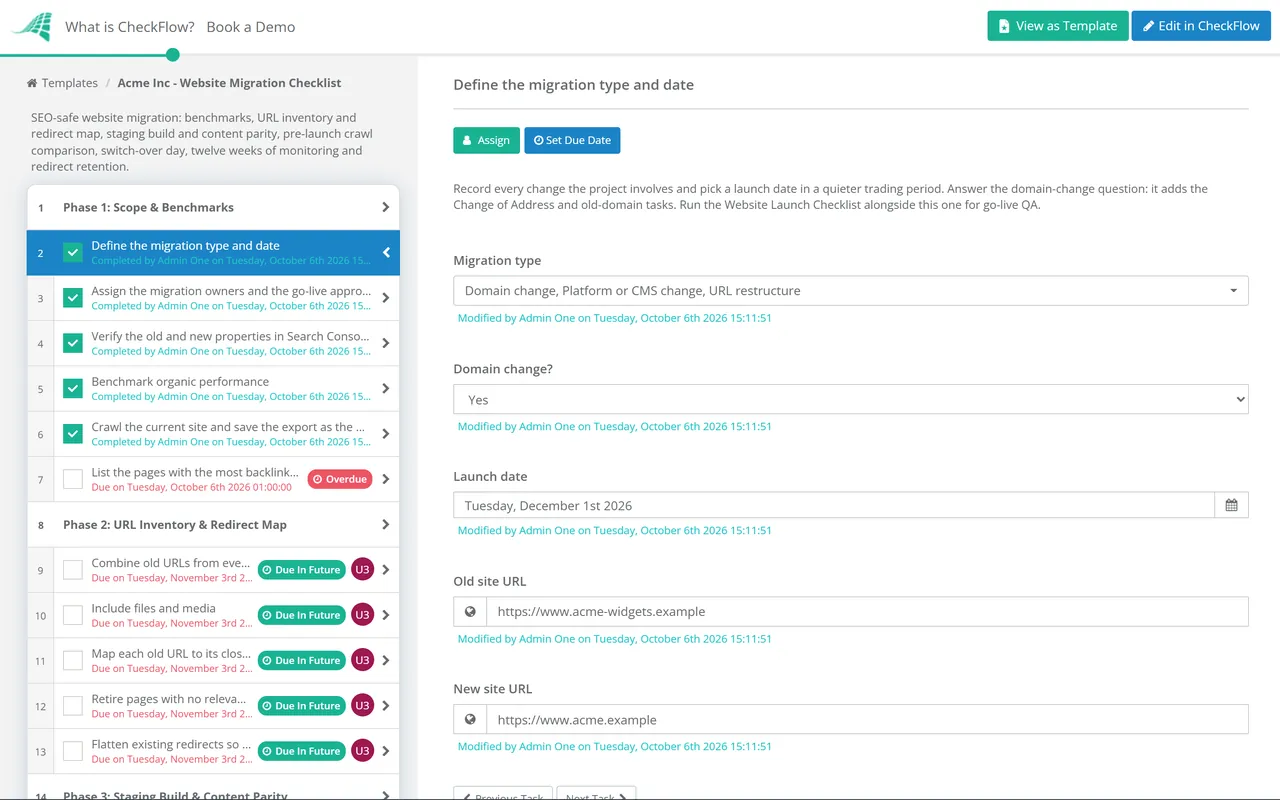
The domain-change question in Phase 1 uses conditional logic. A platform rebuild on the same domain never sees the Change of Address or old-domain tasks; a rebrand to a new domain gets both, assigned and dated.
Last reviewed: October 2026
No Credit Card Required
Printed from checkflow.io/templates/marketing/website-migration-checklist
This free website migration checklist protects organic traffic when a site changes domain, platform, URL structure or protocol. It starts with benchmarks and a complete URL inventory, builds a one-to-one redirect map, checks the new build for parity on staging, compares crawls before launch, and then tracks indexing, rankings and conversions for twelve weeks against the baseline. It is run by an SEO lead with the developer, in-house or at an agency handling the move for a client. If you are planning the work for next quarter, start with an SEO audit of the current site so the migration does not carry old problems across.
The URL list is the real work. Search engines rank individual addresses, each with its own links, history and queries. When an address changes, the signals it built up only follow if a permanent redirect tells Google where the page went. Google’s site-move guidance asks for server-side permanent redirects, 301 or 308, from each old URL to its new equivalent. A migration that redirects the top 50 pages and forgets the 2,000 long-tail articles behind them can look fine for a week and then bleed traffic for a year.
No single source has every URL. The CMS knows the pages it publishes, but not the PDFs uploaded in 2019, the old campaign pages, or the addresses other sites link to with a typo. Google suggests building the list from your sitemaps, server logs, the Links report in Search Console and the CMS itself, including images, videos and other files. Analytics adds the landing pages that actually bring visits. Combine them, remove duplicates, and the result is usually much longer than anyone expected.
Expect a dip, plan for it and measure it. Google says rankings may fluctuate while it recrawls and reindexes, and that for a medium-sized site it can take a few weeks or more for new URLs to replace old ones in results. Time the move for a quieter trading period, move a small or medium site in one go, and consider sections only for a large site. The benchmark from Phase 1 is what turns “traffic looks lower” into a specific list of pages to investigate.
Who owns it. The SEO lead owns the inventory, the redirect map and the monitoring. The developer owns the build, the redirect rules and the release. A marketing or client-side approver signs off before go-live. The rest of go-live, from forms and tracking to accessibility and the cookie banner, belongs in the Website Launch Checklist, which should run alongside this one.
| Migration type | Do URLs change? | Change of Address tool? | Main risk |
|---|---|---|---|
| Domain change | Every URL | Yes, for every subdomain variant, including www and non-www | Losing the link equity of the old domain |
| Platform or CMS change | Often: slugs, trailing slashes, categories, pagination | No | Templates dropping titles, canonicals and structured data |
| URL restructure | Yes, by pattern | No | Pattern rules that miss edge cases or create chains |
| HTTP to HTTPS | Protocol only | No | Mixed content and redirect loops |
| Hosting move only | No | No | Downtime during DNS propagation |
Many projects combine several rows: a rebrand that moves to a new domain on a new CMS with a new URL scheme is the riskiest case, because every signal changes at once. Where you have a choice, separate the changes. A hosting move with no URL changes is the gentlest: Google suggests lowering the DNS time to live at least a week beforehand, keeping the old servers running while the change propagates, and switching them off only when their traffic has fallen to zero.
Seven phases from benchmark to close-out. The domain-change question in Phase 1 adds the Change of Address and old-domain tasks.
The Change of Address task appears only when the domain is changing.
Due dates fall one, two, four and twelve weeks after the launch date.
Most redirect maps are a spreadsheet with one row per old URL. Pattern rules save time on large sites, but every rule still needs a sample of real URLs tested against it. These rows show the cases that come up on almost every project.
| Old URL | New URL | Response | Why |
|---|---|---|---|
| /services/web-design.html | /services/web-design/ | 301 | Same page, new URL pattern: a straight one-to-one mapping |
| /blog/2021/05/launch-tips | /blog/launch-tips/ | 301 | A pattern rule removes the date folders; test a sample from each year |
| /products/blue-widget (discontinued) | /products/widgets/ | 301 | Closest page that meets the same need, not a generic page |
| /summer-offer-2022 | None | 410 | No relevant replacement; mass redirects to the home page may be treated as soft 404s |
| /about-us (already redirects to /about) | /company/ | 301 | Flatten the chain: the old URL points straight at the final page |
| http://www.old-domain.com/contact | https://www.new-domain.com/contact/ | 301 | Protocol, hostname and path change in one hop, not three |
| /downloads/price-list.pdf | /files/price-list.pdf | 301 | Files earn links and rankings too, so they need mapping as well |
Useful columns besides the two URLs: where the old URL was found, its organic clicks over the last 12 months, its referring domains, the person who mapped it and the tested result after launch. Sort by clicks and referring domains so the pages that matter most are checked by a human, not just a rule. Google recommends keeping chains as short as possible, ideally three redirects or fewer, and testing individual URLs with URL Inspection or in bulk with a script or crawler in list mode.
Freeze the map a few days before launch and treat later changes as exceptions with a named owner, because a page added to the old site after the inventory was taken is the one most likely to be missed. After go-live, run the full old-URL list through the crawler again on the live site, not just staging, and file every result that is not a single hop to a 200 page as a fix in Phase 6.
The domain-change question in Phase 1 uses conditional logic. A platform rebuild on the same domain never sees the Change of Address or old-domain tasks; a rebrand to a new domain gets both, assigned and dated.
The go/no-go task goes to the sign-off owner chosen at the start, and it sits after the crawl comparison and redirect tests. Not approved halts the checklist, so launch-day tasks cannot be ticked early. See how approvals work.
The week 1, 2, 4 and 12 checks have due dates set from the launch date, so the twelve-week review lands in someone’s task list instead of being forgotten once the project team moves on.
Agencies migrating several client sites can run one checklist per client from this template, give the client contact the approval task, and keep the benchmark, redirect map and monitoring notes on that client’s record. See how CheckFlow supports client work.
Infrastructure moves deserve the same discipline. Pair this checklist with the IT Change Management Checklist for the release and rollback, and the Backup Verification Checklist to prove the old site can be restored before it is switched off.
Describe the process in a sentence and the AI checklist generator drafts the phases and tasks for you.
Google says that for a medium-sized site it can take a few weeks or more before the new URLs consistently replace the old ones in results, and longer for large sites. Some ranking movement during that period is normal. That is why the checklist reviews performance at one, two, four and twelve weeks: a page that is still well below its benchmark at week four needs investigating, not waiting.
Google’s advice is to keep them for as long as possible, and generally for at least a year, so that ranking signals pass to the new URLs. In practice, keep any redirect that still receives visits or has external links pointing at it. For a domain change, Google also recommends keeping the old domain registered for at least a year so it cannot be bought and reused by someone else.
Use permanent redirects: 301 or 308, set on the server. Google treats a permanent redirect as a signal that the target should become the canonical URL; with a temporary 302 or 307 it follows the redirect but does not use it as that signal. Avoid JavaScript or meta refresh redirects where a server redirect is possible, and make sure each old URL reaches its final destination in one step rather than through a chain.
Only when you move to a different domain or subdomain, for example from example.co.uk to example.com. It is not needed for HTTP to HTTPS, a switch between www and non-www on the same domain, or a change of paths. You must own both properties in Search Console and have the old home page redirecting to the new one. Submit it for every subdomain variant of the old domain.
For small and medium sites Google recommends moving all URLs at the same time. Large sites can move one section at a time, which limits the impact of a mistake and lets the team learn from the first section before the next. If you phase it, each section needs its own redirect map, benchmark and monitoring dates, so start one checklist per section.
Export at least twelve months of organic clicks and impressions by page and by query from Search Console, organic sessions and conversions by landing page from analytics, a full crawl of the current site, and the list of pages with the most referring domains. Save the exports with the date, because after launch the old property’s data stops growing. Twelve months matters for seasonal businesses: comparing a December launch with a busy October is not a fair test, so compare each week with the same week last year as well as with the weeks just before the move.
14-day free trial, no card required. The Business plan is $10 per user per month after the trial. Full details at checkflow.io/pricing.
14-day free trial, no credit cardFull refund in your first 30 daysUS hosting, EU on request