
Agency Transition Checklist Template

Taking over a client from another agency? List every account and who owns it, get admin access, keep the campaigns running, sign off the transfer list with the old agency and remove its access only once the client owns everything.

Last reviewed: November 2026

Printed from checkflow.io/templates/professional-services/agency-transition-checklist

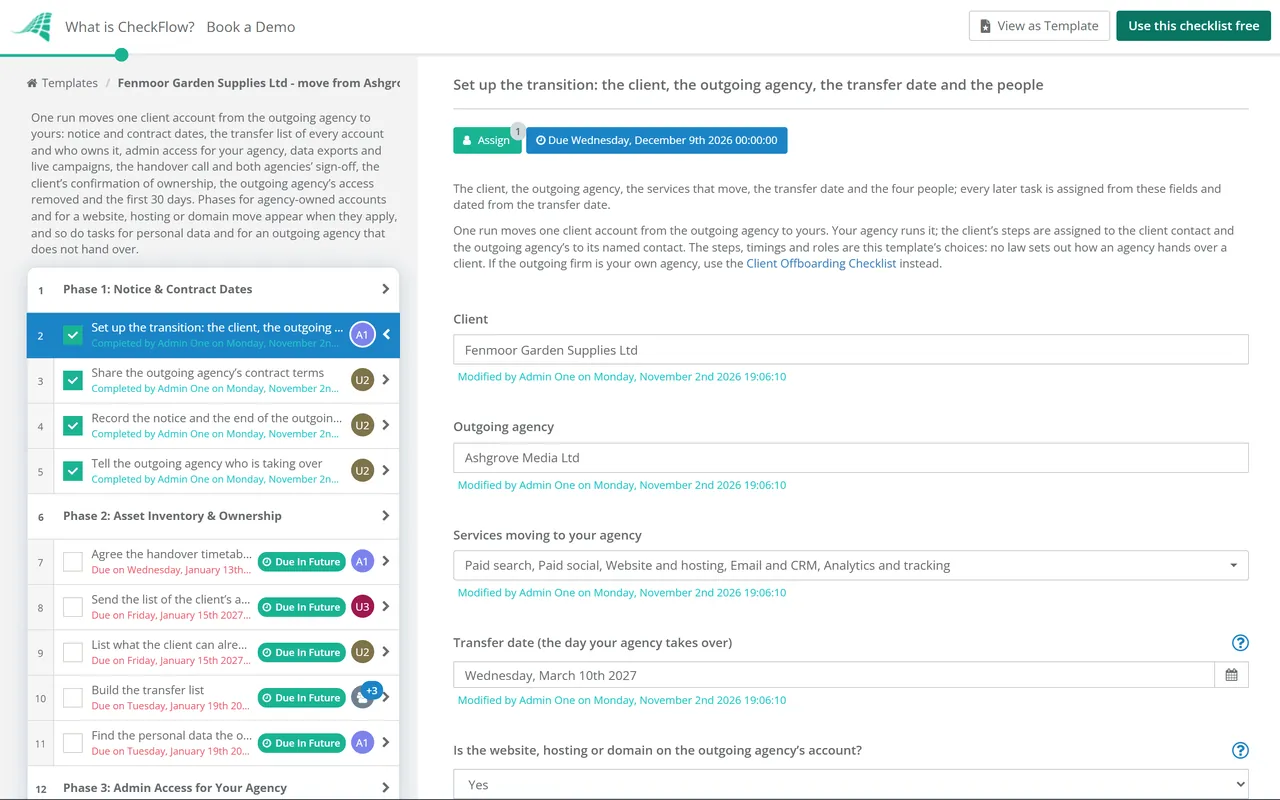
This free agency transition checklist is for marketing, advertising and digital agencies taking over a client from another agency. One run moves one client account, planned around the transfer date. It reads the notice and contract terms, builds a transfer list of every account and asset with who owns it, gets your agency admin access from the client’s own accounts, and moves anything the old agency owns: ad accounts, an Analytics property, a Tag Manager container, Meta assets and, where it applies, the website, hosting and domain. The reports, files and any personal data come across on the client’s instructions, and every running campaign keeps running through the switch. After a handover call, both agencies sign off the transfer list, the client confirms everything is in its ownership, and only then is the rest of the old agency’s access removed. The first 30 days follow a plan agreed before the transfer date.

One Client Account Between Two Agencies

An agency transition is the handover of one client between two agencies. This checklist is written for the incoming agency, which runs it: the client’s steps go to the client contact and the outgoing agency’s to its named contact, so all three work from one list. It ends with the 30-day review, after the old agency has no access left.

The outgoing firm’s own exit (finishing work, its final invoice, its records) is the Client Offboarding Checklist, and it links here for the handover. A new client with no agency before you is the Marketing Agency Client Onboarding Checklist, and the client onboarding guide for marketing agencies covers that start in more depth.

This checklist

One client moving between two agencies

Covers: notice and contract dates, the transfer list, admin access for your agency, agency-owned accounts, a website or domain move, data exports, live campaigns, the handover call, both agencies’ sign-off, the client’s confirmation, removing the old agency’s access and the first 30 days.

Run by: the incoming agency, with tasks for the client and the outgoing agency.

Output: every account in the client’s ownership, the old agency out, and a first-month plan.
Outgoing firm

Client Offboarding

Covers: the firm that is leaving: confirming the exit, finishing the work, handing back client-owned assets, removing its access, settling data and the final invoice.

Use it: when the client is leaving your own agency. Client Offboarding Checklist.

No incumbent

Marketing Agency Client Onboarding

Covers: a new client starting from scratch: intake, the kickoff meeting, collecting access, strategy and the first deliverable.

Use it: when there is no previous agency to hand over. Marketing Agency Client Onboarding Checklist.

What the Agency Transition Checklist Covers

Nine phases take one client account from the notice to the end of your first month. The first task records the transfer date, which sets every due date, the four people and two answers: whether the website, hosting or domain is on the outgoing agency’s account, which adds a phase to move it, and whether personal data moves between the agencies, which adds the client’s instructions, a processing contract, the move and the return or deletion. The transfer list in Phase 2 asks two more: whether the outgoing agency owns any of the accounts, which adds a phase to move them, and whether it is handing over as agreed. The client’s confirmation that every asset is in its ownership is the gate: on the transfer date the client lowers the old agency’s access to accounts it already owns, and the rest is removed only once the answer is Confirmed.

  1. Phase 1

    Phase 1: Notice & Contract Dates

    4 tasks

    Your account lead starts the run once the client has chosen your agency. The transfer date on the first task sets every due date: this phase falls about thirteen weeks before it, so a long notice period can still be read and served in time, and the handover itself starts eight weeks out. These timings are this template’s choice.

    • Set up the transition: the client, the outgoing agency, the transfer date and the people — the client, the outgoing agency, the services that move, the transfer date and the four people; every later task is assigned from these fields and dated from the transfer date
    • Share the outgoing agency’s contract terms — the notice period and how notice must be given, any minimum term, the handover clauses, who owns the accounts, data, creative and code, and any fee or asset the outgoing agency says it keeps
    • Record the notice and the end of the outgoing contract — the date notice was served and how, the date the outgoing contract ends, and the transfer date on the first task checked against it; if notice has not been served, the client serves it now in the form the contract asks for
    • Tell the outgoing agency who is taking over — the client tells the outgoing agency in writing that your agency takes over on the transfer date, names its contact for the handover and authorises it to share the account details with your agency
  2. Phase 2

    Phase 2: Asset Inventory & Ownership

    7 tasks

    Before anyone is given or loses access, list every account and file the client’s marketing depends on, and who owns each one. The transfer list built here is what both agencies sign off and the client confirms in Phase 7.

    • Agree the handover timetable with the outgoing agency — a call with the outgoing agency’s contact to agree the dates in this checklist, what it will send and when, and that it keeps the account running unchanged until the transfer date
    • Send the list of the client’s accounts and assets — every ad account, analytics property, tag manager container, Search Console property, social page, domain, hosting account, email or CRM account, file store and tool used for the client, with who owns it, who pays for it and who has admin access
    • List what the client can already see — the client contact signs in to each account in their own name and lists the ones where they are an administrator, the ones where they have less, and the ones they cannot find
    • Build the transfer list — one line per account or asset from both lists, with the platform, who owns it today, whether the client has admin access and the date it moves; anything only one list shows is checked with both sides; the client contact and the outgoing agency’s contact are assigned too, so they can open the list and add to it
    • Find the personal data the outgoing agency holds — email lists, CRM records, form leads, customer lists uploaded for audiences and any exports, where each one is kept and whether it moves, stays with the client’s own systems or is deleted
    • Ask for the handover formally under the contract — the client writes to the outgoing agency citing the contract’s handover and ownership clauses, lists what is missing from the transfer list and gives a date
    • Recover access through each platform’s own route — the client uses the routes each platform gives an account’s owner, and lists what cannot be recovered so your agency can rebuild it
  3. Phase 3

    Phase 3: Admin Access for Your Agency

    8 tasks

    The client gives your agency access from the client’s own accounts, at the level each job needs, while the outgoing agency still has its access. Where the outgoing agency owns an account, it gives your agency access at the client’s written request, and Phase 4 then moves the account to the client. Nobody shares a password: every person signs in with their own account.

    • Give your agency access to Google Ads — the client accepts a link request from your agency’s manager account or invites your users, at the access level each person needs, and keeps at least one administrator of its own
    • Give your agency access to Google Analytics — the client adds your people to the property (or the account) with the role each needs; adding users needs the Administrator role
    • Give your agency access to Google Tag Manager — the client adds your people to the container with Read, Edit, Approve or Publish rights as each job needs, and keeps the account’s administrators inside its own organisation
    • Give your agency access to Search Console — an owner of the property adds your people as full users, or as owners where they need to manage users, and the client checks it has a verified owner of its own
    • Share the Meta assets with your agency’s business portfolio — someone with full control of the client’s business portfolio shares its Pages and ad accounts with your portfolio as a partner, with full control or partial access for the tasks you do
    • Give access to the other social and ad accounts — every other platform on the transfer list (for example LinkedIn, TikTok, Pinterest or Microsoft Advertising) shared through that platform’s own admin or partner route, each in the client’s ownership
    • Give access to the domain, DNS and hosting — your technical lead added as a named user at the domain registrar, the DNS host and the website host, or the access agreed for this job, with no shared logins
    • Test every access your agency was given — each account opened by the person who will work in it, the access level checked against the job, and anything missing sent back to the client the same day
  4. Phase 4

    Phase 4: Agency-Owned Accounts

    6 tasks

    Applies only when the outgoing agency owns some of the client’s accounts (answered on the transfer list). Each one moves to the client’s side, or is replaced, before the outgoing agency loses access, and the billing moves first.

    • Agree how each agency-owned account moves — for each account the outgoing agency owns, the route agreed in writing (moved into the client’s ownership, or replaced by a new account in the client’s name; shared with the client for now only as a stopgap, which gives access, not ownership), who does it and the date
    • Move the billing off the outgoing agency — every ad account the outgoing agency pays for, or invoices through its own manager account, moved to the client’s payment method or a billing setup under a manager account that stays linked
    • Hand Google Ads ownership to the client’s side — for an account the outgoing agency’s manager account owns, the client contact made an administrator of the account first, then ownership transferred to your manager account or turned off
    • Move the Analytics property into the client’s account — a property in the outgoing agency’s Analytics account moved to an account the client owns, with the permissions option chosen, and the links and data streams checked afterwards
    • Move the Tag Manager container to the client — for a container in the outgoing agency’s Tag Manager account, either, where that account holds only this client’s containers, the client’s people made administrators of it before the agency removes itself, or the container exported and imported into a container in the client’s own account and published on the site in place of the old one
    • Move the agency-owned Meta assets into the client’s ownership — any Page, ad account or other asset that the outgoing agency’s business portfolio owns, moved into the client’s portfolio where Meta allows it or replaced by a new asset in the client’s name; a share with the client’s portfolio gives access, not ownership, so any asset that can only be shared is recorded on the transfer list as not yet moved
  5. Phase 5

    Phase 5: Website, Hosting & Domain

    4 tasks

    Applies only when the website, hosting or domain is on the outgoing agency’s account (answered on the first task). The domain moves into the client’s own name and the site moves without breaking email or the client’s own Search Console verification.

    • Plan the website and domain move — where the site, the domain and the DNS will live, every DNS record copied (including email and verification records), the order of the steps and a date with low traffic
    • Hand over the website files, database and logins — a full copy of the site files and database, the theme or code repository, plugin and licence details and the admin logins for the client’s own users
    • Move the domain into the client’s own registrar account — the domain transferred or pushed to a registrar account in the client’s name, the renewal date and the contact details checked, and every DNS record still in place
    • Move the site and check it — the site running on the new host, forms, checkout and tracking tested, email still delivered, and the client’s own Search Console verification still in place
  6. Phase 6

    Phase 6: Data Exports & Live Campaigns

    8 tasks

    The reports, files and history the client paid for come across, and every campaign that is running keeps running through the switch. Personal data moves only on the client’s instructions.

    • Send the reports, creative and source files — past monthly reports, performance exports, audit notes, the creative and copy, source design files and anything else the contract says the client owns, sent by a secure link
    • Give the instructions for the personal data — the client decides which personal data moves to your agency, which stays in the client’s own systems and which the outgoing agency returns or deletes, and puts that in writing to both agencies
    • Put a processing contract in place with your agency — where your agency will process the personal data on the client’s behalf, a written contract between the client and your agency covering it, signed before any of it reaches you
    • Record how the tracking and accounts are set up — conversion actions and where each fires, tags and triggers, audiences and remarketing lists, naming rules, scripts and automated rules, and anything that relies on the outgoing agency’s own accounts
    • List every campaign that is running — each live campaign, flight or automated rule with its platform, budget, end date and anything booked for the weeks around the transfer date
    • Agree who runs each campaign until the transfer date — for each live campaign, whether the outgoing agency runs it unchanged to the transfer date or your agency takes it over earlier, and no new campaigns launched in the last week without both agencies agreeing
    • Move the personal data securely — the personal data the client named sent to your agency by a secure route, never by email attachment, with a record of what was sent and received
    • Check budgets and billing will not lapse at the switch — each ad account’s payment method, budgets and spending limits checked for the weeks either side of the transfer date, so no campaign stops because a card or invoice belonged to the outgoing agency
  7. Phase 7

    Phase 7: Handover, Sign-Off & Client Confirmation

    9 tasks

    Both agencies walk through the transfer list and sign it off, the transfer date passes with every campaign still running, and the client confirms every asset is in its ownership. That confirmation is the gate: on the transfer date the client lowers the outgoing agency’s access to accounts the client already owns, and the rest of its access is removed only once the answer is Confirmed.

    • Run the handover call with both agencies and the client — the transfer list, the running campaigns, tracking and conversions, what has been tried and learned, open issues and the dates ahead, walked through with a record sent to everyone afterwards
    • Write the first-30-days plan — what your agency will check, keep, change and report in the first 30 days, built from the handover call and agreed with the client contact
    • Sign off the transfer list for the outgoing agency — the outgoing agency confirms the transfer list is complete and that each item has moved or will move by the date shown
    • Sign off the transfer list for your agency — your account lead confirms every item on the transfer list has been received, tested or scheduled, and lists anything still open
    • Check every campaign is still running on the transfer date — each campaign serving, each conversion recording and the site’s tags firing on the transfer date, with the outgoing agency asked to make no further changes
    • Lower the outgoing agency’s access to accounts the client owns — on every account the client already owns and administers, the outgoing agency’s users removed or set to the least access the platform offers on the transfer date, and any shared password it knows changed today; it keeps admin access only where it still owns the account or is its only administrator, until the confirmation
    • Confirm the personal data is returned or deleted — the outgoing agency confirms in writing to the client that it has returned or deleted the personal data it processed for the client, as the client chose, with any copy the law requires it to keep named
    • Client confirms every asset is in its ownership — the client contact confirms that every account and asset on the transfer list is in the client’s ownership, with the client as administrator, before the outgoing agency’s remaining access is removed; nothing after this task can be completed until it is answered, and the Phase 8 tasks appear only when the answer is Confirmed
    • Move the outstanding items and confirm again — each item the client named moved or replaced, then the decision on the confirmation changed to Confirmed (or the task un-completed and completed again); the outgoing agency keeps its remaining access until then
  8. Phase 8

    Phase 8: Remove the Outgoing Agency’s Access

    6 tasks

    Its tasks appear only when the client’s answer in Phase 7 is Confirmed; if it is Not yet, finish the follow-up task there first. The client, as the owner, removes the outgoing agency’s remaining users and links from each account; your technical lead checks nothing was missed.

    • Remove the outgoing agency from Google Ads — the outgoing agency’s users removed and its manager account unlinked, after the billing and shared lists that depended on it were replaced; your manager account made the owner if the client wants that
    • Remove the outgoing agency from Analytics and Tag Manager — the outgoing agency’s users removed from the Analytics account and its properties (including any roles given for a property move) and from the Tag Manager account and containers, with the client’s own administrators kept
    • Remove the outgoing agency from Search Console and its tokens — the outgoing agency’s users and owners removed, and any verification token of a removed verified owner taken off the site or DNS
    • Remove the outgoing agency from Meta and the other social accounts — the outgoing agency removed as a partner from the client’s business portfolio, after checking on the transfer list that no asset the client relies on is only shared by the outgoing agency, and its people removed from every other social and ad account
    • Close the outgoing agency’s other logins — its users removed from the registrar, DNS, hosting, website, email and CRM tools, file stores and any other tool on the transfer list, and any password it ever knew changed
    • Check the outgoing agency can no longer get in — each account’s user list read against the transfer list, nothing left for the outgoing agency, and the date recorded for the client
  9. Phase 9

    Phase 9: First 30 Days

    4 tasks

    Your agency works to the plan written in Phase 7. The first month checks what was handed over before anything big changes, and ends with a review with the client.

    • Set the baseline from the handed-over history — the last three months of results before the transfer date, from the client’s own accounts, recorded as the baseline your first reports compare against
    • Audit the tracking and conversions — every conversion and tag checked against the set-up record, with anything that stopped at the switch fixed and logged
    • Send the first report — the first report from your agency, against the baseline, with what changed at the switch and what you are doing next
    • Hold the 30-day review with the client — the first-30-days plan reviewed with the client contact: what was done, what was found in the handover, and the plan for the next three months

Access and Ownership on Google and Meta

Who can move what, platform by platform

What each platform’s own help says about access and ownership when an account changes agency. The tasks in Phases 3, 4 and 8 follow it.

Platform Who gives and removes access When the outgoing agency owns it Google or Meta help page
Google AdsA user with admin access invites users and accepts or rejects manager account links. Google suggests adding a second administrator.A manager that creates an account owns it, and an account has only one owner. The owner manager can transfer ownership or remove all owners; the client can always unlink it. Unlinking a paying manager on monthly invoicing stops the ads, and shared remarketing lists stop populating.About ownership of client accounts; About unlinking accounts
Google AnalyticsA user with the Administrator role adds users; deleting a user is done at account level by an account Administrator.The property can be moved to the client’s account by someone with the Administrator and Editor roles on both accounts. The tag ID does not change.Add, edit, and delete users; Move a property
Google Tag ManagerAccount administrators manage users; containers take Read, Edit, Approve or Publish rights.Google says the account should be managed by someone in your organisation, not an external agency. Tag Manager does not let you remove every administrator, and an account or container with no administrator is deleted.Managing users and permissions
Search ConsoleOnly an owner adds or removes users. A property needs at least one verified owner.A removed owner’s verification token stays on the site until someone takes it off, and while it does they can re-verify. A new owner can verify with their own token and then remove the old ones.Managing owners, users, and permissions
Meta business portfolioSomeone with full control of the portfolio shares Pages and ad accounts with partners, and removes partners.Only the organisation that owns an asset can share it with another business portfolio, so the outgoing agency has to act.Give a partner access to business assets; Remove partners

Where this comes from. Read on 2 November 2026: Google’s About ownership of client accounts, About unlinking accounts from your manager account and Manage access to your Google Ads account; Add, edit, and delete Analytics users and user groups and [GA4] Move a property; Managing users and permissions for Tag Manager; Managing owners, users, and permissions for Search Console; and Meta’s Give a partner access to business assets in your business portfolio and Remove partners from your business portfolio. Platforms change these pages; read them again on the day you move an account. Domains, hosting and other social platforms each have their own rules, which this template does not state.

Personal data (UK). The ICO’s guidance on controllers and processors says the controller decides the purposes and means of processing and a processor acts on its behalf. Its guidance on what the contract must include says the contract between a controller and a processor must include the terms in Article 28(3) of the UK GDPR, including processing only on documented instructions and, at the end of the contract, deleting or returning the personal data at the controller’s choice. The ICO marks both pages as under review after the Data (Use and Access) Act. Outside the UK, check the local law. This is not legal advice.

Why Run Agency Transitions in CheckFlow?

1

No access removed before the client confirms

The client contact confirms that every asset on the transfer list is in the client’s ownership, and the checklist halts there: the tasks that remove the old agency’s remaining access cannot be completed until the client answers. A Not yet answer adds a task to move what is outstanding, and the removal tasks appear only once the answer is Confirmed. See how approval steps work.

2

Only the branches this client needs

Answers on the first task and the transfer list add a phase for accounts the old agency owns, a phase for a website, hosting or domain move, tasks for personal data and tasks for an agency that does not hand over. Everything else stays out of the way, through rules.

3

Your team, the client and the old agency on one list

Every task is assigned from four people on the first task and dated from the transfer date. The client’s and the outgoing agency’s contacts can join your team as Guests, which are free, to complete their own tasks, and both are assigned to the transfer list so they can check it. The Reports Grid lists every transition with its transfer date and progress, and Analytics shows where the handover waits.

CheckFlow does not sign in to ad platforms or move accounts for you, and it gives no legal advice: the client and the agencies do that in each platform. It makes sure every handover follows the same steps, with an owner and a due date for each, a record of what moved and when, and the client’s confirmation before anyone loses access.

Run your own agency’s exits with the Client Offboarding Checklist, new clients with no incumbent with the Marketing Agency Client Onboarding Checklist, the monthly report with the Agency Monthly Client Reporting Checklist and a site move with the Website Migration Checklist.

AI generator

Didn’t find what you need? Describe it.

Describe the process in a sentence and the AI checklist generator drafts the phases and tasks for you.

Frequently Asked Questions

What should an agency transition checklist include?

The notice and contract dates, a transfer list of every account and asset with who owns it today, admin access for the incoming agency from the client’s own accounts, a plan for any account the old agency owns, data and file exports, the campaigns that are running, a handover call, both agencies’ sign-off of the list, the client’s confirmation of ownership, the old agency’s access removed and a first-30-days plan. For an advertising agency transition, it also moves the billing and replaces shared audiences and conversion tracking.

Who owns the ad accounts when a client changes agency?

It depends on who created them and where. Google says a manager account that creates a Google Ads account becomes its owner, but the client account “still owns its data” and can remove the owner by unlinking. Meta says only the organisation that owns an asset can share it with another business portfolio. So the transfer list records who owns each account today, and this template adds a phase to move any the old agency owns.

How do you move a Google Ads account from one agency to another?

The client gives the new agency access, for example by accepting a link from its manager account. If the old agency’s manager account owns the account, it makes the client an administrator, then transfers ownership or turns it off. Before unlinking the old manager, move any monthly invoicing it pays for, because Google says the account stops serving otherwise, and replace shared remarketing lists and cross-account conversion tracking. Then the client removes the old agency’s users.

Can the old agency move a Google Analytics property to the new agency?

It can move a GA4 property into an account the client owns. Google’s guide to moving a property names hiring a new agency as a reason, and says the person who moves it needs the Administrator and Editor roles on both accounts, so the client gives the old agency’s contact those roles on the client’s account for the move and removes them afterwards. The tag ID does not change, so nothing needs retagging, and linked accounts such as Google Ads stay linked.

What happens to Search Console when an agency leaves?

The client removes the old agency’s users and owners in Settings, under Users and permissions. Google warns that a removed verified owner’s tokens are not deleted (in the site’s HTML, its DNS or a linked Analytics or Tag Manager account), and while one remains that person can verify again. So this template removes those tokens too, and checks the client has a verified owner of its own: if every verified owner is removed, the other users lose access after a grace period.

What if the old agency will not hand over the accounts?

The client writes to it under the contract’s handover and ownership clauses and follows any dispute clause. Meanwhile the client uses each platform’s own routes: in Google Ads a client account can always unlink an owner manager, and in Search Console a new owner can verify with their own token and remove the old ones. Whatever cannot be recovered is rebuilt in the client’s name. Answering No on the transfer list adds these tasks.

What happens to customer data held by the old agency?

In the UK, where the client decides why and how the data is used it is the controller, and the ICO says a processor’s contract must require it, at the end of the contract and at the controller’s choice, to delete or return the personal data. So the client gives both agencies written instructions on what moves, your agency signs a processing contract first, the data moves securely and the old agency confirms the return or deletion. Answering Yes on the first task adds those tasks.

How far ahead should an agency transition start?

This template starts thirteen weeks before the transfer date, so the notice period and contract terms are known in time, and starts the handover itself eight weeks out: the transfer list, access, any account moves, exports and the campaigns that are running. On the transfer date the client lowers the old agency’s access to accounts it already owns; the rest goes once the client confirms ownership, and the run ends with the 30-day review. These timings are the template’s choice.

Is CheckFlow free for this template?

14-day free trial, no card required. The Business plan is $10 per user per month after the trial. Full details at checkflow.io/pricing.

Take Over Every Client Without Losing an Account

Free trial — no credit card required.

14-day free trial, no credit cardFull refund in your first 30 daysUS hosting, EU on request