SEO Audit Checklist

A crawler can list four hundred warnings in ten minutes. What it cannot tell you is which six matter, who will fix them, and whether last quarter’s fixes moved anything.

This free SEO audit checklist turns a site review into a repeatable routine you can run every quarter, or once before a redesign, replatform or content overhaul. It works through crawl and indexation, mobile and page experience, on-page elements and structured data, content and search performance, links and, for businesses with a physical presence, local visibility. Every audit ends the same way: findings scored for impact and effort, a fix plan with owners, and a named person signing it off. An in-house SEO lead or an agency account team can run it with Google Search Console, a site crawler, PageSpeed Insights and your analytics. Keyword research and page mapping sit in the separate Keyword Strategy Checklist.

Use This Template Free See Live Example
No Credit Card Required

Last reviewed: October 2026

Why Most SEO Audits Change Nothing

The export is not the audit. Crawlers flag every missing alt attribute, every long title and every redirect, and rate them all as warnings. Handing that spreadsheet to a developer produces either nothing or a week spent on cosmetic fixes while a template-wide noindex keeps product pages out of Google. The value of an audit is the judgement applied to the export: which issues affect pages that earn traffic or revenue, and in what order to fix them.

Without a baseline, nobody knows if it worked. An audit that does not record clicks, impressions, indexed pages and Core Web Vitals at the start cannot show next quarter whether the fixes helped. Search Console keeps 16 months of performance data, so record your benchmarks inside the audit itself and compare like with like: the last three months against the same three months a year earlier, which removes seasonal swings.

The fundamentals have not been replaced. Google’s own guidance on generative AI search, published in May 2026, says AI Overviews and AI Mode draw on the same core ranking and quality systems as the rest of Search. It states that Google Search ignores llms.txt files, that content does not need to be broken into small chunks, and that no special markup is needed. An audit that checks crawlability, indexation, page quality and helpfulness is already the audit for AI search.

Scope it to what the business sells. A 20,000-page ecommerce site and a 60-page professional services site need the same phases but very different depth. Before crawling anything, list the sections that earn enquiries or revenue and the goal each one serves. Those sections get a full review in every phase; archive pages, tag pages and old campaign pages get a lighter pass. Writing the scope down also stops an audit growing into a site rebuild halfway through the quarter.

Someone has to own the outcome. The audit lead finds the problems, but developers, content editors and whoever manages the Business Profile fix them. This checklist ends with a signed-off fix plan so the work is agreed before tickets are raised, and the next quarterly run opens by checking what happened to the last plan.

Quarterly audit

Health check and trend

When: a fixed date each quarter, on a recurring schedule.

Focus: what changed since last time, new indexing problems, decaying pages and the status of last quarter’s fixes.

Output: a short fix plan of the top issues, signed off and ticketed.

Pre-project audit

Baseline before big changes

When: before a redesign, migration, CMS change or large content pruning.

Focus: a complete crawl, the pages that earn traffic and links, and every issue the new build must not inherit.

Output: a saved baseline and a requirements list for the project team.

What the SEO Audit Checklist Covers

Six phases run on every audit. The local phase appears only when the business has a Google Business Profile.

Phase 1

Phase 1: Scope, Access & Benchmarks

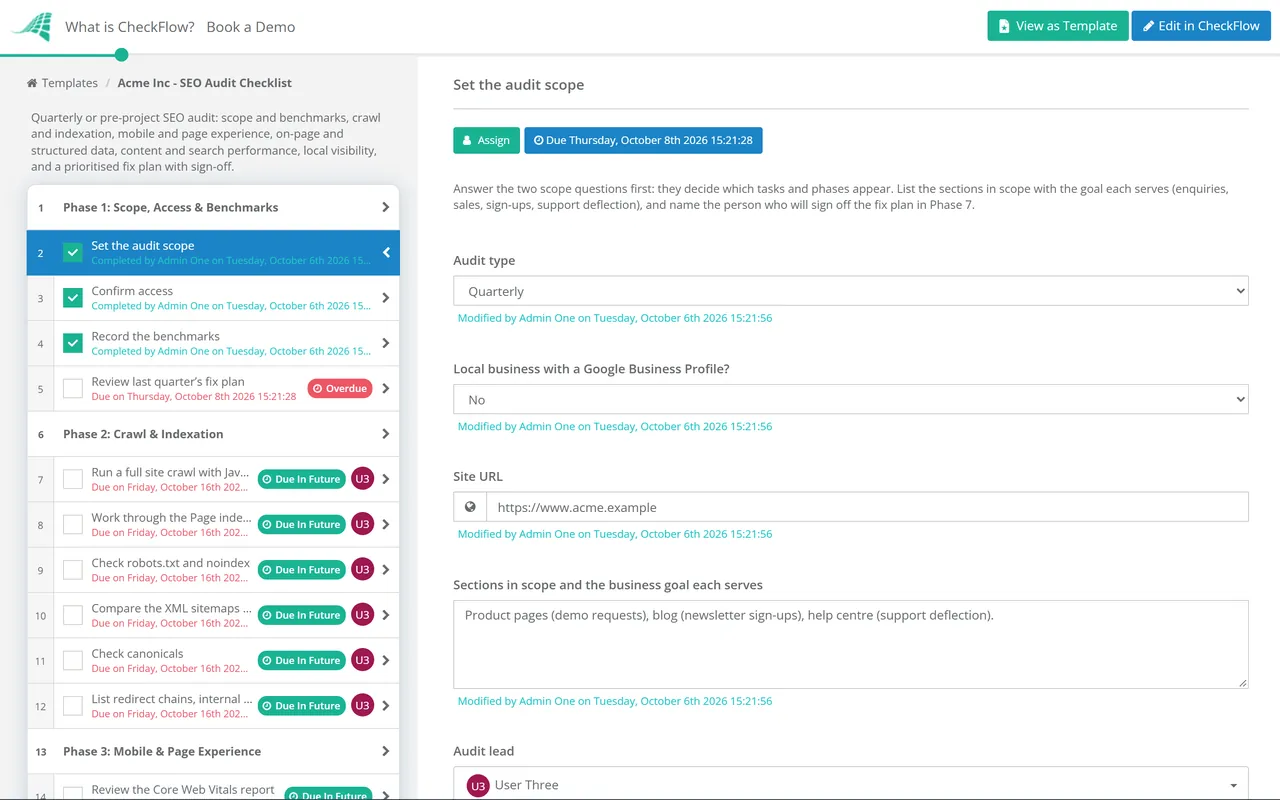
  • Set the audit scope — site, sections, audit type and the business goal each section serves
  • Confirm access — Search Console, analytics, the CMS, the crawler and, if local, the Business Profile
  • Record the benchmarks — clicks, impressions, CTR, average position, indexed pages and organic conversions
  • Review last quarter’s fix plan — on quarterly runs, what was done, what was dropped and which metrics moved
Phase 2

Phase 2: Crawl & Indexation

  • Run a full site crawl with JavaScript rendering on, and save the export
  • Work through the Page indexing report — every reason affecting pages you want in search
  • Check robots.txt and noindex — nothing important blocked, nothing private relying on robots.txt
  • Compare the XML sitemaps with the crawl — only canonical, indexable URLs returning 200
  • Check canonicals — including pages where Google chose a different canonical than you
  • List redirect chains, internal links to errors, 5xx spikes and orphan pages
Phase 3

Phase 3: Mobile & Page Experience

  • Review the Core Web Vitals report — mobile and desktop URL groups rated Poor or Need improvement
  • Test one URL per page template in PageSpeed Insights — field data first, lab data to find the cause
  • Confirm mobile parity — the same content, links, metadata and structured data on mobile
  • Check HTTPS — valid certificate, no mixed content, HTTP redirecting to HTTPS in one hop
  • Check the Manual actions and Security issues reports are clear
Phase 4

Phase 4: On-Page & Structured Data

  • Review title elements — unique, descriptive, no duplicates and no repeated boilerplate
  • Review meta descriptions on the pages that earn the most impressions
  • Check headings — one clear H1 per page and a logical H2 and H3 structure
  • Find duplicate and thin pages — improve, merge or redirect each one
  • Check internal linking — key pages a few clicks from the home page, with descriptive anchor text
  • Validate structured data — supported types only, matching visible content, no errors
Phase 5

Phase 5: Content, Links & Search Performance

  • Compare queries and pages in the Performance report with the same period last year
  • Find low-CTR pages — high impressions on page one, clicks well below the site average
  • Flag decaying pages — clicks falling quarter on quarter and year on year
  • Check for cannibalisation — two or more URLs taking turns to rank for the same query
  • Review the Links report — top linked pages, top linking sites, anchor text and links into pages that now 404
Phase 6 — Conditional

Phase 6: Local Visibility

Shown when the business has a Google Business Profile.

  • Check the Business Profile is complete — categories, address or service area, hours and attributes
  • Check the name, address and phone match the website and the main directories
  • Review new reviews and reply to any left unanswered
  • Check each location has its own page with unique content, linked from its profile
  • Compare clicks and impressions for local queries with the benchmark
Phase 7

Phase 7: Fix Plan & Sign-Off

  • Score each finding — priority, impact, effort, affected URLs and a proposed owner
  • Write the audit summary — benchmarks, the top issues and what changed since the last audit
  • Fix plan sign-off — the approver accepts the plan or sends it back
  • Raise a ticket for each accepted fix, with an owner and a due date
  • Hand the baseline crawl and requirements to the project team — pre-project audits only
  • Schedule the next audit and archive this one’s exports

How to Prioritise SEO Audit Findings

Score every finding in Phase 7 against this scale before it goes into the fix plan. Priority depends on two things: how many pages that matter are affected, and whether the issue stops Google from crawling, indexing or understanding them. A sitewide problem on a low-value section can rank below a single broken template that carries your revenue pages.

Priority What qualifies Typical findings Fix window
Critical Important pages cannot be crawled or indexed A noindex left on a template after launch; robots.txt disallowing a key section; canonicals pointing at a staging domain; 5xx errors on core pages Days, outside the normal sprint
High Pages are indexed but held back, or signals are split Core Web Vitals rated Poor on mobile for a main template; content missing from the mobile view; redirect chains on high-traffic URLs; pages cannibalising each other This quarter
Medium Clear opportunity to earn more clicks from existing visibility Low CTR on page-one rankings; duplicate titles across a section; decaying posts; orphan pages that should be linked Next one or two quarters
Low Hygiene with little measurable effect on its own Missing alt text on decorative images; long meta descriptions; minor heading order problems on low-traffic pages Batch into routine content work

Estimate effort in the same terms your developers and editors use, such as a template change, a content rewrite or a configuration setting, rather than in hours you cannot defend. A fix that changes one template and repairs two thousand URLs often costs less than rewriting ten articles, and the table makes that trade-off visible to the approver before anyone commits to a sprint.

Two findings deserve a note of their own. FAQ rich results stopped appearing in Google Search on 7 May 2026, so FAQPage markup that no longer produces a snippet is not a fault to fix, although it remains valid schema.org. And the disavow tool is not a routine clean-up step: Google says most sites never need it, and it is meant for a considerable number of spammy or artificial links that have caused, or are likely to cause, a manual action.

Why Run SEO Audits in CheckFlow?

1

The audit starts itself

Put the quarterly audit on a recurring schedule and a new checklist opens on the same date each quarter, already assigned to the audit lead. The previous run stays in the history, so its fix plan and benchmarks are one click away when Phase 1 asks for them.

2

Only the steps that apply

Two answers on the first task shape the run. Choose the audit type and the review of last quarter’s plan or the project handover appears as needed. Say the business has no Business Profile and the local phase never shows up.

3

A plan someone signed

The fix plan goes to a named approver chosen at the start. If it comes back marked Not approved, the checklist stops and no tickets are raised. Every finding, score and comment is kept against that quarter’s run.

Agencies can start one checklist per client site from the same template and route the fix plan to the client for sign-off. CheckFlow’s approval workflows record who approved what and when, which settles the “we never agreed to that” conversation.

Planning a redesign or replatform? Run this audit as the pre-project baseline, then carry the findings into the Website Migration Checklist so the new site does not inherit the old problems or lose the pages that earn traffic.

Frequently Asked Questions

What should an SEO audit include?

+

A useful audit covers five areas: whether Google can crawl and index the pages that matter, how those pages perform for real users on mobile, whether titles, headings, internal links and structured data describe them properly, how content and links are performing in search, and, for local businesses, the Business Profile. It should end with a prioritised fix plan, not a list of every warning a tool produced.

How often should you run an SEO audit?

+

Quarterly suits most sites. It is often enough to catch an indexing problem before it costs a season’s traffic, and spaced widely enough for last quarter’s fixes to show in the data. Run an extra, deeper audit before any redesign, migration or CMS change, and check the Page indexing report in Search Console after every significant release.

What tools do you need for an SEO audit?

+

Four cover most of the work. Google Search Console supplies indexing status, the Core Web Vitals report, search performance and links. A desktop or cloud crawler shows what a search engine finds when it follows your links. PageSpeed Insights combines 28 days of real-user field data with a Lighthouse lab test. Your analytics platform ties organic visits to conversions. Rank trackers and backlink tools add detail but are not essential for a first audit.

Does an SEO audit need to change for AI Overviews and AI Mode?

+

Not in its structure. Google’s own guidance says optimising for generative AI search is still SEO: the features rely on the same core ranking systems, Google Search ignores llms.txt files, and no special markup or content chunking is required. What the guidance does stress is original, non-commodity content, so give the content review in Phase 5 real weight rather than treating it as a checkbox.

Which structured data is still worth checking?

+

Check the types listed in Google’s Search gallery that apply to your site, such as Article, Breadcrumb, Organization, Product, Local business, Event or Video. FAQ rich results were retired in May 2026, along with several less common types. Whatever you mark up must match content visible on the page, and passing the Rich Results Test confirms the markup is valid, not that a rich result will appear.

Is robots.txt the right way to keep pages out of Google?

+

No, and it is one of the most common findings in Phase 2. Robots.txt controls crawling, not indexing: Google says a disallowed page can still be indexed if other sites link to it. To keep a page out of results, use a noindex meta tag or header and leave the page crawlable so Google can see the rule, or put it behind a login. Robots.txt is for managing crawl load and keeping crawlers out of areas such as internal search results.

Is CheckFlow free for this template?

+

14-day free trial, no card required. The Business plan is $10 per user per month after the trial. Full details at checkflow.io/pricing.

Turn Your Next SEO Audit Into a Fix Plan People Follow

Free trial — no credit card required.