Rebrand Launch Checklist Template

A rebrand rarely fails on the logo. It fails on the invoice template, the partner page and the van nobody listed. This checklist finds every place the old brand appears, gives each one a date and an owner, and has the launch approved before anything goes public.

Last reviewed: October 2026

This free rebrand launch checklist is for marketing directors, brand managers and agencies rolling out a new name, logo or visual identity that has already been decided. One run is one rebrand launch. It starts with the launch plan, owners, objectives and budget, then an inventory of every place the old brand appears: the website, product and apps, email signatures and templates, documents and contracts, social profiles, listings and app stores, partners’ and resellers’ materials and, where you have them, signs, vehicles, packaging, printed stock and merchandise. Each item gets a change date before, on or after launch day. It covers trade mark clearance and filings, the registered company details on the new templates, a change of company name in the UK, the US or elsewhere, and a new domain. Staff are briefed before the public launch, the go-live approver signs off after a readiness check, and the checklist ends with retiring the old brand and a review a month after launch.

A Rebrand Launch Is Not Brand Development or a Website Migration

By the time a rebrand launches, the hard creative decisions are made. What goes wrong is the rollout: the old logo still on the invoice template, a partner’s site that never heard about it, an email signature nobody changed, a sign on the depot six months later. Most of those are places nobody listed. This checklist starts with the inventory and gives every item a date and an owner.

It picks up where the Brand Development Checklist ends. That checklist creates the brand: discovery, positioning, personality, visual identity and guidelines, with a short internal and external launch at the end. This one rolls the finished brand out across everything the organisation owns. The Website Migration Checklist moves the website itself when the domain changes, and the Brand Asset Management Checklist keeps the asset library in order once the new brand is live.

This checklist

Rolling out the new brand

Asks: where does the old brand appear, when does each place change, and is everything ready before we go public?

When: once per rebrand, from about ten weeks before launch day to a month after.

Output: a touchpoint inventory with change dates, the legal and admin changes, an approved launch and the old brand retired.

Before this

Developing the brand

Asks: what does the brand stand for, how is it positioned, and how does it look and sound?

When: once, in the Brand Development Checklist.

Output: positioning, a visual and verbal identity and the brand guidelines.

When the domain changes

Migrating the website

Asks: does every old URL redirect, and do search traffic and rankings hold up after the move?

When: once per move, in the Website Migration Checklist.

Output: a redirect map, a tested switch-over and twelve weeks of monitoring.

What the Rebrand Launch Checklist Covers

Nine phases take a decided brand from the launch plan to the review a month after launch day. The first task records what is changing, which adds tasks for a new name, a change of legal company name in the UK, the US or elsewhere, a new domain, physical items such as signs and vehicles, and a phased rollout. Preparation counts back from launch day and everything after counts forward. The go-live approver signs off the launch after the readiness check.

  1. Phase 1

    Phase 1: Launch Plan & Owners

    5 tasks

    Answer the questions in the first task before anything else: what is changing, whether the legal company name and the website domain change, whether there are signs, vehicles, packaging or printed stock to replace, and whether the rollout is one launch day or phased. They add the matching tasks. Every due date after this task counts in working days from launch day: back from it for the preparation, and forward from it for launch day and everything after. Start the checklist about ten weeks before launch day.

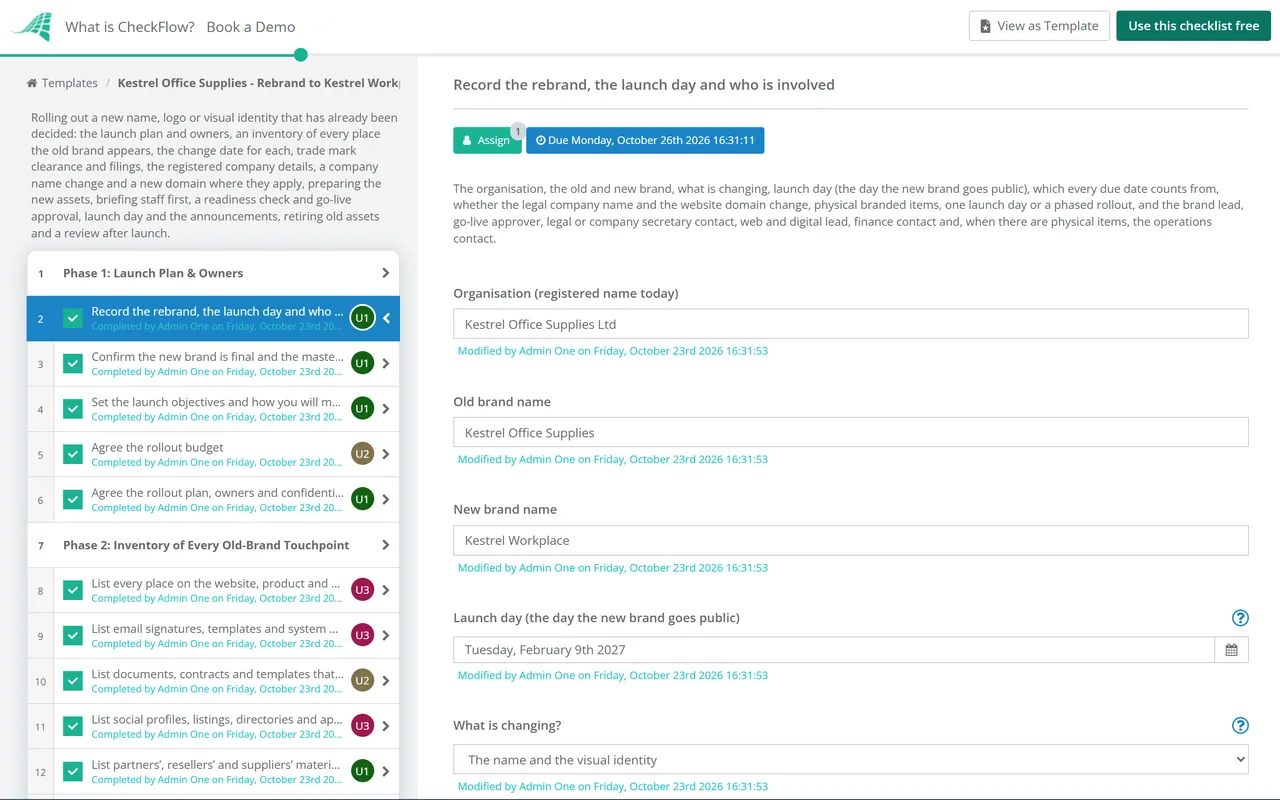
    • Record the rebrand, the launch day and who is involved — the organisation, the old and new brand, what is changing, launch day (the day the new brand goes public), which every due date counts from, whether the legal company name and the website domain change, physical branded items, one launch day or a phased rollout, and the brand lead, go-live approver, legal or company secretary contact, web and digital lead, finance contact and, when there are physical items, the operations contact
    • Confirm the new brand is final and the master files are ready — the approved name, logo files in every format, colour values, fonts, guidelines and templates from the brand project, signed off and stored where everyone takes them from; nothing goes out from drafts
    • Set the launch objectives and how you will measure them — what the launch must achieve (customers and staff know the new name, nothing important still shows the old brand, search traffic holds up), with a measure for each
    • Agree the rollout budget — the cost of replacing everything that carries the brand: design and agency time, website and product work, legal and filing fees, print, merchandise and, if you have them, signs, vehicle livery and packaging, with a contingency for touchpoints found late
    • Agree the rollout plan, owners and confidentiality — who owns each area (website and product, email, documents, social and listings, partners, legal, physical items), how a touchpoint found late is handled, and who may know the new name before launch, with nothing public such as a domain, handle or filing visible before you are ready
  2. Phase 2

    Phase 2: Inventory of Every Old-Brand Touchpoint

    8 tasks

    A rebrand is only as complete as its inventory. List every place the old name or logo appears, who owns it and when it changes. Physical items and a phased rollout add their own tasks.

    • List every place on the website, product and app — every site and subdomain, logos and favicons, page titles and descriptions, share images, the help centre, in-product names and screens, app icons and store listings, error pages, and the registered company details in the footer
    • List email signatures, templates and system emails — staff signatures, newsletter and marketing templates, the emails your systems send (receipts, invoices, password resets, notifications), auto-replies and the sender names they use
    • List documents, contracts and templates that carry the brand — letterhead, invoice and quote templates, proposals and slide templates, contract templates and terms, policies, forms, certificates and anything filed with a regulator or a customer under the old name
    • List social profiles, listings, directories and app stores — every social account with its handle, banner and bio, business profiles on maps and review sites, directories and marketplaces, app store listings and any listing that partners or industry bodies hold for you
    • List partners’, resellers’ and suppliers’ materials — co-branded pages, reseller and partner portals, sales sheets and logos that others use, integration and marketplace pages, and supplier records that print your name
    • List signs, vehicles, packaging, printed stock and merchandise — shown when there are physical items: signs at every site, vehicle livery, uniforms, packaging and labels, printed stock such as brochures and stationery, and merchandise, with the quantities, the supplier and how long a replacement takes
    • Set the change date for each touchpoint — for every item in the inventory: whether it changes before launch (things nobody outside sees), on launch day (everything customers see first) or after launch (items with long lead times or a later wave), the date and the owner
    • Plan the waves of a phased rollout — shown for a phased rollout: which touchpoints change in each wave and when, what customers will see while old and new sit side by side, and how you explain that in the meantime
  3. Phase 3

    Phase 3: Legal & Admin

    8 tasks

    Check the new name and logo are clear to use before money goes into them, protect them, and put the registered company details right. A change of legal company name, a new domain and a new name each add their tasks.

    • Confirm trade mark clearance for the new name and logo — searches for the same or similar marks in every market you sell in and for your goods or services: in the UK the IPO’s trade mark search, and in the US the USPTO database, state trade mark databases and the internet, because the USPTO’s own check covers federal marks only; take anything similar to a trade mark attorney or adviser before launch
    • Register the new domain and plan the website move — shown when the domain changes: register the new domain and its obvious variants and misspellings, keep the old one, and plan the move of the website itself, its URL map, redirects and search monitoring with the Website Migration Checklist
    • File trade mark applications for the new mark — applications for the name and the logo in each market, choosing the classes and terms for the goods and services you plan to sell; a UK registration covers only the classes and terms you choose, and you cannot add terms after you apply
    • Reserve the new name on each social platform — shown for a new name: check the handle is free on every platform you use and decide whether to rename the existing accounts, so followers and history stay, rather than open new ones
    • Pass the resolution and file the name change with Companies House — shown for a UK company: change the name by special resolution or by other means the articles provide, then give Companies House notice, with a copy of the special resolution or, for a change under the articles, a statement saying so (online for a special resolution, or on form NM01); the new name takes effect from the date Companies House issues the new certificate of incorporation, so use it on documents only from then
    • File the name change with the state or registry of incorporation — shown for a US company or one registered elsewhere: follow the rules of the state where the company is incorporated, or of the registry where it is registered; take advice on the steps and record when the change takes effect
    • Put the registered company name and details on the new templates — a new brand does not replace the registered name: for a UK company, letters, invoices, order forms, the website and other business documents must still show the registered name, and letters, order forms and the website also the registered number, registered office address and part of the UK it is registered in
    • Update the company name with banks, tax authorities, suppliers and customers — shown when the legal name changes: once the change is registered, tell the bank, the tax authorities (Companies House notes you may also need to tell HMRC), insurers, suppliers and the accounts teams of customers who pay you, so payments in the new name are not held up
  4. Phase 4

    Phase 4: Preparing the New Assets

    7 tasks

    Get every launch-day change built and waiting, so launch day is switching things on rather than making them. Physical items with long lead times are ordered first, and a new domain adds a task for email on it.

    • Order new signs, vehicle livery, packaging and printed stock — shown when there are physical items: proofs approved against the guidelines, orders placed early enough for their lead times, installation dates booked and only enough old stock kept to last until the change date
    • Build the website and product changes ready to switch on — the new name, logo, colours and fonts on a staging copy of the website, product and app, with page titles, share images, favicons and app icons, ready to publish on launch day; app store updates allow for the store’s review time
    • Prepare new email signatures and templates — signatures for every member of staff, marketing and system email templates, letterhead, invoice and quote templates, slide and document templates and contract templates, all with the registered details, ready to switch on launch day
    • Set up email on the new domain and forward the old addresses — shown when the domain changes: mailboxes and sender settings on the new domain tested before launch, and every old address forwarding or still delivered, so nothing sent to the old domain is lost
    • Prepare social profile images, bios and launch posts — new profile pictures, banners and bios for every account in the inventory, and the launch posts, scheduled or ready to go
    • Write the customer, partner and press announcements — what is changing, why, what stays the same (the same company, people, contracts and prices) and anything a customer must do, such as updating a supplier name or bank payee name, with a short press release and the answers to likely questions
    • Send partners and resellers the new assets under embargo — the new logo files, guidelines, the launch date and what each partner needs to change and by when, shared in confidence before the public launch
  5. Phase 5

    Phase 5: Internal Launch

    4 tasks

    Staff hear about the new brand from you before customers do. Brief managers first, then everyone, and give customer-facing teams the words to use.

    • Brief leaders and managers first — the new brand, the reasons for it, the launch plan and what each manager tells their team, so the first questions get the same answers
    • Brief all staff before the public launch — what is changing, why and when, what changes for each team (signatures, documents, how they answer the phone) and what stays confidential until launch day
    • Publish the internal FAQs, guidelines and templates — one place where staff find the answers to likely questions, the brand guidelines, logo files and the new templates, with a contact for anything else
    • Train customer-facing teams on what to say — sales, support and reception: how to explain the change, what customers need to do, if anything, how to answer the phone and where to send questions they cannot answer
  6. Phase 6

    Phase 6: Readiness Check & Go-Live Approval

    5 tasks

    Check every launch-day change is ready before anyone switches anything on. The go-live approver approves the launch, and nothing after that step can be completed until they do.

    • Check every launch-day touchpoint is ready — each item due on launch day in the change-date table is built, approved against the guidelines and has someone ready to switch it on
    • Check the legal and admin items are in place — trade mark clearance and filings recorded, the registered details right on every new template and, if the company name changes, the new name registered before it appears on documents
    • Test the website, email and app changes before launch — staging checked on desktop and phone, every redirect from old URLs tested, signatures and system emails sent to a test inbox, and a plan to undo a change that goes wrong
    • Confirm the launch-day running order — the order of the changes on launch day, the time of each, who does it and who checks it, and when the announcements go out
    • Approve go-live — the go-live approver reviews the readiness checks and records the decision; anything not ready moves to a later date in the change-date table rather than going out unfinished
  7. Phase 7

    Phase 7: Launch Day & External Launch

    9 tasks

    Switch things on in the agreed order, then tell people. A new name adds a task to say what the old name was where people will look for it.

    • Switch the website, product and app to the new brand — publish the staged changes, then check the main pages, the sign-in and checkout or contact pages, share images and favicons on desktop and phone
    • Check redirects from old URLs and domains — every renamed page and, if the domain changed, every old URL redirects permanently, in one step, to the closest new page, with nothing ending on an error page
    • Switch email signatures, templates and system emails — staff signatures, marketing templates and the emails your systems send, each checked with a test send
    • Update social profiles and announce the new brand — profile images, banners, bios and handles changed on every account, the launch posts published and the press release sent
    • Tell customers about the new brand — the announcement to customers by email and on the website, saying what changes, what stays the same and anything they need to do
    • Tell partners, resellers and suppliers — confirm the launch to everyone briefed under embargo, and tell the rest, with the date by which each should have swapped your logo and name
    • Update third-party listings and app stores — business profiles, directories, review sites, marketplaces and app store listings changed, and a note of any that wait for the platform’s review
    • Say what the old name was where people will look for it — shown for a new name: a line such as “formerly” and the old name on the website’s about page, in social bios and in listings for the first months, so people searching for the old name find you
    • Watch questions and feedback in the first days — comments, messages, support tickets and press questions answered with the agreed words, and anything that points to a missed touchpoint added to the inventory
  8. Phase 8

    Phase 8: Retiring the Old Brand

    5 tasks

    Work through everything that changes after launch day, and take the old brand out of circulation so nobody keeps using it. Physical items add tasks to install the new ones and dispose of the old.

    • Switch the remaining touchpoints on their dates — every item set to change after launch, including any moved at go-live and any later wave, changed on its date and ticked off in the change-date table
    • Install new signs and vehicle livery — shown when there are physical items: signs at each site and livery on each vehicle, checked against the proofs; a UK company must show its registered name, readable with the naked eye, at its registered office and other places it carries on business, with some exceptions
    • Dispose of old printed stock, signs and merchandise — shown when there are physical items: old stock, signs and branded items recycled or destroyed, never handed out, with a record of what went where and anything kept for the archive
    • Archive the old brand assets — old logo files, templates and guidelines moved out of the shared asset library into an archive, so nobody picks them up by mistake
    • Decide what to keep: old domains, handles and trade marks — which old domains and handles to keep so nobody else takes them, how long to keep redirects, and whether to keep or let lapse trade marks for the old name, with renewal dates recorded
  9. Phase 9

    Phase 9: Review After Launch

    4 tasks

    About a month after launch, look for what was missed and check how customers and search engines have taken the change. Record what to do differently next time.

    • Search for touchpoints still on the old brand — search your own website, documents and shared drives, the web and image results for the old name and logo, and ask staff to report anything they find
    • Check search and website traffic — visits, searches for the old and new names, sign-ups or enquiries against the weeks before launch, and errors or broken links from old URLs; a domain move follows its own monitoring in the Website Migration Checklist
    • Collect feedback from customers, staff and partners — what people noticed, what confused them and what they liked, from support and sales notes, a short staff survey and conversations with key partners
    • Hold the review and report against the objectives — each objective against its target, the spend against the budget, touchpoints missed and why, and what to change in the inventory and plan next time

Company Names and Trade Marks in a Rebrand: UK and US

A rebrand can change the name customers see and leave the legal company name alone, or change both, and every new name or logo needs checking against other people’s trade marks. These are the main points from the UK and US sources the checklist follows. The table is a starting point, not legal advice: take advice on your own case.

Topic UK US
Brand name and company nameA new brand does not replace the registered name. A company must show its registered name on its business letters, notices, order forms, invoices and other demands for payment, receipts, websites and all other business correspondence and documentation (2015 Regulations, reg 24).Keep the legal name and the brand name straight on contracts and invoices, and take advice on your state’s rules for trading under another name.
Other details on letters and websitesBusiness letters, order forms and websites must also show the part of the UK the company is registered in, its registered number and its registered office address (reg 25).Take advice on what your state requires.
Signs at your premisesThe registered name must be displayed at the registered office, any inspection place and other places the company carries on business, with some exceptions such as a place used mainly as a home, in characters readable with the naked eye (regs 20 to 22).Take advice on what your state requires.
How the company name changesBy special resolution, or by other means the company’s articles provide (Companies Act 2006, s.77). After a special resolution the company gives Companies House notice of the change as well as a copy of the resolution (s.78), online or on form NM01.Under the law of the state where the company is incorporated. Take advice on the steps and the filing.
When the new company name takes effectFrom the date Companies House issues the new certificate of incorporation (s.81(1)). Use the new name on documents from then.As the state’s rules say.
Existing contracts and claimsThe change does not affect the company’s rights or obligations or make legal proceedings by or against it defective, and proceedings that could have been continued or started against it under its former name can be continued or started against it under the new name (s.81(2) and (3)).Take advice.
Checking the new mark is clearSearch the trade marks database for the same or similar marks before you apply, and get professional advice if you find one. The IPO contacts holders of identical or similar marks when you apply.Search the USPTO database, state trade mark databases and the internet. The USPTO’s examining attorney checks only the federal database, and likelihood of confusion with a registered mark is one of the commonest reasons applications are refused.
What registration protectsA UK registration protects the brand in the UK and the Isle of Man, only in the classes and terms you choose, and you cannot add terms after you apply. It lasts 10 years and must be renewed.Federal registration creates rights throughout the United States. Without it you may rely on common law rights from use in a particular area; a state registration covers that state only. Registration is kept by filing maintenance documents.
The ® symbolOnce the trade mark is registered.With a federal registration, to show the mark is registered with the USPTO.

Sources. UK: the Companies Act 2006, sections 77 to 81 (change of name); the Company, Limited Liability Partnership and Business (Names and Trading Disclosures) Regulations 2015 (SI 2015/17), Part 6, regulations 20 to 25; Companies House guidance on changing a company name and form NM01 on GOV.UK; and the Intellectual Property Office’s guide to registering a trade mark on GOV.UK. US: the USPTO’s trademark basics, “Why register your trademark?” and “Why search for similar trademarks?”. Fees and timings change, so check them when you file.

Other countries and other names. Other countries have their own company registries and trade mark offices, and sole traders and partnerships trading under a business name have their own disclosure rules. Check the rules that apply to you with an adviser.

Why Run Rebrand Launches in CheckFlow?

1

Every touchpoint has an owner and a date

Enter launch day and every task falls due a set number of working days before or after it. Tasks are assigned from the people named in the first task, overdue alerts go to the assignees, and rebrands in progress show on the Reports Grid with their answers. Tables keep the inventory, the change dates and the running order in one place.

2

Only the tasks this rebrand needs

A new name adds tasks to reserve it on social platforms and to say what the old name was. A change of legal company name adds the Companies House, state or registry filing and the records to update. A new domain adds the website move and email on the new domain. Signs, vehicles and packaging add tasks to order, install and dispose of them, and a phased rollout adds a plan for the waves.

3

Approved before anything goes public

The readiness checks record Ready or Not ready yet for the touchpoints, the legal items and the digital changes. The go-live approver then records the decision, and nothing after that approval step can be completed until it is recorded, so launch day waits for a decision on record.

CheckFlow does not design logos, file trade marks or change your website. Your team and advisers use their own tools for those. CheckFlow makes sure every touchpoint is listed, changed on its date and checked, and that the go-live decision is on record. Workflow software shows how hand-offs like these run across a team.

Create the brand first with the Brand Development Checklist. When the domain changes, move the site with the Website Migration Checklist; for a new site, use the Website Launch Checklist. Check new email templates with the Email Campaign QA Checklist, keep the new logos and templates in order with the Brand Asset Management Checklist, and a quarter after launch run the Social Media Audit Checklist to catch any account still on the old brand.

AI generator

Didn’t find what you need? Describe it.

Describe the process in a sentence and the AI checklist generator drafts the phases and tasks for you.

Frequently Asked Questions

What should a rebrand checklist include?

A launch plan with owners, objectives and a budget; an inventory of every place the old brand appears, from the website, product, emails and documents to social profiles, listings, partners’ materials and physical items; a change date for each; trade mark clearance and filings; the registered company details, and a company name change and a new domain where they apply; the new assets prepared in advance; a staff briefing before the public launch; a readiness check and go-live approval; launch day and the announcements; retiring the old brand; and a review after launch.

How far ahead should you plan a rebrand launch?

This checklist starts about ten weeks before launch day, once the new brand is final. Long lead times set the pace: trade mark searches and filings, a company name change, new signs, vehicle livery and packaging, and app store reviews. If yours are longer, start earlier or phase the rollout so those items change after launch day.

What needs updating when a company rebrands?

More than most teams expect: the website, product and apps, favicons and share images, email signatures and the emails your systems send, invoice, quote, letterhead and contract templates, slide and document templates, social profiles and handles, business listings, directories and app stores, partners’ and resellers’ materials, and physical items such as signs, vehicles, uniforms, packaging, printed stock and merchandise. Phase 2 lists them all with an owner and a change date.

Should a rebrand launch internally first?

Yes. Staff should hear about it from you, not from a customer or the press. This checklist briefs managers first, then all staff, publishes internal FAQs and the new templates, and trains customer-facing teams on what to say, all before launch day, with what stays confidential until then made clear.

Do you have to change the company name when you rebrand?

No. A company can trade under a brand that differs from its registered name. In the UK the registered name must still appear on business letters, invoices, order forms, websites and other documents, so put it on the new templates. If you do change the company name, a UK company does it by special resolution or by other means its articles provide, gives Companies House notice, and the new name takes effect from the date Companies House issues the new certificate of incorporation. A US company follows the rules of its state of incorporation; take advice on the steps.

Do you need a trade mark for a new brand name?

Registration is not compulsory, but check that the name and logo are clear to use before you spend money on them. In the UK, search the trade marks database for the same or similar marks and take advice if you find one; a UK registration covers only the classes and terms you choose and lasts 10 years. In the US, the USPTO advises searching its database, state trade mark databases and the internet, because its own examination checks only federal marks. A trade mark attorney can advise on both.

What happens to the old domain and website?

Keep the old domain, so nobody else can buy it, and redirect every old URL permanently to the closest new page. Keep email to old addresses arriving too. Moving a website to a new domain is a project of its own: the Website Migration Checklist covers the URL map, redirects, switch-over day and the monitoring afterwards.

What should you do with old branded stock and signs?

Order replacements early enough for their lead times, keep only enough old stock to last until the change date, then recycle or destroy what is left rather than handing it out, and record what went where. Move old logo files and templates out of the shared asset library into an archive so nobody uses them by mistake.

Is CheckFlow free for this template?

14-day free trial, no card required. The Business plan is $10 per user per month after the trial. Full details at checkflow.io/pricing.

Launch Your New Brand Everywhere at Once

Free trial — no credit card required.

14-day free trial, no credit cardFull refund in your first 30 daysUS hosting, EU on request