Social Media Audit Checklist Template

Most brands have more social media accounts than they think, and more people with access to them than they would choose. A quarterly audit finds the forgotten accounts and old logins before someone else does, then checks whether the work is paying off.

Last reviewed: October 2026

This free social media audit checklist is for marketing managers, social media teams and agencies that run accounts for a brand. One run is one quarterly audit of every account the brand runs. It starts with an inventory that includes forgotten and unofficial accounts and impersonators, then checks who has admin access, two-factor authentication and recovery details, the consistency of names, bios, links and images, performance against last quarter and the goals from each platform’s own analytics, the content and how quickly people got replies, ad labelling, accessibility and privacy, and three competitors. It ends with a decision for each account and an action plan with owners, approved by the head of marketing. The platforms you use, paid social and creator partnerships add the matching notes and tasks.

A Quarterly Audit Is Not the Daily Routine or a Campaign

Social media accounts pile up. A product launch gets its own account, an event gets another, a regional team starts one, and an agency sets up a fourth. People join and leave, and their admin roles stay. Meanwhile the daily work of posting and replying never stops long enough for anyone to ask whether each account is still safe, still on brand and still worth the effort.

A quarterly audit is that pause. It is not the daily routine of monitoring, posting and replying, which the Social Media Manager Daily Checklist covers, and it is not the launch of one campaign, which belongs in the Campaign Launch Checklist. It looks across every account at once, once a quarter, and ends with decisions.

This checklist

The quarterly audit

Asks: which accounts do we have, who can get into them, are they on brand, and are they meeting their goals?

When: once a quarter, over about four weeks, and after a big change such as a new agency.

Output: a full inventory, security fixes, a decision for each account and an approved action plan.

Every day

The daily routine

Asks: what needs a reply, what is going out today, and what is planned for tomorrow?

When: every working day, in the Social Media Manager Daily Checklist.

Output: posts published, comments and messages answered, and tomorrow’s content ready.

One campaign

The campaign launch

Asks: is everything for this campaign ready, approved and tracked before it goes live?

When: once per campaign, in the Campaign Launch Checklist.

Output: a campaign launched with its assets, approvals and tracking in place.

What the Social Media Audit Checklist Covers

Eight phases follow one quarterly audit of every account the brand runs, from the inventory to the head of marketing’s approval. The first task records the platforms in use, which add notes for LinkedIn, YouTube, Facebook and Instagram, and TikTok where they matter. Paid social adds an ad account and pixel review and a paid results task, and creator partnerships add two disclosure checks. An account the brand does not control, a security problem or an account to close each add a task to deal with it.

  1. Phase 1

    Phase 1: Scope, Goals & Last Quarter’s Actions

    4 tasks

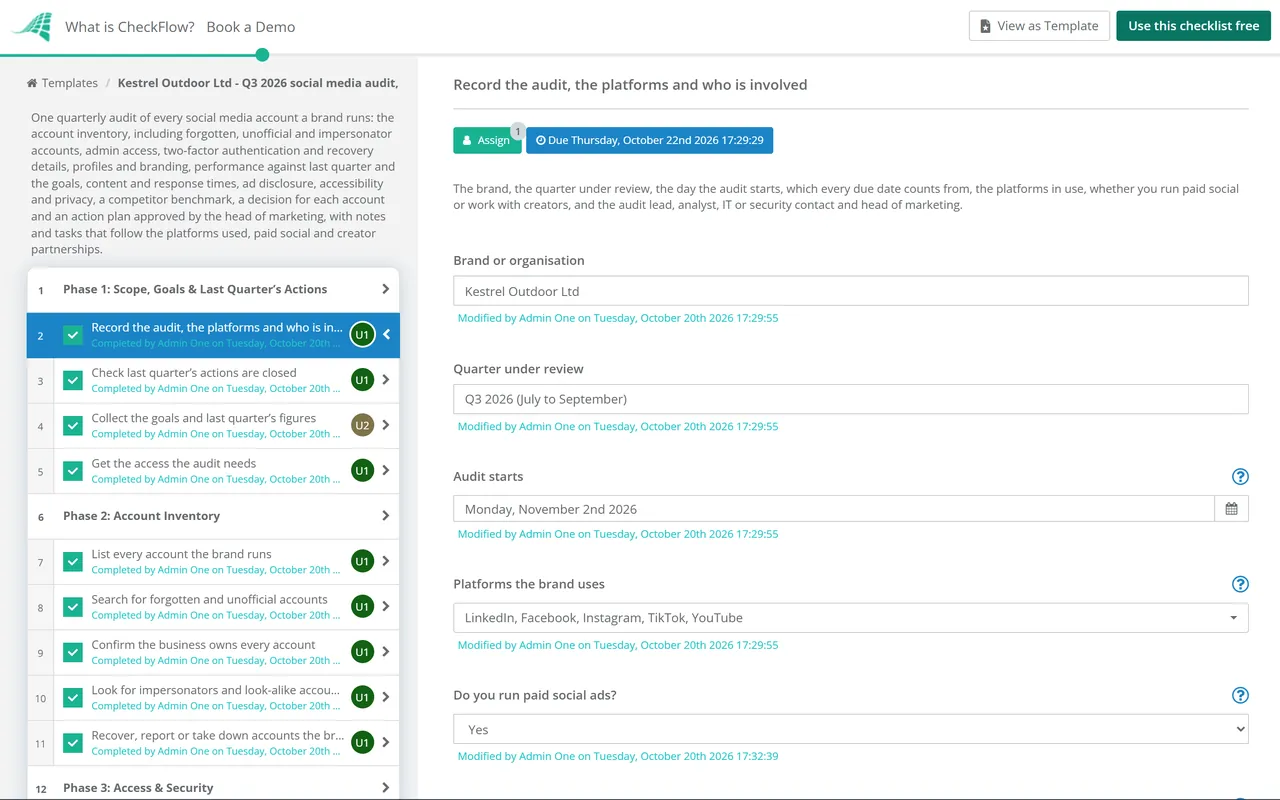
    Answer the questions in the first task before anything else: which platforms the brand uses, whether it runs paid social and whether it works with creators. They add the matching tasks and platform notes. Every due date counts in working days from the day the audit starts.

    • Record the audit, the platforms and who is involved — the brand, the quarter under review, the day the audit starts, which every due date counts from, the platforms in use, whether you run paid social or work with creators, and the audit lead, analyst, IT or security contact and head of marketing
    • Check last quarter’s actions are closed — every action from the last audit closed, or carried forward with a reason, an owner and a new date
    • Collect the goals and last quarter’s figures — the social media goals for the quarter (reach, engagement, clicks, conversions, follower growth or others) and last quarter’s figures, or a first baseline if this is the first audit, so Phase 5 has something to compare with
    • Get the access the audit needs — access to each platform’s analytics and admin settings through the auditor’s own login, with the lowest role that shows them, never a shared password
  2. Phase 2

    Phase 2: Account Inventory

    5 tasks

    List every account before judging any of them. Old campaign, event, regional and product accounts are the ones nobody watches. An account the brand does not control adds a task to recover it or have it removed.

    • List every account the brand runs — each account on each platform with its handle, web address, who manages it and the date of its last post, including regional, product, event and recruitment accounts
    • Search for forgotten and unofficial accounts — a search of each platform for the brand name, products and old campaign names, links from the website and email signatures, and a question to staff and agencies about accounts they set up
    • Confirm the business owns every account — each account registered to a company email address rather than a personal one, and the owner or top admin role held by the business, not only by an agency, a freelancer or someone who has left
    • Look for impersonators and look-alike accounts — accounts using the brand’s name, logo or a near-identical handle, fake customer support accounts and accounts copying your posts, with a screenshot and link for each
    • Recover, report or take down accounts the brand does not control — shown when an account is out of the brand’s control: request access through the platform’s business or recovery process, report impersonation through its reporting route, and warn customers if a fake account is asking for payments or personal details
  3. Phase 3

    Phase 3: Access & Security

    8 tasks

    Most social media account takeovers start with a login nobody remembered: a former employee, an agency that has moved on, a shared password or a recovery email nobody reads. Paid social adds a review of ad accounts and tracking pixels, and a security problem found here adds a task to fix it the same day.

    • Review who has an admin role on each account — every person, agency and tool with a role on each account, the role they hold and whether they still need it, with at least two admins from the business on every account so one person leaving cannot lock the brand out
    • Remove leavers and former agencies — people who have left or changed jobs, agencies and freelancers whose work has ended, and anyone you cannot identify, removed from every account and business tool
    • Check two-factor authentication on every account — two-factor authentication switched on for every account and every admin’s own login where the platform offers it, using an authenticator app or security key rather than text messages where you can
    • Check passwords and business management tools — people working through their own logins and the platform’s business roles rather than one shared password; where a shared login cannot be avoided, the password kept in the company password manager, not a spreadsheet or a chat
    • Check recovery details and backup codes — the recovery email address and phone number on each account owned by the business and still monitored, and backup codes stored in the password manager
    • Review ad accounts, billing and tracking pixels — shown when you run paid social: who can create ads and spend money in each ad account, the payment methods and spending limits on file, and every tracking pixel or conversion tag on the website, who owns it and whether it waits for cookie consent where that is needed
    • Review connected apps and scheduling tools — every scheduling, listening, analytics and design tool connected to the accounts, who in each tool can publish, and tools nobody uses any more disconnected
    • Fix the security problems found today — shown when a security problem was found: remove the access, switch on two-factor authentication, change the password and move it to the password manager, or update the recovery details, then check the account’s recent activity for posts or changes you did not make
  4. Phase 4

    Phase 4: Profiles & Branding

    5 tasks

    Look at each profile the way a customer would, on a phone. The name, description, links and images should match the brand today, not the one from two campaigns ago.

    • Check names, handles and bios — the same brand name and, where you can, the same handle on every platform, and a bio that describes what the brand does now, in the brand’s voice
    • Check the links on every profile — every profile link and link-in-bio page working, going to a current page on your own website, and tagged for analytics if you track social traffic that way
    • Check profile and cover images — the current logo and brand images, sharp at each platform’s sizes, with no out-of-date offer, event or campaign still showing
    • Check contact details, categories and locations — the email address, phone number, address, opening hours, business category and location pages shown on each profile, all matching the website
    • Check verification and business badges — verification or business badges on the accounts where the platform offers them and you use them, and the details they depend on still correct
  5. Phase 5

    Phase 5: Performance Against Goals

    5 tasks

    Use each platform’s own analytics for the same dates as last quarter, and your web analytics for clicks and conversions. Compare with last quarter and the goals set in Phase 1, not with industry averages.

    • Export each platform’s figures for the quarter — reach or impressions, engagements, clicks and followers from each platform’s own analytics for the full quarter, with the exports saved where the next audit can find them
    • Compare reach and engagement with last quarter — the change on each platform, with the posts, campaigns or platform changes that explain the biggest rises and falls
    • Compare clicks, conversions and follower growth with the goals — clicks to the website and the sign-ups, leads or sales they led to in your web analytics, and follower growth on each platform, against the goals for the quarter
    • Review paid social results — shown when you run paid social: spend, results and cost per result for each campaign against its goal, and what to stop, keep or test next quarter
    • Rate each platform against its goals — each platform marked ahead, on track or behind, with one sentence on why, ready for the decisions in Phase 8
  6. Phase 6

    Phase 6: Content & Community

    5 tasks

    Look at what was posted and how people were answered, not only at the numbers. A slow or missing reply to a customer’s comment or message is often what people remember.

    • Review the best and worst posts — the five best and five worst posts on each platform by the measure that matters for its goal, and what each group had in common: format, topic, timing or the call to action
    • Check the content mix against the plan — the share of each content theme and format (video, images, text, links, live) against the content plan, and any theme that was planned but never posted
    • Check posting frequency on each platform — posts per week on each platform against the plan, gaps of more than a week, and accounts that have not posted at all this quarter
    • Check response times to comments and messages — a sample of comments and direct messages from the quarter: how long the first reply took against the target you set, how many were never answered, and messages left in inboxes nobody checks
    • Review complaints, escalations and difficult moments — public complaints, negative spikes and any post that caused a problem, how each was handled, and whether the escalation route and the people on it are still right
  7. Phase 7

    Phase 7: Compliance & Competitor Benchmark

    6 tasks

    Paid, gifted and affiliate content has to be clearly labelled as an ad, whoever posts it: the brand, an employee or a creator. Working with creators adds two checks. Then look at three competitors to see what you might be missing.

    • Check ad and sponsored content labels — posts this quarter that promote something the brand was paid for, was given, or earns from through affiliate links, and employees’ posts about the brand’s products, each labelled clearly as an ad at the start, not hidden in hashtags or behind “more”
    • Check creator and influencer posts are labelled as ads — shown when you work with creators: every paid, gifted or affiliate post about the brand this quarter checked for a clear “Ad” label upfront, in the video as well as the caption, and any that are missing it corrected with the creator straight away
    • Check creator agreements and briefs ask for the ad label — shown when you work with creators: contracts, briefs and the notes sent with gifted products telling creators to label their content as an ad, a written policy that agencies and other intermediaries also follow, and a decision on creators who repeatedly leave the label off
    • Check posts are accessible — alt text on images, captions on videos, text in images large enough to read and repeated in the post, and hashtags and emoji used so screen readers can follow the post
    • Check privacy in social media work — personal details collected through lead forms, competitions and direct messages covered by the privacy notice, stored only where they should be, and deleted from scheduling and listening tools when no longer needed
    • Benchmark three competitors — what three competitors show publicly: the platforms they use, how often they post, the formats and topics that get responses, and anything they do that the brand could test
  8. Phase 8

    Phase 8: Decisions, Action Plan & Approval

    6 tasks

    Decide what happens to each account, then turn the findings into actions with owners and dates. The head of marketing approves the audit and the action plan, and nothing after that step can be completed until they do. Closing or merging an account adds a task after the approval.

    • Decide to keep, change, close or merge each account — a decision for every account in the inventory with the reason: keep as it is, change how it is run, close it, or merge it into another account
    • Write the action plan with owners and dates — every gap from Phases 2 to 7 and every account decision as an action with an owner, a due date and a priority, and what stops next quarter
    • Write the audit summary — the accounts found, the security fixes made, results against the goals, the main content findings, compliance gaps and the decisions for each account
    • Head of marketing approves the audit and action plan — Approved, Approved with changes or Not approved, based on the summary, the account decisions and the action plan
    • Close or merge the accounts agreed — shown when an account is to close or merge: download its archive, post a notice pointing followers to the account that stays, remove links to it from the website and other profiles, then close or merge it through the platform and update the inventory
    • Share the results and book the next audit — the approved summary and action plan shared with everyone who posts for the brand, the actions started, and the next quarterly audit’s start date set

Labelling Paid, Gifted and Creator Posts: UK and US

Phase 7 checks that paid, gifted and affiliate content is labelled as an ad. These are the main points from the UK and US guidance for brands and the people who post for them. The table is a starting point, not legal advice.

Topic UK (ASA, CAP and CMA guidance) US (FTC Endorsement Guides)
Who is responsibleBoth the brand and the creator are responsible for making sure content is disclosed. The CMA expects brands to check content that refers to them and not to ignore posts that are not labelled.Advertisers can be liable for failing to disclose unexpected material connections with their endorsers, even when the endorser is not. Agencies and other intermediaries can be liable too (16 CFR 255.1(d) and (f)).
What counts as a connectionAny payment or incentive, including free products, even when there is no obligation to post; and being an owner, employee or shareholder, or having another commercial or personal interest.A business, family or personal relationship, payment, free or discounted products, early access or the chance to win a prize, whether or not an endorsement is required (16 CFR 255.5(a)).
Words to useSay what it is: “Ad” or “Advert”. Avoid “Gifted”, “Sponsored”, “Spon”, “Collab”, “Aff”, “In partnership with” or just tagging the brand.Simple, clear words such as “Advertisement”, “Ad” or “Sponsored”. Avoid vague terms such as “sp”, “spon” or “collab”.
Where the label goesClear, prominent and upfront: at the very start, not buried in hashtags, behind “more” or part-way through a video. Label each story in a series.Difficult to miss and easy to understand; on social media it should be unavoidable (16 CFR 255.0(f)). Not only on a profile page or behind a “more” link (16 CFR 255.0, example 9).
Video and liveWherever people look first, such as the title or thumbnail. Each format (a story, a post, a reel) needs its own label.In the video itself, not just the description, and repeated during live streams. In both the picture and the sound when the claim is made in both (16 CFR 255.0(f)).
Platform labelling toolsA tool such as Instagram’s Paid partnership label may be enough if it is upfront, clear and prominent; if not, add “Ad”.Do not assume a platform’s disclosure tool is good enough. A built-in label that is easy to miss is not clear and conspicuous (16 CFR 255.0, example 9).
Employees and tagsAn employee or owner posting about the brand has a connection to disclose. Tagging the brand is not a label.Employees promoting their employer’s products should disclose the connection, and the employer should train and monitor them (16 CFR 255.5, example 8). Tags in social media posts can be endorsements (16 CFR 255.0(b)).
What the brand should doPut the labelling requirement in the contract or with gifted products, have a written policy for creators and agencies, check posts, and get unlabelled content corrected promptly.Give endorsers guidance on disclosure, monitor what they post, and act to fix non-compliance (16 CFR 255.1(d)).

Sources. UK: the ASA and CMA’s Influencers’ guide to making clear that ads are ads (third edition, March 2023) and the CMA’s Social media endorsements: guidance for brands (updated August 2025). The ASA says the influencer guide will be updated for the Digital Markets, Competition and Consumers Act 2024, which replaced the Consumer Protection Regulations, and that its advice remains broadly correct. US: the FTC’s Guides Concerning the Use of Endorsements and Testimonials in Advertising (16 CFR Part 255, revised in July 2023) and its Disclosures 101 for Social Media Influencers.

Other countries. Rules on advertising disclosure differ by country. Check the rules where your audience is, and the platforms’ own branded content policies, with an adviser.

Why Run Social Media Audits in CheckFlow?

1

Every account, every quarter

Enter the day the audit starts and every task falls due a set number of working days after it. Tasks are assigned from the four people named in the first task, overdue alerts go to the assignees, and audits in progress show on the Reports Grid. Run it on a recurring schedule so it starts every quarter without anyone remembering.

2

Only the checks your accounts need

The platforms you tick add notes on the tasks they affect, such as LinkedIn’s admin roles and Instagram’s Paid partnership label. Paid social adds the ad account and results reviews, creators add the disclosure checks, and an account you do not control or a security problem adds a task to fix it. Every check records In order or Gaps found.

3

Approved before the actions start

The head of marketing reviews the summary, the account decisions and the action plan, and records Approved, Approved with changes or Not approved. Nothing after that approval step can be completed until a decision is recorded, so no account is closed on one person’s say-so.

CheckFlow does not connect to social media platforms, post for you or pull their analytics. Your team uses each platform’s own tools and analytics. CheckFlow makes sure every account is checked the same way each quarter, that every gap has an owner and a date, and that the head of marketing’s approval is on record. Workflow software shows how hand-offs like these run across a team.

Run the day-to-day work with the Social Media Manager Daily Checklist, and plan what to post with the Digital Content Strategy Checklist. Switch on two-factor authentication across the company with the MFA Rollout Checklist, remove a leaver’s access to every tool with the SaaS Access Offboarding Checklist, check the website the profiles link to with the WCAG 2.2 Accessibility Audit Checklist and the Website Privacy & Cookie Compliance Checklist, and prepare for a public problem with the Crisis Management Plan Checklist.

AI generator

Didn’t find what you need? Describe it.

Describe the process in a sentence and the AI checklist generator drafts the phases and tasks for you.

Frequently Asked Questions

What should a social media audit include?

An inventory of every account the brand runs, including forgotten and unofficial ones and any impersonators; who has access and whether two-factor authentication and recovery details are in place; whether names, bios, links and images are consistent; performance against last quarter and the goals; what content worked, how often you posted and how quickly people got replies; ad labelling, accessibility and privacy; a look at competitors; and a decision for each account with an action plan that someone senior approves.

How often should we audit our social media accounts?

This checklist is built for a quarterly audit, which keeps the comparison with last quarter simple and catches leavers’ access before it builds up. Run an extra audit when you change agency, after a security incident, or when someone who managed the accounts leaves. The daily posting and replying in between belongs in a daily routine, not in the audit.

How do we find social media accounts we have forgotten about or do not control?

Search each platform for the brand name, product names and old campaign names; follow the links from your website, email signatures and old campaigns; and ask staff, former staff and agencies which accounts they set up. Check that each account you find is registered to a company email address and that the business holds the top admin role. For an account you cannot get into, or one pretending to be you, use the platform’s own recovery or impersonation reporting process and record what you did.

Who should have admin access to company social media accounts?

Only the people who need it, each through their own login and the platform’s business roles rather than a shared password, with the lowest role that does the job. Keep at least two admins from the business on every account so one person leaving cannot lock you out. LinkedIn Pages, for example, separate super admins, content admins and analysts, and YouTube recommends channel permissions over sharing a password. Remove leavers and former agencies every quarter.

Do brands have to make sure influencers label their posts as ads?

In the UK, the ASA and CMA guidance says both the brand and the creator are responsible, and the CMA expects brands to tell creators to label content as an ad, check their posts and get unlabelled ones corrected. In the US, the FTC’s Endorsement Guides say advertisers can be liable for an endorser’s undisclosed connection and should give guidance, monitor posts and act on problems. Free products count as a connection in both. The table above sets out the main points.

Which figures should a quarterly social media audit compare?

The ones tied to your goals: usually reach or impressions, engagements, clicks to the website, the conversions those clicks led to, and follower growth, per platform. Take them from each platform’s own analytics for the same dates as last quarter, and conversions from your web analytics. Compare with last quarter and your goals rather than published averages, which measure other brands with other audiences.

How is a social media audit different from the daily social media checklist?

The Social Media Manager Daily Checklist runs every working day: monitoring, publishing, replying and preparing tomorrow’s posts. The audit runs once a quarter and steps back from the daily work to check every account’s security, branding, results and compliance, then decides what to keep, change, close or merge. A campaign launch is different again: it gets one campaign ready to go live.

Is CheckFlow free for this template?

14-day free trial, no card required. The Business plan is $10 per user per month after the trial. Full details at checkflow.io/pricing.

Audit Every Social Media Account Every Quarter

Free trial — no credit card required.

14-day free trial, no credit cardFull refund in your first 30 daysUS hosting, EU on request