Social media management without a daily operating checklist is social media management by whatever seems most urgent. A checklist turns a reactive job into a structured one — without removing the creativity.
The social media manager’s day is a constant competition between the reactive and the proactive. A trending topic pulls attention away from scheduled publishing. A comment crisis pulls attention away from the content calendar. A positive customer mention goes unacknowledged because the manager was in production mode. By the end of the day, the monitoring was patchy, one platform got published and three did not, and tomorrow’s content was never prepared. A structured daily checklist does not remove the reactive nature of the role — social media is inherently real-time. What it does is ensure the most important tasks happen every day, in a sensible order, before the reactive demands of the job consume all available time. Monitoring and engagement come first. Publishing happens on schedule. Analytics are reviewed consistently, not just before a monthly report. And tomorrow’s content is prepared today. This free checklist gives social media managers, coordinators, and marketing managers a structured daily operating framework for the full social media management workflow.
Priority: Monitoring, engagement, and crisis identification.
Why first: Overnight activity accumulates while you sleep. Unresponded comments look worse every hour. Emerging issues need to be identified early. Engagement with others’ content before noon outperforms afternoon engagement on most platforms.
Key tasks: Check all mentions, notifications, and DMs. Respond to all comments. Publish any scheduled early posts. Review overnight performance data briefly.
Midday
Midday Block
Priority: Publishing and active community management.
Why midday: Peak engagement windows vary by platform and audience, but midday is broadly effective for B2B LinkedIn. Publish the day’s scheduled content. Engage actively with community and industry conversations.
Key tasks: Publish scheduled content for the day. Active engagement with comments, shares, and relevant industry conversations. Respond to any new DMs or enquiries.
End of day
End-of-Day Block
Priority: Analytics, review, and tomorrow preparation.
Why last: Analytics review without context is noise; doing it at end of day provides the full picture of the day’s performance. Preparing tomorrow’s content today removes morning rush.
Key tasks: Review the day’s performance metrics. Final engagement sweep. Prepare and schedule tomorrow’s content. Update the content calendar status.
What the Social Media Manager Daily Checklist Covers
Six phases covering the full day from morning monitoring through end-of-day planning — the same structured operating rhythm running automatically every working day.
Monitoring is not passive checking — it is active scanning for opportunities and threats. A positive mention that goes unacknowledged for 24 hours is a missed relationship opportunity. A negative comment that goes unresponded for 6 hours is a crisis in progress.
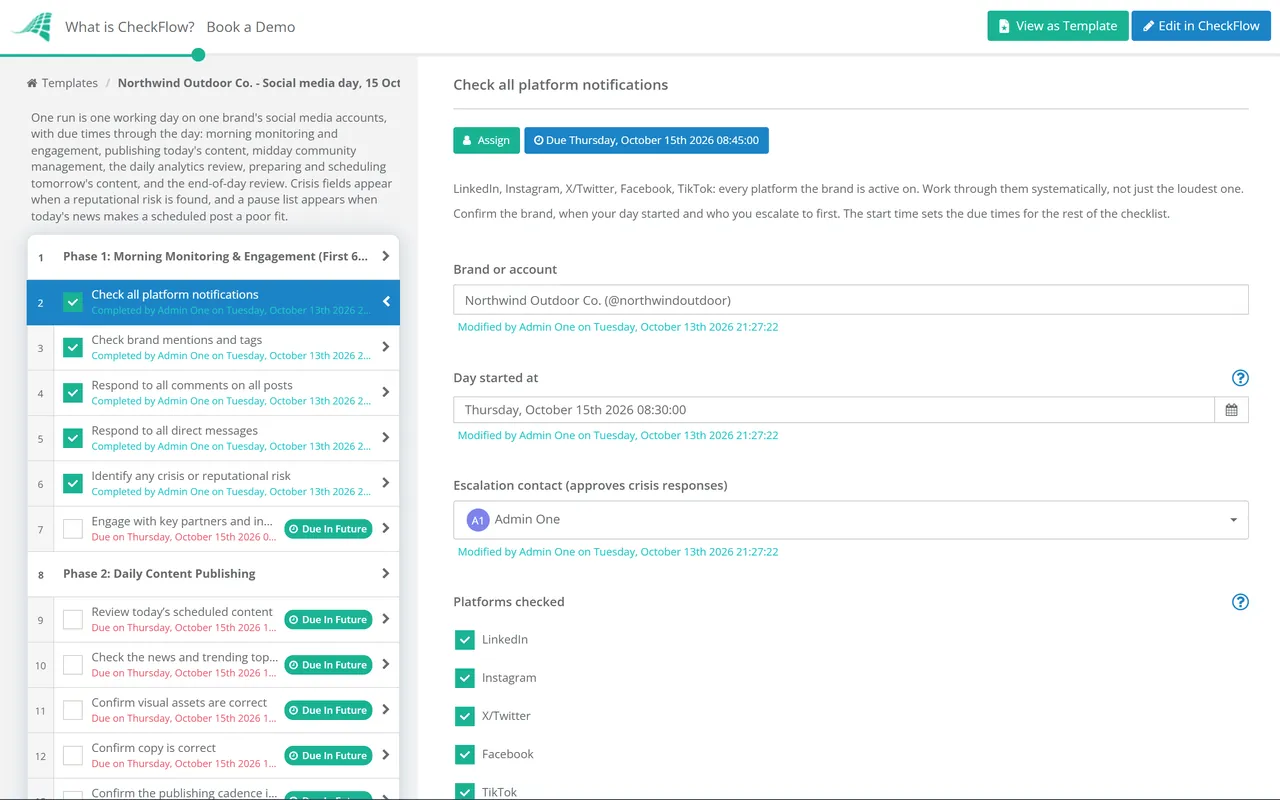
Check all platform notifications — LinkedIn, Instagram, X/Twitter, Facebook, TikTok; every platform the brand is active on; systematically, not just the loudest one
Check brand mentions and tags — using a social listening tool or platform-native search; both tagged and untagged mentions
Respond to all comments on all posts — within the defined response time standard (ideally <2 hours for the morning window); genuine, on-brand responses
Respond to all direct messages — customer enquiries, collaboration requests, and partnership outreach; escalate customer service issues to the relevant team
Identify any crisis or reputational risk — negative viral content, customer complaints getting traction, or brand association with unwanted topics; escalate immediately per the crisis communication protocol
Engage with key partners and industry accounts — like, comment, or share relevant content from partners, customers, and industry influencers; builds reciprocal engagement
Phase 2
Phase 2: Daily Content Publishing
Review today’s scheduled content — in the social media scheduling tool; confirm all posts are scheduled correctly for the right platform, time, and format
Check the news and trending topics — before publishing; is there anything happening today that makes a scheduled post inappropriate or poorly timed? Pause and reschedule if needed
Confirm visual assets are correct — images sized correctly per platform; no typos in overlay text; correct brand elements
Confirm copy is correct — hashtags relevant and current; no broken links; mentions are correct
Confirm the publishing cadence is balanced — not two posts on one platform and nothing on another; platform-appropriate frequency
Publish or confirm scheduling for all today’s content — across all active platforms
Phase 3
Phase 3: Active Community Management (Midday)
Engage actively with comments on today’s published content — beyond the automated “thanks!”; genuine conversation starters; question responses; community building
Engage in relevant industry conversations — trending hashtags, industry topics, and conversations where the brand’s perspective adds genuine value
Engage with customer and partner content — reshares and comments on relevant customer posts; amplify user-generated content where appropriate
Engage with competitor-adjacent conversations — where relevant and tasteful; brand presence in industry discussions where target audience is active
Identify shareable UGC or testimonials — customer posts mentioning the brand that could be shared with permission
Phase 4
Phase 4: Daily Analytics Review
Daily analytics review is not about making daily decisions — most social media decisions need a week of data minimum. It is about maintaining awareness: knowing which content is resonating and catching anomalies before they become unreviewed history.
Review the previous 24 hours’ performance — across all active platforms; reach, engagement rate, and follower changes
Note any exceptional performers — content that significantly outperformed average; what format, topic, or angle drove this? Log for content strategy review
Note any underperformers — content with unusually low engagement; was it timing, creative, topic, or algorithm?
Check link click performance — for posts with links; click-through rate versus organic engagement
Check follower growth or decline — unusual spikes or drops warrant investigation
Phase 5
Phase 5: Content Creation & Scheduling for Tomorrow
Review the content calendar for tomorrow — what needs to be created, designed, or finalised today for tomorrow’s schedule?
Complete any content in production — copy drafting, image creation, video editing; all content for tomorrow completed today
Schedule tomorrow’s content — in the scheduling tool; correct platform, time, and assets; confirmed and queued
Review the content calendar for the next 3 days — any upcoming content that needs creation to begin today?
Flag any content calendar gaps — upcoming days or platforms with nothing scheduled; communicate to the content or marketing team
Phase 6
Phase 6: End-of-Day Review & Handover
Final engagement sweep — any new comments or messages since the midday block; respond before close of business
Confirm tomorrow’s content is scheduled — final confirmation that all scheduled content is in the tool and correctly configured
Note the day’s key observations — one or two lines in a daily log; top performer, key engagement, or community trend; feeds the weekly report without effort
Set up any urgent monitoring alerts — if a sensitive campaign or announcement is live; social listening tool alerts for brand mentions overnight
Confirm the next day’s priorities — any campaigns launching, events to react to, or scheduled reviews due?
This checklist is available as a free, runnable template in CheckFlow — with the daily checklist generated automatically every working day as a recurring checklist, with each phase assigned and ready to run from the first task of the day.
Daily priority: Business hours engagement (8am–5pm local). Comment on industry conversations. Respond to all post comments within 2 hours. Post 1× daily maximum for company page.
Note: Algorithm rewards dwell time and meaningful comments over likes. Engage genuinely, not with generic reactions.
Instagram
Daily priority: Stories engagement (daily stories maintain algorithm favour). Respond to story DMs and poll responses. Check hashtag performance.
Note: Reels algorithm is reach-prioritised; feed posts are engagement-prioritised with followers. Different strategies for different objectives.
X / Twitter
Daily priority: Monitor brand mentions and trending topics. Real-time engagement window is short — posts go stale within hours. Respond to mentions same day.
Note: X’s organic reach has declined significantly for many brands. Evaluate whether investment is returning results for your audience.
TikTok
Daily priority: Check video performance in first 24 hours (TikTok’s algorithm decides reach quickly). Respond to early comments.
Note: TikTok success is primarily driven by content quality and hooks — engagement rate matters more than follower count. Comments in first hour signal algorithm value.
Why Run Social Media Management in CheckFlow?
1
The daily checklist that runs automatically, every working day
A social media manager daily checklist that has to be manually started each morning is a checklist that will be skipped on the busiest days — the days when it is most needed. CheckFlow’s recurring feature starts the daily social media checklist automatically every working day, with all tasks pre-populated and assigned. The daily operating rhythm runs as a process, not a personal discipline.

2
Consistent monitoring that does not miss a mention
The most expensive social media failures are mentions that went unresponded for hours — a customer complaint that became a viral thread, a positive mention that went unacknowledged. CheckFlow’s morning monitoring block is a structured, systematic platform sweep — not an informal “check” — with each platform as a discrete task that must be confirmed before the block is complete.
3
A daily performance log that feeds the monthly report
Monthly social media reports that require manual data collection from scattered notes are reports that get rushed and lack insight. The end-of-day observation note in CheckFlow’s daily checklist creates a searchable daily log of performance highlights — accessible when the monthly report is due without any additional data gathering.
The content that a social media manager publishes daily is produced by the content strategy process. CheckFlow’s Digital Content Strategy Checklist covers the strategic and production process that feeds the social media calendar. See the Digital Content Strategy Checklist →
The social media manager daily checklist is one of the strongest recurring checklist use cases on the platform — the same structured daily process runs every working day. CheckFlow’s recurring feature makes this automatic. Learn more about recurring checklists →
What should a social media manager daily checklist include?
+
A social media manager daily checklist covers six blocks: morning monitoring and engagement (checking all platform notifications, brand mentions, responding to comments and DMs, and identifying any crisis indicators), content publishing (reviewing scheduled content for timing and news context, confirming visual and copy accuracy, and publishing), active community management (engaging with comments on published content, participating in industry conversations, and amplifying partner content), daily analytics review (24-hour performance summary, exceptional and underperforming content identification), content creation and scheduling (completing and scheduling tomorrow’s content today), and end-of-day review (final engagement sweep, daily observation log, and next day preparation).
What is the best time to post on social media?
+
Optimal posting times vary by platform and audience. For B2B LinkedIn, business hours (8am–5pm) in the audience’s primary timezone are most effective, with particular engagement on Tuesday–Thursday mornings. For Instagram, midday and early evening (11am–1pm and 7–9pm) are broadly effective but vary significantly by audience. For X/Twitter, the engagement window is short regardless of time — the algorithm shows posts when published and they decline quickly. For TikTok, early evening (7–9pm) and posting when the audience is active in their own time zone. However, the most reliable approach is to review your own analytics — when your specific audience is most active on each platform is always more accurate than any general benchmark.
How should a social media manager handle a negative comment or crisis?
+
The first principle is to respond promptly — a negative comment that sits unanswered for hours signals indifference and allows others to pile on. The response should acknowledge the issue, take responsibility where appropriate, and offer a path to resolution (often moving the conversation to a private channel: “We’d love to resolve this — please DM us”). For a crisis (content going negatively viral, widespread customer complaint), the social media manager should immediately escalate to leadership and the communications team, pause any scheduled promotional content that would look tone-deaf, and respond only per an approved crisis communication framework. All responses during a crisis should be approved before publishing.
What metrics should a social media manager track daily?
+
Daily metrics to track include: engagement rate (total engagements divided by reach or impressions — the most meaningful single metric), reach and impressions (to identify algorithm impact on organic distribution), follower growth or decline (unusual changes signal either a viral moment or an issue), response time and response rate (for community management performance), and link click performance where applicable. Daily review should focus on identifying outliers (exceptional or very poor performers) and trends — most optimisation decisions should wait for weekly data to avoid overreacting to daily noise.
Is CheckFlow free to use for this template?
+
You can start a free 14-day trial with no credit card required, giving you full access to all features including this template. The Business plan is $10 per user per month after the trial. Full details at checkflow.io/pricing.
Run a Consistent, Structured Social Media Operation — Every Single Day
Free trial — no credit card required.
Do you like cookies? 🍪 We use cookies to ensure you get the best experience on our website. Learn more