MFA Rollout Checklist Template

Switching on multi-factor authentication takes an afternoon. Rolling it out so that nobody is locked out, nothing is quietly left behind and the helpdesk cannot be talked into resetting it takes a plan.

Most MFA projects stall in the same places: the service account nobody knew about, the shared mailbox still answering IMAP and the exclusion group that grew from three people to forty. This free MFA rollout checklist is the project plan for getting from “some people have MFA” to “every account that can use MFA does, and every one that cannot is on a register with an owner and an end date”. It is written for in-house IT teams and for MSPs running the same rollout for each client: inventory identities and apps, choose methods with phishing-resistant options first for admins, design the access policy and break-glass accounts, close the helpdesk reset route, pilot, run the registration campaign, enforce in stages, block legacy authentication, then measure coverage and hand over to business as usual.

Use This Template Free See Live Example
No Credit Card Required

Not All MFA Is Equal

Any second factor stops most password-spraying and credential-stuffing attacks, which is why MFA is the control insurers and auditors ask about first. But attackers have adapted. Push bombing, also called MFA fatigue, floods a user with approval prompts until they tap Approve to make it stop. Adversary-in-the-middle phishing kits sit between the user and the real sign-in page and pass the code or push approval straight through. SIM swapping moves a victim’s phone number to an attacker’s SIM, so SMS codes go to the wrong person. CISA’s October 2022 fact sheets on phishing-resistant MFA and on number matching rank methods for exactly this reason, and NIST SP 800-63B-4, published in 2025, requires phishing-resistant authenticators at its highest assurance level and treats SMS and voice codes as restricted authenticators.

Number matching is the cheapest fix for push bombing. Instead of a plain Approve button, the user has to type the number shown on the sign-in screen into the authenticator app. Someone who did not start the sign-in does not know the number, so a flood of prompts cannot be approved by accident. Microsoft made number matching mandatory for all Microsoft Authenticator push notifications from 8 May 2023. It does not stop a real-time phishing proxy, so administrators and other high-value accounts should go further.

Strongest

Phishing-resistant

Methods: FIDO2 security keys, passkeys, Windows Hello for Business and certificate-based or smart card authentication.

Why: the credential is bound to the real site, so a proxy page cannot replay it.

Use for: every administrator first, then finance, executives and anyone a targeted attack would go after.
Good default

Authenticator app with number matching

Methods: push with number matching, or app-generated one-time codes.

Why: defeats password spraying and casual push bombing at no extra cost.

Watch for: users approving prompts they did not expect; train them to report it.

Fallback only

SMS and voice codes

Methods: one-time codes by text message or phone call.

Why it is weak: exposed to SIM swapping, number porting and interception.

Use for: users with no alternative, recorded on the exception register with a date to move off it.

The checklist bakes this ordering in: admins move to a phishing-resistant method during the pilot, everyone else registers an authenticator app, and SMS stays only where someone has recorded why. If you manage Microsoft 365 tenants, the Microsoft 365 Security Baseline Review Checklist then checks quarter by quarter that the rollout has not drifted.

What the MFA Rollout Checklist Covers

Seven phases take the rollout from a blank inventory to a measured, handed-over control. Policy design and go-live each need named approval, and the legacy-protocol tasks appear only when the inventory finds legacy authentication in use.

Phase 1

Phase 1: Inventory Identities & Apps

Owned by the project lead. Phase 1 records whether legacy authentication is in use (Yes/No) and whether the identity platform supports conditional access; later tasks depend on both answers.

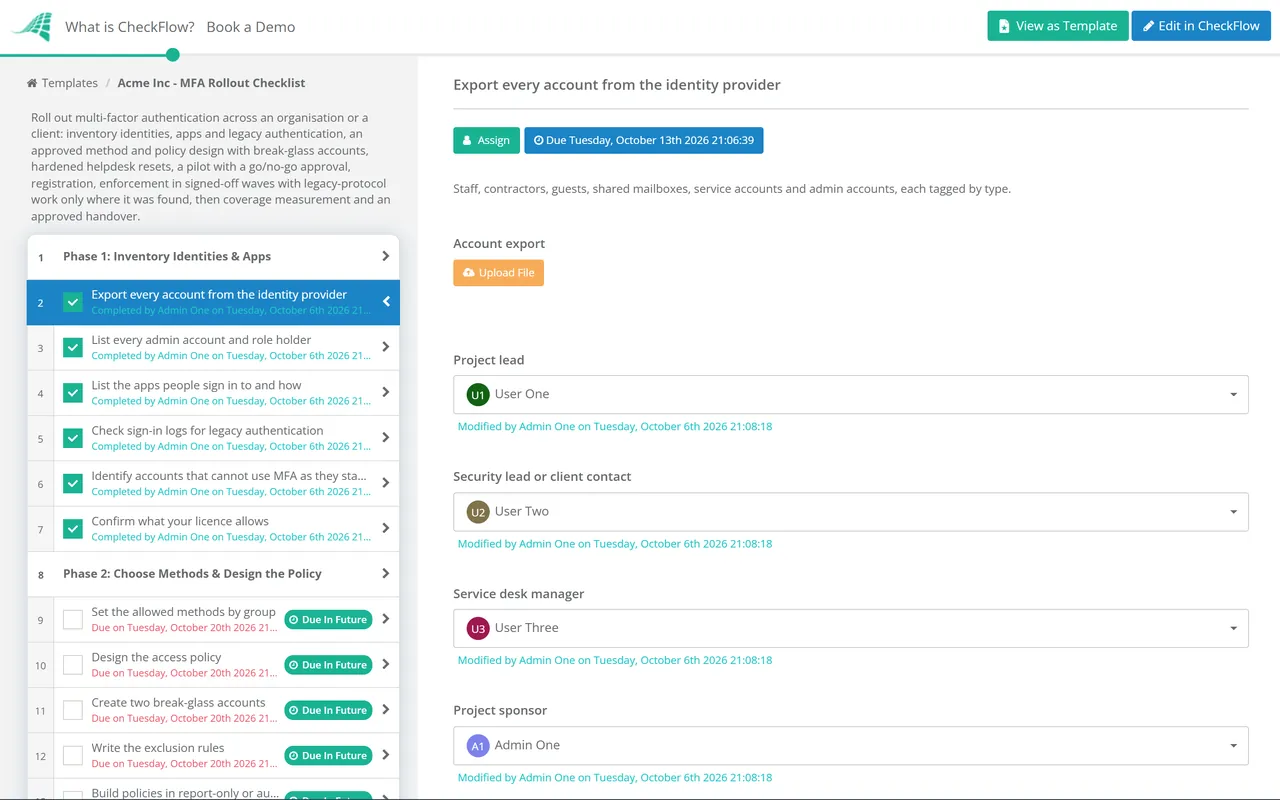
  • Export every account from the identity provider — staff, contractors, guests, shared mailboxes, service accounts and admin accounts, each tagged by type
  • List every admin account and role holder — cloud directory, email, firewall, backup, remote management and finance system admins
  • List the apps people sign in to and how — single sign-on through the identity provider, separate logins, VPN and remote desktop
  • Check sign-in logs for legacy authentication — POP, IMAP, SMTP AUTH, older Office clients and anything else that cannot prompt for a second factor
  • Identify accounts that cannot use MFA as they stand — service accounts, scanners and apps sending mail, shared kiosk logins; record each with an owner
  • Confirm what your licence allows — conditional access, per-app policies and reporting differ between tiers and vendors; attach the summary
Phase 2

Phase 2: Choose Methods & Design the Policy

Policy sign-off is an approval task for the security lead (or, for an MSP, the client’s nominated contact); the rollout halts until it is Approved.

  • Set the allowed methods by group — phishing-resistant for admins, authenticator app with number matching for staff, SMS or voice only by exception
  • Design the access policy — conditional access or the platform’s equivalent: who, which apps, which conditions, and what is blocked outright
  • Create two break-glass accounts — cloud-only, excluded from normal policies, protected by a FIDO2 key or certificate stored securely, with an alert on every sign-in
  • Write the exclusion rules — every exclusion is a named group with an owner, a reason and a review date, never an individual added on request
  • Build policies in report-only or audit mode first — review a week of results to see who would have been blocked before anything is enforced
  • Approve the design — methods, policies, exclusions and break-glass arrangements, with the approval recorded
Phase 3

Phase 3: Harden Helpdesk Resets

Assigned to the service desk manager. These tasks must be complete before Phase 5 opens.

  • Write the identity check for MFA and password resets — call back on a number from the HR record, manager confirmation or a video check with ID, never details the caller supplies
  • Ban resets on the strength of urgency or seniority — attackers impersonate executives and claim to be locked out before a flight
  • Use a time-limited one-time pass for re-registration — such as a temporary access pass, instead of disabling MFA on the account
  • Require a second person to approve resets for admin accounts — recorded against the ticket
  • Log every reset and alert the user by a second channel — an unexpected reset notice is often the first sign of an attack
  • Brief and test the service desk — walk through a social-engineering call script and record who has completed it
Phase 4

Phase 4: Pilot

The go/no-go decision at the end of the pilot is an approval task for the project sponsor.

  • Move IT and every admin to their final method first — admins on phishing-resistant methods before anyone else is enforced
  • Enrol a pilot group from every department and location — include remote staff, shift workers and at least one heavy traveller
  • Test the awkward cases — new phone, lost phone, no smartphone, shared devices, overseas travel and guest access
  • Test break-glass sign-in end to end — and confirm the alert reached the people who should see it
  • Log every problem with a fix or a decision — attach the issue list to this task
  • Approve go or no-go for the wider rollout — with the open issues accepted or resolved
Phase 5

Phase 5: Communicate & Register

  • Send the announcement from a named leader — why it is happening, the dates, what users must do and how to get help
  • Publish short how-to guides — one per method and device, with screenshots from your own sign-in pages
  • Run the registration campaign — in-product prompts to register before enforcement, plus drop-in sessions for those who need help
  • Supply hardware keys or alternatives — for users without a suitable phone, in secure areas or who decline a personal device
  • Track registration by department weekly — chase the stragglers through their line managers before their wave goes live
  • Tell users what a legitimate prompt looks like — and to report, not approve, any prompt they did not start
Phase 6

Phase 6: Enforce in Stages

Each wave needs sign-off from the project lead before the next starts. The legacy-authentication tasks appear only when Phase 1 recorded legacy authentication in use.

  • Enforce wave by wave — one department or site at a time, with the service desk briefed and staffed for the first morning of each
  • Move the remaining legacy clients and apps to modern authentication — update mail clients, scanners and scripts, or replace them
  • Block legacy authentication for everyone — once the sign-in logs show only accounts on the exception register still using it
  • Block sign-in for shared mailbox accounts — people reach them through their own accounts, so they do not need a password of their own
  • Record every exception — account, reason, compensating control such as location or device restrictions, owner and expiry date
  • Confirm the wave — sign-in failures and service desk tickets checked and closed before the next wave begins
Phase 7

Phase 7: Measure & Hand Over

Closure needs approval from the security lead. The handover creates the quarterly review, so the coverage check recurs without a new project.

  • Measure coverage — percentage of users registered and enforced, admins on phishing-resistant methods, and accounts on the exception register
  • Review exceptions with their owners — anything without a current reason is removed or given a new expiry date
  • Add MFA registration to the joiner process — and MFA method removal to the leaver process, so new gaps do not open
  • Set up monitoring for repeated denied prompts and unusual resets — and agree who investigates them
  • Schedule the quarterly coverage review — including a break-glass sign-in test
  • Approve closure — with the coverage figures, exception register and policy export attached

Which Requirements an MFA Rollout Helps You Meet

MFA appears in almost every framework, but the detail differs. The table maps the main references to the phase that produces the evidence. Requirements change, so check each against the current text; this is a starting point, not legal or audit advice.

FrameworkReferenceWhat it expectsEvidenced in
NIST SP 800-63B-4 (2025)AAL2, AAL3; restricted authenticatorsPhishing-resistant authenticators required at AAL3 and offered as an option at AAL2; SMS and voice codes are restricted, needing an alternative and a risk assessmentPhases 2 and 7
CISA fact sheets (October 2022)Phishing-resistant MFA; number matchingMove to FIDO or PKI-based MFA, prioritising high-value accounts; use number matching where push is still usedPhases 2 and 4
PCI DSS v4.0.18.4.1, 8.4.2, 8.4.3MFA for administrative non-console access into the cardholder data environment, for all access into it, and for all remote network access that could reach itPhases 1, 2 and 6
PCI DSS v4.0.18.5.1MFA not open to replay, not bypassable by any user (including admins) without a documented, time-limited exception, using two different factor typesPhases 2 and 6
Cyber Essentials v3.3 (Danzell)User access controlMFA on every cloud service that offers it; from 27 April 2026 a cloud service without it is an automatic failPhases 1 and 7
CIS Controls v8.16.3, 6.4, 6.5MFA for externally exposed applications, for remote network access and for all administrative accessPhases 4 and 6

Two outside pressures often set the timetable. Microsoft now requires MFA to sign in to the Azure portal, the Microsoft Entra and Intune admin centres and the Microsoft 365 admin centre, and since October 2025 has been extending that to Azure command-line tools, PowerShell, SDKs and infrastructure-as-code tools, so any admin or automation account that cannot do MFA will eventually stop working there. As of October 2026, Microsoft’s plan is to disable Basic authentication for SMTP AUTH in Exchange Online by default for existing tenants at the end of December 2026, which is a good deadline for Phase 6’s legacy work.

Cyber insurers also commonly ask about MFA on email, remote access and admin accounts at application and renewal. The coverage figures and exception register from Phase 7 are the honest answer to those questions; the Cyber Insurance Readiness Checklist collects them alongside the other controls insurers ask about.

Why Run Your MFA Rollout in CheckFlow?

1

Exceptions have owners and end dates

Every exception is recorded in a table inside the task, with an owner and an expiry, and the quarterly review that the handover creates walks through them again. The exclusion group cannot quietly grow because each addition is visible against a name.

2

Nothing goes live without sign-off

Policy design, the pilot go/no-go, each enforcement wave and closure are approval steps assigned to a named person. The checklist halts until they approve, so a wave never starts while the last one still has open tickets.

3

The same plan for every client

MSPs start one run per client from the same template. Conditional logic adds the legacy-protocol work only where the inventory found it, and the audit trail shows the client exactly who did what and when.

CheckFlow is not an identity provider or MFA product. It runs the human side of the rollout around those tools: the inventory, the decisions, the communications, the waves and the exceptions. For MSPs running this across a client base, CheckFlow for MSPs shows how one template becomes a repeatable project per client, and the MSP process management guide covers how to standardise that work.

An MFA rollout is often the first project after taking on a client, so it sits naturally after the MSP Client Onboarding Checklist. Once it is live, check admin accounts properly with the Privileged Access Review Checklist, and use the Cyber Essentials Certification Checklist if certification is the reason for the deadline.

Frequently Asked Questions

How do you roll out MFA to an organisation?

+

Start with an inventory of every account and app, including service accounts, shared mailboxes, admin accounts and anything using legacy protocols. Choose methods by risk, with phishing-resistant options for admins. Design the access policy and test it in report-only mode, secure the helpdesk reset process, pilot with IT and a cross-section of staff, run a registration campaign, then enforce in waves. Finish by blocking legacy authentication, recording every exception with an owner and expiry, and handing coverage checks to a recurring review.

What is phishing-resistant MFA?

+

It is MFA that a fake sign-in page cannot capture and replay. FIDO2 security keys, passkeys, Windows Hello for Business and certificate-based or smart card authentication all qualify, because the credential is cryptographically tied to the genuine site. Codes from an app, SMS or a phone call, and push approvals, can all be relayed by an adversary-in-the-middle phishing kit, so they are not phishing-resistant even though they are much better than a password alone.

What is MFA fatigue and how does number matching help?

+

MFA fatigue, or push bombing, is when an attacker who already has a password triggers sign-in after sign-in, sending the user a stream of push prompts until they approve one by mistake or to make it stop. Number matching asks the user to type the number shown on the sign-in screen into the app. The real user can see it; someone being bombed at random cannot, so the attack fails. Train users to deny and report any prompt they did not start.

Should we still allow SMS codes?

+

Only as a fallback for people with no better option, and recorded as an exception. SMS and voice codes can be intercepted or redirected by SIM swapping and number porting, and NIST SP 800-63B-4 classes them as restricted authenticators that need an alternative to be offered. Do not block a user’s only method before they have something to move to.

What about service accounts and shared mailboxes that cannot use MFA?

+

Shared mailboxes do not need their own sign-in: people open them through their own accounts, so block sign-in on the mailbox account itself. Service accounts should move to an option designed for machines, such as managed identities or certificate-based app authentication. Where that is not yet possible, restrict the account to the locations and systems it needs, give it a named owner, and record it on the exception register with a date to fix it.

How long does an MFA rollout take?

+

For a small business with one identity platform, a few weeks from inventory to full enforcement is realistic. Larger organisations with legacy applications, shift workers and many sites often take a few months, mostly spent on legacy clients and people without a suitable phone. The pilot usually shows how long the rest will take.

Is CheckFlow free for this template?

+

14-day free trial, no card required. The Business plan is $10 per user per month after the trial. Full details at checkflow.io/pricing.

Roll Out MFA Without Locking Anyone Out

Free trial — no credit card required.