WCAG 2.2 Accessibility Audit Checklist Template

The accessibility failures that matter stop a real customer: a checkout that traps keyboard focus, a cookie banner that covers the button you just tabbed to, a login form that blocks paste.

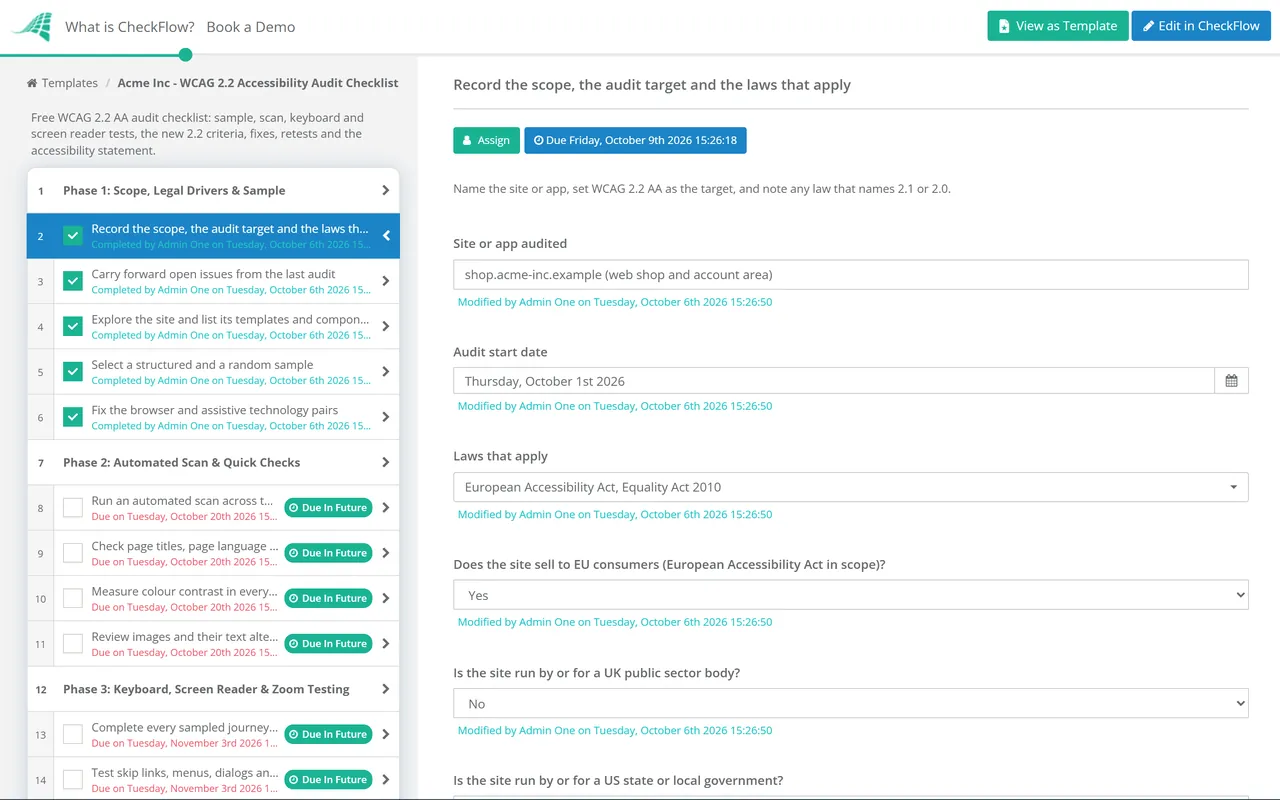
This free WCAG accessibility audit checklist is for the digital, product or compliance lead who owns a website or web app and needs a repeatable audit against WCAG 2.2 Level AA. It follows the W3C evaluation method from scope and sample through scan, keyboard, screen reader and zoom testing, and the new 2.2 criteria. Findings are rated, fixed and retested, and the run ends with an approved accessibility statement. Answers on the first task add the European Accessibility Act, UK public sector and US Title II tasks only where they apply.

Use This Template Free See Live Example
No Credit Card Required

Last reviewed: October 2026

Audit to WCAG 2.2 AA. Record Which Version the Law Names.

WCAG 2.2 became a W3C Recommendation on 5 October 2023 and was updated on 12 December 2024. ISO also publishes it as ISO/IEC 40500:2025. It adds nine success criteria to WCAG 2.1, six of them at Level A or AA, and removes 4.1.1 Parsing. W3C states that content conforming to 2.2 also conforms to 2.1 and 2.0, which makes 2.2 AA the right audit target even where a law names an older version.

Several laws do. The US Title II and HHS Section 504 rules specify WCAG 2.1 AA, Section 508 still points at WCAG 2.0, and the cited version of EN 301 549, the European standard behind the EU directives, uses WCAG 2.1. Record the legal benchmark next to the audit target so the report answers both questions.

Automated scan

Fast, repeatable and partial

What: rule-based checks a tool runs across many pages at once.

Finds: missing alternative text, low contrast, empty links and buttons, unlabelled fields, no page language.

Misses: whether alternative text makes sense, focus order, custom widgets, screen reader output.

Use: on every release, as a regression net.
Manual audit

Sampled, slower and complete

What: a tester checks a defined sample against every A and AA success criterion.

Covers: keyboard, screen reader, zoom, forms, media, documents and complete processes.

Output: findings by criterion and the evidence behind the accessibility statement.

Use: annually, and after a redesign or platform change.

A clean scan is not conformance

W3C’s own guidance on evaluation tools

W3C says plainly that “tools cannot check all accessibility aspects automatically”. A page can pass every automated rule and still be unusable without a mouse. The Phase 2 scan clears the obvious failures so the manual hours in Phases 3 and 4 go on what only a person can find.

What the WCAG Accessibility Audit Checklist Covers

Seven phases follow the WCAG-EM steps from scope to report, then publish the statement and set up the checks that keep the site conformant. Success criterion numbers are from WCAG 2.2.

Phase 1

Phase 1: Scope, Legal Drivers & Sample

The answers on the first task decide whether the document task in Phase 5 and the EU, UK and Title II tasks in Phase 7 appear.

  • Record the scope, the audit target and the laws that apply — name the site or app, set WCAG 2.2 AA as the target, and note any law that names 2.1 or 2.0
  • Carry forward open issues from the last audit — and the known failures listed in the current accessibility statement
  • Explore the site and list its templates and components — page types, shared navigation, forms and dialogs, and the journeys users come to complete
  • Select a structured and a random sample — every template, each complete process end to end, plus random pages as a cross-check
  • Fix the browser and assistive technology pairs — for example NVDA with Firefox or Chrome, VoiceOver with Safari on macOS and iOS, TalkBack with Chrome on Android
Phase 2

Phase 2: Automated Scan & Quick Checks

Automated rules cover only part of WCAG. A clean scan is where manual testing starts, not a result.

  • Run an automated scan across the sample — include a wider crawl, drop false positives and group repeats caused by one shared component
  • Check page titles, page language and heading structure — descriptive titles (2.4.2), a declared language (3.1.1), headings that match the content (1.3.1)
  • Measure colour contrast in every state — 4.5:1 for text, 3:1 for large text (1.4.3); 3:1 for control borders, focus indicators and icons (1.4.11)
  • Review images and their text alternatives — alternatives serve the same purpose (1.1.1); decorative images are hidden from screen readers
Phase 3

Phase 3: Keyboard, Screen Reader & Zoom Testing

  • Complete every sampled journey by keyboard alone — all functions operable (2.1.1), no keyboard traps (2.1.2), a logical focus order (2.4.3) and visible focus (2.4.7)
  • Test skip links, menus, dialogs and custom widgets — bypass blocks (2.4.1), focus into and out of dialogs, name, role and state exposed (4.1.2)
  • Run each journey with a screen reader — headings, landmarks, link purpose (2.4.4), and labels and instructions announced (3.3.2)
  • Check error handling and status messages — errors described in text (3.3.1) with a suggested fix (3.3.3); status messages announced (4.1.3)
  • Zoom to 400% and resize text to 200% — content reflows at 320 CSS pixels without two-way scrolling (1.4.10) and nothing is lost (1.4.4)
  • Apply text-spacing overrides and rotate the device — no clipped text (1.4.12), and no lock to portrait or landscape (1.3.4)
Phase 4

Phase 4: The New WCAG 2.2 Criteria

Six of the nine new criteria are Level A or AA. The other three (2.4.12, 2.4.13 and 3.3.9) are AAA and sit outside an AA audit.

  • Check that sticky content never hides the focused element (2.4.11) — cookie banners, sticky headers and chat launchers must not cover it entirely
  • Find every drag interaction (2.5.7) — sliders, sortable lists and maps need a single-pointer alternative
  • Measure small pointer targets (2.5.8) — at least 24 by 24 CSS pixels or enough spacing; links inside a sentence are exempt
  • Confirm help appears in a consistent place (3.2.6) — contact details, chat or help links in the same relative order on every page
  • Walk multi-step forms for redundant entry (3.3.7) — details already given are filled in or selectable, unless re-entry is essential or for security
  • Test sign-in and verification steps (3.3.8) — paste and password managers allowed; a test such as solving a puzzle needs an alternative or help
Phase 5

Phase 5: Documents, Media & Third-Party Content

The document task appears only when PDFs or other documents are in scope.

  • Test the in-scope PDFs and office documents — tags, reading order, headings, text alternatives, form fields and document language
  • Check prerecorded video and audio — captions (1.2.2), audio description for video (1.2.5), and a transcript for audio-only content (1.2.1)
  • Check live and moving content — captions for live audio (1.2.4), and a way to pause, stop or hide moving or auto-updating content (2.2.2)
  • Review third-party components — booking, payment, chat and map widgets; ask suppliers for a conformance report and test what you can
  • Record each exception the law allows — such as archived pages or third-party content you do not control, citing the provision
Phase 6

Phase 6: Findings, Remediation & Retest

When the first task records at least one failure, the three remediation and retest tasks appear.

  • Log each failure against its success criterion — page, component, steps to reproduce, who is affected and a suggested fix
  • Rate every finding by its effect on users — a blocker that stops a task outranks many minor failures on a rarely used page
  • Fix shared components first — one fix to a template or component clears the failure on every page using it
  • Agree an owner and a target date for each finding — and document any disproportionate burden assessment with the reasoning behind it
  • Retest each fix the way it was found — same page, browser, assistive technology and steps; close only on a pass
  • Write the audit report — scope, sample, method, tools, result per criterion and date: the evidence behind the statement
Phase 7

Phase 7: Accessibility Statement & Ongoing Checks

The EU, UK and Title II tasks appear only when the matching scope answer on the first task is Yes. The approver named in Phase 1 signs off the statement.

  • Update the accessibility statement — conformance status, known failures and alternatives, the audit date and a way to report problems
  • Publish the EAA service information (Annex V) — in the terms and conditions or equivalent, explaining how the service meets the requirements
  • Follow the UK model accessibility statement — with the contact form and enforcement procedure link that regulation 8 requires, kept under regular review
  • Record the Title II compliance date and any exceptions relied on — 26 April 2027 or 2028 by population and entity type; WCAG 2.1 AA is the legal benchmark
  • Approve and publish the statement — the named approver signs off and the publication date is recorded
  • Add accessibility checks to the release process — scans and keyboard checks on changed templates, and a quarterly check of key journeys

Which Law Names Which WCAG Version

The audit target stays the same. What changes between regimes is the benchmark a regulator or court would apply, the dates, and what you must publish. Treat the table as a starting point, not legal advice.

Law or standard Who it covers Technical benchmark Key dates Evidenced in
WCAG 2.2 (W3C; ISO/IEC 40500:2025)Any website or web app; the audit targetLevel A and AA success criteriaRecommendation 5 October 2023; updated 12 December 2024Phases 1–6
European Accessibility Act, Directive (EU) 2019/882Services to consumers, including e-commerce and consumer banking (Art. 2(2)); microenterprises providing services are exempt (Art. 4(5))Annex I requirements; EN 301 549 V4.1.1 (WCAG 2.2) once cited in the Official JournalApplied from 28 June 2025; transitional period to 28 June 2030 for products already used to provide a service (Art. 32)Phases 5–7
Web Accessibility Directive (EU) 2016/2102EU public sector bodiesEN 301 549 V3.2.1 (WCAG 2.1 AA), cited by Implementing Decision (EU) 2021/1339V3.2.1 cited August 2021Phase 7
UK Public Sector Bodies Accessibility Regulations 2018UK public sector bodiesWCAG 2.2 AA, per GOV.UK guidanceGDS monitoring the 2.2 criteria since October 2024; statement under regulation 8Phase 7
Equality Act 2010, sections 20 and 29UK service providers, public and privateNo named standard; a duty to make reasonable adjustmentsContinuing dutyPhases 6 and 7
ADA Title II, 28 CFR 35.200US state and local governmentsWCAG 2.1 A and AA26 April 2027 (population 50,000 or more); 26 April 2028 (under 50,000, and special district governments)Phases 5 and 7
Section 504 (HHS), 45 CFR 84.84Recipients of HHS federal financial assistanceWCAG 2.1 A and AA11 May 2027 (15 or more employees); 10 May 2028 (fewer than 15)Phase 7
Section 508, 36 CFR part 1194US federal agencies’ ICTWCAG 2.0 A and AA (E205.4)In effect since 18 January 2018Phase 1
ADA Title IIIUS businesses open to the publicNo regulation names a WCAG versionNone setPhase 1

Three things were moving at the time of review. ETSI, CEN and CENELEC published EN 301 549 V4.1.1 on 2 September 2026, but it gives a presumption of conformity only once cited in the Official Journal, which had not happened. The Justice Department moved the Title II dates back a year by interim final rule on 20 April 2026 and plans a further review of the rule; HHS did the same for Section 504 in May 2026. WCAG 3.0 is an incomplete draft that W3C does not expect to finish for a few more years. None of this changes how you audit. This page is not legal advice.

Why Run Your Accessibility Audit in CheckFlow?

1

A full audit yearly, spot checks between

A recurring schedule starts this checklist every year and a shorter regression run every quarter. Due dates count from the audit start, and retests from each finding’s target date.

2

Only the law that applies to you

Conditional logic shows the EAA, UK public sector and Title II tasks and the document test only where the scope answers call for them. The findings answer opens the remediation tasks.

3

Evidence behind every claim

Scan exports, screenshots and screen reader notes sit on the task they support, beside the findings table. The statement runs as an approval for the person named in Phase 1, and the activity trail shows who tested what and when.

CheckFlow is not an accessibility scanner, an overlay or a certification body, and it does not test your pages. It runs the audit around the tools and testers you already use and keeps the dated record. CheckFlow’s compliance checklist software shows how the same schedules, evidence and approvals work across your other compliance reviews.

If the same review covers the cookie banner and privacy notice, run the Website Privacy & Cookie Compliance Checklist alongside this one: the banner is often the element that hides keyboard focus. For pre-release testing, add the Phase 3 keyboard checks to the QA Testing Checklist so new templates arrive accessible.

Frequently Asked Questions

Should we audit against WCAG 2.1 or WCAG 2.2?

+

Audit against WCAG 2.2 Level AA. W3C states that content conforming to 2.2 also conforms to 2.1 and 2.0, so one audit covers a law that names either. Note in the report that 4.1.1 Parsing, removed in 2.2, may still be tested by someone assessing against 2.1.

When do US state and local government websites have to meet WCAG 2.1 AA?

+

Under 28 CFR 35.200 as amended by the Justice Department’s interim final rule of 20 April 2026: from 26 April 2027 for public entities with a total population of 50,000 or more, and from 26 April 2028 for smaller entities and all special district governments. The original dates were 24 April 2026 and 26 April 2027. The technical standard did not change, and the department has said it will review the rule further.

Does the European Accessibility Act apply to our website?

+

It applies to listed services provided to consumers after 28 June 2025, including e-commerce, so a site selling to EU consumers is likely in scope. Microenterprises providing services, meaning fewer than 10 staff and annual turnover or balance sheet total of no more than €2 million, are exempt. Services provided only to businesses are outside its scope. National laws transpose the Directive, so confirm the detail for the countries you sell into.

How often should a website accessibility audit be done?

+

Once a year is a common baseline, plus a fresh audit after a redesign or a new platform. Between audits, scan each release and check key journeys quarterly. The UK regulations require the statement to be kept under regular review, and the EAA requires procedures that keep a service conformant as it changes.

Can an automated accessibility checker prove WCAG conformance?

+

No. Automated tools reliably catch some failures, such as missing alternative text or low contrast, but W3C notes that human judgement is needed for the rest. Focus order, custom widgets with a screen reader and the meaning of alternative text all need a person.

What changed between WCAG 2.1 and WCAG 2.2?

+

Nine success criteria were added. Six count in an AA audit: Focus Not Obscured (Minimum), Dragging Movements, Target Size (Minimum) and Accessible Authentication (Minimum) at AA, and Consistent Help and Redundant Entry at A. Focus Not Obscured (Enhanced), Focus Appearance and Accessible Authentication (Enhanced) are AAA. 4.1.1 Parsing was removed as obsolete.

Is CheckFlow free for this template?

+

14-day free trial, no card required. The Business plan is $10 per user per month after the trial. Full details at checkflow.io/pricing.

Every Journey Tested, Every Fix Retested

Free trial — no credit card required.