Nearly 60% of marketing campaigns miss their objectives. The reason is almost never the strategy — it is the details.
A broken tracking pixel. A landing page that does not render on mobile. A UTM parameter with a typo that splits your attribution data into two useless segments. An ad approved by the creative team but not reviewed by legal. A campaign that launches on schedule but measures nothing correctly for the first three days. Every one of these is preventable — and every one of them has happened, to every marketing team that has ever launched a campaign without a structured pre-launch checklist. This free campaign launch checklist gives marketing managers, campaign managers, and creative teams a structured framework covering every phase of a campaign — from strategy and audience definition through to creative production, channel setup, tracking verification, legal review, pre-launch QA, go-live, and post-launch optimisation.
Why Campaigns Fail at the Details, Not the Strategy
Most campaign post-mortems identify the same root cause: execution gaps that a checklist would have caught. The ad was compelling, the offer was right, and the audience was well-defined — but the confirmation email went to a broken address, the Facebook Pixel was not firing on the thank-you page, and the mobile version of the landing page had a form that would not submit. The campaign ran, spent the budget, and generated data that was wrong from day one.
The solution is not a longer planning process or a bigger team. It is a structured pre-launch checklist that assigns every technical, legal, and creative verification task to a named person with a deadline — and that prevents the campaign from going live until every critical check is marked complete. A campaign that launches two days later than planned but tracks correctly from go-live is worth significantly more than one that launches on time and measures nothing.
What the Campaign Launch Checklist Covers
This checklist covers nine phases that take a campaign from initial brief to post-launch optimisation — with a structured pre-launch QA phase designed to catch every technical, creative, and compliance issue before a single pound or dollar of budget is spent.
Phase 1
Strategy & Campaign Brief
Every campaign decision that follows — audience, messaging, channels, budget — flows from the brief. A vague brief produces vague campaigns. Define this phase clearly before any creative work begins.
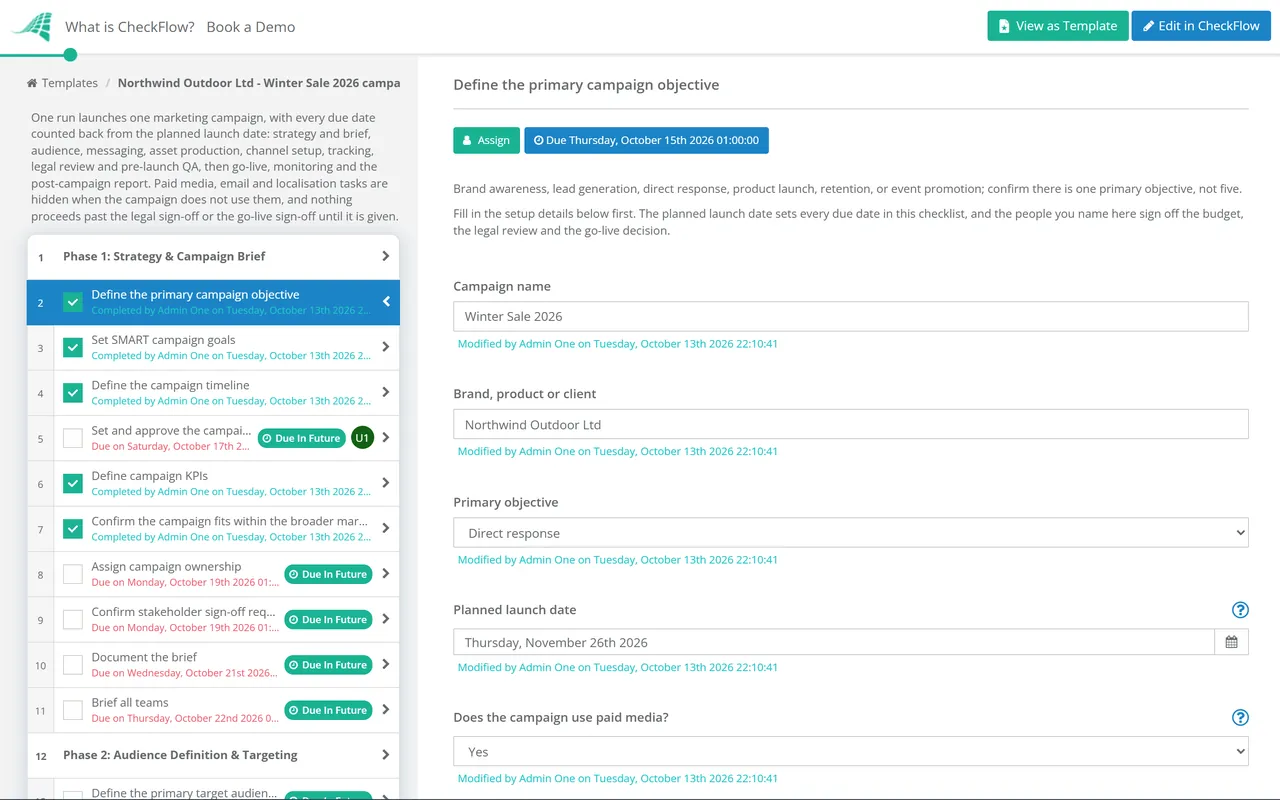
Define the primary campaign objective — brand awareness, lead generation, direct response, product launch, retention, or event promotion; confirm there is one primary objective, not five
Set SMART campaign goals — specific, measurable, achievable, relevant, and time-bound; document what success looks like in concrete numbers
Define the campaign timeline — start date, end date, key milestone dates, content delivery deadlines, and paid spend ramp dates
Set and approve the campaign budget — allocated by channel, by expense type (creative, tools, paid media, production), with documented approval from the relevant decision-maker
Define campaign KPIs — the specific metrics that will determine whether the campaign met its objectives
Confirm the campaign fits within the broader marketing calendar — check for conflicting campaigns, seasonal factors, and business events during the campaign window
Assign campaign ownership — one named campaign manager responsible for overall delivery, with clear roles for each contributing team member
Confirm stakeholder sign-off requirements — who needs to approve the brief, the creative, the budget, and the go-live decision
Document the brief — confirm a written campaign brief exists, has been reviewed by all relevant stakeholders, and is the single source of truth for the campaign team
Brief all teams — confirm creative, content, paid media, email, social, analytics, and legal all have the brief and understand their responsibilities
Phase 2
Audience Definition & Targeting
Define the primary target audience — demographics, psychographics, behaviours, and the specific problem or need the campaign addresses
Define any secondary audiences — and confirm whether messaging and creative will be differentiated by segment
Confirm audience size estimates for paid channels — verify the audience is large enough to deliver results at the planned budget, and not so broad that targeting becomes meaningless
Define exclusions — existing customers, recent converters, or audience segments that should not see this campaign
Confirm remarketing audiences are set up where relevant — pixel-based, email-based, or CRM-based retargeting lists are populated and ready
Validate audience data — confirm any CRM or first-party audience data being used is accurate, compliant with data protection law, and correctly formatted for upload
Define the customer journey for this campaign — the path from first exposure to the desired action, and what happens at each stage
Confirm competitor and market context — are competitors running similar campaigns? Is there any timing or positioning conflict?
Phase 3
Messaging & Creative Brief
Define the core campaign message — the single, clear proposition the campaign communicates; confirm it is differentiated, relevant, and aligned to the target audience’s needs
Develop the campaign creative brief — covering objective, audience, message, tone, mandatories, deliverables, and timelines
Confirm the brief has been approved by the campaign owner and relevant stakeholders before creative work begins
Define the required creative deliverables — every asset needed for every channel: social ad sizes, display banner sizes, email header, landing page hero, video lengths, copy variations, etc.
Confirm creative meets brand guidelines — colours, typography, logo usage, and tone of voice are consistent with the brand standards
Confirm the campaign has a clear, consistent call to action across all creative executions and channels
Define the approval process for creative — who reviews, who has final sign-off, and what the turnaround expectation is
Confirm accessibility requirements are met — alt text for images, captions for video, colour contrast for display ads, and any relevant WCAG compliance
Phase 4
Content & Asset Production
Confirm all creative assets are produced to the correct specifications — file format, dimensions, file size limits, and any platform-specific requirements
Confirm all copy is written, reviewed, and approved — headlines, body copy, CTAs, email subject lines, and ad copy for every variant
Confirm all video assets meet platform requirements — length, aspect ratio, caption requirements, and any platform content policies
Confirm landing page content is complete — headline, body, social proof, CTA, and any supporting content consistent with ad messaging
Confirm all assets have been reviewed against brand guidelines and the creative brief
Obtain final creative approval from the campaign owner — confirm every asset is signed off before channel setup begins
Confirm assets are stored in the correct location and accessible to all channel managers
Confirm A/B test variants are prepared where applicable — headlines, imagery, CTAs, or audience segments to be tested
Confirm localisation or translation is complete where the campaign runs across multiple markets or languages
Archive all source files in the brand asset library for future use
Phase 5
Channel Setup & Configuration
Set up all paid media campaigns — Google Ads, Meta, LinkedIn, or other relevant platforms; confirm campaign structure, ad sets, audiences, and bidding strategy
Upload all creative assets to each platform — confirm assets meet each platform’s format and content policies
Set up the email campaign — template, content, subject line, send time, and segmentation; confirm test sends to seed addresses have been reviewed
Configure social media posts — organic content scheduled for the campaign window with correct copy, assets, and posting times
Set up the landing page — confirm it is live (or staged for launch), correctly linked from all traffic sources, and functioning correctly on all devices
Configure the lead capture or conversion mechanism — form, checkout, sign-up, or download; confirm it works end-to-end
Set campaign budgets, bid strategies, and scheduling in all paid platforms — confirm start and end dates are correct
Confirm all campaign elements are in DRAFT or PAUSED status — nothing should go live until the QA phase is complete
Set up audience lists and targeting in each platform — confirm exclusions are applied
Confirm all channel managers have reviewed their setups independently before QA
Phase 6
Tracking & Analytics Setup
Tracking is the most commonly skipped pre-launch step and the most expensive mistake. A campaign that launches without verified tracking spends budget generating data you cannot trust or act on.
Confirm UTM parameters are applied to all campaign URLs — consistently structured, correctly spelled, and documented in a UTM tracking sheet
Verify UTM parameters are passing through correctly to the analytics platform — test each URL and confirm source, medium, campaign, and content are captured correctly
Verify conversion tracking is firing — test the conversion event (form submission, purchase, sign-up) and confirm it is recording correctly in every relevant platform (Google Ads, Meta, GA4)
Verify the tracking pixel or tag is correctly installed on the landing page and any other relevant pages
Confirm GA4 (or equivalent) is capturing sessions, events, and goals correctly for the campaign landing page
Set up campaign performance dashboards — confirm the team can monitor live campaign performance from day one
Confirm remarketing pixels are populating the correct audiences
Confirm any CRM or marketing automation integrations are correctly passing lead or conversion data
Test the full customer journey with tracking — from ad click to conversion; confirm every step is captured
Document the tracking setup — confirm all parameters, pixels, and tags are recorded for future reference
Phase 7
Legal, Compliance & Risk Review
Confirm all claims in ad copy and landing page content are accurate and substantiated — no superlatives, statistics, or promises that cannot be verified
Confirm required legal disclosures are present — terms and conditions, pricing disclaimers, competition rules, financial promotions disclaimers, or any other applicable mandatory disclosures
Confirm the campaign complies with platform-specific advertising policies — Google, Meta, LinkedIn, and any other platforms; flag any content that may trigger a policy review
Confirm data collection complies with applicable privacy law — consent mechanisms are in place for email capture, cookie consent is functioning, and any data transfer to third parties is compliant with GDPR / CCPA or equivalent
Confirm trademark and copyright compliance — all images, video, and music are licensed for commercial use in all markets where the campaign will run
Confirm any regulated industry requirements — financial promotions, healthcare claims, alcohol advertising, or other sector-specific content rules
Obtain legal or compliance sign-off — confirm the approval is documented and the campaign cannot go live without it
Confirm the campaign has a contingency plan — what happens if a platform disapproves an ad, a tracking issue is discovered post-launch, or the campaign needs to be paused urgently
Phase 8
Pre-Launch Quality Assurance
QA is not a nice-to-have — it is the phase that earns the right to launch. Run every check on a staging or preview version before anything goes live.
Review every ad unit in preview — confirm copy, creative, CTA, and URL are correct for every variant in every placement
Test the landing page on desktop, tablet, and mobile — confirm layout, load speed, form functionality, and CTA are correct on all devices and major browsers
Test the full conversion path — click the ad, arrive on the landing page, complete the form or purchase; confirm every step works as expected
Test the email campaign — send to seed addresses on multiple email clients and devices; confirm subject line, preheader, layout, images, links, and unsubscribe function correctly
Verify all links are correct and working — no broken links, no links pointing to the wrong page, no links missing UTM parameters
Re-verify tracking is firing correctly — do not rely on the setup check alone; confirm tracking is live on the production environment
Review all campaign targeting settings one final time — audience, exclusions, geography, schedule, budget, and bid strategy
Confirm all assets are approved and nothing is pending review in any platform
Obtain final go-live sign-off from the campaign owner — confirm this is documented and the campaign does not launch without it
Set a launch time and confirm who will activate the campaign and who will monitor it in the first hour
Phase 9
Launch, Monitoring & Post-Launch Optimisation
Activate all campaign elements — ads, email send, social posts, and any other scheduled campaign activity
Monitor closely in the first 24–48 hours — check for tracking issues, platform disapprovals, technical errors, and early performance anomalies
Confirm all tracking is firing correctly post-launch — verify in real-time reporting that data is being captured
Send internal launch notification — confirm all relevant stakeholders know the campaign is live
Complete a 24-hour performance review — confirm delivery, CTR, and conversion data are within expected ranges; flag any significant anomalies
Optimise based on early data — pause underperforming ad variants, adjust bidding if CPCs or CPMs are outside target ranges, and reallocate budget to top performers
Complete a weekly performance review throughout the campaign — document findings and optimisation actions taken
Monitor for audience fatigue — track frequency in paid channels and refresh creative if engagement begins to decline
Document all optimisation decisions and their rationale — this becomes the basis for the post-campaign review
Complete the post-campaign report — performance against KPIs, key learnings, recommendations for future campaigns, and any assets or audiences to carry forward
This checklist is available as a free, runnable template in CheckFlow — with tasks assigned across creative, paid media, email, legal, and analytics teams, the pre-launch QA phase enforced before go-live is possible, and every campaign run from the same structured process.
Pre-launch QA is the phase that earns the right to launch. It is also the phase most frequently compressed, rushed, or skipped entirely when deadlines are tight — which is precisely when it matters most. The details that QA catches are not edge cases: they are the broken tracking links, the form that will not submit on iOS, the email that renders as a broken image in Outlook, and the ad that links to last quarter’s landing page because someone copied the wrong URL.
Common pre-launch failures that structured QA prevents:
UTM parameters missing or misspelled — splitting attribution data and making campaign reporting unreliable from day one
Conversion tracking not firing on the thank-you or confirmation page — spending the full budget with no conversion data
Landing page form not submitting on mobile — losing the majority of traffic for campaigns where most users are on a phone
CheckFlow’s enforced task order ensures the pre-launch QA phase cannot be bypassed — the campaign cannot advance to go-live until every QA task is marked complete.
Why Run Campaign Launches in CheckFlow?
1
The same rigorous process for every campaign
Without a checklist, campaign quality depends on who is running it and how much time they have. A campaign launched in a busy quarter gets less QA than one launched in a quiet one. CheckFlow runs the same nine-phase process for every campaign — the same pre-launch checks, the same tracking verification, the same legal review — regardless of team capacity or deadline pressure.

2
Coordinate across every team simultaneously
Campaign launches involve creative, copy, paid media, email, social, analytics, and legal — often all at once, all with different deadlines and dependencies. CheckFlow assigns tasks to the right team member automatically, notifies them when their deadline is approaching, and gives the campaign manager a live view of what is complete and what is still outstanding across every function.
3
Build a launch history that improves future campaigns
Every completed campaign checklist is archived in CheckFlow with a timestamped record of what was done, when, and by whom. Post-campaign reviews become more useful because the full launch record is there — not reconstructed from memory or email chains. Over time, campaign launches get faster and more reliable as the checklist improves based on actual experience.
If your team runs campaigns on a regular schedule — monthly email campaigns, quarterly product promotions, seasonal launches — CheckFlow’s recurring checklist feature can schedule the campaign launch checklist automatically so nothing is missed and no campaign starts without a structured process. Learn more about recurring checklists in CheckFlow →
Marketing agencies running campaign launches for multiple clients simultaneously use CheckFlow to manage the same structured process across every account — with the campaign manager seeing every active campaign’s status in one grid view, without clicking into each account separately. See how CheckFlow handles multi-client process management →
A comprehensive campaign launch checklist should cover nine phases: strategy and campaign brief (objective, goals, timeline, budget, and KPIs), audience definition and targeting (primary and secondary audiences, exclusions, and remarketing setup), messaging and creative brief (core message, deliverables, and approval process), content and asset production (all creative assets produced, approved, and stored correctly), channel setup (paid media, email, social, and landing page configured and in draft status), tracking and analytics (UTM parameters, conversion tracking, and analytics verification), legal and compliance review (claims substantiation, disclosures, and data privacy), pre-launch QA (end-to-end testing of every campaign element on all devices), and launch and optimisation (go-live, monitoring, and post-launch reporting).
Why do marketing campaigns miss their objectives?
+
Research consistently shows that campaign failures are more often execution failures than strategy failures. Nearly 60% of campaigns miss their stated objectives, and the most common causes are: tracking not set up correctly (meaning campaign data cannot be trusted or acted upon), technical failures on the landing page or conversion path (meaning budget is spent but conversions are lost), compliance issues discovered post-launch (requiring campaign pausing and rework), and inconsistent execution across channels (different messaging, broken links, or missing assets). All of these are preventable with a structured pre-launch checklist that enforces quality checks before a single penny of budget is spent.
How far in advance should campaign launch preparation begin?
+
For most campaigns, pre-launch preparation should begin at least two to four weeks before the intended go-live date — longer for complex, multi-channel campaigns involving significant creative production, regulatory review, or technical build. The most common timeline mistake is underestimating how long legal and compliance review takes, or how long ad platform approval can take for certain ad formats. A campaign brief that is only finalised a week before launch almost always results in compressed QA — which is where most preventable failures occur.
How do you coordinate a campaign launch across multiple teams?
+
The most reliable approach is to run the campaign launch from a structured checklist with tasks assigned to specific individuals or teams — rather than managing coordination through meetings and email threads. Each team (creative, paid media, email, legal, analytics) works through their assigned tasks independently, and the campaign manager has a live view of what is complete across all functions without needing to chase for status updates. CheckFlow’s auto-assignment and real-time dashboard are designed specifically for this kind of multi-team, deadline-driven process.
What is the most important pre-launch check for a digital campaign?
+
Tracking verification is the most important and most commonly skipped pre-launch check. A campaign with incorrect or missing tracking spends its full budget generating data that cannot be trusted or acted upon — and the mistake is only discovered when the post-campaign report reveals anomalies that cannot be explained. Conversion tracking, UTM parameter consistency, and end-to-end conversion path testing should be completed on the production environment before any paid spend is activated — not assumed to be working because it worked on the previous campaign.
Is CheckFlow free to use for this template?
+
You can start a free 14-day trial with no credit card required, giving you full access to all features including this template. The Business plan is $10 per user per month after the trial. Full details at checkflow.io/pricing.
Launch Campaigns That Are Ready, Not Rushed
Free trial — no credit card required.
Do you like cookies? 🍪 We use cookies to ensure you get the best experience on our website. Learn more