An email cannot be unpublished. Once it goes, a wrong price, a dead link or a segment that quietly includes last year’s unsubscribes lands in every inbox at once, and the only fix is an apology email.
This free email campaign QA checklist runs once for every send, whether it is the weekly newsletter or a product announcement to the whole list. It covers the segment and suppressions, the consent basis, copy and footer proof, rendering and links, sender authentication, a sign-off that stops the send when it is refused, and the first two days afterwards. It is the check that sits inside a campaign, not the campaign plan itself: the brief, budget and channel mix belong in the Campaign Launch Checklist.
Mistakes ship as copies. A typo on a web page takes a minute to fix. An email arrives as a separate copy in every inbox, so the checking has to happen before the button is pressed. The errors that get through are rarely exotic: a merge tag that prints “Hi {first_name}”, a discount code that expired yesterday, a link tagged with a different campaign name from the rest, or a segment rebuilt from last month’s filter.
Your reputation is shared across sends. Mailbox providers judge a sending domain on its history, not on one message. Gmail asks every sender to keep the spam rate shown in Postmaster Tools below 0.3% and advises staying under 0.1%, so one badly targeted send can undo months of good ones. Gmail has required sender authentication since February 2024 and began ramping up enforcement in November 2025, including temporary and permanent rejections of mail that falls short. Yahoo and Microsoft’s Outlook.com apply similar rules to high-volume senders.
The law follows the reader, not the sender. A US list and a UK list need different checks, and many lists hold both. The comparison below summarises the main rules the checklist turns into tasks. It is a QA aid, not legal advice: the consent phase ends by referring anything uncertain to your own data protection officer or counsel before the send is approved.
Split the roles. The person who builds the email runs most of the checks, a second person proofs the copy, and a named approver signs off. Agencies usually make the client the approver. The split matters because the builder has read the copy so often they no longer see it.
United States
CAN-SPAM Act
Basis: no prior consent is needed for commercial email, but every recipient must be able to opt out.
In every message: accurate header and From details, a subject that does not mislead, identification as an advertisement, and a valid physical postal address.
Opt-outs: the mechanism must work for at least 30 days after the send, and requests must be honoured within 10 business days. You stay liable if a vendor sends for you.
Penalty: up to $53,088 for each email in breach.
United Kingdom
PECR, as amended by the DUAA
Basis: consent for marketing email to individuals and sole traders, unless the soft opt-in applies: existing customers, similar products, an opt-out offered at collection and in every message.
Companies: corporate addresses can be emailed without consent, but the ICO recommends keeping a do-not-email list.
Changed in 2026: the Data (Use and Access) Act 2025 changes took effect on 5 February 2026 and added a soft opt-in for charitable purposes.
Penalty: raised from £500,000 to up to £17.5 million or 4% of global turnover.
What the Email Campaign QA Checklist Covers
Seven phases for every send. Two of them appear only when the scope answers in Phase 1 say they apply.
Phase 1
Phase 1: Brief, Audience & Scope
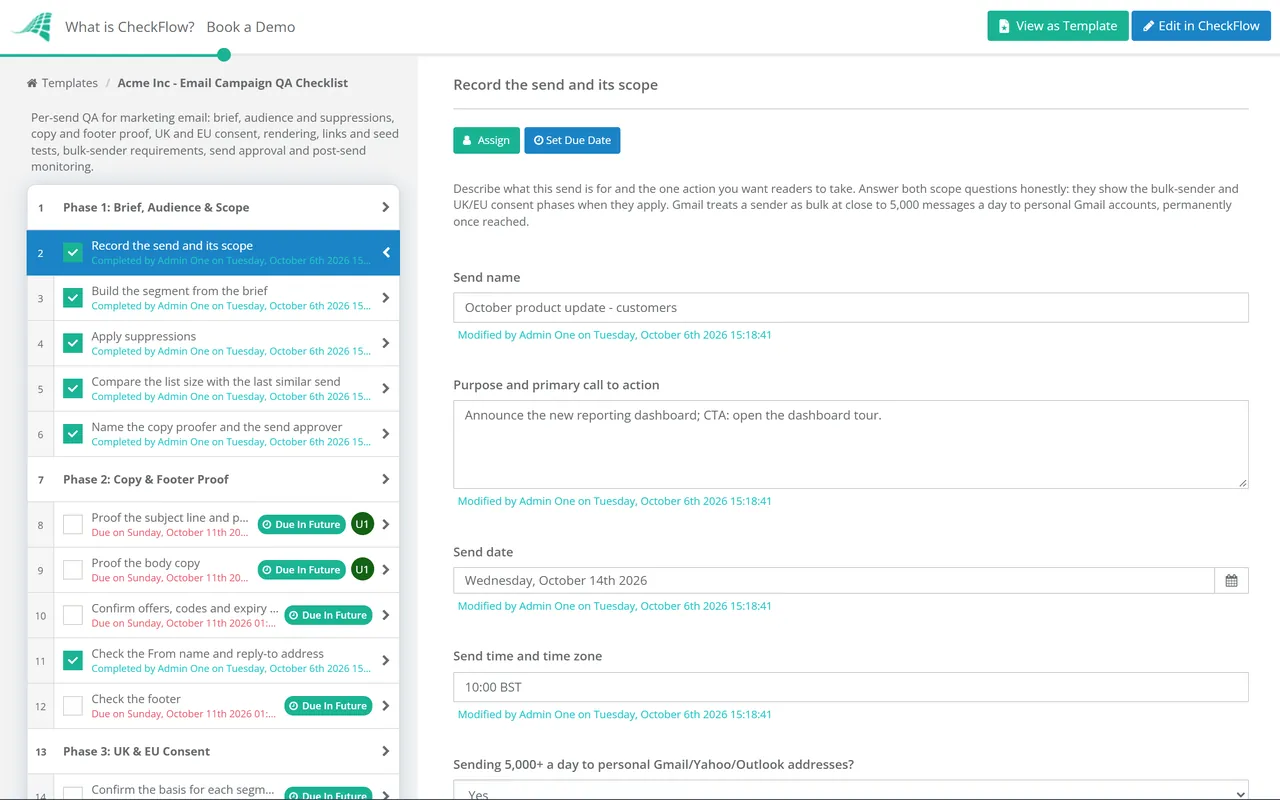
Record the send and its scope — purpose, primary call to action, send date and time zone, daily volume and recipient countries
Build the segment from the brief — check the filter logic, not just the count
Apply suppressions — unsubscribes, hard bounces, spam complaints and anyone the brief excludes
Compare the list size with the last similar send — a sudden jump usually means a broken filter
Name the copy proofer and the send approver
Phase 2
Phase 2: Copy & Footer Proof
Proof the subject line and preheader — spelling, how they truncate on a phone, and no promise the email does not keep
Proof the body copy — names, prices, dates and the fallback text for every merge tag
Confirm offers, codes and expiry dates with the person who owns the offer
Check the From name and reply-to address — recognisable, accurate and monitored
Check the footer — a valid postal address and a visible unsubscribe link that works
Phase 3 — Conditional
Phase 3: UK & EU Consent
Shown when the send includes recipients in the UK or the EU.
Confirm the basis for each segment — recorded consent or the soft opt-in for existing customers
Check soft opt-in segments only promote similar products or services — and that an opt-out was offered when the address was collected
Separate individuals and sole traders from corporate addresses on B2B lists
Refer open questions to your DPO or counsel — and record the answer before approval
Phase 4
Phase 4: Rendering, Links & Seed Tests
Render in the clients your list uses — Outlook desktop, Gmail, Apple Mail, the mobile apps and dark mode
Test with images turned off — every image has alt text and the message still makes sense
Click every link — right destination, no errors, and UTM tags that follow your naming convention
Preview personalisation and dynamic blocks with a test contact from each segment
Send seed tests — check inbox or spam placement and that Gmail does not clip the message
Check the sending domain’s spam rate in Postmaster Tools — below 0.3%, ideally under 0.1%
Phase 5 — Conditional
Phase 5: Bulk-Sender Requirements
Shown when you send around 5,000 or more messages a day to personal Gmail, Yahoo or Outlook.com addresses.
Confirm SPF and DKIM both pass in a seed message’s headers
Confirm DMARC is published and passing — p=none at minimum, with the From domain aligned
Check the one-click unsubscribe headers — List-Unsubscribe with an HTTPS address, plus List-Unsubscribe-Post
Check how fast unsubscribes are processed — Gmail recommends 48 hours, Yahoo asks for two days
Phase 6
Phase 6: Send Approval
Upload the final proof and seed test screenshots
Confirm the segment, send time and time zone in the email platform
Approve the send — Approved or Not approved; Not approved halts the checklist
Schedule the send and record the campaign ID
Phase 7
Phase 7: Post-Send Monitoring
Check the send in its first hour — delivered count, early bounces and the copy that reached staff inboxes
Review bounces and complaints at 24 hours — remove hard bounces and compare the complaint rate with your normal level
Confirm unsubscribes have synced to every system that mails this list
Report clicks and conversions against the brief — and treat open rates with caution
Log fixes for next time — template, segment or process
Phase 5 exists because the three largest consumer mailbox providers now publish rules for high-volume senders. Gmail counts close to 5,000 messages a day to personal Gmail accounts, and a sender that reaches it once is treated as a bulk sender from then on. Microsoft uses 5,000 a day for Outlook.com. Yahoo publishes its bulk requirements without a number, so if you are near the line for one provider, meet the rules for all three.
Check
Who asks for it
How to verify
SPF and DKIM both pass
Gmail, Yahoo and Outlook.com for bulk senders. Gmail asks every other sender for at least one of the two
Open a seed message’s headers and read the Authentication-Results line
DMARC published and passing
All three; p=none is enough. Gmail also requires the From domain to align with SPF or DKIM
Look up the _dmarc record for the From domain, then check dmarc=pass in the seed headers
One-click unsubscribe
Gmail requires it for marketing and subscribed mail. Yahoo strongly recommends it and accepts a mailto link
Find List-Unsubscribe (with an HTTPS address) and List-Unsubscribe-Post: List-Unsubscribe=One-Click in the headers
Visible unsubscribe link
Gmail and Yahoo for bulk mail; CAN-SPAM requires a clear opt-out in every commercial email
Find it in the footer of the rendered proof, on mobile as well as desktop
Spam rate
Gmail and Yahoo: below 0.3%. Gmail advises staying under 0.1%
Gmail Postmaster Tools for the sending domain, checked before each large send
Unsubscribes processed
Gmail recommends 48 hours, Yahoo asks for two days, CAN-SPAM allows 10 business days
Unsubscribe a test address after the send and time how long until it is suppressed everywhere
What happens if you miss
Gmail: temporary and permanent rejections since November 2025. Outlook.com: Junk folder from 5 May 2025, rejection possible later
Watch bounce codes and deferrals in your sending platform after each send
Email platforms often manage these records and headers on your behalf, which is why the checklist asks you to confirm them in a real seed message rather than on the platform’s settings screen. A platform can sign messages with its own domain instead of yours: DKIM passes, but the signature does not align with your From domain, so DMARC fails. The headers of one seed message show the difference in seconds, and the screenshot goes on the approval task as evidence.
Why Run Email QA in CheckFlow?
1
Only the checks that apply
Answer two questions when the checklist starts. A US-only newsletter skips the UK and EU consent phase, and a small send skips the bulk-sender phase, so nobody ticks boxes that do not apply and nobody forgets the ones that do.
2
A sign-off that stops the send
The approver is chosen in Phase 1 and assigned the approval task. If they pick Not approved, the checklist halts and the scheduling task cannot be reached. The proof and seed screenshots sit on the task above, so the approver signs off what was tested.
3
A record of every send
Each send gets its own checklist with names, dates and comments. When a complaint spike or a wrong price needs explaining, the history shows who checked the segment, who approved and what the seed test looked like.
Most emails point somewhere. Before a send drives clicks to a new page, run the Landing Page QA Checklist on it, so the form, tracking and offer on the page match what the email promised.
Regular newsletters can start their QA checklist automatically with recurring checklists, and agencies can run one per client with the client as approver. See how CheckFlow approvals route sign-off to the right person and halt the work when it is refused.
At minimum: the segment and suppressions, a proof of the subject line, preheader, body and footer, a rendering test in the clients your list actually uses, a click test of every link, a seed send to check inbox placement, and a named person who approves the send. Add consent checks for UK and EU recipients and the authentication and unsubscribe header checks if you send in bulk. Finish with a review of bounces, complaints and unsubscribes after the send.
Do the Gmail and Yahoo bulk-sender rules apply to me?
+
Gmail’s bulk rules apply if you send close to 5,000 or more messages in a day to personal Gmail accounts, and once you have reached that level you are treated as a bulk sender permanently. Microsoft uses 5,000 a day for Outlook.com, and Yahoo does not publish a number. Some rules apply to every sender regardless of volume: Gmail asks all senders for SPF or DKIM and a spam rate below 0.3%. If your list is growing, set up the bulk requirements before you need them.
What is one-click unsubscribe?
+
It is a standard, defined in RFC 8058, that lets the mail app show its own unsubscribe button and remove the reader without opening a web page. The message carries a List-Unsubscribe header with an HTTPS address and a List-Unsubscribe-Post header, both covered by the DKIM signature. Gmail requires it for bulk marketing mail, alongside a visible unsubscribe link in the body. If your email platform adds the headers for you, still open a real seed message and confirm they are there.
Do I need consent to send marketing email to UK contacts?
+
For individuals and sole traders, PECR generally requires consent, unless the soft opt-in applies to existing customers who bought or discussed buying a similar product and were offered an opt-out. Companies can be emailed without consent. The Data (Use and Access) Act 2025 kept these rules, added a soft opt-in for charitable purposes and raised the maximum fine. EU countries apply a similar rule under the ePrivacy Directive, implemented nationally. Confirm how the rules apply to your lists with your own DPO or counsel; this template records the check, it does not replace advice.
How many email clients should I test in?
+
Test where your readers are, not every client that exists. Your email platform’s reports show which clients opened recent sends, though Apple Mail Privacy Protection loads images in the background when a message arrives, so Apple figures are inflated. A sensible set is Outlook on Windows, Gmail on the web and on Android, Apple Mail on iPhone, and dark mode in at least one of them. A preview tool such as Litmus or Email on Acid speeds this up, but still send one real seed to a phone.
Is CheckFlow free for this template?
+
14-day free trial, no card required. The Business plan is $10 per user per month after the trial. Full details at checkflow.io/pricing.
Check Every Send Before It Reaches the Inbox
Free trial — no credit card required.
Do you like cookies? 🍪 We use cookies to ensure you get the best experience on our website. Learn more