VoIP Phone System Migration Checklist Template

A move from a PBX or ISDN lines to a cloud phone system can fail on small things: a number left off the port order, an alarm still on an analogue line, or a phone that sends the wrong address with an emergency call.

Last reviewed: November 2026

Printed from checkflow.io/templates/information-technology/voip-phone-system-migration-checklist

This free VoIP phone system migration checklist moves one site, or a company that works from one site, from an on-premises PBX, ISDN lines or analogue lines to a cloud phone system. It is for IT leads, the network engineer and facilities manager who work with them, and the managed service providers who run these moves. One run covers the numbers, extensions, call flows and the devices that still use a phone line, the provider and contract, the network at the busiest hour, the address of every phone for emergency calls, the port order, the build and tests, training, the approver’s go/no-go, the cutover and ceasing the old lines. A question on the first task adds the UK or US tasks: the UK switch-off date for traditional lines, or the alert US law requires when someone dials 911. Changing switches and firewalls is the job of the Network Upgrade & Cutover Checklist, and moving servers to the cloud the Cloud Migration Checklist.

VoIP Migration, Network Upgrade or Office Move?

A VoIP phone system migration, in this template, is the telephony change itself: the numbers port to a cloud provider, the call flows are rebuilt, every phone sends the right location with an emergency call, and the old lines and PBX are retired. The network underneath and the building around it have their own checklists.

Replace switches, routers or firewalls with the Network Upgrade & Cutover Checklist; its tests include phones on the voice VLAN, and this template links to it when the network needs changing first. Fit out a new office’s circuits, cabling and Wi-Fi with the New Office IT Setup Checklist, and run the whole move with the Office Relocation Checklist. Moving servers and applications to a cloud platform is the Cloud Migration Checklist.

This checklist

One site’s phones, a new provider

Moves: the numbers, extensions and call flows of one site from a PBX, ISDN or analogue lines to a cloud phone system.

Covers: devices on analogue lines, network readiness, emergency locations, the port order, the build, tests and training, the cutover, and ceasing the old lines and PBX.

Gate: the approver gives the go or no-go two working days before the cutover.
The network

Network Upgrade & Cutover

Switches, routers, firewalls and Wi-Fi replaced in a change window, with tests for everything that depends on them, phones included.

Use the Network Upgrade & Cutover Checklist when Phase 4 here finds the network needs new equipment.

What the VoIP Phone System Migration Checklist Covers

Nine phases take one site from its current phone system to the day the old lines are ceased. Every due date counts in working days from the cutover and port date on the first task: back from it for the inventory, provider, network, port order, build and tests, and forward from it for the checks, hypercare and closing the old lines. The country on the first task adds the UK or US tasks and notes, a device still on an analogue or ISDN line adds a plan to replace it, a network that falls short adds a fix, and a number that has not ported at cutover adds a task to chase it. The approver’s go/no-go is the gate before the cutover.

  1. Phase 1

    Phase 1: Scope, Dates & Roles

    5 tasks

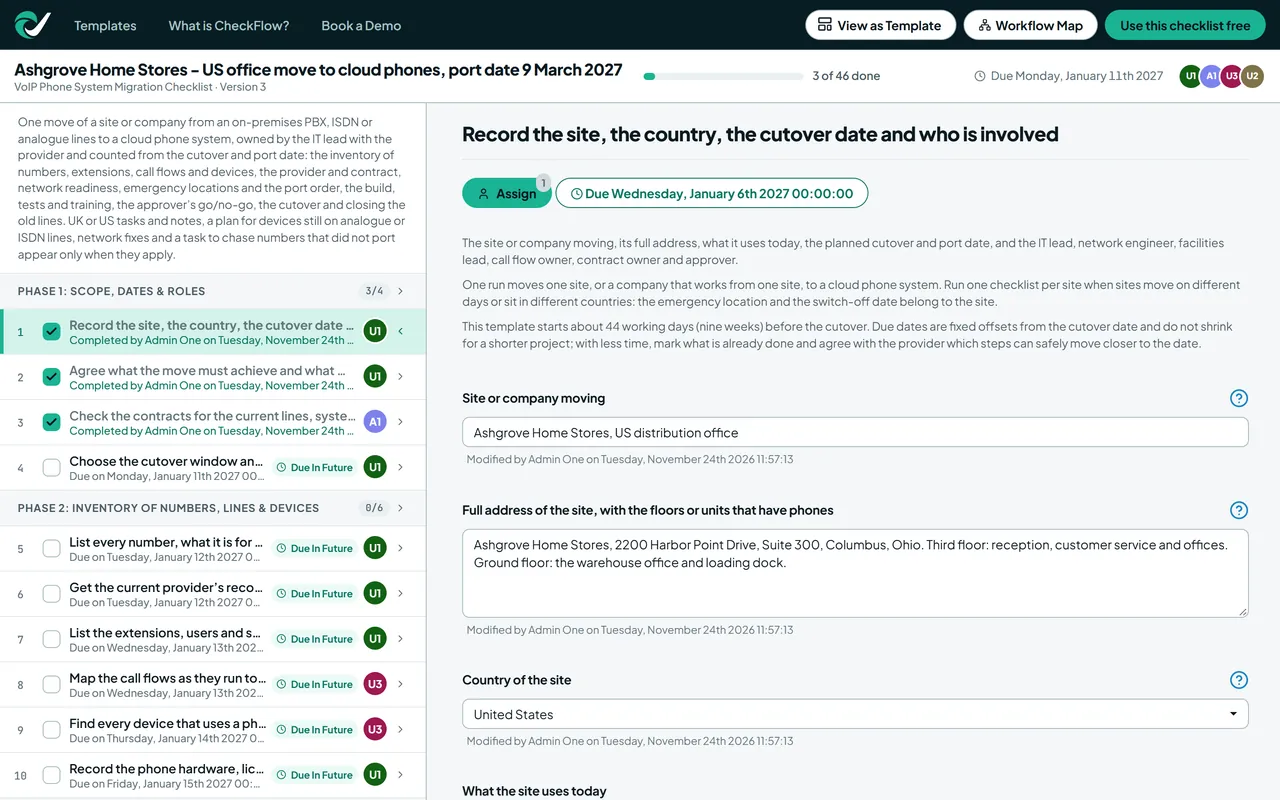
    Record the site, the country and the cutover and port date, and who does each part. Every task before the cutover counts back from that date in working days and every task after it counts forward, so moving the date moves the plan. The country adds its own emergency calling and switch-off tasks.

    • Record the site, the country, the cutover date and who is involved — the site or company moving, its full address, what it uses today, the planned cutover and port date, and the IT lead, network engineer, facilities lead, call flow owner, contract owner and approver
    • Agree what the move must achieve and what must not get worse — every number kept, emergency calls working from every phone, no calls lost during the cutover, the features people rely on today and the budget
    • Check the contracts for the current lines, system and maintenance — the end date, notice period and any early termination charge for each, so the old services end soon after the numbers have moved
    • Check your lines against the UK switch-off date — the date the current provider gives for each line, with the cutover and every device on an analogue or ISDN line moved before it
    • Choose the cutover window and the point of no return — a quiet day and time, the old lines kept working until every number has ported, and the point after which you fix forward rather than switch back
  2. Phase 2

    Phase 2: Inventory of Numbers, Lines & Devices

    7 tasks

    List everything the phone system does today before choosing what replaces it. The port order, the call flows and the emergency locations are built from this list. A device found still using an analogue or ISDN line adds a task to plan its replacement.

    • List every number, what it is for and who answers it — the main number, direct dial ranges, fax and freephone or other non-geographic numbers, and any number held with another provider, each marked port, keep or retire
    • Get the current provider’s record of your numbers and account — the account number, the installation address and the numbers exactly as the current provider holds them, because a port order whose details do not match can be rejected
    • List the extensions, users and shared phones — each user’s extension and direct number, shared phones in reception, meeting rooms and the warehouse, and who needs a desk phone, a softphone or both
    • Map the call flows as they run today — what happens to calls to each main number in and out of hours: the menu, hunt groups, queues, overflow, voicemail, call recording and any calls that ring a mobile
    • Find every device that uses a phone line besides phones — intruder and fire alarms, lift emergency phones, door entry, card payment terminals, franking machines, fax, telecare and building management, with the line each one uses
    • Plan a replacement for each device on an analogue or ISDN line — ask the alarm company, lift maintainer, payment provider or telecare provider what each device needs, agree the date it changes, and keep the old line until it works on the new one
    • Record the phone hardware, licences and support contracts — the PBX make and model, handsets the new service can or cannot reuse, voicemail and call recordings stored on the PBX, and the maintenance contract
  3. Phase 3

    Phase 3: Provider & Contract

    3 tasks

    Choose the service against the inventory, and get the provider’s network, porting and emergency calling terms in writing before anyone signs. Any provider named in this template is an example, not a recommendation.

    • Write down what the new service must do and compare providers — users and devices, call flows and features, numbers to port, emergency calling for every site, integrations such as Microsoft Teams or a CRM, support hours and where data is kept, compared for at least two providers
    • Check the contract before signing — the term and notice, service levels and support hours, porting charges, the emergency calling terms and their limits, where call data and recordings are kept, and what the provider manages and what you do
    • Get the provider’s network, porting and set-up requirements in writing — bandwidth per call and quality limits, firewall and router settings, supported handsets, what a port order needs and the lead time to a port date
  4. Phase 4

    Phase 4: Network Readiness

    7 tasks

    Check that the network can carry calls at the busiest hour before any handset arrives. Compare each measurement with the provider’s own figures: this template sets no thresholds of its own. If the network falls short, a task to fix it appears.

    • Measure the internet connection at the busiest hour — download and upload speed, latency, jitter and packet loss, measured at the busy time over several days with the test the provider suggests, and how many calls happen at once
    • Set up a voice VLAN, quality of service and power for the phones — a separate voice VLAN, voice traffic marked and given priority on the switches and router, and enough power over Ethernet ports and budget for every desk phone
    • Apply the firewall and router settings the provider lists — the addresses and ports the service uses, any router feature the provider says to turn off, and a pass on the provider’s own network test
    • Check Wi-Fi and mobile coverage where people will use softphones — the warehouse, meeting rooms and anywhere people will answer calls on a laptop or the mobile app
    • Plan how calls and emergency calls work in a power cut — which switches and routers are on a UPS and for how long, a charged mobile phone at reception, and any battery back-up the provider offers
    • Compare the results with the provider’s requirements — each measurement against the provider’s figures for the number of calls at the busiest hour, and whether the network is ready
    • Fix the network gaps and measure again — a faster or second connection, VLAN, quality of service or power changes, then the measurements repeated at the busiest hour
  5. Phase 5

    Phase 5: Emergency Locations & Port Order

    3 tasks

    Give the provider the address of every place a phone will be used, then place the port order for the date on the first task. Emergency calls must reach the right place from every phone from the first day.

    • Register each site’s address and where each phone is with the provider — the full address of the site, with the floor, unit or area of each phone, and how people working elsewhere on a softphone keep their location up to date
    • Place the port order for the cutover date — the numbers to port, the current provider’s account details and a signed authority, with the port date and time the provider confirms
    • Order the handsets, headsets and adapters — desk phones the provider supports, headsets, and adapters for any analogue device the provider says can stay on the new service
  6. Phase 6

    Phase 6: Build & Call Flows

    7 tasks

    Build the new system from the inventory while the old one keeps taking calls. The call flow owner checks every menu and greeting, and every phone gets emergency calling that works without a prefix.

    • Set up users, extensions and licences — each user from the extension list with their direct number, licence, voicemail box and devices, on temporary numbers until the port
    • Rebuild the call flows, menus and hunt groups — each flow from the map in Phase 2, checked by the call flow owner before testing
    • Record greetings and set out-of-hours and holiday routing — the greetings and menu prompts, opening hours, public holidays, and where calls go when nobody answers
    • Set up voicemail, call recording and integrations — voicemail to email, any call recording with the message your policy says callers hear, and links to Microsoft Teams, a CRM or a contact centre
    • Set up emergency calling on every phone and softphone — 999 and 112 in the UK or 911 in the US dialled with no prefix from every phone, each phone tied to its registered location, and no call barring rule that blocks an emergency call
    • Set up the alert when someone dials 911 — the notification Kari’s Law requires, sent to reception, security or a named person where someone is likely to see or hear it
    • Read the provider’s emergency calling limits and label the phones — when emergency calls may not work, such as in a power cut, an internet failure or on a softphone used somewhere new, told to staff and put on labels if the provider supplies them
  7. Phase 7

    Phase 7: Testing, Training & Go/No-Go

    8 tasks

    Test everything on temporary numbers, train people and confirm the port with the provider. The approver gives the go or no-go two working days before the cutover; nothing after it can be completed until they do.

    • Deploy and test the handsets and softphones — every desk phone on the voice network, softphones and mobile apps installed, and each user signed in
    • Test calls, transfers, menus and voicemail on the temporary numbers — inbound and outbound calls, transfers, every menu option and hunt group, out-of-hours routing, voicemail to email and call quality from each area
    • Test emergency calling and the location shown for each area — with the provider’s test method or a test call arranged in advance with the emergency service, confirming the address and floor each phone sends
    • Train users, reception and the people who manage call flows — how to answer, transfer and use voicemail and the app, what changes on the day, and how reception changes greetings and routing
    • Tell staff, customers and suppliers what changes — the cutover day and what to expect, and new numbers or contact details only where something really changes
    • Confirm the port date, the cutover plan and who is on hand — the provider’s confirmation of the port date and time, the step-by-step plan, who is on site and on call, and how to switch back while the old lines still work
    • Fix what stopped the go and come back to the decision — the failed tests, missing handsets or unconfirmed port put right, or a new port date agreed with the provider and the date on the first task moved
    • Give the go or no-go for the cutover — the tests passed, emergency calling tested at every area, the port date confirmed, every device on an analogue or ISDN line with a working plan, and people trained
  8. Phase 8

    Phase 8: Cutover & Porting

    5 tasks

    Move the numbers on the agreed day while the old system can still take calls. Check each number as it ports; any number that has not moved adds a task to chase it.

    • Keep the old system answering until the numbers have ported — the old PBX and lines left connected through the cutover window, so calls still reach someone while the numbers move
    • Check that every number has ported and rings on the new system — a test call to each number from an outside line, and a count of any number that has not moved
    • Run the day-one checks — inbound and outbound calls from each area, the emergency location check, each alarm or device moved off an analogue or ISDN line reporting to whoever monitors it, and card machines taking payments
    • Support users on site on the first day — someone on the floor and at reception to fix handsets, sign-ins and greetings as calls start
    • Chase the numbers that did not port and route their calls — the provider’s reason and new port date for each number, and a forward or message on the old service so callers still get through
  9. Phase 9

    Phase 9: Hypercare & Closing the Old Lines

    6 tasks

    Fix what users report, then end the old services only once every number has ported and every device has moved. The old PBX may hold voicemail and recordings: decide what is kept before it goes.

    • Log and fix the issues users report in the first two weeks — each issue with the user, the area and the fix, and anything the provider must change
    • Review call quality and missed calls with the call flow owner — the provider’s call reports for the first two weeks, dropped or missed calls, and any change to menus or hunt groups
    • Cease the old lines once every number has ported and every device has moved — each old line, rental and service ended with the current provider in writing, after checking that nothing still uses it
    • End the maintenance contract and retire the PBX and handsets — the maintenance contract ended at its notice date, voicemail and recordings on the PBX kept or deleted under your retention rules, and the hardware wiped and disposed of
    • Update the IT records, diagrams and the emergency location list — the asset register, network and call flow diagrams, the support contacts, and a check that the provider’s locations still match the building
    • Review the migration with the approver and close — what went well, what to change for the next site, the final cost against the budget, and the date to review the contract

UK and US Rules This Template Covers

Emergency calls, porting and the switch-off

The country on the first task shows these notes on the tasks where they apply. They describe what the rules say, read on 24 November 2026; they are not legal advice, and your provider’s terms say how its service meets them.

Topic United Kingdom United States
Dialling the emergency servicesProviders must ensure all end-users can call 112 and 999 at no charge (Ofcom General Condition A3.4)A multi-line system installed after 16 February 2020 must let users dial 911 directly, with no prefix such as 9 (Kari’s Law, 47 CFR 9.16(b)(1); date from the FCC’s MLTS page)
The caller’s locationFor a fixed location, at least the full postal address of the phone; VoIP providers serving consumers, micro and small businesses and not-for-profits must recommend that they register and update the address where the service is used (A3.6)A dispatchable location: the validated street address plus suite, floor or similar detail, automated for fixed phones on the premises (RAY BAUM’S Act, 47 CFR 9.16(b)(3) and 9.3)
Telling someone on siteNot a requirement in Ofcom’s General Conditions; this template leaves it to your own procedureThe system must alert a central point or person where someone is likely to see or hear it, if it can without an upgrade (47 CFR 9.16(b)(2))
Power cuts and outagesOfcom guidance expects providers to offer landline-dependent customers at least one hour of emergency access, such as a battery back-upProviders must tell subscribers when 911 may be limited, including in a power cut or broadband failure, and keep their acknowledgement (47 CFR 9.11(b)(5))
Keeping your numbersPortability on reasonable terms, no direct charge to the customer, and a number kept portable for at least a month after the contract ends (C7.6); a failed port is reactivated (C7.7)Simple ports in one business day; the old company cannot refuse to port because money is owed; do not end the old service first (FCC guide)
The old networkOpenreach’s traditional lines (PSTN) close on 31 January 2027; Openreach says ISDN services must move to IP by January 2027 or be ceasedThis template sets no US date; ask your current carrier whether it plans to retire the lines you use

Devices that still use a phone line

A number above zero in Phase 2 for lines still used by a device other than a phone shows the task to plan a replacement for each one. Whom to ask is this template’s suggestion.

Device Who to ask What to check after the change
Intruder and fire alarmsThe alarm company or its monitoring centreA test signal reaches the monitoring centre
Lift emergency phoneThe lift maintenance companyA test call from the lift car is answered
Card payment terminalsThe payment providerA test payment goes through
Door entry and building managementThe installer or the building’s managing agentThe door entry calls the right phone
TelecareThe telecare provider, before any line movesAn alarm call reaches the telecare provider’s response centre
Fax and franking machinesThe supplier, or retire the deviceA test fax or a postage top-up works

Sources, read on 24 November 2026. UK: Ofcom’s General Conditions of Entitlement (unofficial consolidated version in force from 8 April 2026; the notified text prevails), Ofcom’s letter to providers of 29 January 2026, GOV.UK’s Telecommunications Modernisation: Connectivity Timeline (updated 29 July 2026), Openreach (and its page for businesses) and the PSTN charter. US: 47 CFR 9.16, 9.11 and 9.3 on eCFR (title 47 up to date as of 20 November 2026), the FCC’s MLTS 911 requirements and its porting guide (last reviewed 10 December 2025). The steps, roles and timings are this template’s practice; providers are named only as examples.

Why Run Phone System Migrations in CheckFlow?

1

Every number and device on one list

Phase 2 lists every number with its provider and every device that uses a phone line. A device still on an analogue or ISDN line shows a task to plan its replacement, and a number that has not ported at cutover shows a task to chase it, so nothing is ceased while it is still in use.

2

Emergency calling checked before the go

The address and floor of every phone are registered with the provider in Phase 5, emergency calling is set up with no prefix in Phase 6 and tested before the go/no-go. The country on the first task adds the UK switch-off check or the US 911 alert.

3

One date moves the whole plan

Every due date counts in working days from the cutover and port date. If the provider confirms another date, one change on the first task moves every step, overdue alerts go to the people assigned, and the Reports Grid shows each site’s progress when several move in turn.

CheckFlow does not port numbers, configure phones or test emergency calls; your provider, network and people do that. CheckFlow runs the work around them: who does each step by when, what each test found and who gave the go. See how checklists run.

Change the network first with the Network Upgrade & Cutover Checklist, raise the cutover under the IT Change Management Process Checklist and dispose of the old PBX and handsets with the IT Asset Disposal Checklist.

AI generator

Didn’t find what you need? Describe it.

Describe the process in a sentence and the AI checklist generator drafts the phases and tasks for you.

Frequently Asked Questions

What should a VoIP migration checklist include?

It should list every number, extension, call flow and device on a phone line; choose the provider and check the contract; test the network at the busiest hour; register the address of every phone for emergency calls; place the port order; build, test and train; get a go or no-go; then cut over, check every number and cease the old lines. This template does that in nine phases, counted from one cutover date.

How far ahead should I plan a move from a PBX to VoIP?

This template starts about 44 working days, or nine weeks, before the cutover and places the port order 20 working days before it. That is its own practice, not a rule: a large range of numbers, a device on an analogue line or a network fix can take longer. Ask your provider for its port lead time before you fix the date.

When is the UK ISDN and PSTN switch-off?

GOV.UK says all users of the Openreach PSTN need to be migrated to new services by 31 January 2027. Openreach says all services on ISDN must move to an IP service by January 2027 or be ceased, and a business still on the old network may be moved to a temporary emergency voice-only service or lose its service. Ask your provider the date for each of your lines (sources read on 24 November 2026).

Can I keep my business phone numbers when I move to VoIP?

Porting moves them to the new provider. In the UK, Ofcom’s rules give portability on reasonable terms with no direct charge to the customer. In the US, the FCC says you can keep your number when you change provider in the same area, the old company cannot refuse to port it because you owe money, and simple ports take one business day. Keep the old service running until every number has moved.

What happens to alarms, lifts and card machines on analogue lines?

They stop when the line they use is ceased, so each needs a plan. This template counts the lines still used by devices and, if there are any, adds a task to ask the alarm company, lift maintainer, payment provider or telecare provider what each needs and when it changes. The old line stays until the device works on the new one.

What do Kari’s Law and RAY BAUM’S Act mean for a business phone system?

For a multi-line system installed after 16 February 2020, Kari’s Law means users must be able to dial 911 with no prefix, and the system must alert someone on site or elsewhere when a 911 call is made, if it can without an upgrade. RAY BAUM’S Act rules require a dispatchable location, the street address plus floor or suite, with each 911 call from a fixed phone on the premises, and from other phones where technically feasible, with a fallback the rule describes.

How do emergency calls show my location on a VoIP phone in the UK?

Providers must make caller location available for 999 and 112 calls where technically feasible. For a service at a fixed place it must include the full postal address, and VoIP providers serving consumers, micro and small businesses and not-for-profits must recommend registering the address where the service is used, and updating it. This template registers each site and the floor of each phone in Phase 5.

When should I cancel the old phone lines after moving to VoIP?

Only once every number has ported and every device has moved off them. In the UK, the losing provider must end the contract for the service that moved on the day the move completes, but spare lines, alarm lines and maintenance contracts may still need ending. This template ceases the old lines 15 working days after the cutover.

Is CheckFlow free for this template?

14-day free trial, no card required. The Business plan is $10 per user per month after the trial. Full details at checkflow.io/pricing.

Move Your Phones Without Losing a Number

Free trial — no credit card required.

14-day free trial, no credit cardFull refund in your first 30 daysUS hosting, EU on request