Office relocation is one of the most operationally complex tasks a business undertakes — not because each individual task is difficult, but because there are so many of them, they involve so many different parties (IT, HR, legal, operations, building management, service providers), and the consequences of getting the sequence wrong compound quickly. The internet circuit that was not ordered early enough delays the network setup. The network setup delay means IT cannot test before move day. The untested network means the team cannot work on day one. The team that cannot work on day one costs significantly more than the order lead time that was missed. A structured office relocation checklist addresses this by working backwards from move day — identifying every dependency, assigning every task to a named owner, and ensuring the activities that have the longest lead times start earliest. IT and telecoms should be in planning 2–3 months before the move. The internet circuit order should be placed 3–4 months before. The moving company should be booked 2–3 months before. This free checklist gives operations managers, office managers, and IT managers a structured framework for the full office relocation process.
When Each Phase Must Start — Working Backwards from Move Day
12 months before (or at lease decision)Strategy and planning. Confirm the business case. Define space requirements (headcount, hybrid model, specialist spaces). Engage a commercial real estate agent.
6–9 months beforeNew space selection and commitment. Lease or service agreement signed. Budget set (with 10–15% contingency). Move project team appointed. Existing lease reviewed for exit notice requirements.
3–6 months beforeFit-out and setup planning. Interior design and fit-out contractor appointed. IT and telecoms migration planning started (internet circuit ordered no later than 4 months before). HR and employee communication plan activated.
2–3 months beforeVendor confirmation. Moving company booked. IT equipment inventory complete. Data backup confirmed. Service providers notified (telecoms, utilities, subscriptions).
1–2 months beforeDetailed preparation. Floor plan published to staff. Packing materials distributed. New address update planning started. Parallel running period confirmed.
Move weekFinal preparation and execution. Final walkthrough. Packing confirmed. Move-day team briefed. IT tested at new location before full move.
Post-moveSetup and address updates. IT systems verified. Staff settled. Address updated across all channels. Old space surrendered.
The Office Relocation Checklist
Seven phases covering the full office move lifecycle — from planning and budgeting through new space setup, IT migration, lease exit, employee communication, move-day execution, and post-move address updates.
- 1
Phase 1
Planning & Budgeting
6 tasks
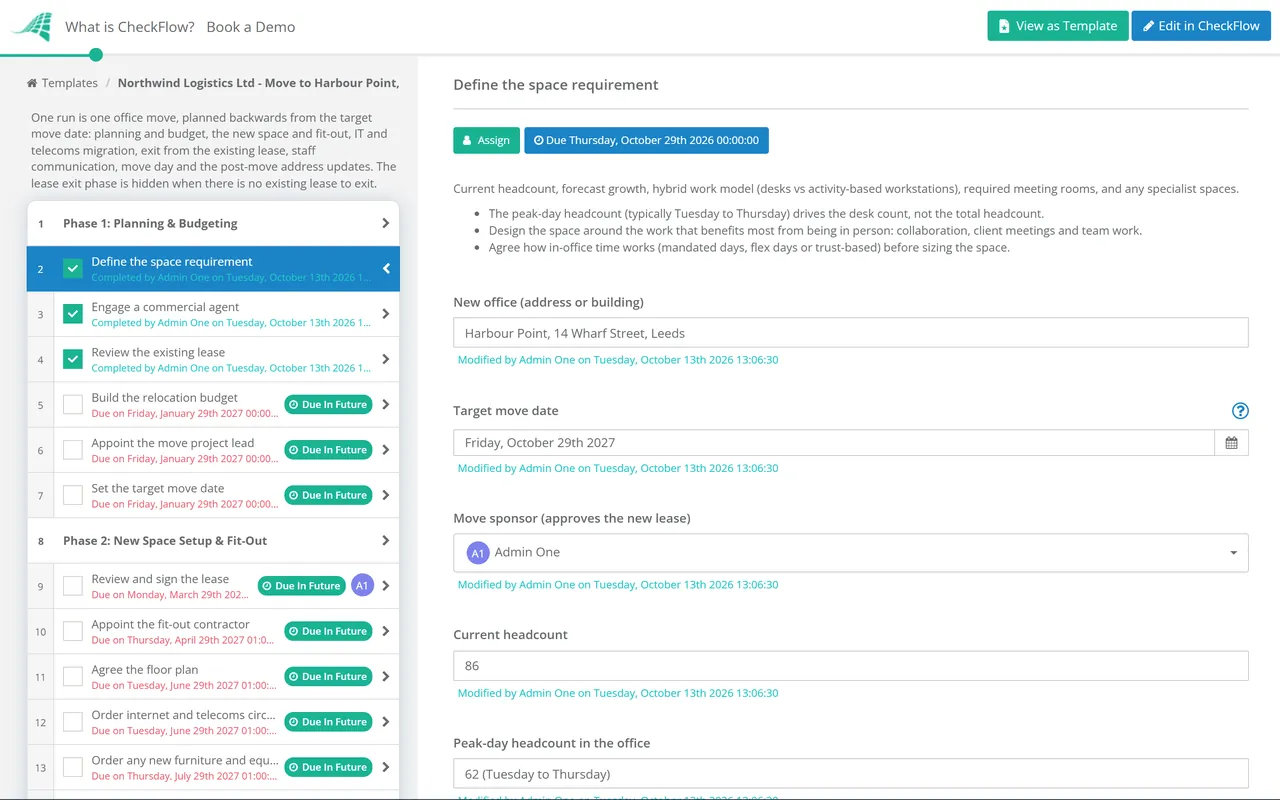
- Define the space requirement — current headcount, forecast growth, hybrid work model (desks vs activity-based workstations), required meeting rooms, and any specialist spaces
- Engage a commercial agent — to identify properties meeting the specification; within budget and target geography
- Review the existing lease — exit notice requirement; dilapidations obligations; break clause dates; confirm with a commercial solicitor
- Build the relocation budget — including fit-out costs, moving company, IT and telecoms setup, new furniture, legal fees, temporary remote working arrangements, and 10–15% contingency
- Appoint the move project lead — and the cross-functional project team (IT lead, HR lead, operations lead)
- Set the target move date — avoiding end-of-quarter, peak business periods, and key client delivery milestones
- 2
Phase 2
New Space Setup & Fit-Out
6 tasks
- Review and sign the lease — with qualified commercial property solicitor; rent, service charge, lease length, break clauses, and dilapidations provisions
- Appoint the fit-out contractor — for any required interior work; brief with the space plan, IT requirements, and move date
- Agree the floor plan — with input from department heads; published to staff so everyone knows where they will sit
- Order internet and telecoms circuits — minimum 3–4 months before the move; internet circuit lead times are the most commonly underestimated delay in office relocations
- Order any new furniture and equipment — with lead times factored in; delivery before move day, not after
- Arrange utilities — electricity, gas, water; confirmed with the building manager (typically included in service charge for managed offices; direct supply for leased buildings)
- 3
Phase 3
IT & Telecoms Migration
6 tasksIT migration is the highest-risk phase of an office relocation. A team that cannot access its systems, its email, or its files on day one at the new location has zero productivity and significant client service risk. IT planning and testing must happen before move day — not on it.
- Complete the IT equipment inventory — every server, network device, workstation, laptop, screen, and peripheral; asset tagged and assigned to a specific user or location in the new floor plan
- Confirm data backup — complete backup of all critical data before equipment is moved; confirmed and verified; not assumed
- Plan the server room or network setup — rack layout, power, cooling, and cabling at the new location; confirmed with the IT infrastructure team
- Set up the network at the new location before moving workstations — internet circuit live, firewall and switching configured, Wi-Fi tested; test every critical system before workstations arrive
- Transfer telecoms — phone numbers transferred to the new location or ported to a cloud telephony system; confirmed active before move day
- Test all critical systems at the new location — internet, email, cloud systems, VPN, video conferencing, printers; before announcing readiness to staff
- 4
Phase 4
Existing Lease Exit Management
5 tasks
- Serve exit notice — per the lease terms; in writing; within the required notice period; retain proof of service
- Review dilapidations obligations — what must the tenant do to return the space? Decoration, repairs, removal of fixtures; assessed by a building surveyor
- Engage a commercial surveyor — to assess the dilapidations position; ideally negotiate a schedule of dilapidations settlement rather than undertaking the works
- Arrange a pre-move-out inspection — with the landlord; identify any disputed items before departure
- Surrender the old space — all keys and access devices returned; meter readings taken; surrender confirmed in writing
- 5
Phase 5
Employee Communication Plan
5 tasks
- Announce the move to all staff — as early as practical after the decision is made; the unofficial information flow always moves faster than the official one
- Address key employee concerns — commute changes, parking, local amenities, and hybrid/flexible arrangements at the new location; proactively, not reactively
- Share the floor plan — at least 4–6 weeks before the move; staff know where they will sit
- Confirm move-day arrangements — who is expected in, packing instructions, access to the new location, and what working arrangements are in place during the transition
- Confirm any temporary remote working arrangements — for the move day and the day after if IT testing requires additional time
- 6
Phase 6
Move-Day Execution
5 tasks
- Briefing meeting for all parties — move manager, IT team, moving company, and any specialist contractors; sequencing confirmed
- Disconnect and label all IT equipment — per the IT migration plan; specialist packing for servers and sensitive equipment
- Oversee the move team — movers have the floor plan; items going to the correct locations; no boxes left in unknown locations
- Final walkthrough of old office — nothing left behind; all areas empty; all personal items accounted for
- Confirm IT setup at new location — before end of move day; key systems operational; any issues logged and prioritised
- 7
Phase 7
Post-Move Setup & Address Updates
6 tasksThe address update exercise is larger than most organisations anticipate. A comprehensive update means finding every place the old address exists — and there are more of them than anyone remembers.
- Update the company website — contact page, footer, and Google Business Profile; immediately after move day
- Update all client-facing communications — email signatures, letterhead, invoices, business cards, and marketing materials
- Update all regulatory filings — Companies House (UK) / Secretary of State (US), HMRC/IRS, VAT registration, business licences
- Update all service providers — banks, insurance, utilities (if transferred), telecoms, subscriptions, supplier accounts
- Notify clients and key contacts — proactively; before they try the old address
- Set up mail forwarding — from the old address; for a minimum of 6 months
Office Move Project Plan: Workstreams, Owners and Milestones
The checklist above is the full task list. A project plan sits on top of it: it groups the tasks into workstreams, gives each one an owner and a start date counted back from move day, and names the milestone that shows the workstream is done. The dates below are the same ones the timeline uses.
Review the plan with every workstream owner each week from three months out, and daily in move week. In CheckFlow each owner sees their own tasks and due dates, and the project lead sees the whole move on one checklist.
The IT and telecoms workstream is a project of its own in most moves. The New Office IT Setup Checklist covers it in detail: the site survey, circuits and long-lead orders, the comms room and cabling, network and Wi-Fi, moving servers and comms equipment, testing and the go-live approval.
Planning an Office Move Around Hybrid Work — the Questions to Answer First
How many people are in the office on any given day?
Peak day headcount (typically Tuesday–Thursday) vs average. The peak day drives the desk count — not the total headcount.
What does the work require physically?
Heads-down focus work can happen anywhere. Collaboration, client meetings, and team work benefit from being in-person. Design the space around the work that benefits most from being in-person.
What is the culture around in-office time?
Mandated days vs flex days vs trust-based. The culture determines whether the office is used as planned — a space designed for 60% occupancy with 80% of people in every day is the wrong design.
What does the new generation of employees expect?
Research from 2025 shows 48% of job seekers want hybrid roles — office design that communicates inflexibility affects recruitment and retention.
Why Run Your Office Relocation in CheckFlow?
1A timeline-anchored checklist that works backwards from move day
An office move managed from a single-column to-do list misses the dependencies that cause cascade failures. CheckFlow’s relocation checklist anchors every task to a deadline offset from the move date — the internet circuit order appears 4 months before, the employee announcement as early as possible, the data backup the week before. The sequence is enforced by the process.
Multi-party coordination across IT, HR, legal, and operations
An office move involves four to six different internal teams and multiple external vendors, all working in parallel with interdependent deliverables. CheckFlow assigns every relocation task to the correct team and individual, tracks completion across all parties, and gives the project lead a single status view.
A complete post-move address update process
The most commonly underestimated phase of an office move is the address update exercise — the number of places where the old address exists, each of which needs to be found and updated. CheckFlow’s post-move phase provides a comprehensive address update checklist — every regulatory filing, every service provider, every client-facing document — ensuring the old address stops producing problems months after the move.
Moving the IT is the part of an office move with the longest lead times. CheckFlow’s New Office IT Setup Checklist covers circuits, cabling, network, equipment relocation and testing at the new site. See the New Office IT Setup Checklist →
Office relocation involves setting up new vendor relationships — moving company, fit-out contractor, IT vendors. CheckFlow’s Vendor Onboarding Checklist covers the structured process for setting up new vendors correctly. See the Vendor Onboarding Checklist →
After the move, the new facility needs a documented maintenance schedule and a first inspection. CheckFlow’s Office Maintenance Schedule covers the recurring maintenance programme for the new space. See the Office Maintenance Schedule →