
Security Exception Request Checklist Template

Someone needs to depart from a security policy? Record the requirement and the reason, rate the risk, agree compensating controls, get the risk owner’s acceptance and the approver’s decision, and end or renew the exception on its expiry date.

Last reviewed: November 2026

Printed from checkflow.io/templates/cybersecurity/security-exception-request-checklist

This free security exception request checklist is for security teams, IT and the people who need to depart from a security policy or standard for a while: an account that cannot use MFA, an unsupported operating system on a machine that runs a lab instrument, unencrypted removable media on one production line, or a firewall rule wider than the standard allows. One run takes one request from the date it is raised to its expiry date. The requester names the policy and the requirement, describes the departure, gives the business reason, lists the assets and data involved and sets out how the departure will end. The security reviewer checks that it is an exception rather than a scanner finding or a policy change, rates the risk with your own method, agrees compensating controls, checks the expiry date against your policy’s own maximum and writes a recommendation. The risk owner accepts or declines the residual risk, with a senior sign-off for a high or critical risk, and the approver, the CISO or the delegate your policy names, decides: approved, approved with changes, more information needed or rejected. An approved exception goes in the register, its compensating controls are checked before it applies and again before it ends, and at the expiry date the system is brought into line or a new request has replaced it.

Security Exception, Vulnerability Exception or Policy Change?

This checklist runs one request to depart from a security policy or standard, such as no MFA on one account, an unsupported operating system on a lab PC, unencrypted removable media on one production line or a firewall rule wider than the standard allows. It takes the request from the business reason to the risk rating, the compensating controls, the risk owner’s acceptance and the approver’s decision, then keeps the exception in the register until it ends or a new request replaces it.

A scanner finding that cannot be fixed by its deadline is handled inside the monthly cycle of the Vulnerability Management Checklist, which has its own exceptions phase. A requirement that keeps needing exceptions is a question for the Annual Policy Review Checklist, which reads the exception log. The risk method this checklist rates against is set up with the IT Risk Assessment Checklist. Certification and framework programmes run in the ISO 27001 Compliance Checklist, the NIST CSF Checklist and the FISMA Compliance Checklist, and a review of a whole cloud account in the Cloud Security Review Checklist.

This checklist

One security exception request

Covers: the policy and requirement, the business reason, the assets and data, the risk rating, compensating controls, the risk owner’s acceptance, the decision, the register entry, monitoring and the expiry.

Planned around: the date the request is raised and the expiry date.

Output: a recorded decision and, if approved, an exception that ends on a known date.

Scanner findings

Vulnerability management

Covers: scan coverage, triage, remediation deadlines, exceptions for findings that miss them, rescans and the monthly report.

Planned around: a monthly cycle.

Output: findings fixed or excepted within the cycle. A departure from a policy that is not a scanner finding comes here instead.

The policy itself

Annual policy review

Covers: every policy’s triggers, redlines, approval, publication and attestation.

Planned around: the yearly approval deadline.

Output: current policies. This checklist tells the policy owner each exception’s outcome for that review.

What the Security Exception Request Checklist Covers

Nine phases take one request from the business reason to the end of the exception. The first task records two dates: the date the request is raised, from which the assessment and the decision fall due within about four weeks, and the expiry date asked for, from which the review and the close-out count. The due dates stay in order for an exception of at least three months; for a shorter one, move the due dates in Phases 7 and 8 when you start the run. The decision in Phase 6 is assigned to one person and nothing after it can be completed until they decide. A rejection hides Phases 7 to 9 and shows its own follow-up tasks.

  1. Phase 1

    Phase 1: Raise the Request

    7 tasks

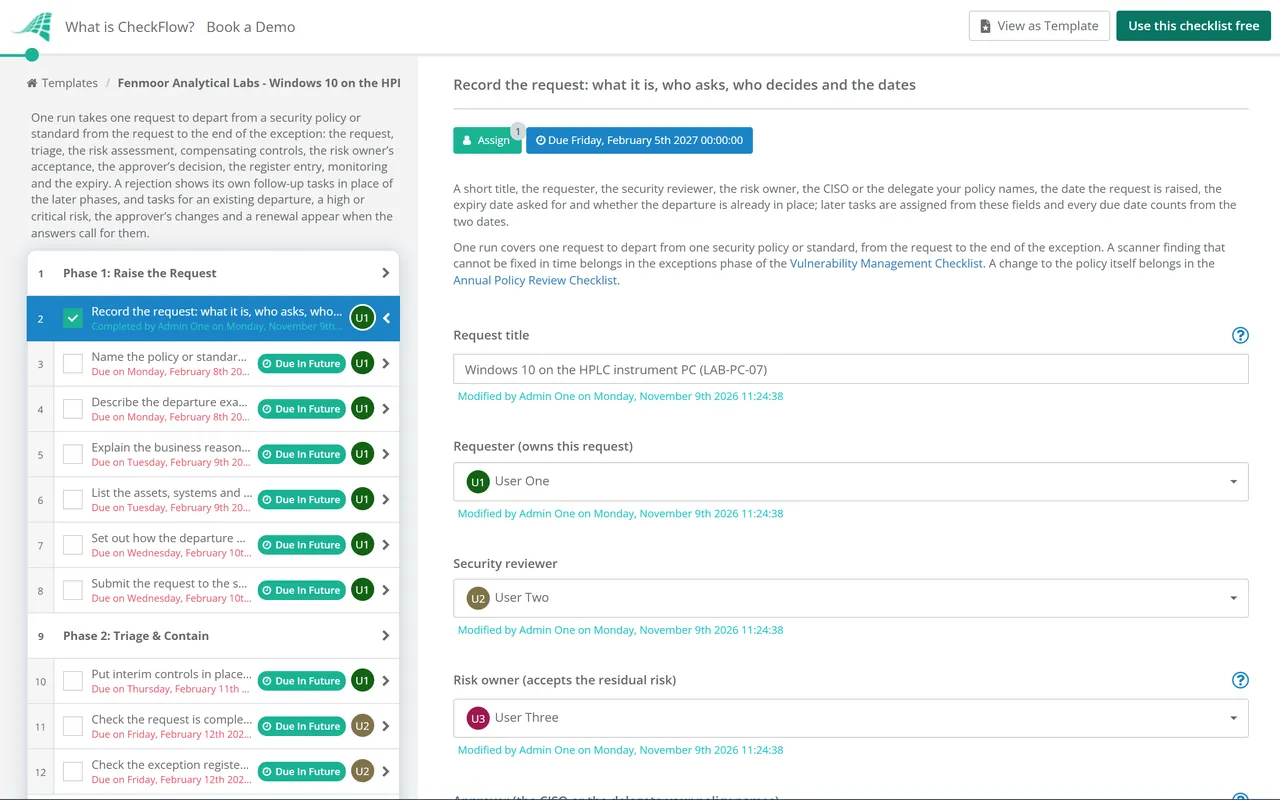
    Owned by the requester. Enter the date the request is raised and the expiry date you are asking for on the first task: the work up to the decision counts from the first date, and the review and the end of the exception count from the second. Name the people who review, accept and decide, and say whether the departure is already in place.

    • Record the request: what it is, who asks, who decides and the dates — a short title, the requester, the security reviewer, the risk owner, the CISO or the delegate your policy names, the date the request is raised, the expiry date asked for and whether the departure is already in place; later tasks are assigned from these fields and every due date counts from the two dates
    • Name the policy or standard and the requirement you cannot meet — the document, its version, the clause or control number and the requirement in its own words, with any framework control it maps to
    • Describe the departure exactly — what will be different from the requirement, on which systems, for which users or accounts, and since or from when
    • Explain the business reason and why you cannot comply now — what the departure makes possible, what complying would take (a vendor fix, a replacement, money, time), the alternatives you looked at and why they do not work
    • List the assets, systems and data involved — each system, device or account the exception covers, its owner, the most sensitive data it holds or reaches, and where it runs
    • Set out how the departure will end — the plan to meet the policy by the expiry date, such as an upgrade, a replacement or a vendor fix, with its milestones and who does the work
    • Submit the request to the security team — the request checked for gaps and sent to the security reviewer, with any supporting documents attached
  2. Phase 2

    Phase 2: Triage & Contain

    4 tasks

    The security reviewer checks that this is an exception rather than a scanner finding or a policy change, and looks for related exceptions. A departure that is already in place is contained now; a planned one waits for the decision.

    • Put interim controls in place while the request is decided — for a departure that is already in place, the quickest controls that limit the risk now, such as restricting access, extra logging or isolating the system, and who put them in place
    • Confirm the change waits for the decision — for a planned departure, confirmation that the change will not be made until the request is approved, and the date it is planned for
    • Check the request is complete and is an exception — every section filled in, the requirement correctly quoted, and the request confirmed as an exception rather than a scanner finding, a policy change or a request the policy already allows
    • Check the exception register for related exceptions — earlier or live exceptions on the same systems or the same requirement, and how many times this departure has been renewed before
  3. Phase 3

    Phase 3: Assess the Risk

    3 tasks

    The security reviewer works out what the departure exposes and rates the risk with your own risk method.

    • Identify the threats and weaknesses the departure opens — what an attacker or a failure could do because the requirement is not met, which assets and data that reaches, and any known exploitation
    • Rate the risk with your risk method — the likelihood and the impact as your risk method defines them, and the risk rating before any compensating controls
    • Check the effect on personal data, contracts and certifications — whether the departure affects personal data, a customer contract, a regulator’s rule, cyber insurance terms or the scope of a certification, and who has been asked
  4. Phase 4

    Phase 4: Compensating Controls & Recommendation

    4 tasks

    The security reviewer agrees compensating controls with the requester, rates the risk that remains, checks the expiry date against the policy’s own maximum and writes a recommendation for the approver. A high or critical residual rating adds a senior sign-off in Phase 5.

    • Agree the compensating controls with the requester — each control that reduces the risk while the requirement is not met, what it reduces, who runs it and when it will be in place
    • Rate the risk that remains with the controls in place — the risk rating once the compensating controls work as planned, and why
    • Check the expiry date against the policy’s maximum — the longest exception your policy allows, whether the requested expiry date is within it, and whether the plan to comply fits before it
    • Write the security team’s recommendation — approve, approve with changes or reject, with the reasons, the conditions you would attach and the expiry date you recommend
  5. Phase 5

    Phase 5: Risk Owner Acceptance

    3 tasks

    The risk owner, not the requester or the security team, accepts the residual risk or declines it. A high or critical residual risk also needs the senior sign-off your policy requires.

    • Brief the risk owner on the risk and the controls — the departure, the risk before and after the compensating controls, the expiry date and the security team’s recommendation
    • Accept or decline the residual risk — the risk owner’s decision on the risk that remains for the period asked, with any conditions
    • Get the senior sign-off your policy requires for a high or critical risk — the sign-off of the executive, board committee or risk forum your policy names for a high or critical residual risk, recorded before the decision
  6. Phase 6

    Phase 6: Decision

    4 tasks

    The approver decides: approved, approved with changes, more information needed or rejected. Only the person named on the first task can complete the decision, and nothing after it can be completed until they do. A rejection hides the later phases and shows the tasks that follow it.

    • Give the approver the information they asked for — the answers or documents the approver asked for, added to the request; then the approver changes the decision and completes it
    • Decide the request — the request, the risk assessment, the compensating controls, the risk owner’s answer and the recommendation weighed, and a decision recorded with reasons. If the risk owner declined the residual risk, choose Rejected or More information needed, not Approved
    • Tell the requester and the risk owner the request was rejected — the decision and the reasons sent to the requester and the risk owner, and the rejection recorded in the exception register
    • Bring the system into line with the policy, or stop the planned change — for a departure already in place, the system made to meet the requirement and the date it did; for a planned one, confirmation that the change will not go ahead
  7. Phase 7

    Phase 7: Record & Put in Place

    6 tasks

    Applies only when the exception is approved. The exception goes in the register, the compensating controls are put in place and checked, and the teams affected are told when it starts.

    • Make the changes the approver asked for — each change or condition from the decision made, such as a shorter period, an extra control or fewer systems covered
    • Add the exception to the exception register — the reference, the requirement, the systems, the risk owner, the residual risk, the compensating controls, the approver and the expiry date
    • Put the compensating controls in place — each control from the table in Phase 4 in place and working, with the date and who did it
    • Check the compensating controls are in place — evidence for each control, such as a screenshot of the setting, a firewall rule, an alert firing or a log review record, checked by the security reviewer
    • Tell the teams affected that the exception applies — what is allowed, on which systems, until when, and the controls that must stay in place, sent to the requester, the risk owner and the teams who run the systems
    • Record the plan to comply where you track risk — the plan to meet the policy entered in your risk register or plan of action with its milestones, owner and the expiry date
  8. Phase 8

    Phase 8: Monitor & Review

    4 tasks

    Applies only when the exception is approved. The controls and the plan are checked about eight weeks after the request was raised; the review falls five weeks before the expiry date and a renewal request four weeks before it. The due dates stay in order for an exception of at least three months (about 65 working days) from the request; for a shorter one, move the due dates in Phases 7 and 8 when you start the run so they fall between the decision and the expiry date.

    • Check the compensating controls are still working — each control from the register entry checked again, with the evidence and any control that has lapsed put right
    • Check progress on the plan to comply — each milestone done or late, and whether the system will meet the policy by the expiry date
    • Review the exception before it expires — whether the departure will end by the expiry date, or is still needed and needs a new request
    • Raise a new exception request — a new Security Exception Request checklist started with fresh facts and an updated plan, raised early enough to be decided before this exception expires
  9. Phase 9

    Phase 9: Expiry & Close

    4 tasks

    Applies only when the exception is approved. On the expiry date the departure ends or a new exception covers it, the register entry is closed and the policy owner hears the outcome.

    • Bring the system into line with the policy — the system made to meet the requirement by the expiry date, and the date it did
    • Confirm the departure has ended — a check that the system meets the requirement, or that a new exception was approved before this one expired; a departure still in place with neither is a policy breach to escalate
    • Close the register entry — the exception’s register entry closed with the outcome, and the plan of action closed or linked to the new request
    • Tell the policy owner the outcome — the exception, its outcome and whether the requirement caused it, so the next policy review can consider it

Security Exceptions in NIST, and the Four Decisions

What the frameworks say

Each step maps to a NIST control you may already be assessed against. Use your own policy’s words where they differ.

Step in this checklist What the source says Source
Describe and approve the departureCM-6(c): identify, document and approve any deviations from established configuration settings.NIST SP 800-53 Rev. 5, CM-6
Assess the riskRA-3: identify threats to and vulnerabilities in the system, and determine the likelihood and magnitude of harm.NIST SP 800-53 Rev. 5, RA-3
Accept the risk, or notRA-7’s discussion lists accepting risk with appropriate justification or rationale as one response, alongside mitigating, sharing or transferring, and avoiding it, all within the organisation’s risk tolerance.NIST SP 800-53 Rev. 5, RA-7
Rate against your risk tolerancePM-9’s discussion: the risk management strategy includes an expression of the organisation’s risk tolerance.NIST SP 800-53 Rev. 5, PM-9
Record the plan to complyCA-5: a plan of action and milestones documents planned remediation of weaknesses or deficiencies.NIST SP 800-53 Rev. 5, CA-5
Check the controls while it runsCA-7: ongoing control assessments and monitoring, with response actions to the results.NIST SP 800-53 Rev. 5, CA-7
Who accepts the riskFor US federal systems, the authorizing official cannot delegate the authorization decision (the acceptance of risk).NIST SP 800-37 Rev. 2

The four decisions

The approver’s decision in Phase 6 decides which tasks follow.

Decision What the checklist does next
ApprovedPhases 7 to 9 stay: the register entry, the compensating controls put in place and checked, monitoring, the review and the expiry.
Approved with changesAs approved, with a task for the requester to make the changes. A shorter period is set by changing the expiry date on the first task.
More information neededA task for the requester appears above the decision, which stays open until the approver chooses another decision.
RejectedPhases 7 to 9 are hidden. The rejection is sent and recorded, and the system is brought into line or the planned change is stopped.

Where this comes from. None of the sources on this page sets a process or a maximum period for security exceptions: your own policy defines them. The NIST controls are from SP 800-53 Revision 5 (release 5.2.0 of August 2025, read on 9 November 2026), whose controls are written for US federal systems, and SP 800-37 Revision 2 (December 2018). ISO/IEC 27001:2022 is a paid standard, named here only: it was still the current edition on 9 November 2026, with one amendment (2024). Check the clause your own ISMS uses for approving risk treatment and residual risk. The CIS Controls v8.1 include Control 2 (inventory and control of software assets) and Control 4 (secure configuration of enterprise assets and software); a departure from either can be recorded here. As one example of published practice, GitLab’s public handbook has exceptions approved, logged centrally and reviewed as their expiration date approaches, with any extension needing a new approved request; your own policy sets your rules. This template does not give legal or audit advice.

Why Run Security Exception Requests in CheckFlow?

1

Every request asks the same questions

The policy and requirement, the departure, the business reason, the assets and data, and the plan to comply are captured before the security team starts. The reviewer rates the risk with your own method and agrees compensating controls, so the approver reads the same facts every time.

2

The right people decide

Only the risk owner named on the first task can accept the residual risk, and only the approver can complete the decision, which locks the later phases until they do. A high or critical residual risk adds a senior sign-off. A rejection hides the approved path and shows the follow-up instead.

3

Exceptions that end on time

The controls and the plan are rechecked during the exception, the next step is decided five weeks before the expiry date, and a renewal is a new request. Track every open exception in the Reports Grid.

CheckFlow does not rate risks or change any system: your security team, your risk owners and your approver do. CheckFlow makes sure every request follows the same steps, by the right people, with the record kept until the exception ends.

Handle scanner findings in the Vulnerability Management Checklist, review the policies themselves with the Annual Policy Review Checklist, and set up your risk method with the IT Risk Assessment Checklist.

AI generator

Didn’t find what you need? Describe it.

Describe the process in a sentence and the AI checklist generator drafts the phases and tasks for you.

Frequently Asked Questions

What is a security exception request?

It is a formal request to depart from a security policy or standard for a set period, because meeting the requirement is not possible or not practical yet. Examples are an account that cannot use MFA, an operating system past its support date that runs a lab instrument, or a firewall rule wider than the standard allows. The request is assessed, decided by a named approver, recorded in a register and ends on an expiry date.

What should a security exception request include?

The policy and the requirement it departs from, exactly what will be different, the business reason and why complying is not possible now, the assets and data involved, the risk rating, the compensating controls, the plan to comply and the expiry date asked for. This template also records the risk owner’s acceptance, the approver’s decision with reasons and the exception register reference.

Who approves a security exception?

Your policy decides. In this template the risk owner named on the first task accepts or declines the residual risk, and the approver, the CISO or the delegate your policy names, makes the decision; only they can complete it. A high or critical residual risk also needs the senior sign-off your policy requires. For US federal systems, NIST SP 800-37 says the authorizing official cannot delegate the acceptance of risk, so name the authorizing official as the risk owner or the approver on the first task.

How long can a security exception last?

None of the frameworks on this page sets a maximum, so this template asks for the longest period your own policy allows and checks the requested expiry date against it. A renewal is a new request, not an extension. The due dates stay in order for an exception of at least three months; for a shorter one, move the later due dates when you start the run. If your policy says nothing, the security reviewer says so in the recommendation and the approver chooses a period.

What counts as a compensating control for a security exception?

A control that reduces the risk the departure opens while the requirement is not met, such as moving the system to its own network segment, removing internet access, limiting who can sign in, extra monitoring and alerts, or more frequent log reviews. In this template, a control the requirement already expects does not count. This template records each control’s owner and date, and the security reviewer checks the evidence before the exception applies and again before it ends.

What is the difference between a security exception and risk acceptance?

A security exception is the permission to depart from a specific policy requirement for a set period. Risk acceptance is the decision to live with the risk that remains. In this template the risk owner accepts or declines the residual risk first, then the approver decides the exception; a declined risk leads to Rejected or More information needed, not approval. NIST SP 800-53 RA-7’s discussion lists accepting risk with appropriate justification as one way to respond to risk.

What happens when a security exception expires?

About five weeks before the expiry date this template has the reviewer decide whether the departure will end or is still needed. If it ends, the requester brings the system into line by the expiry date. If it is still needed, the requester raises a new request, which goes through its own assessment and decision. After the expiry date the reviewer confirms which happened and closes the register entry.

Is this the same as a vulnerability exception?

No. A scanner finding that cannot be fixed by its deadline is handled in the exceptions phase of the Vulnerability Management Checklist, inside its monthly cycle. This checklist is for a departure from any security policy or standard that is not a scanner finding, such as an MFA, encryption, removable media or firewall requirement, from the request to its expiry.

Is CheckFlow free for this template?

14-day free trial, no card required. The Business plan is $10 per user per month after the trial. Full details at checkflow.io/pricing.

Decide Every Security Exception the Same Way

Free trial — no credit card required.

14-day free trial, no credit cardFull refund in your first 30 daysUS hosting, EU on request