IT Risk Assessment Checklist Template

Most IT risk registers are written once, for an audit, and never opened again. The risks that hurt are the ones nobody scored, nobody owned, or somebody accepted without the authority to do so.

Last reviewed: October 2026

An IT risk assessment answers one question for management: which risks to our systems and data are serious enough to act on, and who has agreed to live with the rest? This free IT and cybersecurity risk assessment checklist is for in-house IT and security teams who run that review once a year, or before a major change such as a new core system, an acquisition or a move to the cloud. One run is one assessment. It follows the approach in NIST SP 800-30 Rev. 1: agree the scales and the risk appetite, inventory assets, data and suppliers, identify threats and vulnerabilities, test the controls already in place, score each risk by likelihood and impact into a risk register, choose a treatment and an owner for every risk, and have a senior risk owner accept the residual risk. An extra task appears when a change triggered the assessment, and an escalation phase appears when any risk scores above your appetite.

A Risk Assessment Decides What Matters. Scans and Audits Feed It.

Security teams collect plenty of findings: scanner output, penetration test reports, audit observations and supplier questionnaires. None of them, on its own, tells management which risks matter most to this organisation, or which ones it has decided to live with. That is the job of the IT risk assessment. It takes every source of evidence, links each weakness to the asset and business process it threatens, scores it on one agreed scale and ends with a decision for every risk, recorded against a named owner.

It sits above the routine security cycles. The monthly vulnerability management cycle fixes technical findings, and an IT security audit checks that controls exist and work. The risk assessment uses both as inputs and decides where the next year’s security effort and budget should go. Most teams run it on two triggers.

Annual assessment

Run once a year by the IT or security lead

Covers: every in-scope system, data store, supplier and critical business process.

Trigger: the same month each year.

Output: a refreshed risk register, a treatment plan with owners and residual risk accepted by a senior manager.

Change-triggered assessment

Run before a major change goes live

Covers: the systems, data and suppliers the change touches, and anything they connect to.

Trigger: a new core system, a cloud migration, an acquisition, a new site or a serious incident.

Output: new and re-scored risks in the same register, signed off before the change goes ahead.

What the IT Risk Assessment Checklist Covers

Eight phases take one assessment from method to management sign-off. Phase 1 adds a task describing the change when a change triggered the assessment, and Phase 7 appears only when a risk scores above your risk appetite.

  1. Phase 1

    Phase 1: Prepare the Assessment

    7 tasks

    Agree the scales and the risk appetite before anyone scores a risk. Settled afterwards, every rating becomes a negotiation.

    • Confirm why this assessment is running — an annual review or a major change, and the decisions its results will support
    • Describe the change being assessed — shown only for change-triggered assessments: what is changing, when it goes live and which systems and data it touches
    • Set the scope — sites, business units, systems, cloud services and suppliers in scope, and anything deliberately left out
    • Pull the current risk register and open actions — which treatments were completed, which slipped and which risks were accepted
    • Agree the likelihood and impact scales — five points each, with written definitions, so two assessors would score the same risk the same way
    • Confirm the risk appetite with the senior risk owner — the score above which a risk cannot be tolerated without their sign-off
    • Name the assessment team and interviewees — IT, security, system owners, HR, finance and a business lead for each critical process
  2. Phase 2

    Phase 2: Inventory Assets, Data & Suppliers

    6 tasks
    • Update the hardware and software inventory — servers, endpoints, network devices and applications, checked against the asset management tool
    • List cloud and SaaS services — including services bought outside IT, with an owner and the data each one holds
    • Map where sensitive data is stored — personal, financial, confidential and regulated data, and who can reach it
    • Identify the critical business processes — the systems each one depends on, and the downtime its owner can tolerate
    • Record suppliers with access to systems or data — managed service providers, software vendors and contractors with remote or data access
    • Rate each critical asset’s importance — confidentiality, integrity and availability, so impact scores have a basis
  3. Phase 3

    Phase 3: Identify Threats & Vulnerabilities

    6 tasks
    • List the threats that apply to the critical assets — ransomware, phishing and account takeover, insider misuse, supplier compromise, hardware failure, power loss, fire and flood
    • Review the year’s incidents and near misses — the incident log shows which threats have already reached you
    • Gather technical vulnerability evidence — the latest vulnerability scan, penetration test findings, unsupported systems and configuration gaps
    • Note organisational weaknesses — single points of knowledge, shared accounts, missing policies and procedures nobody has tested
    • Check current threat advisories for your sector — from your national cyber security agency, key vendors and industry groups
    • Write each risk as a scenario against its asset — one line per threat and vulnerability pair, such as ransomware encrypting the file server through an unpatched VPN
  4. Phase 4

    Phase 4: Assess Existing Controls

    4 tasks

    A control that has never been tested is an assumption. Score risks on the controls you have evidence for.

    • Identify the controls already in place for each risk — technical, procedural and physical
    • Test the key controls instead of assuming them — sample MFA coverage, a recent leaver’s accounts, a backup restore and a firewall rule set
    • Record control gaps and weaknesses — controls that are missing, partly in place or not working as designed
    • Check controls that a supplier runs for you — and whether you hold evidence that they work, such as an assurance report
  5. Phase 5

    Phase 5: Score Risks & Build the Register

    6 tasks
    • Score the likelihood of each risk — on the agreed scale, taking the tested controls into account
    • Score the impact of each risk — operational, financial, legal and reputational, using the worst credible outcome
    • Calculate each risk score — likelihood × impact, banded Low, Medium, High or Critical
    • Enter every risk in the register — scenario, asset, existing controls, scores, band and risk owner
    • Calibrate the scores in a review meeting — challenge outliers so similar risks carry similar scores
    • Record whether any risk is above the risk appetite — this answer switches on Phase 7
  6. Phase 6

    Phase 6: Decide Treatment & Owners

    5 tasks
    • Choose a treatment for each risk — treat, tolerate, transfer or terminate, with the reason recorded
    • Plan each treatment action — what will be done, by whom, by when and at what estimated cost
    • Score the residual risk — the likelihood and impact expected once the planned actions are complete
    • Document every tolerated risk — the reason, the compensating controls and the date the decision will be reviewed
    • Check that transferred risks are really covered — insurance terms and supplier contracts, because transfer does not make the event less likely
  7. Phase 7 — If Needed

    Phase 7: Escalate Risks Above Appetite

    4 tasks

    Shown only when Phase 5 records a risk scored above the risk appetite agreed in Phase 1.

    • Brief the senior risk owner on each risk above appetite — the scenario, the score and why current controls are not enough
    • Put interim measures in place — reduce exposure now, for example by disabling a service, restricting access or adding monitoring
    • Approve the treatment deadline and budget — the senior risk owner’s decision, recorded with any conditions
    • Report the risk to the board or executive committee — where your risk policy requires it
  8. Phase 8

    Phase 8: Sign Off & Follow Up

    6 tasks

    The senior risk owner signs off personally. The person who compiled the register should not accept its residual risk.

    • Write the risk assessment report — scope, method, scales, the register, the treatment plan and the residual risk
    • Present the results to management — the top risks, the treatment plan and the risks proposed for tolerance
    • Senior risk owner accepts the residual risk — and approves the treatment plan, with the decision and date on record
    • Set the next review date and the change triggers — the next annual assessment, and the events that start one early
    • Track treatment actions to completion — review progress with each risk owner every month
    • Update the register as treatments close — re-score each risk and attach the evidence

An Example 5 × 5 Risk Scoring Scale

A risk register is only useful if two assessors would score the same risk the same way. The scale below is an example to adapt in Phase 1, not a standard. Write your own definitions in your organisation’s terms, such as hours of downtime, numbers of records or the cost that needs board approval, and keep them for the whole assessment so this year’s scores can be compared with next year’s.

Score Likelihood Impact
1Rare: not expected in the next five yearsNegligible: no noticeable effect on services, data or cost
2Unlikely: could happen within five yearsMinor: brief disruption to a non-critical service, a few records exposed, cost absorbed in budget
3Possible: could happen in the next yearModerate: a critical service down for up to a day, or a data breach that may have to be reported
4Likely: expected in the next yearMajor: critical services down for several days, a breach affecting many people, regulatory action likely
5Almost certain: expected several times a year, or already happeningSevere: core processes cannot run for an extended period, or the organisation’s survival is at risk

From score to decision. Multiply likelihood by impact for a score from 1 to 25. A common banding is Low 1–4, Medium 5–9, High 10–16 and Critical 20–25. Your risk appetite, agreed with the senior risk owner in Phase 1, is the score above which a risk cannot simply be tolerated. Anything above it opens Phase 7 and needs an approved deadline and budget.

Where the method comes from. NIST SP 800-30 Rev. 1, Guide for Conducting Risk Assessments, describes four steps: prepare for the assessment, conduct it, communicate the results and maintain it. Its conduct step identifies threat sources and events, then vulnerabilities and predisposing conditions, then determines likelihood, impact and risk, which is the order of Phases 3 to 5 here. It allows qualitative scales from very low to very high and semi-quantitative ones that use bins or numeric scales, and it warns that unless each value is clearly defined, different experts can produce very different results. NIST SP 800-39 lists the responses to a risk as acceptance, avoidance, mitigation, sharing or transfer, which this checklist calls tolerate, terminate, treat and transfer. The NIST Cybersecurity Framework 2.0 expects the same outcomes: risk appetite and tolerance statements (GV.RM-02), the likelihood and impact of threats identified and recorded (ID.RA-04), and risk responses chosen, prioritised, planned, tracked and communicated (ID.RA-06).

Why Run IT Risk Assessments in CheckFlow?

1

The assessment starts on time every year

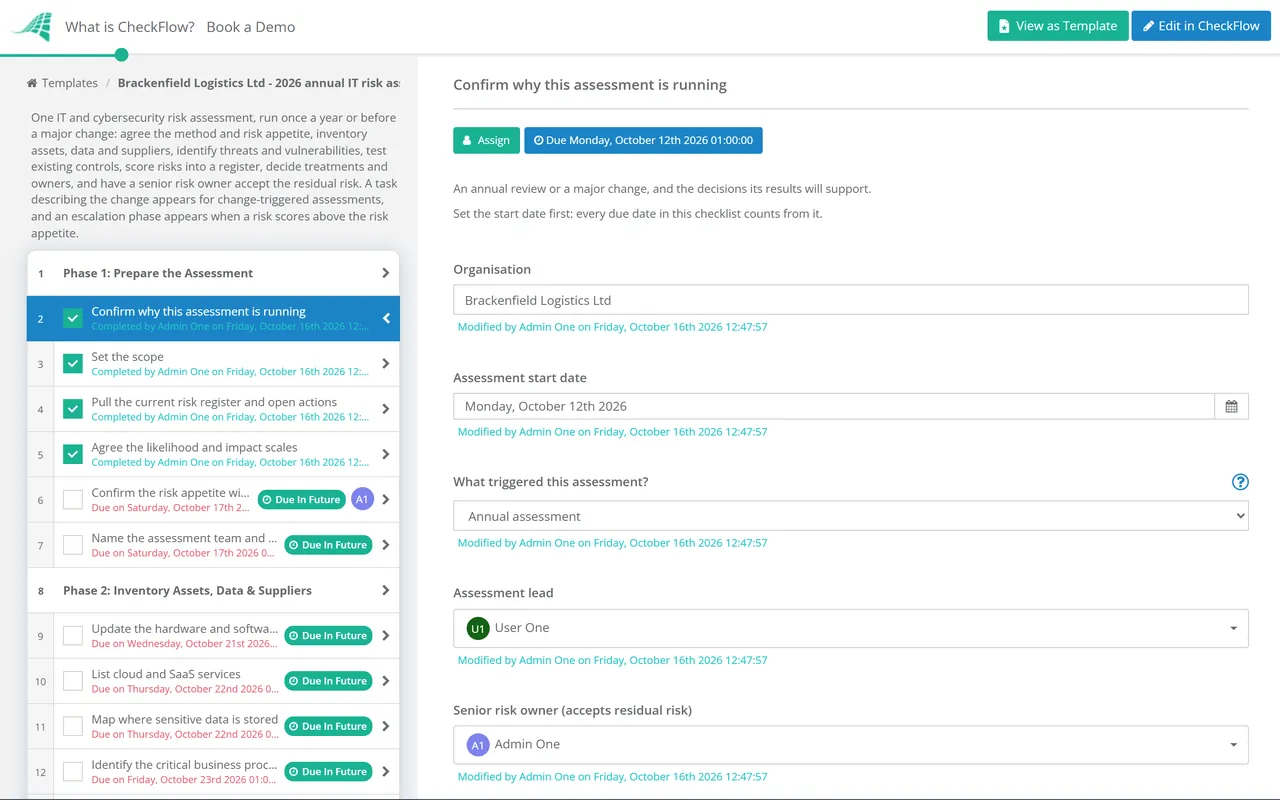
A yearly recurring schedule starts the assessment in the same month and assigns Phase 1 to the assessment lead. A major change gets its own run from the same template, so change-triggered risks arrive in the same format as the annual ones and land in the same register.

2

Residual risk has a named owner

The senior risk owner is chosen on the first task. The risk appetite, any escalation decision and the final acceptance are assigned to them alone, and nothing after the sign-off step can be completed until they have recorded a decision. Nobody can quietly accept a risk on someone else’s behalf.

3

The evidence sits with the score

Scan reports, control tests, the register and the final report are attached to the tasks they support, with names and dates. When an auditor, an insurer or next year’s assessor asks why a risk was scored High, the reasoning is in the completed checklist, and the Reports Grid lists every past assessment.

CheckFlow does not scan your network or score risks for you. It runs the assessment around your tools: who does what, by when, with what evidence, and who accepted the result. CheckFlow’s compliance checklist software shows how the same approach handles recurring control reviews and audit evidence.

The risk assessment draws on the routine security work. The Vulnerability Management Checklist and the Penetration Test Checklist supply technical evidence, and the Vendor Risk Assessment Checklist goes deeper on individual suppliers. If you are an MSP assessing a client, use the Client Cybersecurity Risk Assessment Checklist; healthcare organisations should use the HIPAA Security Risk Assessment Checklist.

AI generator

Didn’t find what you need? Describe it.

Describe the process in a sentence and the AI checklist generator drafts the phases and tasks for you.

Frequently Asked Questions

What is an IT risk assessment?

It is a structured review of the risks to an organisation’s systems and data. The team lists the assets, data and suppliers in scope, identifies the threats and vulnerabilities that apply to each, checks the controls already in place and scores every risk by likelihood and impact. The result is a risk register and a decision on every risk: treat it, tolerate it, transfer it or terminate it. A senior manager then accepts the risk that remains. Most organisations run one a year and another before a major change.

What should a cyber security risk assessment checklist include?

Agreed scales for likelihood and impact and a risk appetite, set before scoring starts. Then an inventory of hardware, software, cloud services, sensitive data and suppliers; the threats and vulnerabilities that apply; a test of the key existing controls; a scored risk register; a treatment decision, owner and date for every risk; and a sign-off of the residual risk by someone with the authority to accept it. Add an escalation step for risks above appetite and a date for the next review.

How often should an IT risk assessment be done?

Once a year is the usual baseline, with an extra assessment before or after a significant change, such as a new core system, a cloud migration, an acquisition or a serious incident. NIST SP 800-30 Rev. 1 leaves the frequency to each organisation, and says that after significant changes organisations can revisit the purpose, scope and assumptions to decide whether the whole assessment needs repeating. Between assessments, keep the register current as treatments close and new risks appear.

How do you calculate a risk score?

Rate the likelihood that a threat exploits a vulnerability and the impact if it does, each on an agreed scale, then combine them. On a 5 × 5 scale the usual method is likelihood multiplied by impact, giving a score from 1 to 25 that you band as Low, Medium, High or Critical. What matters most is that every level has a written definition, so different assessors reach the same score. Score likelihood with the controls you have actually tested, not the ones you assume work.

What are the four ways to treat a risk?

Treat it by adding or improving controls; tolerate it by accepting it with a documented reason; transfer it through insurance or a contract; or terminate it by stopping the activity or retiring the system that causes it. NIST SP 800-39 calls these mitigation, acceptance, sharing or transfer, and avoidance. It also notes that transferring a risk reduces neither the likelihood of the event nor its consequences, so a transferred risk still needs checking against the actual policy or contract terms.

Who should sign off the residual risk?

A senior manager with authority over the business the risk affects, such as a director, the chief operating officer or the owner of the risk policy. It should not be the person who compiled the register, because the sign-off is a check on their work. The checklist names this senior risk owner on the first task, assigns them the appetite, escalation and acceptance decisions, and holds the follow-up tasks until they record a decision.

How is this different from a vulnerability scan or an MSP client assessment?

A vulnerability scan finds technical weaknesses; the Vulnerability Management Checklist handles fixing them every month. This template is the yearly, organisation-wide view that decides which risks matter and who accepts what remains. It is written for an in-house IT team. MSPs assessing a client should use the Client Cybersecurity Risk Assessment Checklist, and HIPAA-covered organisations the HIPAA Security Risk Assessment Checklist.

Is CheckFlow free for this template?

14-day free trial, no card required. The Business plan is $10 per user per month after the trial. Full details at checkflow.io/pricing.

Score Every IT Risk and Get the Rest Signed Off

Free trial — no credit card required.

14-day free trial, no credit cardFull refund in your first 30 daysUS or EU hosting