NIST CSF 2.0 Checklist Template

Most NIST CSF assessments end as a spreadsheet of scores that nobody reopens. The gaps are known, the actions have no owners, and next year’s assessment starts again from a blank sheet.

The NIST Cybersecurity Framework 2.0 describes 106 cybersecurity outcomes and leaves each organisation to decide which ones matter and how well it meets them. This free NIST CSF checklist runs that assessment for security leads, IT managers and risk teams. It follows NIST’s five-step process for Organizational Profiles: scope the Profile, score a Current Profile Function by Function, set a Target Profile with executive sign-off, analyse the gaps and track a prioritised action plan to closure. Answers on the first task switch on the reassessment, Tiers and Community Profile steps only where they apply. The result is a dated Current and Target Profile, an action plan with owners and deadlines, and the evidence behind every score.

Use This Template Free See Live Example
No Credit Card Required

Last reviewed: September 2026

The CSF Produces a Profile, Not a Certificate

CSF 2.0, published by NIST on 26 February 2024, is a taxonomy of outcomes, not a control set. A Subcategory such as PR.DS-11 says that backups are created, protected, maintained and tested. It does not say how often, with which tool or to what standard. That is why a CSF assessment cannot be passed or failed. What it produces is an Organizational Profile: where you are, where leadership wants to be and what stands between the two.

NIST does not certify anyone against the CSF and has no plans for a conformity assessment programme. A questionnaire asking whether you are “NIST CSF compliant” is really asking for your Profile, your Tier and the actions still open. This checklist produces that record.

Current Profile

What the organisation achieves today

Records: the practices in place for each outcome, a status and a rating.

Evidence: policies, inventories, test results and logs that show the practice exists.

Scored by: the people who run the controls, challenged by the Profile owner.

Target Profile

What leadership has decided it needs

Records: the selected outcomes, a priority for each and the goals that define success.

Inputs: legal and contractual requirements, risk tolerance, threat trends and planned technology.

Set by: executives, optionally from a sector Community Profile.

Tiers are optional

Rigour of risk practices, not a maturity score per control

The four Tiers, Partial, Risk Informed, Repeatable and Adaptive, describe how rigorous the organisation’s cybersecurity risk governance and management practices are. They are optional. NIST’s Tiers quick-start guide advises selecting them for the organisation as a whole, a Function or a Category rather than for individual Subcategories, and says the selection is generally made by leadership.

What the NIST CSF 2.0 Checklist Covers

Seven phases follow NIST’s five steps for creating and using an Organizational Profile, with the Current Profile split by Function so each owner scores their own outcomes. Identifiers are from the CSF 2.0 Core.

Phase 1

Phase 1: Scope the Profile & Gather Inputs

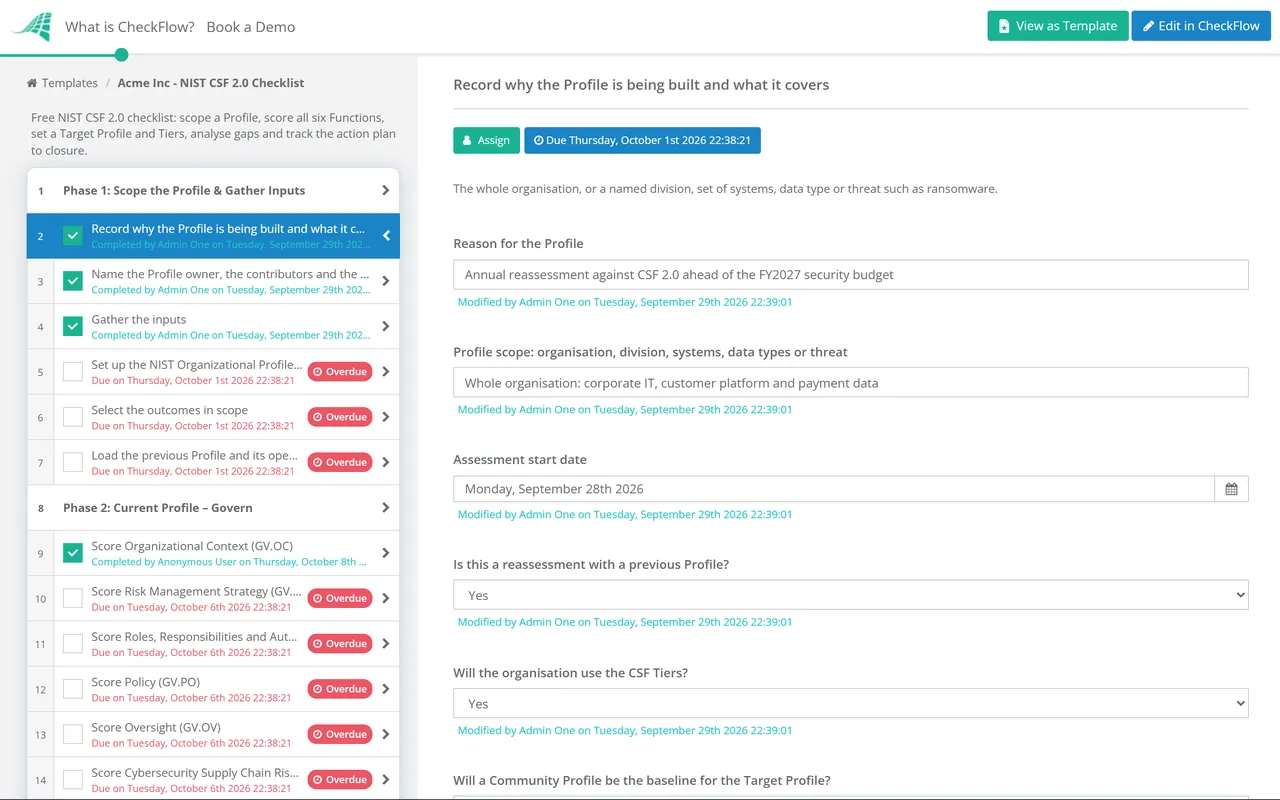
The answers on the first task drive the conditional tasks in Phases 1, 5 and 6.

  • Record why the Profile is being built and what it covers — the whole organisation, or a named division, set of systems, data type or threat such as ransomware
  • Name the Profile owner, the contributors and the executive who sets targets — the person who approves the Target should not be the person scoring the Current Profile
  • Gather the inputs — policies, the risk register, risk appetite statements, business impact analysis, key contracts and the standards the organisation already follows
  • Set up the NIST Organizational Profile template — agree the status, rating and priority scales before anyone scores an outcome
  • Select the outcomes in scope — start from all 106 Subcategories and record a rationale for each one excluded or added
  • Load the previous Profile and its open actions — shown only for a reassessment, so this cycle is scored against the last one
Phase 2

Phase 2: Current Profile – Govern

Govern shapes how the other five Functions are run, so it is scored first. Each scoring task records practices, status and a rating per Subcategory, with evidence attached.

  • Score Organizational Context (GV.OC) — mission, stakeholders, dependencies and the legal, regulatory and contractual requirements in GV.OC-03
  • Score Risk Management Strategy (GV.RM) — written risk appetite and tolerance statements, and one standard method for rating risks
  • Score Roles, Responsibilities and Authorities (GV.RR) — leadership accountability, defined roles, adequate resources and cybersecurity in HR practices
  • Score Policy (GV.PO) — policy exists and has been reviewed for changes in requirements, threats, technology and mission
  • Score Oversight (GV.OV) — evidence that leadership reviews strategy outcomes and risk management performance and adjusts them
  • Score Cybersecurity Supply Chain Risk Management (GV.SC) — suppliers known and ranked by criticality, contract requirements, due diligence and exit provisions
Phase 3

Phase 3: Current Profile – Identify & Protect

  • Score Asset Management (ID.AM) — hardware, software, services and data inventories and data-flow diagrams, tested against a sample of real assets
  • Score Risk Assessment (ID.RA) — vulnerabilities and threats recorded, risk responses tracked and critical suppliers assessed before acquisition
  • Score Improvement (ID.IM) — lessons drawn from evaluations, tests, exercises and incidents, with response plans kept current
  • Score Identity Management, Authentication and Access Control (PR.AA) — including least privilege and separation of duties under PR.AA-05
  • Score Awareness and Training (PR.AT) — general staff and people in specialised roles, rated separately
  • Score Data Security and Platform Security (PR.DS, PR.PS) — backups created and tested, configuration management, software maintenance and logging
  • Score Technology Infrastructure Resilience (PR.IR) — network protection, resilience requirements and capacity
Phase 4

Phase 4: Current Profile – Detect, Respond & Recover

  • Score Continuous Monitoring (DE.CM) — networks, personnel activity, external service providers and computing environments
  • Score Adverse Event Analysis (DE.AE) — correlation across sources, and written criteria for declaring an incident under DE.AE-08
  • Score Incident Management (RS.MA) — the response plan executed with third parties, with triage, prioritisation and escalation
  • Score Incident Analysis, Reporting and Mitigation (RS.AN, RS.CO, RS.MI) — root cause, preserved records, stakeholder notification and containment
  • Score Incident Recovery (RC.RP, RC.CO) — backup integrity verified before restoring, criteria for ending recovery, and approved public updates
  • Review the completed Current Profile with each Function owner — lower any score the attached evidence does not support before targets are set
Phase 5

Phase 5: Set the Target Profile

The Tiers task appears only when the organisation uses Tiers, and the Community Profile task only when one is the baseline for the Target.

  • Select the Tiers leadership wants to reach — for the organisation, a Function or a Category rather than single Subcategories
  • Copy the chosen Community Profile into the Target — then adjust its priorities and add outcomes specific to the organisation
  • Set a priority for each in-scope outcome — driven by legal requirements, risk tolerance, threats and mission, on the agreed scale
  • Write goals for every high-priority outcome — the policies, procedures, roles and Informative References that define success
  • Allow for anticipated change — new requirements, planned technology adoption and trends in threat intelligence
  • Approve the Target Profile — signed off by the executive named in Phase 1
Phase 6

Phase 6: Gap Analysis & Action Plan

The second task appears only for a reassessment.

  • Compare Current and Target for each outcome — across people, process and technology, recording each difference as a candidate improvement
  • Compare this Current Profile with the previous one — flag every outcome whose score went down and find out why
  • Build the prioritised action plan — each action with a priority, owner, deadline and the resources it needs
  • Move long-running gaps to a POA&M or the risk register — with interim milestones rather than a single end date
  • Record risk acceptance for gaps that will not be closed — approved within the risk tolerance set under GV.RM
  • Present the gap summary and action plan to leadership — minute the decisions as Oversight evidence for GV.OV
Phase 7 — Ongoing

Phase 7: Implement, Track & Reassess

Runs after leadership approves the plan. The action review can repeat monthly or quarterly on its own schedule until the next full reassessment.

  • Track each action to closure with evidence — attach the proof and update the outcome’s status in the Profile
  • Report progress to leadership at the agreed cadence — key performance and key risk indicators, not only the share of actions closed
  • Re-score outcomes whose actions have closed — the Current Profile moves only when the evidence does
  • Trigger an out-of-cycle review after a major change — a new legal requirement, a significant incident, an acquisition or a platform migration
  • Set the date of the next full reassessment — the CSF sets no cadence, so record the one leadership chose and why

The Six CSF 2.0 Functions and Where Each Is Assessed

The CSF 2.0 Core has three levels: 6 Functions, 22 Categories and 106 Subcategories. Subcategory numbers have gaps where CSF 1.1 outcomes moved. Govern is the largest Function, which is why it gets a phase of its own. The CSF creates no legal obligation by itself, although the requirements you record under GV.OC-03 may, so treat the table as a map of the framework, not legal advice.

Function Categories Subcategories Assessed in
Govern (GV)Organizational Context; Risk Management Strategy; Roles, Responsibilities, and Authorities; Policy; Oversight; Cybersecurity Supply Chain Risk Management31Phase 2
Identify (ID)Asset Management; Risk Assessment; Improvement21Phase 3
Protect (PR)Identity Management, Authentication, and Access Control; Awareness and Training; Data Security; Platform Security; Technology Infrastructure Resilience22Phase 3
Detect (DE)Continuous Monitoring; Adverse Event Analysis11Phase 4
Respond (RS)Incident Management; Incident Analysis; Incident Response Reporting and Communication; Incident Mitigation13Phase 4
Recover (RC)Incident Recovery Plan Execution; Incident Recovery Communication8Phase 4
Total22 Categories106Phases 5–7 set targets and close gaps

At the time of review, CSF 2.0 remains the current version and NIST has announced no revision of the Core; its FAQ says there are no immediate plans to update the Core to address AI. The Cyber AI Profile (NIST IR 8596) is still a preliminary draft, released in December 2025, and a draft quick-start guide on using AI for CSF analysis (SP 1353) is open for comment until 15 October 2026. Informative References change more often than the Core: NIST finalised mappings from ISO/IEC 27001:2022 in May 2025 and SP 800-53 Rev. 5.2.0 in November 2025, and the PCI Security Standards Council mapped PCI DSS v4.0.1 to CSF 2.0 in July 2026. Check the CSF 2.0 Reference Tool before you write goals.

Why Run Your NIST CSF Assessment in CheckFlow?

1

Each Function scored by its owner

Assign Govern to the risk lead, Protect to IT operations and Respond to the incident manager. Each scoring task holds a table of its Subcategories, and the policy, inventory or test report behind each score is attached to that task.

2

Targets wait for the evidence

Enforced step order stops the Target Profile being set before the Current Profile review is complete, and the Target is signed off as an approval by a named executive. Conditional logic adds the Tiers, Community Profile and reassessment steps only when the first task says they apply.

3

The action plan keeps moving

A recurring schedule starts the action review every month or quarter, with dynamic due dates, and the next full reassessment on the date leadership chose. The activity trail shows who changed each score and when.

CheckFlow is not a GRC platform, a vulnerability scanner or an assessor, and nobody can certify you against the CSF. It keeps the scores, evidence, approvals and actions in one record. CheckFlow’s compliance checklist software shows how the same schedules, evidence and sign-offs work across your whole compliance calendar.

A CSF Profile does not replace a scheme with its own requirements and assessors. If a defence contract requires CMMC, use the CMMC Compliance Checklist. If you want a certifiable information security management system, the ISO 27001 Compliance Checklist covers it, and NIST’s ISO/IEC 27001:2022 mapping lets one body of evidence support both. The Respond outcomes you score here are run live with the Incident Management Checklist.

Frequently Asked Questions

What are the six functions of NIST CSF 2.0?

+

Govern, Identify, Protect, Detect, Respond and Recover. Govern is new in version 2.0 and covers context, risk strategy, roles, policy, oversight and supply chain risk. Together the six Functions contain 22 Categories and 106 Subcategories, and NIST says they should be addressed concurrently rather than in sequence.

What changed between NIST CSF 1.1 and 2.0?

+

Version 1.1, from April 2018, had five Functions, 23 Categories and 108 Subcategories. Version 2.0 adds Govern and moves the governance, risk strategy and supply chain Categories out of Identify into it. It also adds an Improvement Category under Identify and two Protect Categories, Platform Security and Technology Infrastructure Resilience. NIST states that no 1.1 content was removed, only relocated. To convert a 1.1 Profile, use NIST’s published crosswalk.

Is NIST CSF mandatory?

+

For most organisations, no. NIST is not a regulator and most organisations use the CSF voluntarily. NIST’s FAQ notes that Executive Order 13800 made it mandatory for US federal agencies, and that some companies require it of their customers or suppliers. In practice it often arrives through a contract or a customer questionnaire, which is why GV.OC-03 asks you to record those obligations.

Can an organisation be certified against NIST CSF?

+

No. NIST does not offer certifications or endorsements for CSF implementations, and says it has no plans to develop a conformity assessment programme. A consultant can assess you against the CSF, but the result is their opinion, not a NIST certificate. The best evidence for a customer is a dated Current Profile, the approved Target and progress on the action plan.

What are the NIST CSF Implementation Tiers?

+

Four levels describing the rigour of an organisation’s cybersecurity risk practices: Partial (Tier 1), Risk Informed (Tier 2), Repeatable (Tier 3) and Adaptive (Tier 4). Each Tier has a governance description, which relates to Govern, and a risk management description for the other five Functions. They are optional, and they are not a scoring scale for individual outcomes.

How often should a NIST CSF assessment be repeated?

+

The CSF sets no frequency. It says the Profile steps can be repeated as often as needed. A practical rhythm is a full reassessment once a year, a monthly or quarterly review of the action plan, and an out-of-cycle review after a significant incident, acquisition or new legal requirement. Record the cadence you chose, and why, in the Profile.

Is CheckFlow free for this template?

+

14-day free trial, no card required. The Business plan is $10 per user per month after the trial. Full details at checkflow.io/pricing.

A Profile You Can Defend and an Action Plan That Keeps Moving

Free trial — no credit card required.