Cloud estates drift every day. A developer opens a storage bucket for a demo, a contractor’s access key outlives the contract, and a new account appears outside the landing zone. None of it is visible until someone goes looking.
Posture tools flag misconfigurations continuously, but a dashboard full of red is not a review. Someone still has to confirm the tool can see every account, judge which findings matter, decide what gets fixed and what gets accepted, and put a name to that decision. This free cloud security review checklist gives platform and security teams a quarterly routine for AWS, Microsoft Azure and Google Cloud. It covers account inventory, identity and privileged access, public exposure, encryption and keys, audit logging, backups and the triage of posture findings. Provider-specific checks appear only for the clouds you actually use, and every quarter ends with an owner’s sign-off and a record that SOC 2 and ISO 27001 auditors can sample.
Every major provider publishes a shared responsibility model, and all of them draw the line in roughly the same place. The provider runs the data centres, the hardware, the hypervisor and the managed service software. You own how those services are configured: who can sign in, what is reachable from the internet, which data is encrypted with which keys, and whether anyone would notice if logging were switched off. Most cloud breaches trace back to that customer side of the line.
The split also moves with every service you adopt. Moving a database from a virtual machine to a managed service hands operating system patching to the provider, but access control, network exposure and backup retention stay firmly with you. That is why this review re-checks the split each quarter rather than assuming last year’s answer still holds.
Security of the cloud
The provider’s responsibility
Covers: physical facilities, hardware, global network and virtualisation layer.
Also: the underlying platform of managed services such as databases and serverless.
Your evidence: the provider’s own SOC 2 reports and ISO certificates.
Your job: read those reports and track the controls they expect you to run.
Security in the cloud
Your responsibility
Covers: identities, permissions, network rules, data exposure, encryption settings and logging.
Also: workloads you run on virtual machines and containers, including their patching.
Your evidence: this review, posture reports and the decisions recorded on each finding.
Your job: check it on a schedule and sign off the result.
The provider side still needs some attention from you. AWS, Microsoft and Google publish SOC 2 reports for their platforms, and each report lists the controls the provider expects its customers to run, often labelled complementary user entity controls or user entity responsibilities. Typical examples are managing your own users and protecting your own keys. Read those reports once a year with the SOC Report Review Checklist and confirm every assumed control has an owner. Many of them turn up again as tasks in this review.
What the Cloud Security Review Checklist Covers
Six phases run each quarter. Phase 3 switches on the AWS, Azure and Google Cloud checks for the providers you record in Phase 1.
Phase 1
Phase 1: Inventory & Scope
Assigned to the cloud platform lead. You cannot review an account you do not know exists.
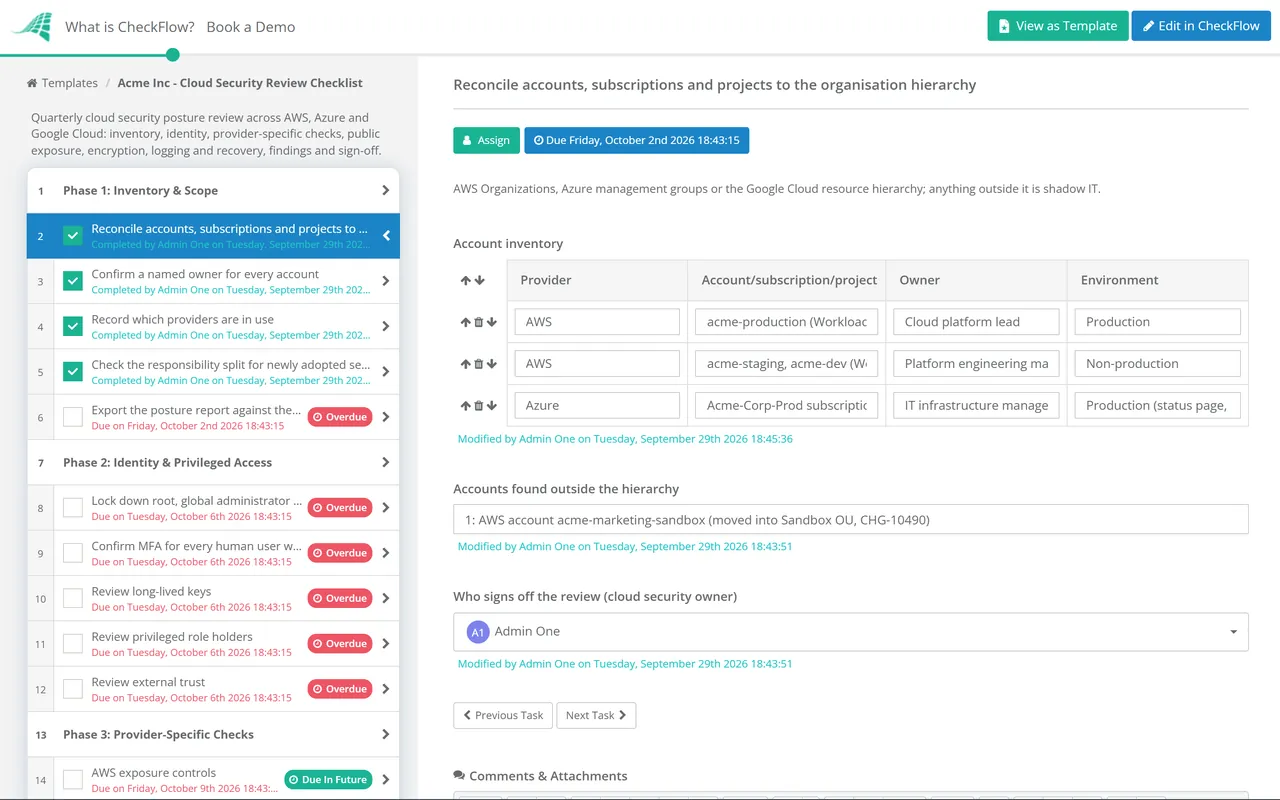
Reconcile accounts, subscriptions and projects to the organisation hierarchy — AWS Organizations, Azure management groups or the Google Cloud resource hierarchy; anything outside it is shadow IT
Confirm a named owner for every account — close or reassign any without one
Record which providers are in use — one yes/no answer each for AWS, Azure and Google Cloud
Check the responsibility split for newly adopted services — note which controls moved to the provider and which stayed with you
Export the posture report against the CIS Foundations Benchmark — from your posture management tool or the provider’s native service
Phase 2
Phase 2: Identity & Privileged Access
Lock down root, global administrator and break-glass accounts — MFA enforced, no day-to-day use, every sign-in alerted
Confirm MFA for every human user with console access — including contractors and federated users
Review long-lived keys — access keys and service account keys by age and last use; rotate or delete the stale ones
Review privileged role holders — each owner or administrator assignment needs a current reason; prefer just-in-time elevation
Review external trust — cross-account roles, guest users and third-party integrations with standing access
Phase 3
Phase 3: Provider-Specific Checks
Each pair of tasks switches on only when that provider is marked as in use. Assign them to the engineer who knows that platform best.
AWS exposure controls — account-level S3 Block Public Access on, and IAM Access Analyzer external-access findings reviewed
AWS audit trail — an organisation trail in CloudTrail covering all regions, with log file integrity validation enabled
Azure posture coverage — Defender for Cloud plans enabled on every subscription, with its recommendations exported
Azure logging and storage — Activity Log sent to a central workspace, and anonymous blob access disallowed on storage accounts
Google Cloud organisation policies — domain-restricted sharing, service account key creation disabled and public access prevention on Cloud Storage
Google Cloud audit logs — Data Access logs enabled where sensitive data lives, since they are off by default for most services
Phase 4
Phase 4: Public Exposure & Network
Review every publicly readable storage location — each needs a documented business reason, or it gets closed
Find admin ports open to the internet — SSH, RDP and database ports allowed from any address in security groups, NSGs or firewall rules
Reconcile public IPs and load balancers to the approved internet-facing list — anything unexpected is investigated
Check for shared or public snapshots, machine images and database endpoints — a public disk snapshot is a full copy of the data on it
Confirm public applications sit behind a WAF where your policy requires one — with rules blocking, not only logging
Phase 5
Phase 5: Encryption, Logging & Recovery
Confirm encryption at rest and key control — customer-managed keys where policy demands them, and a short list of who can disable or delete keys
Check secrets handling — secrets held in a secrets manager, none in code, templates or instance metadata
Confirm audit logs are central and tamper-resistant — kept in a separate log account or project, with retention matching policy
Test alerting on high-risk events — root sign-in, logging disabled or policy changes reach a monitored queue
Verify backups are isolated and restorable — copies held outside the production account, and a restore tested this quarter
Phase 6
Phase 6: Findings & Sign-Off
The risk acceptance task appears only when a finding is marked “accept risk”. Sign-off belongs to the cloud security owner.
Triage high and critical posture findings — fix, accept risk or false positive, with a reason for each
Raise remediation tickets — one per finding, with a named owner and target date
Approve risk acceptances — the risk owner approves or rejects, and every acceptance carries an expiry
Compare with last quarter — repeat findings point to a missing guardrail rather than a one-off mistake
Sign off the quarterly review — the approval records who reviewed the estate and when
Management frameworks tell you to govern cloud use. Benchmarks tell you which settings to check. The review sits between the two. The table below reflects ISO/IEC 27001:2022, SOC 2 as revised in 2022, the current CIS Foundations Benchmarks and CSA Cloud Controls Matrix v4.1. It is a place to begin your own mapping rather than legal or audit advice.
Framework
Control
What it expects
Evidenced in
ISO/IEC 27001:2022
A.5.23 Information security for use of cloud services
Processes for acquiring, using, managing and exiting cloud services, in line with your security requirements
Phases 1 and 6
ISO/IEC 27001:2022
A.8.15 Logging and A.8.24 Use of cryptography
Logs produced, protected and analysed; rules for cryptography, including key management
Phases 3 and 5
SOC 2
CC6.1 and CC6.6
Logical access security over protected assets, and defences against external threats at the system boundary
Phases 2 and 4
SOC 2
CC7.1 and CC7.2
Detecting configuration changes that introduce vulnerabilities, and monitoring components for anomalies
Phases 3, 5 and 6
CIS Benchmarks
AWS Foundations 7.0.0, Azure Foundations 6.0.0, Google Cloud Platform Foundation 5.0.0
Prescriptive configuration settings for identity, logging, monitoring, networking and storage
Phases 1 and 3
CSA CCM v4.1
IAM, LOG, CEK, TVM and STA domains
Cloud control objectives, with a shared responsibility model stating who owns each control
Phases 1–6
Benchmark versions change several times a year, so record the version your posture tool assessed against in Phase 1, along with any account it could not reach, because an unassessed account looks exactly like a clean one. CSA published CCM v4.1 in January 2026 and plans to withdraw v4.0.x from use in January 2028. For the framework programmes themselves, see the SOC 2 Readiness Checklist and the NIST CSF 2.0 Checklist.
Why Run Your Cloud Security Review in CheckFlow?
1
One template, any mix of clouds
Conditional logic shows the AWS, Azure or Google Cloud tasks only when that provider is marked as in use. A single-cloud team gets a short checklist, and a multi-cloud estate gets every check without maintaining three templates.
2
Quarterly, without a reminder
A recurring schedule opens the review at the start of each quarter, assigns Phase 1 to the platform lead and gives each phase a due date. A skipped quarter shows as overdue, not as a gap discovered during the audit.
3
Decisions an auditor can follow
Posture exports, screenshots and tickets are attached to the tasks they support, and every accepted risk records its approver and expiry. Four signed quarters give a SOC 2 Type 2 auditor a clear operating history.
CheckFlow is not a posture management tool or a SIEM. It runs the human review, decisions and sign-off around them. The SOC 2 compliance software page explains how this review sits alongside your other recurring controls, and the User Access Review Checklist covers entitlement recertification in depth.
Configuration review is only part of the picture. Workload vulnerabilities belong in the monthly Vulnerability Management Checklist, and the Penetration Test Checklist tests whether the settings you signed off hold up against a real attacker.
It is a scheduled check of how your cloud accounts are configured and governed. It covers which accounts exist, who has privileged access, what is exposed to the internet, how data and keys are protected, whether audit logs are complete, and what the posture findings say. Unlike a one-off assessment, it runs on a fixed cycle and ends with named decisions on every significant finding.
How often should we review cloud security?
+
Quarterly is a common rhythm for a full review, with posture tools and alerting covering the time in between. Neither ISO 27001 nor SOC 2 prescribes a frequency, but auditors expect evidence that the control operated consistently across the period, so a regular cycle is easier to defend than ad hoc checks. Add an extra review after a major migration, acquisition or new landing zone.
Do we still need this if we use a CSPM tool?
+
Yes. A cloud security posture management tool finds misconfigurations, but it cannot confirm it is connected to every account, decide which findings are acceptable, or record who took that decision. The review uses the tool’s report as its main input and adds the judgement, approvals and history that auditors ask for.
Does the checklist work for multi-cloud estates?
+
Yes. The common phases apply to every provider, and Phase 3 adds AWS, Azure or Google Cloud tasks according to what you mark as in use. You can also add checks for other platforms, such as Kubernetes clusters or a regional provider, as extra tasks in the same phase.
Which CIS Benchmark versions should we use?
+
Use the latest version your posture tool supports, and record it with each review. At the end of September 2026, CIS lists AWS Foundations 7.0.0, Microsoft Azure Foundations 6.0.0 and Google Cloud Platform Foundation 5.0.0 as current. If a tool lags behind, note the version it used, so a finding that appears after an upgrade is not mistaken for new drift.
Is CheckFlow free for this template?
+
14-day free trial, no card required. The Business plan is $10 per user per month after the trial. Full details at checkflow.io/pricing.
Four Signed Cloud Reviews a Year, Across Every Provider
Free trial — no credit card required.
Do you like cookies? 🍪 We use cookies to ensure you get the best experience on our website. Learn more