Vulnerability Management Checklist Template

The scanner produced another report with thousands of findings. The hard part is proving which ones were fixed, which were accepted, who decided and whether the fix actually held.

Scanning is the easy half of vulnerability management. The half that fails audits is everything after the scan: checking that every asset was actually covered, deciding what matters this month, getting fixes onto the right team’s plate, handling the findings nobody can fix in time, and confirming with a rescan that the problem has gone. This free vulnerability management checklist turns that cycle into a repeatable monthly run. It covers scan coverage, triage with CVSS, EPSS and the CISA Known Exploited Vulnerabilities catalogue, remediation deadlines by priority, time-limited risk exceptions with a named approver, rescan verification and a signed monthly report. Each cycle leaves a record that an ISO 27001 auditor, a PCI QSA or a SOC 2 assessor can follow from finding to closure.

Use This Template Free See Live Example
No Credit Card Required

Vulnerability Management vs Patch Management: Who Decides and Who Deploys

The two terms get used interchangeably, and that is where findings go missing. Patch management is an IT operations process: test the update, schedule it, deploy it, confirm it installed. Vulnerability management is the security process that decides what needs fixing, by when, and whether a patch is even the answer. Plenty of findings have no patch at all. They need a configuration change, a retired service or a documented decision to live with the risk for a while.

Prioritisation is where most teams struggle. A CVSS v4.0 base score measures how bad a flaw could be in general, not how likely it is to hurt you. FIRST’s EPSS adds a daily estimate of the probability that a CVE will be exploited in the next 30 days, and FIRST warns against multiplying the two together. CISA’s KEV catalogue lists vulnerabilities already being exploited in the wild. In June 2026 CISA’s BOD 26-04 replaced BOD 22-01 for US federal civilian agencies. It sets deadlines by internet exposure, KEV status, whether exploitation can be automated and the level of control an attacker gains, ranging from 3 days for the worst combination to fixing at the next upgrade for vulnerabilities not in KEV. Private organisations are not bound by it, but it is a useful model for your own tiers.

Patch management

Run by IT operations and platform teams

Question it answers: did the update install everywhere it should?

Cadence: vendor release cycles, such as monthly OS updates.

Output: deployment reports and change records.

Tooling: endpoint management and deployment systems.
Vulnerability management

Owned by the security team

Question it answers: which weaknesses matter here, and are they gone?

Cadence: a monthly cycle, with emergency handling for actively exploited flaws.

Output: prioritised findings, deadlines, approved exceptions and verified closures.

Tooling: scanners for detection, plus a checklist for decisions and evidence.

Scanning also only finds what a scanner can see. An annual penetration test tests whether findings can be chained into a real compromise, and its results should land in this same remediation queue.

What the Vulnerability Management Checklist Covers

Six phases take each monthly cycle from scan coverage to a signed report. The exception phase switches on only when a finding cannot be fixed on time.

Phase 1

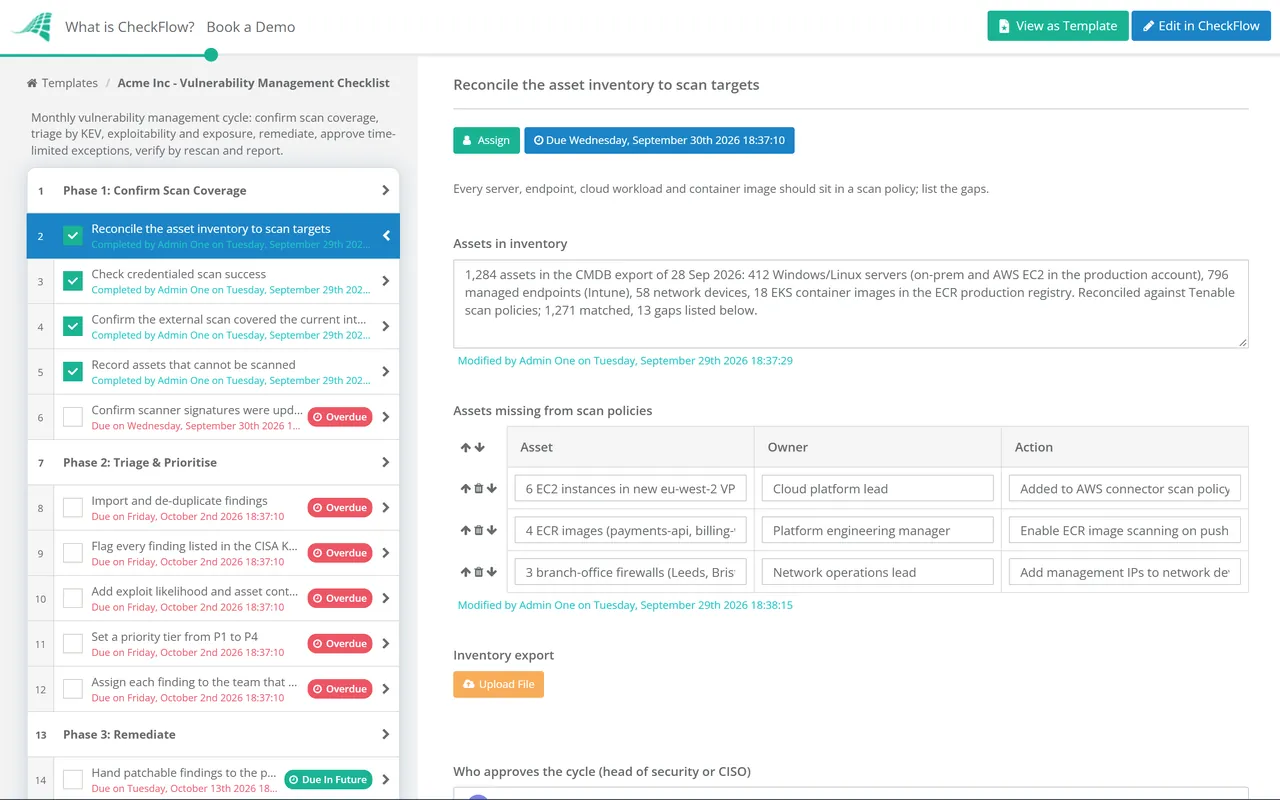
Phase 1: Confirm Scan Coverage

Assigned to the vulnerability management lead. A clean report means nothing if a third of the estate was never scanned.

  • Reconcile the asset inventory to scan targets — every server, endpoint, cloud workload and container image should sit in a scan policy; list the gaps
  • Check credentialed scan success — fix authentication failures before trusting the results, because an unauthenticated scan understates exposure
  • Confirm the external scan covered the current internet-facing list — including hostnames and addresses added since last month
  • Record assets that cannot be scanned — with the reason and the compensating check used instead
  • Confirm scanner signatures were updated before the scan window — and whether any part of the estate is in PCI DSS scope
Phase 2

Phase 2: Triage & Prioritise

  • Import and de-duplicate findings — one record per vulnerability per asset, carrying the CVE and CVSS score
  • Flag every finding listed in the CISA KEV catalogue — known exploitation moves it up regardless of base score
  • Add exploit likelihood and asset context — EPSS probability, internet exposure, data held and business criticality
  • Set a priority tier from P1 to P4 — the tier fixes the remediation deadline, so the reasoning is recorded with it
  • Assign each finding to the team that owns the asset — with the due date taken from your SLA table
Phase 3

Phase 3: Remediate

If a KEV-listed finding sits on an internet-facing asset, an emergency task appears here automatically.

  • Raise an emergency change and check for signs of prior compromise — shown only for exploited flaws on exposed assets
  • Hand patchable findings to the patch process — deployment runs in its own template; record the change or ticket reference here
  • Apply mitigations where no patch exists — disable the service, restrict access, add a WAF rule or isolate the host
  • Chase findings nearing their deadline — escalate to the asset owner’s manager before the SLA is breached, not after
  • Record the outcome for each finding — fixed, mitigated or exception requested
Phase 4

Phase 4: Exceptions & Risk Acceptance

Switches on when any finding is marked “exception requested”. The approver is the business risk owner, never the engineer asking.

  • Document why the fix cannot meet its deadline — vendor dependency, change freeze, end-of-life software
  • Record the compensating controls in place — segmentation, monitoring, restricted access
  • Set an expiry date — an exception with no end date is a permanent vulnerability with paperwork
  • Obtain risk owner approval — approve or reject, with the decision and name kept on record
  • Add the accepted risk to the risk register — so it is reviewed again at expiry
Phase 5

Phase 5: Verify & Close

  • Rescan remediated assets — close a finding only when the rescan no longer reports it
  • Confirm PCI scan obligations — shown for in-scope estates: high and critical internal findings rescanned, and a passing quarterly ASV scan on file
  • Investigate reopened findings — a returning vulnerability usually means a base image or build template was never updated
  • Review expired exceptions — renew with fresh approval or put the finding back into remediation
  • Attach rescan evidence — the report extract that shows each closure
Phase 6

Phase 6: Report & Sign Off

The CISO or security lead owns this phase personally, separate from whoever compiled the numbers.

  • Produce the cycle metrics — open findings by tier, deadlines met, mean time to remediate, scan coverage and live exceptions
  • Compare against last month — explain any tier where the backlog grew
  • Escalate systemic blockers — teams repeatedly missing deadlines, unowned assets, unsupported software
  • Approve the cycle — sign-off recorded against the report
  • Carry open items into next month’s run — each keeps its original due date, so ageing stays visible

Where Vulnerability Management Sits in ISO 27001, PCI DSS, SOC 2 and CIS

Every major framework expects a vulnerability process that is defined, followed and evidenced. Few of them prescribe your deadlines. The table shows the controls this cycle produces evidence for, using ISO/IEC 27001:2022, PCI DSS v4.0.1, SOC 2 (2017 criteria, points of focus revised in 2022) and CIS Controls v8.1. Treat it as a starting point for your own control mapping, not legal or audit advice.

Framework Control What it expects Evidenced in
ISO/IEC 27001:2022A.8.8 Management of technical vulnerabilitiesObtain vulnerability information, evaluate your exposure and take appropriate measuresPhases 1–5
PCI DSS v4.0.16.3.1New vulnerabilities identified from industry sources and risk-ranked, with high-risk and critical ones identifiedPhase 2
PCI DSS v4.0.16.3.3Patches for critical vulnerabilities installed within one month of releasePhase 3
PCI DSS v4.0.111.3.1 (with 11.3.1.1–11.3.1.3)Internal scans at least once every three months and after significant change, authenticated where possible; high and critical findings resolved and rescannedPhases 1 and 5
PCI DSS v4.0.111.3.2External scans at least once every three months by an Approved Scanning Vendor, rescanned until passingPhase 5
SOC 2CC7.1Detection and monitoring procedures that identify configuration changes introducing vulnerabilities and exposure to newly discovered onesPhases 1–2
CIS Controls v8.1Control 7 (7.1–7.7)A documented process; internal scans quarterly or more often, external scans and remediation monthly or more oftenPhases 1, 3 and 6

For your SLA table, use the frameworks as floors rather than targets. PCI DSS fixes one month for critical patches and CIS asks for monthly remediation, while BOD 26-04 shows how a regulator now separates a 3-day emergency from a finding that can wait for the next upgrade. The wider framework work sits in the PCI DSS 4.0 Compliance Checklist and the SOC 2 Readiness Checklist.

Why Run Vulnerability Management in CheckFlow?

1

A cycle that never skips a month

A recurring schedule opens the run after your scan window closes and assigns coverage checks to the lead. Last month’s open items are carried forward, so a finding cannot quietly fall out of view between cycles.

2

Exceptions need a name and a date

Conditional logic shows the exception tasks only when they are needed, and the risk owner’s approval is recorded against each one. Every accepted risk carries an expiry, a reason and the person who agreed to it.

3

Evidence from finding to closure

Scan extracts, change references and rescan reports are attached to the tasks they prove. When an auditor samples a critical finding, you export the cycle and show who triaged it, who fixed it and when the rescan confirmed it.

CheckFlow is not a scanner, and it does not replace one. It runs the triage, decision and sign-off work around the scanner’s output. CheckFlow’s compliance checklist software shows how recurring reviews, owners and approvals fit your wider control calendar, and our ISO 27001 checklist guide explains where control A.8.8 sits within the whole ISMS.

Cloud misconfigurations rarely show up in a network scan, so pair this cycle with the quarterly Cloud Security Review Checklist. Changes raised from Phase 3 can follow the IT Change Management Process Template.

Deployment itself follows the Patch Management Checklist, and scan coverage in Phase 1 is only as complete as the IT Asset Management Checklist behind it. Once a year, the IT Security Audit Checklist checks that the whole cycle is working.

Frequently Asked Questions

What should a vulnerability management checklist include?

+

It should cover the whole loop, not just the scan. That means confirming scan coverage against the asset inventory, triaging findings with exploit and business context, assigning owners and deadlines, handling exceptions with an expiry and a named approver, verifying fixes with a rescan and reporting the results. A checklist that stops at “run the scan” produces reports, not reduced risk.

How often should vulnerability scans run?

+

It depends on the framework and your risk. Under PCI DSS v4.0.1, internal scans and ASV external scans must both run at least once every three months and after significant change. CIS Controls v8.1 asks for internal scans quarterly or more often and external scans monthly or more often. Many teams now scan continuously or weekly and run the review cycle monthly, so decisions keep pace with detection.

Should we prioritise by CVSS, EPSS or the KEV catalogue?

+

Use all three for different jobs. CVSS describes severity, EPSS estimates the chance of exploitation in the next 30 days, and KEV confirms exploitation is already happening. A common approach treats anything in KEV on an exposed asset as urgent, uses EPSS to separate likely from unlikely threats among the rest, and uses CVSS and asset criticality to break ties. Keep the scores as separate inputs rather than combining them into one number.

Does BOD 26-04 apply to private companies?

+

No. Binding Operational Directive 26-04, issued on 10 June 2026, applies to US federal civilian executive branch agencies, and it revoked the earlier BOD 22-01 and BOD 19-02. Contractors are only covered where their contracts say so. Private organisations often borrow its logic anyway, because tiering deadlines by exposure and active exploitation is easier to defend than one flat deadline per severity.

What happens when a vulnerability cannot be fixed in time?

+

It becomes an exception, not a silent overdue item. The template records why the deadline cannot be met, what compensating controls reduce the risk, and when the exception expires. The business risk owner approves or rejects it. When the expiry arrives, the finding comes back into the monthly cycle for renewal or remediation.

Is CheckFlow free for this template?

+

14-day free trial, no card required. The Business plan is $10 per user per month after the trial. Full details at checkflow.io/pricing.

Every Finding Triaged, Fixed or Formally Accepted

Free trial — no credit card required.