Collecting user feedback without a system for synthesising and acting on it is not a feedback programme — it is a collection of unread opinions. The value is in what you do with feedback, not how much of it you gather.
Every product team collects user feedback in some form — through support tickets, NPS surveys, user interviews, or product reviews. The difference between the teams that genuinely improve their products based on user input and the teams that collect feedback as a compliance exercise is not the volume of feedback collected. It is whether the feedback is systematically synthesised across sources, whether the patterns that matter are surfaced rather than buried, whether the product team can distinguish between what users ask for and what users actually need, and whether users who give feedback know that it was heard and acted upon. Users who receive no response to their feedback stop giving feedback. Users who see their feedback reflected in the product become advocates. A structured user feedback collection programme addresses all of this — multiple complementary channels that capture different types of signal, a regular synthesis cadence that converts raw feedback into actionable insight, a clear process for feeding that insight into the product road map, and a loop-closing discipline that keeps users engaged in the process. This free checklist gives product managers, customer success managers, and founders a structured framework for the full user feedback collection and action lifecycle.
Signal type: Highest accuracy for behaviour — users cannot lie about what they do. Tells you what is used, where users drop off, and what correlates with retention.
Limitation: Tells you what is happening, not why. Always needs qualitative data to interpret.
What the User Feedback Collection Checklist Covers
This checklist covers the full feedback lifecycle in seven phases — from channel setup through synthesis, road map input, and closing the loop.
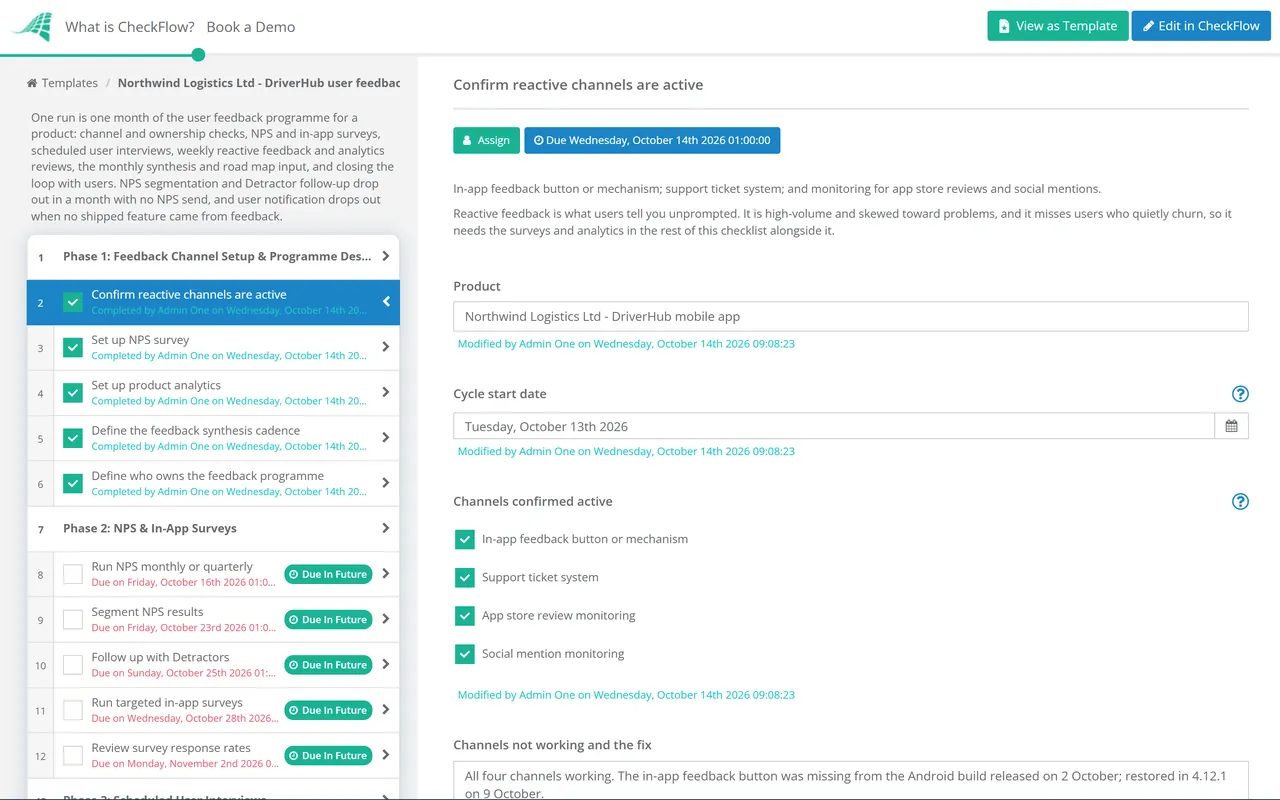
Confirm reactive channels are active — in-app feedback button or mechanism; support ticket system; and monitoring for app store reviews and social mentions
Set up NPS survey — triggered at the appropriate moment in the user journey (not immediately on sign-up; at first value moment or Day 7/30); automated, not manual
Set up product analytics — event tracking for all key user actions; funnel analysis for activation and core use journeys; retention cohort analysis
Define the feedback synthesis cadence — weekly for support tickets; monthly for NPS and interview synthesis; quarterly for in-depth user research
Define who owns the feedback programme — a named product manager or customer success lead; feedback that has no owner is feedback that is not acted upon
Phase 2
Phase 2: NPS & In-App Surveys
Run NPS monthly or quarterly — “How likely are you to recommend [product] to a colleague? (0–10)” with an open-text follow-up question
Segment NPS results — Promoters (9–10), Passives (7–8), Detractors (0–6); the open-text comments are more actionable than the number
Follow up with Detractors — within 24–48 hours; understand what drove the low score; this is churn prevention as well as research
Run targeted in-app surveys — on specific features or user journeys; triggered by behaviour; keep surveys to 1–2 questions
Review survey response rates — if below 15%, improve timing or reduce frequency; survey fatigue produces biased samples
Phase 3
Phase 3: Scheduled User Interviews
Schedule 4–6 user interviews per month — mix of new users (activation understanding), active users (depth of engagement), and churned users (exit interviews)
Prepare an interview guide — open-ended questions aligned with current product hypotheses; not a satisfaction survey
Ask about behaviour, not intentions — “Walk me through the last time you used [feature]” not “What features do you wish we had?”
Document exact user language — the phrases users use to describe problems and workflows are the most valuable output; quotes used verbatim in the synthesis
Share interview insights with the broader team — a monthly “voice of customer” summary distributed to product, engineering, sales, and CS
Phase 4
Phase 4: Reactive Feedback Review & Triage
Review support tickets weekly — for patterns; not individual resolution but for product insights; which issues recur? What do they indicate about product gaps?
Review app store and G2/Capterra reviews — weekly or biweekly; respond to all reviews; extract specific product feedback themes
Monitor social mentions — for unsolicited feedback; both positive (advocacy signals) and negative (problem signals)
Log all feedback in a centralised system — by source and theme; prevents insights from being lost in individual inboxes
Phase 5
Phase 5: Product Analytics Review
Review the activation funnel weekly — sign-up to first key action; where are users dropping off?
Review feature adoption rates — which features are used by what percentage of active users? Features with low adoption may indicate discoverability, usability, or value problems
Review retention cohorts — Day 7, Day 30, Day 90 retention by cohort; trends improving or declining?
Watch session recordings — for key user journeys; 5–10 recordings per week reveal usability issues that surveys miss
Identify correlation between feature adoption and retention — which features, when adopted, most correlate with 90-day retention? These deserve onboarding investment
Phase 6
Phase 6: Feedback Synthesis & Road Map Input
The synthesis step is where feedback becomes insight. Raw feedback is not road map input — synthesis across multiple sources is. Users ask for features; they need solutions to problems. The synthesis step converts the feature request into the underlying problem.
Monthly synthesis session — review all feedback sources; identify recurring themes; distinguish between feature requests and underlying problems
Use the job-to-be-done framing — for every feature request: “What job is the user trying to get done? Is there a better solution to the underlying job?”
Create and update the feedback themes document — top 5–10 recurring themes by frequency and severity; shared with the product team monthly
Feed into the product road map — with context (how many users? How severe? What user language?); as a primary evidence source but not the sole input
Phase 7
Phase 7: Closing the Loop With Users
Closing the loop — telling users what you did with their feedback — is the single most impactful action for building a user community that continues to give you feedback. Users who feel heard become advocates. Users who feel ignored stop engaging.
Respond to all individual feedback submissions — within 48 hours; even if the answer is “we’ve noted this and it’s on our radar”
Notify users when their specific feedback results in a feature — “You suggested X; we built it”; this is the highest-impact retention and advocacy touchpoint in the product lifecycle
Publish a changelog or product updates page — that connects new features to the feedback that drove them; “You asked, we built” framing
Share feedback themes with the user community — in a regular product update or newsletter; “here is what we are hearing and what we are doing about it”
Net Promoter Score — the Number Is Not the Insight; the Verbatim Is
NPS is calculated as the percentage of Promoters (score 9–10) minus the percentage of Detractors (score 0–6). A score above 30 is generally considered good for SaaS; above 50 is excellent. But the score itself tells you almost nothing actionable. A product with NPS 25 might have high Detractor rates for five different reasons or one systemic reason — the score is the same either way and the response is completely different.
The open-text follow-up question — “What is the main reason for your score?” — is where the value is. The themes in the verbatim responses tell you specifically what Promoters love (and should be reinforced in positioning and onboarding) and what Detractors are frustrated by (the product gaps most likely causing churn). Segment the verbatims by Promoters and Detractors separately — the same product feature may appear in both, with opposite sentiment.
Practical rule: always include a mandatory open-text follow-up field in your NPS survey. An NPS survey with no follow-up gives you a number that trends over time; an NPS survey with verbatims gives you a product roadmap input on every cycle.
Why Use CheckFlow for User Feedback Collection?
1
A structured feedback programme that runs automatically
Feedback programmes that depend on a product manager remembering to review support tickets, send the monthly NPS, and schedule user interviews are programmes that get skipped when the sprint is busy. CheckFlow’s recurring feature schedules the weekly support ticket review, the monthly NPS send, the monthly synthesis session, and the user interview slots automatically — ensuring the feedback programme runs consistently regardless of delivery pressure.
2
Synthesis tracking and road map input documented
Feedback themes that are discussed in a product meeting but not documented are feedback themes that disappear. CheckFlow’s synthesis phase requires the top themes to be documented, quantified, and linked to the road map discussion — creating a paper trail from user feedback to product decision.
3
Loop-closing tasks that happen before the window closes
The user who reported a bug or gave a feature suggestion 6 months ago and never heard back has already formed an opinion about whether the company listens. CheckFlow assigns loop-closing tasks when features are shipped — notifying the users whose feedback drove the decision while the moment is still meaningful.
User feedback collection is the input system for product ideation. The problems that recur most frequently in user feedback are the starting point for the ideation and validation process. CheckFlow’s Product Ideation & Validation Checklist covers the process that turns feedback themes into validated product bets. See the Product Ideation & Validation Checklist →
Bug reports from users are a form of reactive feedback. CheckFlow’s Bug Tracking & Resolution Checklist covers the structured process for managing user-reported defects. See the Bug Tracking & Resolution Checklist →
What should a user feedback collection process include?
+
A user feedback collection process covers seven phases: feedback channel setup (reactive channels, NPS survey, product analytics, synthesis cadence definition, ownership), NPS and in-app surveys (monthly NPS with verbatim follow-up, segmentation, Detractor follow-up, targeted in-app microsurveys), user interviews (monthly cadence, mix of new/active/churned users, behaviour-focused questions, voice of customer sharing), reactive feedback management (weekly support ticket review for patterns, review response, social monitoring, centralised logging), product analytics review (activation funnel, feature adoption, retention cohorts, session recordings, adoption-retention correlation), feedback synthesis and road map input (monthly cross-source synthesis, JTBD framing, themes document, road map input), and closing the loop (48-hour individual responses, feature notification for feedback providers, changelog publication, community update).
What is NPS and how should it be used in product feedback?
+
Net Promoter Score (NPS) is a loyalty metric calculated by asking users “How likely are you to recommend [product] to a colleague?” on a 0–10 scale. Scores of 9–10 are Promoters; 7–8 are Passives; 0–6 are Detractors. NPS is calculated as % Promoters minus % Detractors. Scores above 30 are generally good for B2B SaaS; above 50 is excellent. However, the NPS score is not the primary value of the measurement — the open-text verbatim responses to the follow-up question (“What is the main reason for your score?”) are. Verbatims segmented by Promoters and Detractors reveal what the product does well and where it is failing, in the user’s own words.
How often should user interviews be conducted?
+
For a product in active development, 4–6 user interviews per month is a sustainable rhythm for a product manager with other responsibilities, and sufficient to maintain a continuous stream of qualitative insight. Interviews should include a mix of recently activated new users (to understand the activation and onboarding experience), active power users (to understand depth of engagement and unmet needs), and churned or at-risk users (exit interviews are among the highest-value interviews for understanding product gaps). At new feature launches or during significant product changes, interview cadence should increase temporarily.
What is “closing the loop” in user feedback management?
+
Closing the loop refers to the practice of following up with users who provided feedback to let them know what happened as a result. This has two forms: individual loop-closing (responding to specific feedback submissions within 48 hours, and notifying the specific user when their feedback directly influenced a product decision) and community loop-closing (publishing a changelog, product updates blog, or community newsletter that shows users in aggregate how their feedback is shaping the product). Users who see their feedback acknowledged and acted upon give more feedback, give higher NPS scores, and are more likely to become advocates than users who give feedback and hear nothing.
Is CheckFlow free for this template?
+
14-day free trial, no card required. The Business plan is $10 per user per month after the trial. Full details at checkflow.io/pricing.
Build a Feedback Programme That Actually Changes What Gets Built
Free trial — no credit card required.
Do you like cookies? 🍪 We use cookies to ensure you get the best experience on our website. Learn more