Year-End Fundraising Appeal Checklist Template

A year-end appeal is one clear ask, made to the right people before the year closes. Most of the work is in the weeks before it goes out and the thank-yous after it.

Last reviewed: October 2026

Printed from checkflow.io/templates/nonprofit-charity/year-end-fundraising-appeal-checklist

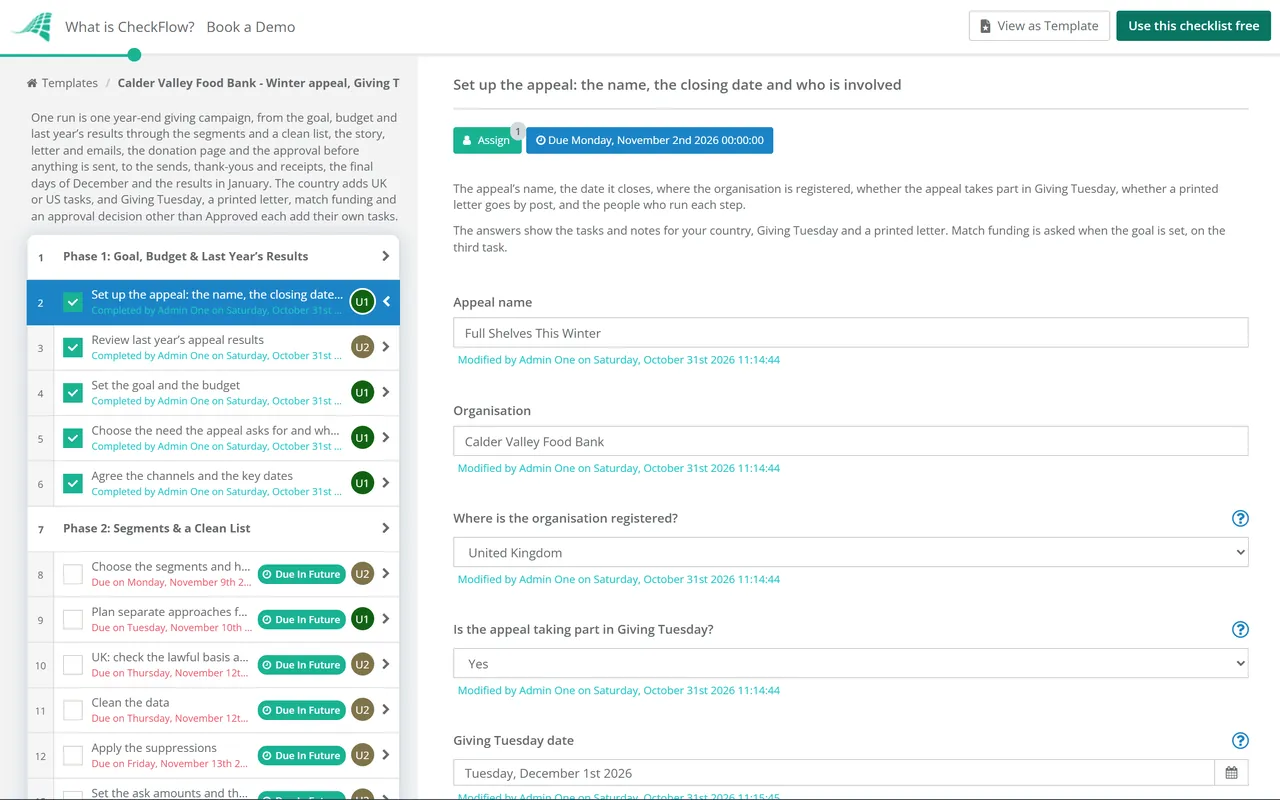
This free year-end fundraising appeal checklist runs one giving campaign from the plan to January’s results. The appeal lead sets the goal and budget from last year’s results, the data lead chooses the segments, checks consent and applies the suppressions, and the content lead writes the story, the letter and the emails. The donation page is built and tested, and the approver signs off the copy, the ask and the data before anything is sent. Then come the launch, any Giving Tuesday sends, the reminders, gift processing and thank-yous, the final days of December and the results. Pick where the organisation is registered on the first task to see the steps for the United Kingdom or the United States.

One Year-End Appeal, From the Plan to January’s Results

A year-end appeal asks supporters for a gift before the year closes, mostly by letter, email and social media, often with Giving Tuesday along the way. It is a short campaign with a fixed end date, so the plan, the data and the approval have to be done before the first send, and the thank-yous and receipts have to keep pace with the gifts.

This checklist runs one appeal, from the goal and budget to the results in January, with notes for the United Kingdom and the United States. The two checklists closest to it are compared below. For commercial marketing, the Campaign Launch Checklist and the Email Campaign QA Checklist cover launches and email testing; this checklist links to the email test where it helps.

This checklist

One year-end appeal

Covers: the goal, budget and last year’s results, segments, consent and suppressions, the story, letter, emails and social posts, the donation page test, the approval, the sends, gift processing, thank-yous and receipts, the final days of December and the results.

Where: UK charities and US nonprofits, with notes for each, and short notes for other countries.

Output: an approved appeal sent to a clean list, every gift thanked and receipted, and the lessons written down for next year.

Events

The Fundraising Event Planning Checklist

Covers: one fundraising event: the concept and budget, venue, sponsors, promotion and tickets, volunteers, the day and the follow-up.

Use it: when the money is raised at an event, with a venue and tickets. An appeal that asks by letter and email runs here instead. Fundraising Event Planning Checklist.

After January

The Charity Donor Management Workflow Checklist

Covers: first-gift acknowledgements, ongoing stewardship, upgrades, major donors, lapsed donors and donor data.

Use it: for the year-round relationship with each donor. New donors from this appeal move to it in Phase 9. Charity Donor Management Workflow Checklist.

What the Year-End Fundraising Appeal Checklist Covers

Nine phases run one year-end appeal from the plan to January’s results. The first task records where the organisation is registered, which shows the UK or US tasks and notes, and whether the appeal takes part in Giving Tuesday and sends a printed letter, each of which adds its own tasks. Match funding, asked when the goal is set, adds the written agreement, a check on the match claims during the appeal and the report to the funder. The approval is the gate: nothing after it can be completed until the approver records a decision, and Approved with changes or Not approved adds the follow-up.

  1. Phase 1

    Phase 1: Goal, Budget & Last Year’s Results

    5 tasks

    Start this checklist at least nine weeks before the appeal closes, and earlier if a mail house or a match funder needs more time. Enter the closing date on the first task: every task before it counts back from it in business days, and the January tasks count forward from it.

    • Set up the appeal: the name, the closing date and who is involved — the appeal’s name, the date it closes, where the organisation is registered, whether the appeal takes part in Giving Tuesday, whether a printed letter goes by post, and the people who run each step
    • Review last year’s appeal results — income, number of gifts, average gift and response rate by segment and channel, what it cost and what the team would change; with no previous appeal, use the last campaign that asked the same supporters
    • Set the goal and the budget — the income target, the number of gifts it needs, the cost of print, postage, design and any paid social, and who approves the spend; base the goal on last year’s results and the segments you will ask
    • Choose the need the appeal asks for and what a gift does — one clear need, what a typical gift pays for, and whether gifts are restricted to that purpose; if they are, the appeal says what happens to money raised above or below the target
    • Agree the channels and the key dates — the launch, any Giving Tuesday sends, the letter’s mail date, the reminders, the final days and the close; the due dates in this checklist are the latest for each step
  2. Phase 2

    Phase 2: Segments & a Clean List

    6 tasks

    The data selection decides who is asked and how. Clean it and apply every suppression before the approval in Phase 5, then run the suppressions again before each send.

    • Choose the segments and how each one is asked — recent donors, lapsed donors, regular givers, major donors, new supporters and event participants, each with its channels and, once the suppressions are applied, its count
    • Plan separate approaches for major donors and regular givers — a personal letter, call or visit for major donors, agreed with whoever manages each relationship, and a decision on whether regular givers get the appeal, a lighter ask or a thank-you only
    • UK: check the lawful basis and consent for each channel — email and texts only to people who consented or who meet one of PECR’s soft opt-ins, and post and phone under consent or legitimate interests, with every objection to direct marketing honoured
    • Clean the data — duplicates merged, addresses checked, names, titles and salutations right, email addresses that bounced removed, and each donor’s last gift date and amount up to date
    • Apply the suppressions — people who asked not to be contacted, people known to have died, gone-aways and bounced email addresses, recent complaints, and anyone a relationship manager has asked to hold back; run them again before each send
    • Set the ask amounts and the source codes for each segment — ask amounts based on each donor’s last or highest gift where you have it, a default for new supporters, and a source code per segment and channel so every gift can be traced in the results
  3. Phase 3

    Phase 3: Story, Letter & Emails

    7 tasks

    Write the appeal around one story and one need. Every claim needs its evidence and every person shown needs to have agreed, so the approver in Phase 5 signs off copy that is accurate.

    • Choose the story and get permission from the person in it — a real person or situation that shows the need, written up truthfully, with clear and informed permission from anyone who could be identified, and photos you have the right to use
    • Agree the match funding in writing — the funder, the amount, the dates gifts must arrive between, which gifts count, what happens if the match is not used up, and the words the appeal may use to describe it
    • Write the appeal letter or main appeal copy — the story, the need, a clear ask with amounts, what a gift does, a deadline, how to give and a postscript, signed by someone the reader knows; the email, web and social copy are cut from it
    • Write the email series — the launch email, any Giving Tuesday emails, a reminder for people who have not given, the last-days emails and the thank-you email, each with one ask, a source code in its links and an unsubscribe link
    • Plan the social posts and the website changes — posts for each stage of the appeal, images sized for each platform, a banner or homepage panel linking to the donation page, and alt text for every image
    • Design the reply form and the printed pack — a reply form with the donor’s details, ask amounts and ways to give, the envelope and any insert, and a print quote with the quantity, the postage method and the mail house’s deadline for data and artwork
    • Check every claim in the copy — figures, what a gift pays for, the story’s details, any match claim and the deadline, each with its evidence, in plain, accessible wording that puts no undue pressure on anyone to give
  4. Phase 4

    Phase 4: Donation Page & Gift Processing

    8 tasks

    The donation page and the thank-you journey are tested with real payments before the approval, so the first gifts are banked, coded and thanked properly.

    • Build the appeal’s donation page — the story and the need, ask amounts that match the letter and emails, one-off and monthly options, the source code captured from each link, and a page that works on a phone
    • US: confirm the charitable solicitation registrations — the states where the organization needs to be registered before asking for gifts, checked against where this appeal’s letters and emails go; state rules differ, so take advice where you are unsure
    • UK: add the Gift Aid declaration to the page and the reply form — the charity’s name, the donor’s full name and full home address with its postcode or other postal code, that they are a non-UK donor if they do not live in the UK, a description of the gift, and a statement that the donor has paid at least as much Income Tax or Capital Gains Tax in that tax year as the Gift Aid claimed and agrees to Gift Aid being claimed
    • US: set up written acknowledgements for gifts of $250 or more — the organization’s name, the amount of a cash gift, a description but not the value of any property given, and a statement that no goods or services were provided in return, or a description and good faith estimate of what was (IRS Publication 1771)
    • US: check for quid pro quo disclosures — if a donor gets goods or services for a payment of more than $75, the appeal or receipt says the deductible amount is limited to the payment minus the value of what they get, with a good faith estimate of that value (IRS Publication 1771)
    • Set up the thank-you emails and receipts — an automatic thank-you and receipt for online gifts, a printed thank-you for gifts by post, wording that names the appeal and what the gift does, and who signs it
    • Test the donation page from start to finish — a test gift by each payment method on a phone and a computer, the confirmation page and email, the receipt, the gift landing in the database with its source code, and every test gift refunded
    • Agree the gift processing plan and holiday cover — who banks and records gifts each working day, how post and cheques are handled, the target for sending thank-yous, and who covers between Christmas and New Year while gifts are still arriving
  5. Phase 5

    Phase 5: Approval Before Anything Is Sent

    4 tasks

    Nothing goes to supporters until the approver signs off the copy, the ask and the data selection. The approval is the gate: no task after it can be completed until it is recorded.

    • Send the approval pack to the approver — the final letter and emails, the ask amounts, the segment counts and suppressions, the send schedule, the donation page test and any match terms
    • Approve the appeal before anything is sent — the approver reads the copy and checks its claims, the ask and the data selection, and records the decision; Approved with changes lists what must change first, and Not approved gives the reasons
    • Make the approver’s changes before the first send — each change made and shown to the approver, who confirms it in writing; the sends can go once this task is complete
    • Rework the appeal and take it back to the approver — change the copy, the ask or the data selection as the reasons say, send the approver a new pack, and ask them to change the decision on the approval task to Approved; nothing is sent until it reads Approved
  6. Phase 6

    Phase 6: Launch & Sends

    7 tasks

    Each send goes to the approved selection with the suppressions run again that day. This template leaves people who have already given out of the later asks and thanks them instead.

    • Approve the print proof and send the data to the mail house — the proof checked against the approved copy, the data file run against the suppressions again and sent securely, and the mail date and postage confirmed
    • Launch the appeal by email, on the website and on social media — the launch email to the approved segments, the donation page live and linked from the homepage, and the first posts published, each link carrying its source code
    • Confirm the letters were posted — the mail house’s proof of posting with the quantity and date, and the team told when letters should start to arrive
    • Keep the match funding claims accurate — how much of the match is left, checked every working day from the launch, with the page and the emails updated and the wording changed as soon as the match is used up or the matching period ends
    • Schedule the Giving Tuesday emails and posts — the Giving Tuesday email and its reminder, the posts for the day and any change to the donation page, all ready the working day before
    • Run Giving Tuesday — the emails sent, posts published through the day, the page and payments watched, gifts thanked quickly, and any running total you planned to share kept up to date
    • Send the reminder to people who have not given — a reminder email, and a follow-up letter or call where planned, to the segments that have not responded, with the appeal’s progress, the suppressions run again and donors left out
  7. Phase 7

    Phase 7: Gifts, Thank-Yous & Receipts

    5 tasks

    Gifts can arrive from the launch until well into January. Bank, record and thank each one quickly, and act straight away on any complaint or request to stop contact.

    • Check the first gifts are banked, coded and recorded — online payouts matched to gifts, post opened and cheques banked, and each gift recorded with its source code; carry on the same routine every working day until January
    • Send every thank-you within the agreed time — the thank-you and receipt sent within the target set in Phase 4, naming the appeal and what the gift does, with any delays logged and fixed
    • Thank larger gifts and first-time donors personally — a call, a handwritten note or a message from the chief executive, at a gift level the team chooses
    • Log and act on complaints, refunds and requests to stop contact — every complaint answered, refunds handled through the payment provider, and every request to stop contact recorded and applied before the next send
    • UK: check the Gift Aid declarations as gifts arrive — each declaration complete, the gifts that cannot be claimed left out of the claim, and declarations kept for six years after the most recent donation claimed
  8. Phase 8

    Phase 8: The Final Days of December

    5 tasks

    Gifts can still arrive while much of the team is away. Schedule the last sends early, agree who is on cover, and keep the page and the payments working until the appeal closes.

    • Schedule the last-days emails and posts — the emails and posts for the final days, the page updated with the closing date and the appeal’s progress, and people who have already given left out
    • Confirm the holiday cover for gifts, the inbox and the page — a name and contact details for each working day between Christmas and New Year, who can fix the page or the payment form, and who answers supporters
    • US: tell donors how year-end gifts are dated — IRS Publication 526 says a check mailed to a charity is considered delivered on the date it is mailed, and a gift charged to a credit card is deductible in the year of the charge; tell donors the last day to give online and to mail a check, without giving tax advice
    • Watch the donation page and payments on the last day — the page and payment form tested in the morning, gifts and errors checked through the day, and the final email sent
    • Close the appeal — the page changed to thank supporters and keep taking gifts or point to general giving, scheduled appeal sends stopped, and the last date a gift counts towards the appeal agreed with finance
  9. Phase 9

    Phase 9: Results & Lessons for Next Year

    7 tasks

    Gifts by post can keep arriving into January. Count them, claim what can be claimed, and write down what to repeat next year while it is fresh.

    • Process the last gifts and reconcile the income with finance — late post and payouts recorded, and the appeal’s income agreed with the finance records by payment method and source code
    • UK: claim Gift Aid on the appeal’s gifts — the claim made through Charities Online with eligible software or a spreadsheet (software for claims of over 1,000 donations), within four years of the end of the financial period the gifts were received in
    • US: check every gift of $250 or more has its written acknowledgement — each one sent with the required wording; Publication 1771 says charities typically send acknowledgements no later than 31 January of the year after the gift
    • Report to the match funder and claim the match — the gifts that counted, the amount matched and the report the agreement asks for, sent by its deadline
    • Report the results against the goal — income, gifts, average gift, response rate and cost by segment and channel, new donors recruited and income for each pound or dollar spent, compared with last year
    • Record the lessons for next year’s appeal — what to repeat, stop and test next time, which steps to start earlier, and the notes to read when next year’s checklist starts
    • Hand new donors over to stewardship — new and returning donors added to the welcome or stewardship programme, so their next contact is a thank-you or an update rather than another ask

Year-End Appeal Rules and Timing at a Glance

Running a year-end appeal: the rules in the UK and the US

The points that shape an appeal, with the source for each. The answer on the first task shows the matching tasks and notes in the checklist.

Point United Kingdom United States
Email and text messagesConsent, or a soft opt-in. The charitable purposes soft opt-in (PECR regulation 22(3A), in force since 5 February 2026) covers only details the charity collected itself on or after that date, with an opt-out then and in every message (ICO’s detailed guidance); the ICO’s short Guide to PECR still says otherwise and is marked as under reviewNot covered by this template’s sources: check with your adviser and your email platform’s terms
Post and phoneWhere you do not have specific permission, check the Fundraising, Mailing and Telephone Preference Services (code rule 8.4.1); stop direct marketing to anyone who objects (UK GDPR Article 21(3))Keep and apply your own do-not-contact list (this template’s practice)
Requests to stop contactNot acting on a Fundraising Preference Service request within 21 days breaches the FPS terms, and within 28 days may breach the code (Fundraising Regulator); the FPS covers charities registered in England, Wales and Northern IrelandApply every request before the next send (this template’s practice)
What the appeal saysDo not mislead, have evidence for any claim likely to be taken literally, and for a restricted purpose say what happens if you raise more or less than the target (code rules 1.2.1 to 1.2.3)Check charitable solicitation registration for each state where you ask for gifts; state rules differ
Case studiesRepresentative of real situations, changed details made clear, and clear and informed permission from anyone who could be identified (code rules 8.1.4 and 8.1.5)Written permission from the person (this template’s practice)
Tax on giftsGift Aid needs a declaration with the charity’s name, the donor’s full name and home address with its postal code, a description of the gift, and a statement that the donor has paid enough tax and agrees to the claim (HMRC)A donor needs a written acknowledgement for any single gift of $250 or more: the organization’s name, the amount, a description of any property, and a statement about goods or services given (Publication 1771)
Gifts with a benefitNo Gift Aid where the donor gets a benefit over a certain limit (HMRC)A payment over $75 that is partly for goods or services needs a written disclosure with a good faith estimate of their value; the penalty is $10 per contribution, up to $5,000 per event or mailing (Publication 1771)
Claims and recordsClaim within four years of the end of the financial period the gift was received in, and keep declarations for six years after the most recent donation claimed (HMRC)Charities typically send acknowledgements no later than 31 January of the following year (Publication 1771)
The closing dateGift Aid deadlines run from the tax year (6 April to 5 April) or the accounting period (HMRC), so 31 December is the appeal’s own deadlineA mailed check is considered delivered on the date it is mailed, and a credit card gift is deductible in the year of the charge (Publication 526)

How the timeline fits together

Every due date counts in business days from the closing date entered on the first task. Phases overlap, because the copy and the donation page are built while the data is cleaned.

Stage What happens Due, in business days from the closing date Where in the checklist
PlanLast year’s results, the goal and budget, the need, the channels and dates43 to 39 beforePhase 1
DataSegments, major donors and regular givers, consent, suppressions, cleaning, ask amounts and codes38 to 33 beforePhase 2
CopyStory and permission, any match terms, the letter, emails, social posts, any reply form, the claims checked37 to 30 beforePhase 3
PageDonation page, any Gift Aid or US receipt wording, thank-yous, the test, the processing plan33 to 29 beforePhase 4
ApprovalThe approval pack, the decision and any follow-up29 to 27 beforePhase 5
SendsAny mailing, the launch, any match check, any Giving Tuesday, the reminder27 to 15 beforePhase 6
GiftsBanking and coding, thank-yous, personal thanks, complaints, Gift Aid checks24 to 12 beforePhase 7
Final daysLast sends, holiday cover, any US dating note, the last day, the close9 before to 2 afterPhase 8
ResultsReconciliation, any Gift Aid claim, US acknowledgements and match report, the results and lessons6 to 20 afterPhase 9

Sources. The Fundraising Regulator’s Code of Fundraising Practice (in effect from 1 November 2025): behaviour when fundraising and fundraising communications, its guide to the charitable purposes soft opt-in and its guidance on FPS requests; PECR regulation 22, as amended by section 114 of the Data (Use and Access) Act 2025 (in force from 5 February 2026, SI 2026/82); the ICO’s guidance on direct marketing using electronic mail; UK GDPR Article 21; HMRC’s Claiming Gift Aid as a charity or CASC, including Gift Aid declarations and how to claim; and the IRS’s Publication 1771 and Publication 526. Guidance is not law, US state rules vary, and this table is not legal or tax advice.

Why Run a Year-End Appeal in CheckFlow?

1

Every step done before the first send

Enter the closing date and every task gets a due date in business days: the plan, the data and the copy before the approval, the sends, thank-yous and the last days after it, and the results in January. Overdue alerts go to the people assigned, so the list is clean and the page is tested before the first send.

2

The right steps for each appeal

One answer shows the UK tasks for consent, Gift Aid and the Fundraising Regulator’s code, or the US tasks for written acknowledgements, quid pro quo disclosures, state registration and how year-end gifts are dated. Giving Tuesday, a printed letter and match funding each add their own tasks, and a decision of Approved with changes or Not approved adds the follow-up.

3

Nothing sent until it is approved

The approval is a gate: no send, post or mailing can be ticked off until the approver has signed off the copy, the ask and the data selection, with the date. The Reports Grid lists each appeal with its answers, so the appeal lead can see what is still open, and Analytics shows completion rates and overdue work. See how approval steps work.

CheckFlow does not decide whether an email can be sent without consent, whether Gift Aid can be claimed or what a donor can deduct. The law, the regulators’ guidance and, where needed, professional advice decide that. CheckFlow makes sure each step happens on time, every task has an owner and the approval rests on a dated record.

Test each email before it is scheduled with the Email Campaign QA Checklist, and the donation page with the Landing Page QA Checklist. Money raised at an event follows the Fundraising Event Planning Checklist, and new donors move to the Charity Donor Management Workflow Checklist in January. A bid to a trust or foundation follows the Nonprofit Grant Application Process Checklist.

AI generator

Didn’t find what you need? Describe it.

Describe the process in a sentence and the AI checklist generator drafts the phases and tasks for you.

Frequently Asked Questions

What should a year-end fundraising appeal checklist include?

Every step for one appeal: last year’s results, the goal and budget, the need, the segments, consent and suppressions, clean data and ask amounts, the story, letter, emails and social posts, a tested donation page, the approval before anything is sent, the launch, any Giving Tuesday and mailing, the reminders, banking and thank-yous, the final days of December, then the results and lessons in January. This template adds the UK or US steps for your country.

When should you start planning a year-end appeal?

This template’s first due dates are 43 business days before the closing date, about nine weeks before a 31 December close, and the approval is due 28 business days before it. Start earlier if a mail house needs the data and artwork weeks ahead, if a match funder needs time to agree terms, or if the story needs permission from someone you have not yet met. The due dates are the latest dates; work ahead of them where you can.

Can a charity email supporters without their consent?

In the UK, sometimes. Since 5 February 2026, PECR’s charitable purposes soft opt-in lets a charity email or text people whose details it collected itself while they showed an interest in or supported its purposes, if it offered an opt-out then and in every message. The ICO says it covers only details collected on or after that date, and not details from a third-party platform. The Fundraising Regulator’s code summary, written earlier, still says consent. Phase 2 checks the basis for each channel.

Should Giving Tuesday be part of a year-end appeal?

It can be. Answer Yes on the first task and the checklist adds scheduling the Giving Tuesday emails and posts and running the day itself, inside the same appeal, with the same story and ask. Giving Tuesday falls on a different date each year, so check its date on the Giving Tuesday website and compare it with the two tasks’ due dates, which this template sets 23 and 22 business days before the closing date. That fits only some years, so change them to match your Giving Tuesday.

What must a Gift Aid declaration include?

HMRC says the declaration must describe the gift and give the charity’s name, the donor’s full name and full home address with its postal code, and say they are a non-UK donor if they do not live in the UK. It should state that the donor has paid at least as much Income Tax or Capital Gains Tax in that tax year as the charity will claim, and agrees to Gift Aid being claimed. Keep declarations for six years after the most recent donation claimed.

What should a US year-end donation acknowledgement include?

IRS Publication 1771 says a donor needs a written acknowledgement for any single gift of $250 or more. It gives the organization’s name, the amount of a cash gift, a description but not the value of any property, and a statement that no goods or services were provided, or a description and good faith estimate of those that were. It can be a letter, a postcard or an email, and one annual summary can cover several gifts.

Does a gift made on 31 December count for that tax year in the US?

IRS Publication 526 says a check mailed to a charity is considered delivered on the date it is mailed, and a gift charged to a credit card is deductible in the year of the charge. This template’s US task in Phase 8 tells donors the last day to give online and to mail a check for the gift to fall in the year. This template does not give tax advice, so donors should ask their own adviser about their deduction.

How should match funding be described in an appeal?

Agree the terms with the funder in writing first: the amount, the dates, which gifts count and what happens if the match is not used up. In the UK the Fundraising Regulator’s code says fundraising must not mislead and claims need evidence, so a promise to double gifts must be true for every gift it covers. This template checks the match during the appeal and changes the wording as soon as the match runs out.

Is CheckFlow free for this template?

14-day free trial, no card required. The Business plan is $10 per user per month after the trial. Full details at checkflow.io/pricing.

Run Your Year-End Appeal on One Checklist

Free trial — no credit card required.

14-day free trial, no credit cardFull refund in your first 30 daysUS hosting, EU on request