Paid traffic starts spending the moment a campaign goes live. If the form routes leads nowhere, or the headline promises something the ad never did, the budget has gone before anyone looks at a report.
This free landing page QA checklist runs once for each campaign page, before any ad, email or social post sends people to it. It checks message match with every traffic source, proof for each offer and claim, the route from form to CRM, conversion tracking and consent, mobile speed and accessibility, an A/B test when you run one, ad platform checks for paid traffic, a launch sign-off, and the first 48 hours of live data. Putting a whole new site live rather than one page? Use the Website Launch Checklist instead.
The worst failures look fine. A broken landing page rarely shows an error. The form submits, the thank-you message appears, and the lead lands in an unmapped CRM field, or arrives labelled as direct traffic because the hidden fields dropped the UTM values. Nobody notices until sales asks where the campaign leads went. That is why the form checks here follow a test lead all the way to the CRM record instead of looking at the page.
Message match is a conversion check and a policy check. People click because of one promise. When the page headline, price or offer differs from the ad, they leave. In Google Ads, landing page experience, which Google describes as how relevant and useful the page is to people who click the ad, is one of the three components of Quality Score. Google Ads can also disapprove an ad whose destination does not work, sits on a different domain from the display URL, or cannot be crawled by AdsBot.
Tracking now depends on the cookie banner. For visitors in the UK and EEA, the consent choice decides what your tags may do. Google has required Consent Mode v2 signals, including ad_user_data and ad_personalization, for audience features in Google Ads since March 2024. A page whose banner does not pass the consent state through will under-report conversions and build smaller remarketing audiences, so the checklist tests the page with consent declined and with consent accepted.
One owner, one approver. The campaign manager runs the checklist, whoever built the page fixes what fails, and a launch approver signs off before traffic is switched on. In agency work the approver is often the client, and the evidence on the checklist is what they approve.
This checklist
Landing page QA
Scope: one page and its form, tied to one campaign and its traffic sources.
When: before each campaign sends traffic, and again whenever the offer or form changes.
Focus: message match, lead routing, conversion tracking, consent and ad platform rules.
Owner: the campaign manager.

A different checklist
Website launch
Scope: a whole new or rebuilt site.
When: once, at go-live.
Focus: indexability, redirects, DNS and SSL, sitewide analytics and legal pages.
Owner: the web or digital lead.
What the Landing Page QA Checklist Covers
Seven phases for each page. The A/B test and paid traffic phases appear only when Phase 1 says they are needed.
Phase 1
Phase 1: Brief, Message Match & Offer
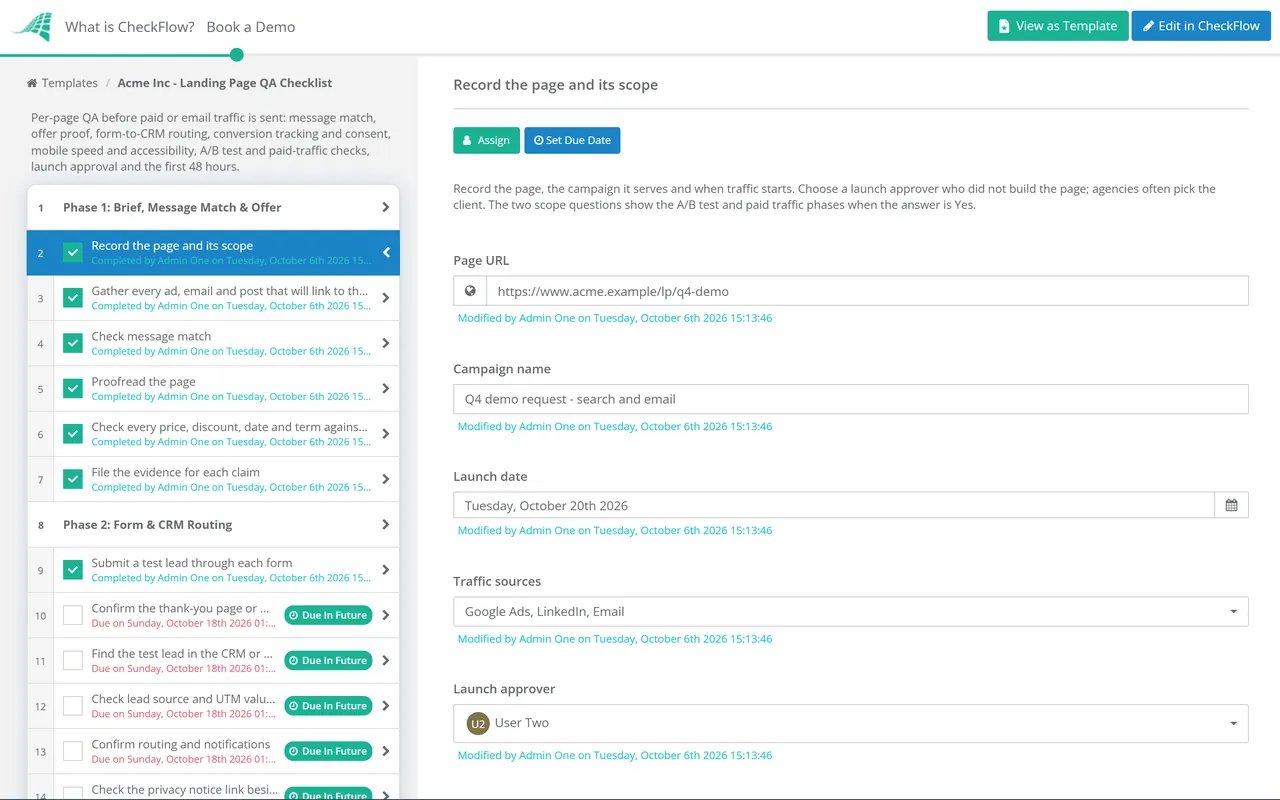
Record the page and its scope — URL, campaign, launch date, traffic sources, launch approver, and whether there is a test or paid spend
Gather every ad, email and post that will link to the page
Check message match — the headline, offer and call to action repeat what each traffic source promised
Proofread the page — including button labels, form error messages and the thank-you text
Check every price, discount, date and term against the signed-off offer
File the evidence for each claim — statistics, awards, ratings and customer quotes, with their source
Phase 2
Phase 2: Form & CRM Routing
Submit a test lead through each form — required fields, validation and error states
Confirm the thank-you page or message loads and offers a next step
Find the test lead in the CRM or marketing automation platform — every field mapped, then tagged as a test so it stays out of reports
Check lead source and UTM values are captured in hidden fields and saved on the record
Confirm routing and notifications — owner assigned, alert sent and autoresponder delivered
Check the privacy notice link beside the form opens the current version
Phase 3
Phase 3: Tracking & Consent
Check the GA4 key event fires once per successful submission — for example generate_lead, not on page load or a failed attempt
Open each tagged URL — the UTM parameters survive any redirect and follow your lowercase naming convention
Test with consent declined — advertising and analytics cookies are not set, and tags send only what your consent setup allows
Test with consent accepted — all four Consent Mode v2 signals update and the tags fire
Publish the tag manager container and record the version number
Phase 4
Phase 4: Mobile, Speed & Accessibility
Test on a real phone — layout, the right keyboard for each field, and nothing sticky covering the call to action
Run PageSpeed Insights on mobile — aim for LCP within 2.5 s, INP within 200 ms and CLS of 0.1 or less
Check tap targets — at least 24 by 24 CSS pixels, or spaced so they cannot be mis-tapped
Check text contrast — at least 4.5:1, or 3:1 for large text
Tab through the form with a keyboard — visible focus, labelled fields, and nothing hidden behind the cookie banner
Phase 5 — Conditional
Phase 5: A/B Test Setup
Shown when the answer to “Running an A/B test?” is Yes.
Write one hypothesis and one primary metric
Set the traffic split, minimum sample size and stop date before launch
Run Phases 1 to 4 on every variant, not just the control
Check variant URLs point rel=canonical at the original — and any redirect is a temporary 302
Confirm the testing tool records the variant against each lead
Phase 6 — Conditional
Phase 6: Paid Traffic Checks
Shown when the answer to “Paid traffic?” is Yes.
Check each ad platform’s conversion tag fires on the thank-you step — Google Ads, Meta, LinkedIn or Microsoft Advertising
Click through with Google Ads auto-tagging on — the GCLID reaches the final page and the extra parameter causes no error
Confirm the final URL’s domain matches the display URL in every ad
Check robots.txt does not disallow AdsBot-Google — it ignores rules written for all user agents, so only a line naming it can block it
Phase 7
Phase 7: Launch Approval & First 48 Hours
Upload the QA evidence — the test lead in the CRM, the key event in GA4 DebugView and both consent tests
Approve the launch — a Not approved answer halts the checklist before any traffic is sent
Switch the traffic on and record the time
Check the first hour — every ad and email link loads the page, and the first real lead reaches the CRM
Reconcile leads at 24 hours — CRM records against GA4 key events and ad platform conversions
Review the first 48 hours — conversion rate and cost per lead by device, then keep, fix or pause
Each check needs a pass standard, or two people will mark the same page differently. Use this table as the reference for Phases 2 to 6, and attach the evidence to the task as you go.
Check
Pass standard
How to test
Message match
Headline, offer, price and call to action repeat the promise in each ad and email
Open the page from every traffic source and compare it side by side with the creative
Lead routing
The test lead appears in the CRM with every field filled and the right owner
Submit from a tagged URL, then search the CRM for the test email address
UTM capture
utm_source, utm_medium and utm_campaign on every link, saved on the lead record
Compare the URL with the record. GA4 treats values as case sensitive, so Email and email count as two sources
Key event
Fires once for each successful submission and never on a failed one
GA4 DebugView or Google Tag Assistant while you submit a valid and an invalid form
Consent
No advertising or analytics cookies before consent; consent state updates when the visitor chooses
A private browser window, the browser’s cookie inspector and Tag Assistant’s consent view
Largest Contentful Paint
2.5 s or less is good; over 4.0 s is poor
PageSpeed Insights, mobile
Interaction to Next Paint
200 ms or less is good; over 500 ms is poor
Field data in PageSpeed Insights once the page has traffic
Cumulative Layout Shift
0.1 or less is good; over 0.25 is poor
PageSpeed Insights; also watch for banners that push the form down
Tap targets and contrast
24 by 24 CSS pixels minimum (WCAG 2.2, 2.5.8); text contrast 4.5:1, or 3:1 for large text
Browser inspector and a contrast checker on the button and form labels
GCLID
The parameter is still in the address bar on the final page
Open the final URL with a test gclid added and follow any redirects
Google rates Core Web Vitals on the 75th percentile of real visits, and a page published this week usually has no field data of its own. PageSpeed Insights then falls back to data for the whole site, or shows none. Use the lab result as a guide before launch and look at the field data again once the campaign has run for a few weeks.
Why Run Landing Page QA in CheckFlow?
1
Two questions set the scope
“Running an A/B test?” and “Paid traffic?” are answered on the first task. An organic email landing page skips the ad platform checks, and a page with no test skips the variant setup, without anyone deleting tasks by hand.
2
Evidence before approval
Screenshots of the CRM record, the key event and the consent tests are uploaded on the task before the sign-off. The approver chosen in Phase 1 picks Approved or Not approved, and Not approved halts the checklist before traffic is switched on.
3
The follow-up is assigned too
The 24-hour reconciliation and 48-hour review have due dates set from the launch date and a named owner. The check that usually gets skipped, comparing CRM leads with reported conversions, turns up on someone’s task list the day after launch.
When the traffic comes from your own list, QA the email as well as the page. The Email Campaign QA Checklist covers the segment, consent, rendering and sender authentication for each send, and its links should land on a page that has passed this checklist.
Building pages for several clients? Start a checklist for each page and give the client the sign-off task; CheckFlow approvals keep the launch blocked until they agree. For the checks that span the whole campaign, read our campaign launch QA guide.
Landing page QA is the set of checks a campaign page passes before traffic is sent to it: the copy and offer match the ads and emails, the form delivers a complete lead to the CRM, tracking records the conversion with the right source, consent is respected, and the page works quickly on a phone. Doing it before launch matters because paid clicks are charged whether or not the page converts.
How is this different from a website launch checklist?
+
A website launch checklist covers a whole site going live once: DNS, SSL, redirects, indexing and sitewide analytics. Landing page QA covers a single page tied to a campaign, and it runs again for every campaign. Its focus is commercial: whether the page keeps the ad’s promise, whether each lead reaches sales with its source attached, and whether the ad platforms can count the conversion.
What is message match?
+
Message match means the landing page repeats the promise that earned the click. If the ad says “free 30-minute audit”, the headline should say the same thing, the offer should be the same, and the form should be for that audit rather than a general contact request. Check it for every ad and email that links to the page, since each may have used a different angle.
How do I check that form leads reach the CRM?
+
Open the page from a URL carrying your real UTM parameters, submit the form with a test email address you can search for, then find the record in the CRM. Check every field, the lead source and UTM values, the owner it was assigned to, and the notification and autoresponder emails. Repeat for each form or variant, then tag the test records so they are excluded from campaign reporting.
Who should approve a landing page before launch?
+
Someone who did not build it and who owns the outcome: usually the campaign or marketing manager, or the client when an agency built the page. They should approve the evidence, not just the design. That means the test lead in the CRM, the key event firing, both consent tests and the offer check. If anything regulated is on the page, such as financial promotions or health claims, add the reviewer your organisation requires before the final sign-off.
Will an A/B test on a landing page hurt SEO?
+
Not if you follow Google’s own testing guidance. Show Googlebot the same variants that people see, because serving it something different is cloaking. Put rel=canonical on variant URLs pointing at the original, use a temporary 302 redirect rather than a 301 if the test redirects visitors, and remove the test as soon as it ends. Google warns that a test left running longer than needed can look like an attempt to deceive search engines.
Is CheckFlow free for this template?
+
14-day free trial, no card required. The Business plan is $10 per user per month after the trial. Full details at checkflow.io/pricing.
Test the Page Before You Pay for the Clicks
Free trial — no credit card required.
Do you like cookies? 🍪 We use cookies to ensure you get the best experience on our website. Learn more