Vendor Verification Checklist Template

Every payment to a vendor relies on the details recorded the day it was set up. Check the business, its tax form and its bank account, screen it against the sanctions lists, and approve it before the first payment goes out.

Last reviewed: October 2026

Printed from checkflow.io/templates/finance-accounting/vendor-verification-checklist

This free vendor verification checklist is for accounts payable teams, controllers and finance managers who add new vendors to the vendor master. One run is one new vendor, from the request to its first payment. It checks the legal name on the official company register, collects the tax form and checks the tax number, confirms the bank account by calling a number you found yourself, runs a payee name check where your bank offers one, and screens the vendor and its owners against the sanctions lists. Then someone who neither asked for the vendor nor checked it approves it into the vendor master, and the first payment is checked against the record. Answers on the first task add the W-9 and IRS TIN Matching for a US vendor, a Form W-8 for a foreign vendor paid by a US business, the VAT number check for a UK or EU vendor, and the insurance and licence checks when the work needs them.

Vendor Verification at Set-Up, Before the First Payment

A new vendor is the moment to check who you are about to pay. Once a vendor is in the vendor master and has been paid, every later invoice relies on that first check. This checklist is that check for one new vendor: the register, the tax form and tax number, the bank account confirmed by a call-back, a sanctions screen, the approval into the vendor master and the first payment.

Changing the bank details of a vendor you already pay is a different risk, covered by the Vendor Bank Detail Change Verification Checklist. The W-9s and TIN matches collected here feed the year-end work in the 1099 Year-End Filing Checklist, which keeps the review of every vendor paid in the year, IRS notices, backup withholding and filing. A vendor’s risk and security review belongs in the Vendor Risk Assessment Checklist, procurement’s qualification of a supplier in the Supplier Onboarding Checklist, and the payment cycle that follows in the Accounts Payable Process Checklist.

This checklist

One new vendor, before its first payment

Covers: the request and the roles, the official register, the W-9 and IRS TIN Matching, a Form W-8 or a UK or EU VAT check, the bank call-back and payee name check, sanctions screening, insurance and licences, the approval, the vendor master entry and the first payment.

When: each time a new vendor is requested, about three working weeks before its first payment.

Output: an approved vendor record, with the evidence for every check, and a first payment confirmed by the vendor.
An existing vendor

The Vendor Bank Detail Change Verification Checklist

Covers: a request to pay a vendor you already pay into a new account: the payment hold, the independent call-back, the name check, the approval and the first payment to the new account.

Use it: for every bank detail change, whoever it comes from. Vendor Bank Detail Change Verification Checklist.

Year end

The 1099 Year-End Filing Checklist

Covers: every vendor paid in the year: missing W-9s, TIN Matching for all of them, IRS CP2100 notices, backup withholding, payment classification and filing.

Use it: from November to March, for US businesses. The W-9s this checklist collects at set-up are its starting point. 1099 Year-End Filing Checklist.

What the Vendor Verification Checklist Covers

Nine phases follow one new vendor from the request to its first payment. The answers on the first task assign every task, set each due date from the first payment date and decide what else appears: a note on the right company register for the vendor’s country, the W-9 and IRS TIN Matching for a US vendor, a Form W-8 for a foreign vendor paid by a US business, a VAT number check for a UK or EU vendor, and the insurance and licence tasks when the work needs them. A TIN mismatch, a failed call-back, a close match or no match on the name check, a possible sanctions match, a vendor approved with conditions and a vendor that is not approved each add their own tasks. The approval is the gate: the vendor master entry and the first payment wait until it is done.

  1. Phase 1

    Phase 1: Request & Roles

    5 tasks

    The verifier starts the run when a new vendor is requested, about three working weeks before its first payment. The answers on the first task assign every task, set each due date from the first payment date and add the checks this vendor needs.

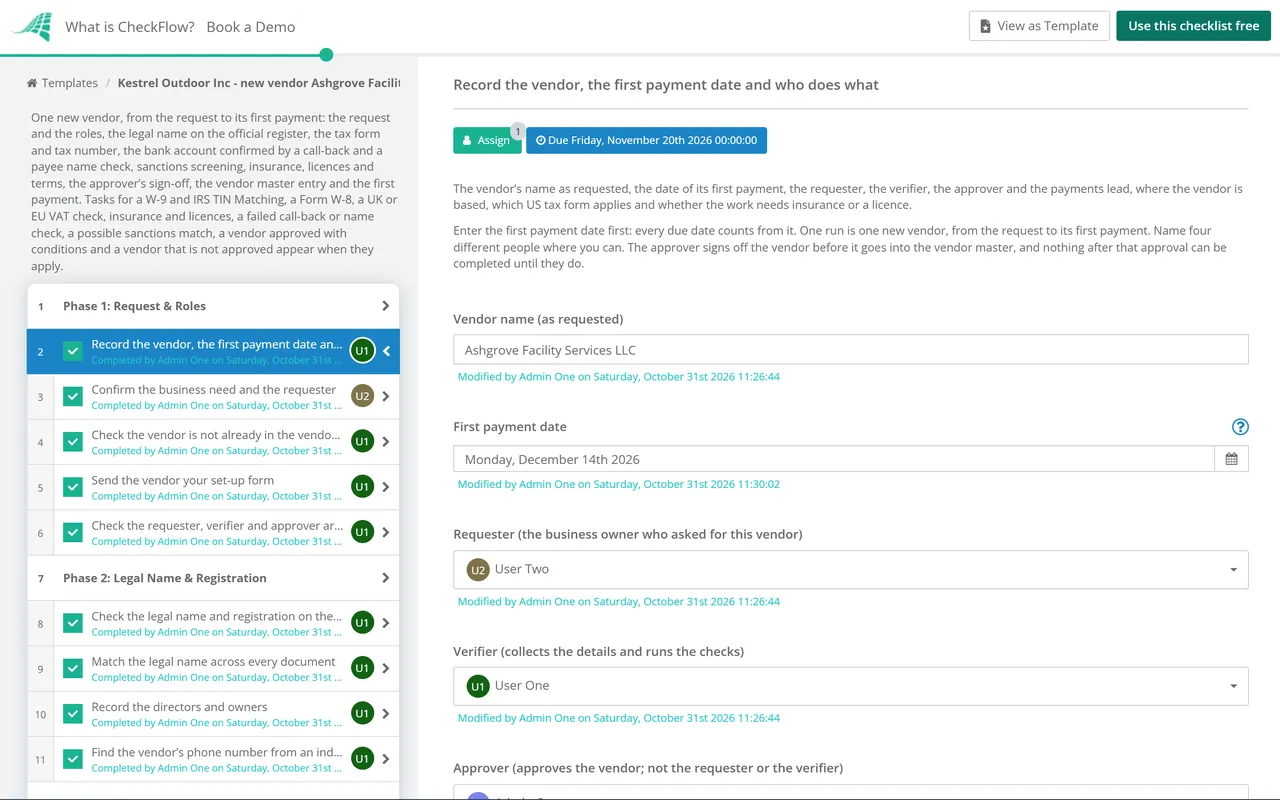
    • Record the vendor, the first payment date and who does what — the vendor’s name as requested, the date of its first payment, the requester, the verifier, the approver and the payments lead, where the vendor is based, which US tax form applies and whether the work needs insurance or a licence
    • Confirm the business need and the requester — what the vendor will supply, the budget or cost centre, the contract or purchase order it will be paid against and the expected spend, confirmed by the person who asked for it
    • Check the vendor is not already in the vendor master — the vendor master searched by name, trading name, tax number, address, phone number and bank account, so the same vendor is not set up twice under another name
    • Send the vendor your set-up form — the form or supplier portal link sent to the vendor’s own contact, asking for its legal name, registration number, address, tax details, a remittance contact and its bank details, so everything comes from the vendor and not second-hand
    • Check the requester, verifier and approver are different people — the three roles held by three people, and the payments lead not the person who will enter the vendor record, so no one can ask for, check and approve the same vendor
  2. Phase 2

    Phase 2: Legal Name & Registration

    4 tasks

    The verifier confirms the vendor is a real business with the name it gave, from the official register rather than the vendor’s own papers. The phone number found here is the one the bank call-back in Phase 4 uses.

    • Check the legal name and registration on the official register — the vendor found on the official company register for its country, with its registered number, status and registered address recorded and an extract saved
    • Match the legal name across every document — the legal name on the register checked against the set-up form, the contract or purchase order and the tax form, with any trading names recorded, so the vendor master, the tax record and the bank account all use one name
    • Record the directors and owners — the directors and the people or companies that own or control the vendor, from the register where it shows them or from the vendor, so each can be screened against the sanctions lists in Phase 5
    • Find the vendor’s phone number from an independent source — a main switchboard or finance number taken from the register, the vendor’s website typed in by hand or an existing contract, never from the set-up form, an email or an invoice, and recorded for the call-back
  3. Phase 3

    Phase 3: Tax Forms & Tax Numbers

    9 tasks

    The verifier collects the tax form and checks the tax number the vendor’s country uses. A US vendor gives a Form W-9, matched through IRS TIN Matching where your business is enrolled; a foreign vendor paid by a US business gives a Form W-8; UK and EU VAT numbers are checked with HMRC or VIES. Only the tasks this vendor needs appear.

    • W-9: get a signed Form W-9 from the vendor — the current Form W-9 completed, signed and dated by the vendor or a person authorised to sign for it, kept in your vendor file and not sent to the IRS
    • W-9: check the name, tax classification and TIN — line 1 holds the legal name (the owner’s name for a sole proprietor or a disregarded entity, with the business name on line 2), one federal tax classification is ticked, the TIN has nine digits and the certification is signed
    • W-9: match the name and TIN through IRS TIN Matching — the line 1 name and the TIN checked through IRS TIN Matching in e-Services, where your business is enrolled, with the response code and the date recorded
    • W-8: get the right Form W-8 from a foreign vendor — Form W-8BEN from a foreign individual or Form W-8BEN-E from a foreign entity, given to you before the first payment and not sent to the IRS, with the date it was signed and the date it runs out recorded
    • UK: check the VAT number with HMRC — the vendor’s VAT number checked in HMRC’s Check a UK VAT number service, with the name and address it is registered to compared with the legal name and address from Phase 2
    • EU: check the VAT number in VIES — the vendor’s VAT number checked in the European Commission’s VIES, with the result saved, and the name and address where its country shows them
    • Elsewhere: record the vendor’s tax registration — the tax or VAT number the vendor’s country uses, checked with that tax authority’s own online service where one exists, and the result recorded
    • TIN mismatch: ask the vendor to check its details and send a corrected W-9 — the vendor asked, through the contact you know, to check the name and TIN it gave against its own IRS records, and the corrected W-9 matched again
    • Record the tax details in the vendor file — the forms on file, the tax and VAT numbers, each check made and its date written down in one place, ready for the approver and for the vendor master
  4. Phase 4

    Phase 4: Bank Account Verification

    8 tasks

    The bank details come from the vendor and are confirmed by calling the number found in Phase 2. A payee name check through your bank adds a second test where it is offered. A failed call-back, a close match and a no match each add their own task.

    • Get the bank details from the vendor in writing — the account name, the account number with its sort code, routing number or IBAN, and the bank’s name, sent by the vendor itself on the set-up form or portal, not passed on in someone else’s email
    • Call the vendor on the independent number to confirm the account — a call to the number found in Phase 2, never one from the set-up form, an email or an invoice, asking the vendor to read the account details to you rather than reading them out yourself
    • Call-back failed: stop and escalate as possible fraud — no bank details entered, the approver told the same day, the set-up form and any emails kept as evidence, and the details asked for again through the contact you know
    • Run a payee name check where your bank offers one — the account name and number checked through your bank before the account is saved: Confirmation of Payee for a UK account, Verification of Payee for a euro account, or your bank’s own account validation where it has one
    • Close match: confirm the exact account name with the vendor — the name your bank showed read back to the vendor on the independent number, and the reason it differs from the legal name, such as a trading name, recorded
    • No match: stop and escalate to the approver — the account not saved, the approver told, and the details asked for again through the known contact; a second no match is a reason to decline the account
    • Check the account holder is the vendor’s legal entity — the account name, from the call and any name check, is the legal name from Phase 2; a personal account or another company’s name is resolved before approval
    • Check the account is not used by another vendor or an employee — the vendor master searched for the same account, and the account checked against employee bank details with payroll, because a shared account needs an explanation before approval
  5. Phase 5

    Phase 5: Sanctions Screening

    4 tasks

    The vendor, its owners and its directors are screened against the sanctions lists that apply to your business before any money is paid. A possible match adds a task to compare the details, and a match that cannot be cleared adds a task to escalate it and pay nothing.

    • Screen the vendor against the sanctions lists that apply to you — the legal name, trading names and address searched in OFAC’s Sanctions List Search for a US business, the UK Sanctions List for a UK business and the EU’s consolidated financial sanctions list for an EU business, with the date and the result saved
    • Screen the owners and directors — each name from Phase 2 searched in the same lists, because a company owned by a sanctioned person can be caught even when its own name is not listed
    • Possible match: compare the details and clear it or escalate it — the listed entry compared with the vendor on full name, address, country and registration number, and dates of birth for people, with the reason it is or is not the same recorded
    • Escalate a match you cannot clear, and pay nothing — the vendor not approved, no money paid or made available to it, the match passed to your compliance lead or adviser, and the regulator contacted as its guidance says
  6. Phase 6

    Phase 6: Insurance, Licences & Terms

    4 tasks

    Insurance and licences apply only when the work needs them, and the first task’s answer adds those two tasks. The contract and the payment terms apply to every vendor.

    • Insurance: get certificates for the cover the work needs — certificates for the cover your contract or policy asks of this vendor, such as public or general liability, employer’s liability or workers’ compensation, or professional indemnity, each checked for the insured name, the limits and the end date
    • Licences: check the licences or registrations the work needs — any trade licence, professional registration or permit the work needs, checked with the body that issues it rather than from a copy alone
    • Confirm the contract or purchase order is in place — the signed contract, or the approved purchase order, that this vendor will be paid against, with its value and term
    • Record the payment terms and method — the payment terms, the currency and the payment method agreed with the vendor, matching the contract and the invoices it will send
  7. Phase 7

    Phase 7: Review & Approval

    5 tasks

    The verifier puts the evidence together and the approver, who is neither the requester nor the verifier, decides. The approval is the gate: nothing after it, including the vendor master entry and the first payment, can be completed until it is done. Approved with conditions adds a task to meet them before the first payment.

    • Put the verification pack together for the approver — one summary of every check, its result and its date, with each exception explained: registration, tax form and tax number, the bank call-back and name check, sanctions, and insurance and licences where they apply
    • Approver checks who did each step — the checklist’s activity read to confirm the requester did not verify the vendor and the verifier is not approving it, and any overlap from Phase 1 covered by its compensating check
    • Approve the vendor into the vendor master — the verification pack reviewed and the vendor approved, approved with conditions or not approved by the approver; until this is done, the vendor master entry and the first payment cannot be completed
    • Not approved: put right what the approver raised, or decline the vendor — each point the approver raised answered or the check repeated, or the vendor declined and the requester told, with no vendor record created
    • Approved with conditions: meet each condition before the first payment — each condition the approver wrote on the approval task met, with how and when recorded, before the first invoice is checked; a condition that cannot be met in time goes back to the approver
  8. Phase 8

    Phase 8: Vendor Master Set-Up

    4 tasks

    Only after approval is the vendor entered, exactly as verified, and checked by someone other than the person who entered it. Renewal dates and ongoing screening keep the record right after this run.

    • Enter the vendor in the vendor master exactly as verified — the legal name, registration number, address, tax details, payment terms and bank details entered as the checks confirmed them, with the approval noted on the record
    • Check the saved record against the verified details — the saved record compared field by field with the verification pack by someone other than the person who entered it, with the bank details checked character by character
    • Set renewal dates and ongoing screening for the vendor — the W-8, insurance and licence end dates diarised, and the vendor added to the screening you repeat when the sanctions lists change
    • Tell the requester and the vendor the set-up is complete — the requester given the vendor number to use on orders, and the vendor told through its known contact which details you hold, so a vendor that did not send them can say so before money moves
  9. Phase 9

    Phase 9: First Payment

    4 tasks

    The payments lead checks the first invoice against the approved record before releasing it, and the verifier confirms with the known contact that the money arrived. Bank details on an invoice that differ from the record are a change request, not a payment.

    • Check the first invoice against the approved record — the vendor name, the bank details printed on the invoice and the amount checked against the vendor record and the contract or purchase order
    • Release the first payment — the first payment released to the account in the vendor master, by someone who did not enter the vendor record, with the payment reference recorded
    • Confirm with the vendor that the first payment arrived — the vendor’s known contact asked, on the independent number or an address you already hold, to confirm the payment reached its account
    • File the evidence and close the run — the set-up form, tax form, register extract, call note, name check, screening results, approval and payment confirmation kept together with the vendor record

What to Check, Country by Country

The checks for each country

The checks are the same everywhere; the register, the tax form and the services that run them differ. The first task’s answers add the right tasks and notes. The sanctions row depends on where your own business is, not the vendor. This is not legal or tax advice.

Check United States United Kingdom EU member state Elsewhere
Company registerThe register of the state where the vendor was formedCompanies House: registered address, date of incorporation, current and resigned officers, previous names and insolvency informationThe national business register of the country where it is incorporatedThe official company register of its country
US tax formForm W-9 from a US person, when your business reports payments to the IRSForm W-8BEN-E (a company) or W-8BEN (an individual), if a US business pays itForm W-8BEN-E or W-8BEN, if a US business pays itForm W-8BEN-E or W-8BEN, if a US business pays it
Tax number checkIRS TIN Matching of the W-9’s name and TIN, for enrolled payersHMRC’s Check a UK VAT number: whether it is valid, and the name and address it is registered toVIES: valid or invalid on the day, with the name and address where the member state shows them; some member states record only numbers registered for intra-EU tradeThe tax authority’s own check, where there is one
Payee name checkYour bank’s account validation, where it offers oneConfirmation of Payee, for UK domestic paymentsVerification of Payee: in the euro area from 9 October 2025, in other member states by 9 July 2027Your bank’s own service, where there is one
Sanctions list (for a business based there)OFAC’s SDN List and non-SDN lists, through Sanctions List SearchThe UK Sanctions List (the OFSI Consolidated List closed on 28 January 2026)The EU consolidated list of financial sanctionsThe lists that apply to your business

Who does what

The first task names four people and assigns every task from them. Keeping the roles apart is practice, not a legal rule; in a small team, record the extra check that stands in for it.

Role Does Should not also be
RequesterConfirms the business need, the contract or purchase orderThe verifier or the approver
VerifierCollects the details, runs the checks and enters the approved vendorThe approver, or the person who releases the payment
ApproverReviews the verification pack, approves the vendor and checks the saved recordThe requester or the verifier
Payments leadChecks the first invoice and releases the first paymentThe person who entered the vendor record

Sources. The IRS on TIN Matching and Publication 2108 (Federal Agency TIN Matching Program), Form W-9 and the Instructions for the Requester of Form W-9, the instructions for Form W-8BEN and Form W-8BEN-E, and backup withholding; OFAC on the SDN List, Sanctions List Search and the 50 Percent Rule; GOV.UK on checking a UK VAT number, company information from Companies House, the UK Sanctions List and OFSI’s financial sanctions general guidance; the European Commission on VIES and EU sanctions; Regulation (EU) 2024/886, Article 5c (inserted into Regulation (EU) No 260/2012); the European Payments Council on Verification of Payee; and Pay.UK on Confirmation of Payee.

Why Verify New Vendors in CheckFlow?

1

No vendor paid before it is approved

The approver is chosen on the first task and is never the requester or the verifier. The approval is a gate: the vendor master entry and the first payment cannot be ticked off until it is done. See how approval steps work.

2

The right checks for each vendor

Three answers on the first task add the W-9 and TIN Matching, the Form W-8, the VAT check or the insurance tasks this vendor needs, and nothing it does not. Every task is assigned from the first task and dated from the first payment date, and rules add the follow-up when a check fails.

3

Evidence an auditor can follow

The register extract, tax form, call note, name check and screening results are uploaded to the tasks that produced them, and the activity log shows who checked and who approved. The Reports Grid lists every vendor set-up with its answers, so a vendor still waiting for approval stands out.

CheckFlow does not match TINs, check VAT numbers, screen sanctions lists or validate bank accounts; the IRS, HMRC, VIES, the sanctions lists and your bank do that. CheckFlow runs the process around them: who asked for the vendor, who checked what, what was found, who approved it and when it was first paid.

Pay the vendor’s invoices through the Invoice Approval Workflow Checklist and the Accounts Payable Process Checklist, run every later bank detail change through the Vendor Bank Detail Change Verification Checklist, test that the roles really are kept apart with the Segregation of Duties Review Checklist, and close the US tax year with the 1099 Year-End Filing Checklist. For a vendor’s risk and security review, use the Vendor Risk Assessment Checklist; for procurement’s side of a new supplier, the Supplier Onboarding Checklist or the Vendor Onboarding Process Checklist.

AI generator

Didn’t find what you need? Describe it.

Describe the process in a sentence and the AI checklist generator drafts the phases and tasks for you.

Frequently Asked Questions

What is vendor verification?

Vendor verification is checking that a new vendor is a real business, with the name, tax details and bank account it gave you, before it is added to your vendor master and paid. This vendor verification checklist covers the register check, the tax form and tax number, a call-back to confirm the bank account, a sanctions screen, an approval by someone who did not request or check the vendor, and the first payment.

What documents do you need to set up a new vendor?

This template asks for a completed set-up form with the vendor’s legal name, registration number, address, a remittance contact and its bank details, sent by the vendor itself. Add a signed Form W-9 from a US vendor or the right Form W-8 from a foreign vendor where your business is a US payer, the VAT number for a UK or EU vendor, the contract or purchase order, and insurance certificates and licences when the work needs them.

How do you verify a new vendor’s bank account?

Get the details from the vendor in writing, then call the vendor on a phone number you found yourself, from the register or its website, and ask it to read the account details to you. Run a payee name check where your bank offers one, such as Confirmation of Payee in the UK, check the account is in the vendor’s legal name and not used by another vendor or an employee, and confirm the first payment arrived.

Do you need a Form W-9 from a new vendor?

In the US, a Form W-9 is how a US person gives its taxpayer identification number to a payer that must file an information return with the IRS. The IRS says a valid W-9 holds the payee’s name and TIN and is signed and dated, and that a foreign person may not give one; it gives a Form W-8 instead. If a vendor gives no TIN, the IRS says 24% backup withholding applies to reportable payments, so get the form before the first payment.

Can you use IRS TIN Matching when you set up a vendor?

Yes, if your business is an authorised payer, which Publication 2108 describes as one that filed information returns in at least one of the two preceding tax years, and the payments are subject to backup withholding. You can match up to 25 names and TINs at a time online. The regulation quoted in Publication 2108 says a payer may not use the results to decide whether to open or close an account, so use a mismatch to ask for a corrected W-9.

How do you check a UK or EU VAT number?

For a UK number, use HMRC’s free Check a UK VAT number service, which shows whether the number is valid and the name and address it is registered to. For an EU number, use the European Commission’s VIES, which confirms whether the number is valid on the day you check and, in some member states, shows the name and address. The Commission says some member states record in VIES only numbers registered for intra-EU trade, so a correct number may not be validated; the vendor’s tax administration can update it.

Do you need to screen new vendors against sanctions lists?

Sanctions laws stop you paying people and companies under an asset freeze. OFAC says US persons are generally prohibited from dealing with those on its SDN List, and UK rules generally prohibit making funds available to a designated person or a company it owns or controls. This template screens every new vendor, its owners and its directors before the first payment, against OFAC’s lists, the UK Sanctions List or the EU’s consolidated list, as they apply to you.

Who should approve a new vendor?

Someone who did not ask for the vendor and did not run the checks. This template names four people: a requester who confirms the need, a verifier who checks the vendor and enters the approved record, an approver who signs it off, and a payments lead who releases the first payment. That split is practice, not a legal requirement. In a small team, record the extra check that stands in for any overlap.

Is CheckFlow free for this template?

14-day free trial, no card required. The Business plan is $10 per user per month after the trial. Full details at checkflow.io/pricing.

Verify Every New Vendor Before You Pay It

Free trial — no credit card required.

14-day free trial, no credit cardFull refund in your first 30 daysUS hosting, EU on request