
Vendor onboarding
- Legal entity, tax forms and insurance
- Risk tier, contract and approval to trade
- First capture of bank details
- Covered by the Vendor Onboarding and Supplier Onboarding checklists
Last reviewed: October 2026
No Credit Card Required
Printed from checkflow.io/templates/finance-accounting/vendor-bank-detail-change-verification-checklist
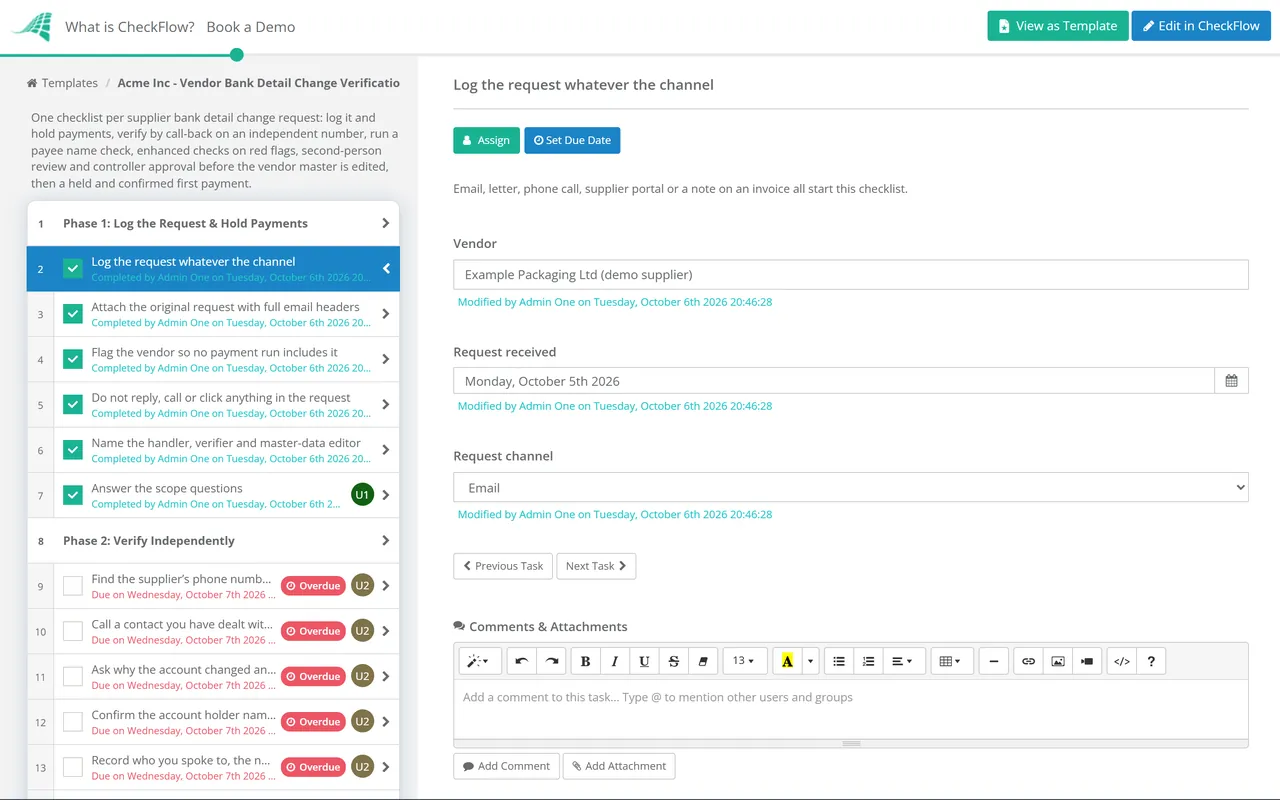
Changing a supplier’s bank details is the single most valuable edit anyone can make to your vendor master, and it is usually made by one person working from one email. This free checklist gives AP leads, controllers and finance managers a control that runs every time a supplier asks to be paid somewhere new. It logs the request whatever the channel, holds payments, verifies the change by calling a contact you already know on a number you already hold, checks the account name where the payment system allows it, and puts a second person and an approval between the request and the vendor master. The first payment to the new account is then held and confirmed. A payee name check phase appears only for UK and eurozone accounts, and an enhanced checks phase only when the request shows a red flag.
Business email compromise, called mandate fraud or invoice redirection fraud in the UK, rarely involves a fake supplier. The criminal either takes over a genuine supplier mailbox or registers a lookalike domain, waits for a real invoice, then asks for the money to go to an account they control. Your team pays a real invoice to a real supplier name. Only the account number is wrong, and the supplier finds out when it chases you for payment weeks later.
The losses are large. The FBI’s IC3 2025 Internet Crime Report recorded almost $3.05 billion of business email compromise losses reported by US victims in 2025, the second-largest category after investment fraud. In the UK, UK Finance’s Annual Fraud Report 2026 put invoice and mandate scam losses at £41.3 million in 2025, £28 million of it on business and other non-personal accounts. Both figures count only what victims reported.
Onboarding checks do not cover this, because the supplier was verified when it was set up. The risk arrives later, as a change to a record everyone already trusts. That is why this checklist sits between your onboarding process and your payment run.
Six phases run from the moment a request arrives to the supplier confirming it received the first payment. Phase 3 appears only for UK and eurozone accounts, and Phase 4 only when the request shows a red flag.
Owned by whoever receives the request. Nothing in the request itself is trusted from this point on.
Owned by the verifier, who did not receive the request.
Shown only when the new account is held in the UK or the eurozone, where a name check is available.
Shown only when the request shows a red flag. Owned by the controller or finance manager.
Any one of these answers Yes to the red flag question in Phase 1. A well-run fraud may show none of them, which is why the call-back in Phase 2 runs on every request.
| Red flag | Why it matters | What the checklist does |
|---|---|---|
| Urgency or secrecy | Pressure to pay today, or not to call, is designed to stop the check | No change is made before Phase 5, however urgent |
| New account in a different country | A UK or US supplier suddenly banking abroad is a classic redirection pattern | Phase 4 and a second contact |
| Account name is a person or another company | Funds are usually sent to a mule account and moved on quickly | Name confirmed on the call and, where available, by a name check |
| Lookalike or changed email domain | A domain one character off is cheap to register and hard to spot | Domain compared with the one on file |
| Change just before a large payment | Criminals time requests to the invoices they have seen in a compromised mailbox | Payment hold from Phase 1 until confirmation |
| New contact or changed signature details | The person you know may not be the person writing | Call-back only to a contact you have dealt with before |
In the UK, most companies carry the loss themselves. The Payment Systems Regulator’s reimbursement requirement, in force since 7 October 2024, makes payment firms reimburse authorised push payment scams over Faster Payments up to £85,000 per claim, and the Bank of England applies the same limit to CHAPS. It protects consumers, micro-enterprises (fewer than 10 staff and turnover or balance sheet total of no more than €2 million) and charities with annual income under £1 million. Claims must be made within 13 months, and international payments are excluded. A PSR-commissioned evaluation published in July 2026 found in-scope losses had fallen, and the government has announced that the PSR’s functions will move to the FCA. Confirmation of Payee helps, but a match only confirms the name on the account, not that your supplier asked for the change.
In the US, there is no reimbursement scheme for business wire fraud. A BEC payment is usually one your own staff authorised, so the protections in UCC Article 4A for unauthorised payment orders rarely help, and section 4A-207 lets the beneficiary’s bank rely on the account number unless it actually knows the name and number belong to different people. The Fourth Circuit applied that rule against a BEC victim in Studco v. 1st Advantage in 2025. Since Nacha’s Phase 2 fraud monitoring rules took effect in June 2026, every non-consumer ACH originator needs risk-based processes to identify payments induced by false pretenses, which include vendor impersonation, and must review them at least annually. A documented checklist like this one can form part of that process. Report a misdirected payment to your bank and to IC3 straight away: the FBI’s Recovery Asset Team works with banks to freeze funds, and the chance of recovery falls quickly.
The controller’s approval task halts the checklist until it is answered Approved or Not approved, so the vendor master edit and the first payment cannot be ticked off before the change is signed off.
The handler, verifier, editor and approver are separate Members fields, and every task is assigned from them. A vendor data set gives a live dropdown of suppliers, so each request is tied to the right record.
The original email, the call note, the name check screenshot and the supplier’s confirmation sit on the tasks that produced them. The timestamped activity trail exports for auditors, and analytics show requests stuck in verification.
This control protects details captured at set-up. Our vendor onboarding guide and vendor onboarding software cover the first capture, the Accounts Payable Process Checklist runs the payment cycle that follows, and the Segregation of Duties Review Checklist tests that the people in this checklist really are separate.
CheckFlow is not a payments system, a bank or an account validation service, and it does not check account names. It runs the workflow around your bank’s name check and your accounting system: who received the request, who called whom, who approved and when. For the monthly review, a recurring checklist compares your accounting system’s change log with the completed checklists, and any change without one is investigated.
Accounts Payable Process Checklist

Vendor Onboarding Process
Supplier Onboarding Checklist
Segregation of Duties Review Checklist
Invoice Approval Workflow Checklist
Describe the process in a sentence and the AI checklist generator drafts the phases and tasks for you.
Call a contact you have dealt with before, on a phone number you already held before the request arrived, and ask them to confirm the new details. Never use contact details from the request. Then have a second person review the evidence, get approval before editing the vendor record, and confirm receipt of the first payment with the same known contact.
Mandate fraud, also called invoice redirection fraud, is when a criminal poses as a supplier and persuades you to change the bank account you pay it into. It is a form of business email compromise aimed at accounts payable teams. The supplier and invoices are real; only the account belongs to the fraudster.
No. Letterheads, bank letters and signed forms are easy to forge, and an email from the supplier’s real address proves nothing if its mailbox has been taken over. Treat documents as supporting evidence, and make the independent call-back the control. A small test payment does not help either: it proves the account works, not who owns it.
Usually not, for most companies. In the UK, mandatory reimbursement for authorised push payment scams covers consumers, micro-enterprises and small charities, up to £85,000 per claim; larger businesses depend on what can be recovered from the receiving account. In the US there is no equivalent scheme, and the law generally leaves the loss with the business that authorised the payment. Check whether your crime or cyber insurance covers social engineering fraud.
Call your bank’s fraud line immediately and ask it to recall the payment and contact the receiving bank. Then report it: to IC3 at ic3.gov in the US, or to Report Fraud, which replaced Action Fraud in December 2025, in the UK. Preserve the emails and headers, check your own mailboxes for compromise, and tell the genuine supplier through its known contact.
14-day free trial, no card required. The Business plan is $10 per user per month after the trial. Full details at checkflow.io/pricing.
14-day free trial, no credit cardFull refund in your first 30 daysUS hosting, EU on request