Budget Variance Review Checklist Template

A variance nobody explains in November is still in the numbers in March. Sent to the right budget holder within days of the close, with the figures and a deadline, it usually has a short answer.

Last reviewed: October 2026

This free budget variance review checklist is the monthly budget-versus-actual review for finance teams, FP&A, controllers and the budget holders who own each cost centre. One run is one month’s review for one entity, started once the month-end close is signed off. It confirms the actuals are final, pulls the report by cost centre or department and account for the month and the year to date, and agrees it to the trial balance. Every line over your threshold, set as an amount and a percentage on the first task, goes to its budget holder with a deadline. The explanations are classified as timing, volume, price or rate, one-off, error or permanent change. Mispostings are corrected through a journal, and a variance that will continue adds a reforecast for the rest of the year. Finance writes the commentary and a variance report, the finance lead reviews it, management signs it off, and the agreed actions are tracked to next month’s review. Answers along the way add a forecast comparison, a chase and an escalation for missing explanations, a leadership decision on a large variance and the quarter-end pages.

Budget Against Actual, Line by Line, With the People Who Own It

The Annual Budget Planning Checklist sets the budget once a year. The Monthly Management Reporting Pack Checklist reports the month to leadership. Between them sits the monthly budget variance review: the budget-versus-actual report taken line by line, every line over the threshold explained by the person who owns it, mispostings corrected and the forecast changed where a variance will not reverse.

This checklist is that review, for the person preparing it, the budget holders, the finance lead and whoever signs it off. It starts once the Month-End Finance & Accounting Close Checklist is signed off, and its commentary and forecast change are what the management pack reports. If you run both, this review replaces the pack’s own variance queries and commentary collection: mark those pack tasks not applicable and take this review’s commentary, forecast change and decisions into the pack once the finance lead has reviewed them. If you do not produce a full management pack, this review’s variance report is the monthly report to leadership.

This checklist

The monthly budget variance review

Covers: budget against actual by cost centre and account, the threshold, budget holder explanations, mispostings, the forecast decision, commentary, sign-off and the action log.

When: every month, once the books are closed.

Output: an explained variance log, a signed-off variance report and a list of actions with owners.


Once a year

The Annual Budget Planning Checklist

Covers: assumptions, department submissions, challenge sessions and the approval chain that produce the budget.

Use it: to set the budget this review measures against. Annual Budget Planning Checklist.

Every month

The Monthly Management Reporting Pack Checklist

Covers: KPIs, the results against budget, forecast and prior year, cash, the board pack and distribution.

Use it: to report the month to leadership, with this review’s commentary in it. Monthly Management Reporting Pack Checklist.

What the Budget Variance Review Checklist Covers

Eight phases take one month’s review from the closed books to the actions agreed for next month. The first task sets the threshold and the people, and later answers add only what this month needs: a comparison with the latest forecast, a chase and an escalation for missing explanations, a correcting journal, the reforecast, a leadership decision on a large variance and the quarter-end pages. Management sign-off is the gate: nothing is shared until it is done.

  1. Phase 1

    Phase 1: Set Up the Review

    5 tasks

    The person preparing the review starts the run once the month’s close is signed off. The answers on the first task assign every task, set each due date in business days from the day the books were closed and add the steps this month needs.

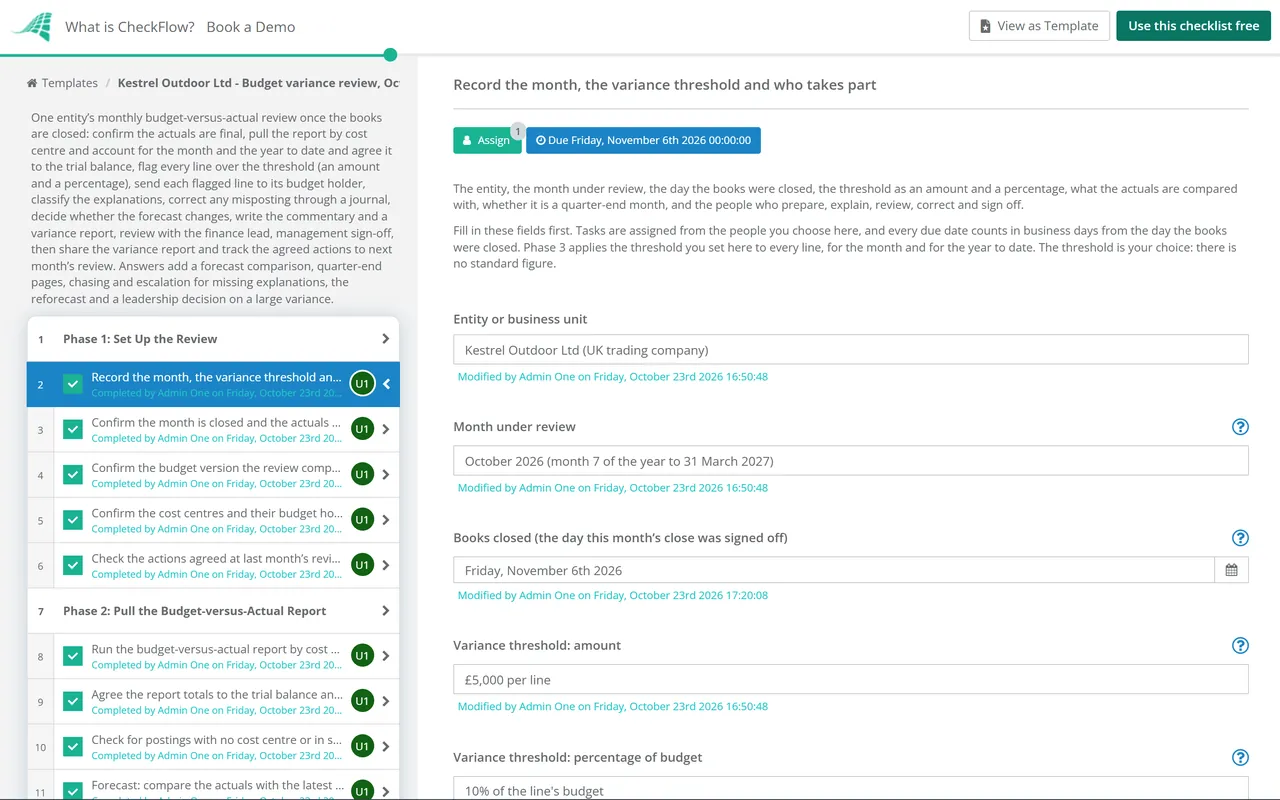
    • Record the month, the variance threshold and who takes part — the entity, the month under review, the day the books were closed, the threshold as an amount and a percentage, what the actuals are compared with, whether it is a quarter-end month, and the people who prepare, explain, review, correct and sign off
    • Confirm the month is closed and the actuals are final — the month-end close signed off, the period locked against new postings and any late adjustment either posted or listed, so the review never explains a figure that is still moving
    • Confirm the budget version the review compares against — the approved budget as loaded in your accounting system or planning tool, with its version, phased by month, and any approved budget transfers since it was loaded
    • Confirm the cost centres and their budget holders — every cost centre or department in the report with the one person who owns its budget, updated for leavers, new cost centres and changes of owner since last month
    • Check the actions agreed at last month’s review — each action from last month’s action log marked closed, in progress or overdue, with any overdue action raised again in this month’s review
  2. Phase 2

    Phase 2: Pull the Budget-versus-Actual Report

    5 tasks

    Pull one report for the entity from the locked ledger, by cost centre or department and by account, for the month and the year to date. Prove it is complete before anyone looks at a variance.

    • Run the budget-versus-actual report by cost centre and account — actual, budget and variance for every cost centre or department and account, for the month and for the year to date, from the locked period
    • Agree the report totals to the trial balance and the loaded budget — total actuals agreed to the trial balance and total budget agreed to the loaded budget, for the month and the year to date, so no cost centre or account has dropped out of the report
    • Check for postings with no cost centre or in suspense — actuals posted without a cost centre, to a suspense account or to a closed code, each moved to where it belongs or listed, because they sit outside every budget holder’s lines
    • Forecast: compare the actuals with the latest forecast too — the month and the year to date against the latest approved forecast as well as the budget, so a variance already reforecast is not explained twice and a new one stands out
    • Note the known timing effects in the month — accruals, prepayments, invoices received late and costs the budget phased into a different month, listed before the variances are worked out, so a timing difference is recognised as one
  3. Phase 3

    Phase 3: Apply the Threshold & Flag Variances

    5 tasks

    Apply the threshold from the first task to every line, for the month and the year to date. A line over it goes in the variance log with its budget holder. Look at the transactions behind it first, so budget holders are not asked about a posting finance can put right.

    • Calculate each line’s variance for the month and the year to date — the variance in money and as a percentage of budget for every line, with one sign convention used throughout and each line marked favourable or adverse
    • Flag every line over the threshold — each line tested against the amount and the percentage on the first task, in the month and in the year to date; a line under the threshold this month but over it for the year to date is still flagged
    • Check favourable variances as well as adverse ones — an underspend over the threshold flagged like an overspend, because it can be a missing accrual, a delayed project or a cost posted to the wrong cost centre
    • Look at the transactions behind each flagged line — the postings that make up each flagged line, checked for the wrong cost centre, the wrong account, the wrong month or a duplicate, with anything finance can explain noted before the line goes to its budget holder
    • Record the flagged lines in the variance log — one row per flagged line with its cost centre, account, month and year-to-date variance and budget holder, which is the list the rest of the review works through
  4. Phase 4

    Phase 4: Budget Holder Explanations

    7 tasks

    Each budget holder gets their own flagged lines and a deadline. Missing explanations add a chase and an escalation. An explanation that shows an error or misposting adds the correction tasks in Phase 5.

    • Send each budget holder their flagged lines — one message per budget holder with their lines, the month and year-to-date figures, the postings behind each one, the question and the deadline
    • Budget holders explain each flagged line — for each line what happened, whether it will reverse or continue, and what the budget holder is doing about it, in a sentence or two rather than a figure repeated back
    • Check every flagged line has an explanation by the deadline — each row of the variance log matched to an explanation, with any line still unexplained at the deadline listed with its budget holder
    • Missing explanations: chase the budget holder — a reminder to each budget holder with a missing explanation, naming the lines and a new deadline one business day away
    • Missing explanations: escalate to the finance lead — any line still unexplained after the chase raised by the finance lead with the budget holder or their manager, and marked unexplained in the variance log so the review can go on without it
    • Classify each explanation — each flagged line given one type: timing, volume, price or rate, one-off, error or misposting, or permanent change, which decides what happens to it next
    • Challenge explanations that do not fit the numbers — an explanation that names a cost the account does not hold, a timing difference with nothing reversing later, or a one-off that has happened before, sent back to the budget holder with the question
  5. Phase 5

    Phase 5: Corrections & Forecast

    6 tasks

    Correct what was posted wrongly, then decide whether the forecast changes. Timing differences move between months and one-offs pass; a permanent variance adds the reforecast tasks. The approved budget stays as it is.

    • Misposting: prepare the correcting journal — a journal that moves each misposted amount to the right cost centre, account or month, with the original posting as support, approved under your journal approval process
    • Misposting: post the journal and re-run the report — the approved journal posted in the open period, the budget-versus-actual report run again and the variance log updated, with any line that falls under the threshold closed
    • Decide whether the forecast changes — the classified variances read together: timing and one-off variances leave the full-year forecast alone, while a volume, price or permanent change that will continue moves it
    • Reforecast: update the forecast for the rest of the year — each continuing variance carried into the remaining months by cost centre and account, with the reason, while the approved budget stays unchanged as the measure
    • Reforecast: check the effect on the full-year outturn and on cash — the new full-year outturn against the budget, and the change in timing of payments or receipts passed to whoever owns the cash flow forecast
    • Reforecast: budget holders agree their revised forecast — each budget holder whose lines were reforecast confirming the new figures, or saying what they would change, before the review goes to the finance lead
  6. Phase 6

    Phase 6: Commentary & Variance Report

    5 tasks

    Turn the explanations into commentary and a short variance report. In a quarter-end month two more tasks add the quarter and year-to-date review and the pages for the board pack.

    • Write the variance commentary for each flagged line — for each line the variance for the month and the year to date, its type, the cause in plain words, when a timing difference reverses, and the action and its owner
    • Write the summary for leadership — the few variances that matter, the full-year view against budget, any change to the forecast and any decision leadership is asked to make, conclusion first
    • Assemble the variance report — the summary, budget against actual by department for the month and the year to date, the variance log with commentary, the forecast change and last month’s actions, in the same order every month
    • Quarter-end: add the quarter and year-to-date review — the quarter against budget by department, the variances that ran through all three months and the forecast for the quarters still to come
    • Quarter-end: prepare the variance pages for the board pack — a short budget-versus-actual page and the main variances for the quarter, in the form your board pack uses, agreed to the figures in the variance report
  7. Phase 7

    Phase 7: Review & Sign-Off

    5 tasks

    The finance lead reviews the log and the commentary. A variance large enough to need a decision, such as a spending freeze or a budget reallocation, goes to leadership before sign-off. Management sign-off is the gate: nothing is shared until it is done.

    • Finance lead reviews the variance log and commentary — every flagged line explained or marked unexplained, the types consistent, the figures traced to the report and the forecast change supported
    • Answer the review queries and update the report — each query from the finance lead answered, the commentary and report corrected, and the updated version saved in place of the draft
    • Decision needed: put the options to leadership — the variance, its cause and the options with their effect on the full year, such as a spending freeze on a cost centre, a reallocation of budget from another one, or accepting the overspend in the forecast
    • Decision needed: leadership records its decision — the option chosen, any conditions, who acts on it and from when, recorded by leadership before the review is signed off
    • Management signs off the variance review — the variance log, commentary, any forecast change and the variance report signed off as this month’s review; if it is not ready, leave this task open, because nothing in Phase 8 can be completed until it is done
  8. Phase 8

    Phase 8: Share & Track Actions

    7 tasks

    Share the signed-off variance report, give each budget holder their results and actions, and track every action to next month’s review, where the first phase checks them again.

    • Share the signed-off variance report with leadership and budget holders — the signed-off version only, from one shared location, to the people on the agreed list
    • Send each budget holder their cost centre results and actions — each budget holder’s month and year-to-date figures, their explained lines, any forecast change and the actions that are theirs
    • Record the agreed actions in the action log — each action from the review with its owner, cost centre and due date, so next month’s review can check it
    • Decision needed: put leadership’s decision into effect — the affected budget holders told, any approved budget transfer or spending freeze recorded in your systems, and the decision added to the action log
    • Reforecast: load the signed-off forecast — the revised forecast loaded into your planning tool or accounting system as a new version, with the approved budget kept unchanged beside it
    • File the review with the month’s records — the report, the variance log, the explanations, any journals, the commentary, the signed-off variance report and the sign-off kept together for the month
    • Track each action to next month’s review — each action followed up by its due date and its status updated in the action log, so the first phase of next month’s review starts from an up-to-date list

Kinds of Variance, and the Month Against the Year to Date

Six kinds of variance

Each flagged line gets one type on the classification task. The type decides the question for the budget holder and what happens to the forecast.

Kind of variance What it usually looks like What to ask the budget holder What it means for the forecast
TimingSpend or income in a different month from the budget’s phasing: an invoice early or late, a project start movedWhen will it reverse, and in which month?None for the full year if it reverses; check the phasing of the next months
VolumeMore or fewer units, hours, customers or people than the budget assumedWhat drove the volume, and will it continue?Changes the forecast if the new level continues
Price or rateThe same volume at a different price, pay rate, exchange rate or supplier costIs the new price fixed for the rest of the year?Changes the forecast from the month the new price applies
One-offA cost or income that will not repeat, such as a settlement or a recruitment feeWill it really not repeat, and was it approved?No change to later months; the year to date carries it
Error or mispostingA cost in the wrong cost centre, account or month, or a duplicateNot a question for the budget holder: finance corrects it through a journalNone; run the report again after the journal
Permanent changeA decision or event that changes the run rate, such as a new contract, a lost customer or a new hireWhat changed, and from when?Reforecast the rest of the year

The month and the year to date

Phase 3 tests every line in both views, because each one catches what the other misses.

What you see What it often means What to do
Over the threshold in the month, not in the year to dateOften timing: the month is catching up with an earlier one, or running ahead of a later oneConfirm when it reverses, and say so in the commentary
Over the threshold in the year to date, not in the monthA small overspend or underspend that repeats every monthAsk whether it will continue; it may need a reforecast
Over the threshold in bothA larger change, or a one-off in this monthExplain it in full and decide on the forecast
Under the threshold in both, but the same direction every monthDrift that the threshold does not catch yetMention it in the commentary and watch next month

These are working rules, not a standard. Your own finance policy decides the threshold, the types you use and who signs off.

Why Run the Budget Variance Review in CheckFlow?

1

Every month, the same review

A monthly recurring schedule starts the review for each entity. Enter the day the books were closed and every task gets a due date from it, counted in business days. Each month’s review sits on the Reports Grid with its answers, so one that is still open stands out.

2

Nothing shared before it is signed off

Management sign-off is a gate: the variance report cannot be marked shared, and the actions cannot be logged, until it is done. A large variance goes to leadership for a decision first, so the sign-off happens with the decision recorded. See how approval steps work.

3

Budget holders answer in one place

Each budget holder is assigned the explanation task, with its due date, and overdue alerts go to every assignee. A missing explanation adds a chase and then an escalation to the finance lead. Analytics shows completion rates and overdue and late work by person and by step, month after month.

CheckFlow does not hold your budget or calculate variances; your accounting system, spreadsheet or planning tool does that. CheckFlow runs the process around the report: who flags each line, who explains it, what was corrected, what changed in the forecast, who signed off and which actions are still open.

Close the month first with the Month-End Finance & Accounting Close Checklist and the Balance Sheet Reconciliation Checklist, so the actuals are final. Correct mispostings through the Journal Entry Review & Approval Checklist, carry the cash effect of a reforecast into the Weekly Cash Flow Forecast Checklist, and report the month to leadership with the Monthly Management Reporting Pack Checklist. The budget itself is set with the Annual Budget Planning Checklist.

AI generator

Didn’t find what you need? Describe it.

Describe the process in a sentence and the AI checklist generator drafts the phases and tasks for you.

Frequently Asked Questions

What is a budget variance review?

A budget variance review is the monthly check of actual results against the budget, line by line, once the books are closed. Finance pulls the budget-versus-actual report by cost centre and account, flags every line over an agreed threshold and asks the budget holder who owns it to explain it. The explanations are classified, errors are corrected, the forecast is changed where a variance will continue, and the review is signed off with a list of actions. A favourable variance is better than budget (lower cost or higher income); an adverse one is worse.

How often should you compare the budget with actuals?

Monthly suits most businesses, once the month-end close is signed off, so the figures being explained are final. Starting before the close means explaining numbers that are still moving. In a quarter-end month this checklist adds a quarter and year-to-date review and the pages for the board pack. Run it on a recurring schedule so it starts every month without anyone remembering to.

What variance threshold should you use?

There is no standard figure. Each business sets its own in its finance policy, usually as an amount and a percentage of the line’s budget, and applies the same threshold every month. Using the amount alone flags every large line, even when the change is small in proportion; using the percentage alone flags small lines that hardly matter. This checklist asks for both on the first task and lets you choose whether a line is flagged when it is over either one or both.

What causes budget variances?

Most variances fall into six types: timing (spend in a different month from the budget’s phasing), volume (more or less activity than planned), price or rate (the same activity at a different cost), one-off items, errors or mispostings, and permanent changes such as a new contract or a lost customer. The type matters because it decides what happens next: timing reverses, an error is corrected through a journal, and a permanent change goes into the forecast.

Should you look at the month or the year to date?

Both. A line can be over the threshold in the month and back on budget for the year, which usually means timing. Another can stay under the threshold every month while the year-to-date overspend keeps growing. This checklist tests every line in both views, and flags a line that is over the threshold in either.

When should a variance change the forecast?

When it will continue. Timing differences and one-off items leave the full-year forecast alone. A volume, price or permanent change that will carry on into later months goes into the forecast for the rest of the year, while the approved budget stays as it was, so you can still see the difference. Pass any change in the timing of cash to whoever runs the Weekly Cash Flow Forecast Checklist.

What if a budget holder does not explain a variance?

Chase once with a short new deadline, then escalate to the finance lead, who raises it with the budget holder or their manager. Mark the line unexplained in the variance log, so the review can be signed off without pretending it has an answer, and carry it into next month’s review. In this checklist, choosing “One or more explanations missing” adds the chase and the escalation tasks.

How is this different from the management reporting pack?

The Monthly Management Reporting Pack Checklist produces the whole pack leadership reads each month: KPIs, results against budget, forecast and prior year, cash and the board pages. The budget variance review is the work underneath its variance section, done with each budget holder: flagging their lines, getting the explanations, correcting mispostings, deciding on the forecast and tracking the actions. If you run both, run this review first and take its commentary and forecast change into the pack once the finance lead has reviewed them (Phase 7), so budget holders are asked once; the pack’s variance queries and commentary tasks can then be marked not applicable. Note anything that changes at sign-off in next month’s pack.

Is CheckFlow free for this template?

14-day free trial, no card required. The Business plan is $10 per user per month after the trial. Full details at checkflow.io/pricing.

Explain Every Variance With the Person Who Owns It

Free trial — no credit card required.

14-day free trial, no credit cardFull refund in your first 30 daysUS hosting, EU on request