Journal Entry Review & Approval Checklist Template

Every manual journal is a way to change the numbers without a sale, a purchase or a payment behind it. When the person who posts it is also the person who approves it, nobody else ever looks.

Most finance teams approve journal entries one at a time, during a busy close. What rarely happens is a review of the whole month’s population afterwards: was every manual entry approved by someone other than the preparer, before it posted, and which entries look like the ones auditors are trained to pick out? This free journal entry review and approval checklist gives controllers, finance managers and internal control teams a monthly process for exactly that. It extracts and proves the complete journal listing, checks the separation between preparer and approver, reviews support, scans for fraud risk indicators and ends in a controller sign-off. Conditional phases cover top-side and post-close entries when there are any, and who can post journals at each quarter-end.

Use This Template Free See Live Example
No Credit Card Required

Two Roles, Two Different People

Journal entries are where management override of controls happens. An invoice has to get past purchasing, but a manual journal can move an amount between accounts with nothing more than a description. That is why auditors test journal entries on every audit, whatever they think of your controls, and why the journal approval is one of the first controls they ask to see.

The control rests on separating two roles. The preparer builds the entry and is accountable for getting it right. The approver is accountable for challenging it. When the same person does both, or the approver clicks “approve” on a batch without opening the support, the entry has been recorded but not controlled. This checklist does not replace approval inside your accounting system. It checks, once a month, that the approval actually worked for every manual entry in the period.

Preparer

Builds the entry and proves it

Accountable for: the right accounts, amount and period, a description that explains why, and support attached before the entry is submitted.

Must not: approve or post their own entry, or split an entry to stay under an approval limit.
Approver

Challenges the entry before it posts

Accountable for: reading the support, questioning the judgement behind estimates, and approving only within their own authority limit.

Must not: approve entries they prepared, approve after the entry has already posted, or approve a batch without opening it.

What the Journal Entry Review Checklist Covers

Five phases run every month, from extracting the journal listing to scanning it for risk indicators, and the controller signs off in the last one. Phases 5 and 6 appear only in the periods that need them.

Phase 1

Phase 1: Extract & Prove the Journal Population

A review of a filtered report proves nothing about the entries the filter left out. Start from the complete listing.

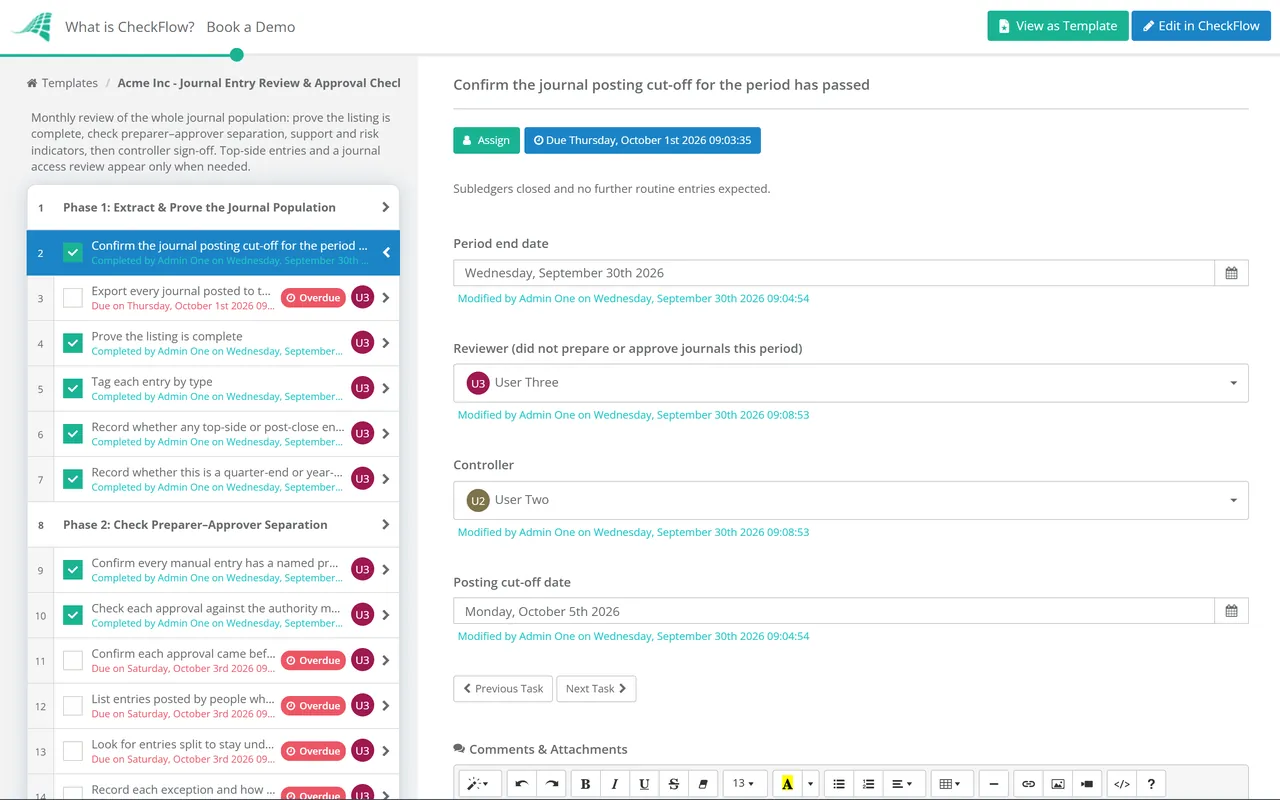
  • Confirm the journal posting cut-off for the period has passed — subledgers closed and no further routine entries expected
  • Export every journal posted to the period — with preparer, approver, posting date, entry date, source, accounts, amounts and description
  • Prove the listing is complete — agree total debits and credits, and the net movement on each account, to the trial balance
  • Tag each entry by type — system-generated, recurring, non-recurring manual, reversing, top-side or post-close
  • Record whether any top-side or post-close entries were made — answer Yes or No; Yes adds Phase 5 to this month’s checklist
  • Record whether this is a quarter-end or year-end close — answer Yes or No; Yes adds the access review in Phase 6
Phase 2

Phase 2: Check Preparer–Approver Separation

  • Confirm every manual entry has a named preparer and a different approver — list any entry that was self-approved or has no approver recorded
  • Check each approval against the authority matrix — the approver’s limit by amount, entity and account type
  • Confirm each approval came before the entry posted — compare the approval date with the posting date
  • List entries posted by people who don’t normally post journals — senior managers, IT administrators, external users and system accounts
  • Look for entries split to stay under an approval limit — several entries to the same accounts on the same day, each just below the threshold
  • Record each exception and how it was resolved — retrospective approval, correction or escalation to the controller
Phase 3

Phase 3: Review Support & Accounting

  • Check that every manual entry has support attached — a calculation, contract, invoice, reconciliation or email that justifies the amount
  • Read the descriptions — each one should say why the entry was made, not only which accounts it touches
  • Validate accounts, cost centres and periods — no postings to control accounts, closed periods or the wrong entity
  • Recalculate estimates and accruals above the review threshold — and compare the assumptions with last month’s
  • Check recurring journals against their templates — amounts that changed, and contracts or leases that have ended
  • Confirm reversing entries reversed once, in the right period — none left standing and none reversed twice
Phase 4

Phase 4: Scan the Population for Risk Indicators

Auditors apply the same kind of filters, so run them first.

  • Filter for entries to unusual or seldom-used accounts — including accounts with no other activity this year
  • Filter for round amounts and repeated ending digits — such as 50,000.00 or several entries ending in 999
  • Filter for entries posted at unusual times — weekends, holidays, late at night or after the draft accounts were produced
  • Filter for entries with blank, vague or duplicated descriptions — “adjustment”, “per CFO” or the same text on unrelated entries
  • Review entries to high-judgement accounts — revenue, reserves and provisions, suspense, intercompany and unreconciled accounts
  • Obtain support for every entry the filters select — and add unexplained ones to the exceptions log
Only If Needed

Phase 5: Top-Side & Post-Close Entries

Shown only when Phase 1 records top-side or post-close entries. These bypass the subledgers, so they get individual review.

  • List every top-side and post-close entry with its reason — consolidation adjustments, audit adjustments and late corrections
  • Confirm each was approved by the controller before posting — and by the CFO above your top-side threshold
  • Confirm any reopening of a closed period was authorised — and that the period was locked again afterwards
  • Push top-side entries down to the entity ledgers — or track them so they are not needed again next month
Quarterly

Phase 6: Journal Access Review

Shown at quarter-end and year-end. Segregation of duties in the approval flow depends on who can do what in the system.

  • Export the list of users who can create, approve or post journals — from the accounting system, not from the HR directory
  • Remove leavers and people who have changed role — and confirm the removal took effect
  • Identify users who can both prepare and approve or post — document the compensating control for each one who must keep both
  • Review journal activity by administrator and shared accounts — these should post nothing, or only system-generated entries
  • Controller approves the access list — Approved or Not approved, with the export attached
Sign-Off

Phase 7: Resolve Exceptions & Controller Sign-Off

  • Summarise the exceptions log — each exception, its cause, its resolution and any entry that still needs action
  • Post correcting entries through the normal approval route — never as a post-close entry approved by the preparer
  • Agree control improvements for repeated exceptions — a tighter limit, a mandatory attachment or a system restriction
  • Controller reviews and signs off the journal review — Approved or Not approved; the checklist stops until it is answered

How to Review Each Type of Journal Entry

Not every journal needs the same scrutiny. System-generated entries from a well-controlled subledger carry little risk; a top-side adjustment made the night before the board pack goes out carries a lot. Tagging each entry by type in Phase 1 lets the reviewer spend time where the risk is.

Journal type Examples Main risk Review approach
System-generatedSales and purchase postings, payroll interface, depreciation runInterface or configuration errors; someone editing the amounts passed to the ledgerReconcile the subledger to the ledger; confirm nobody edited the interface
Recurring (standard)Rent, prepayment release, loan interest, management chargesA template left running after the contract changed or endedReview the template once a year and investigate any change in amount
Non-recurring manualAccruals, provisions, reclassifications, correctionsJudgement and estimates; entries made to reach a targetIndividual approval with support; recalculate above the threshold
ReversingMonth-end accruals reversed on day one of the next periodReversal forgotten, or made twiceMatch every reversing entry to its reversal
Top-side (consolidation)Eliminations and adjustments made at group level onlyBypasses entity ledgers and their controlsController approval of each one; push down or track
Post-closeEntries after the period was locked or the draft accounts producedChanges numbers that were already reviewed or circulatedAuthorised reopening only; individual review of every entry

What the auditing standards look for. PCAOB AS 2401 (paragraphs .58 to .62), which applies to audits of US public companies, and ISA 240, used in most other countries, both require auditors to test journal entries and other adjustments for evidence of fraud. They describe the characteristics of inappropriate entries in almost the same words: entries to unrelated, unusual or seldom-used accounts; entries by people who don’t usually make journal entries; entries at the end of the period or after it with little or no explanation; entries without account numbers; and entries with round numbers or a consistent ending number. Both standards also single out non-standard entries made outside the normal course of business, and ISA 240 warns that some adjustments, such as consolidating adjustments and reclassifications, never pass through a journal at all. Phase 4 turns those characteristics into filters you can run yourself. ISA 240 has been revised, and the new version applies to audits of periods beginning on or after 15 December 2026, so expect your auditors’ approach to journal testing to be updated for those years.

When the team is too small to separate duties. The COSO internal control framework expects segregation of duties to be built into control activities, and where it is not practical, management selects alternative controls instead. In a two-person finance team that usually means someone outside the team, such as the owner or the external accountant, reviews the full journal listing every month. Assign the Reviewer role to that person.

Why Run Journal Entry Reviews in CheckFlow?

1

The sign-off is a real approval

The controller is chosen at the start of each run, and the sign-off task needs an Approved or Not approved answer before the checklist can finish. The approval step records who approved and when, so the evidence of review is part of the process rather than an initial on a printout.

2

Extra phases only in the months that need them

Two questions in Phase 1 decide the shape of the month. Top-side and post-close entries get their own phase only when there are some, and the journal access review appears whenever Phase 1 records a quarter-end or year-end close.

3

An exceptions log your auditors can use

The journal listing, the filter results and the support for every selected entry are attached to the tasks they relate to, with comments showing how each exception was resolved. When the auditors ask how journals are controlled, you hand them twelve completed checklists.

Journal review is one control inside the monthly close. The Month-End Close Checklist covers posting the accruals, prepayments and other adjusting entries that this checklist reviews, and our month-end close guide lists the standard entries each close needs and which ones should auto-reverse.

Approvals work the same way across finance. See how CheckFlow’s approval software handles authority limits and sign-offs, and how the Invoice Approval Workflow Checklist applies the same separation to supplier invoices.

Frequently Asked Questions

What is a journal entry review?

+

It is a check that the journal entries posted to a period are complete, properly supported, correctly recorded and approved by someone other than the person who prepared them. Individual entries are approved as they are posted; the periodic review looks at the whole population afterwards to confirm the approvals worked and to pick out entries that carry a higher risk of error or fraud.

Who should approve journal entries?

+

Someone other than the preparer, with authority for the amount and the accounts involved. Most businesses set an authority matrix: a senior accountant approves routine entries up to a limit, the controller approves larger or unusual ones, and the CFO approves top-side and post-close entries above a higher threshold. Approval should happen before the entry posts, not after.

What is a top-side journal entry?

+

A top-side entry is an adjustment made at the consolidation or reporting level rather than in an entity’s own ledger, often late in the close. Because it bypasses the subledgers and the controls around them, it is one of the entry types auditors look at most closely. Each one should have a documented reason, controller approval and, where possible, be pushed down to the entity ledger.

What do auditors look for when testing journal entries?

+

Under PCAOB AS 2401 and ISA 240, auditors select entries with characteristics linked to fraud: postings to unusual or seldom-used accounts, entries by people who don’t normally post, entries at or after the period end with little explanation, entries without account numbers, and round or repeated amounts. They focus on period-end entries and consider whether to test throughout the period.

How is this different from the month-end close checklist?

+

The Month-End Close Checklist is the process of preparing and posting the period’s entries and reconciliations. This checklist is the control over the journals the close produced: it runs after posting has finished, is assigned to a reviewer who did not prepare them, and ends with the controller’s sign-off. Most teams run both every month.

Is CheckFlow free for this template?

+

14-day free trial, no card required. The Business plan is $10 per user per month after the trial. Full details at checkflow.io/pricing.

Every Manual Journal Reviewed by Someone Who Didn’t Post It

Free trial — no credit card required.