
Answer and resolve a support request
When: every time a customer raises a ticket.
Covers: acknowledgement, triage and priority, investigation, the reply, resolution and closure.
Output: a resolved ticket. The Support Ticket Response Checklist.
Last reviewed: October 2026
No Credit Card Required
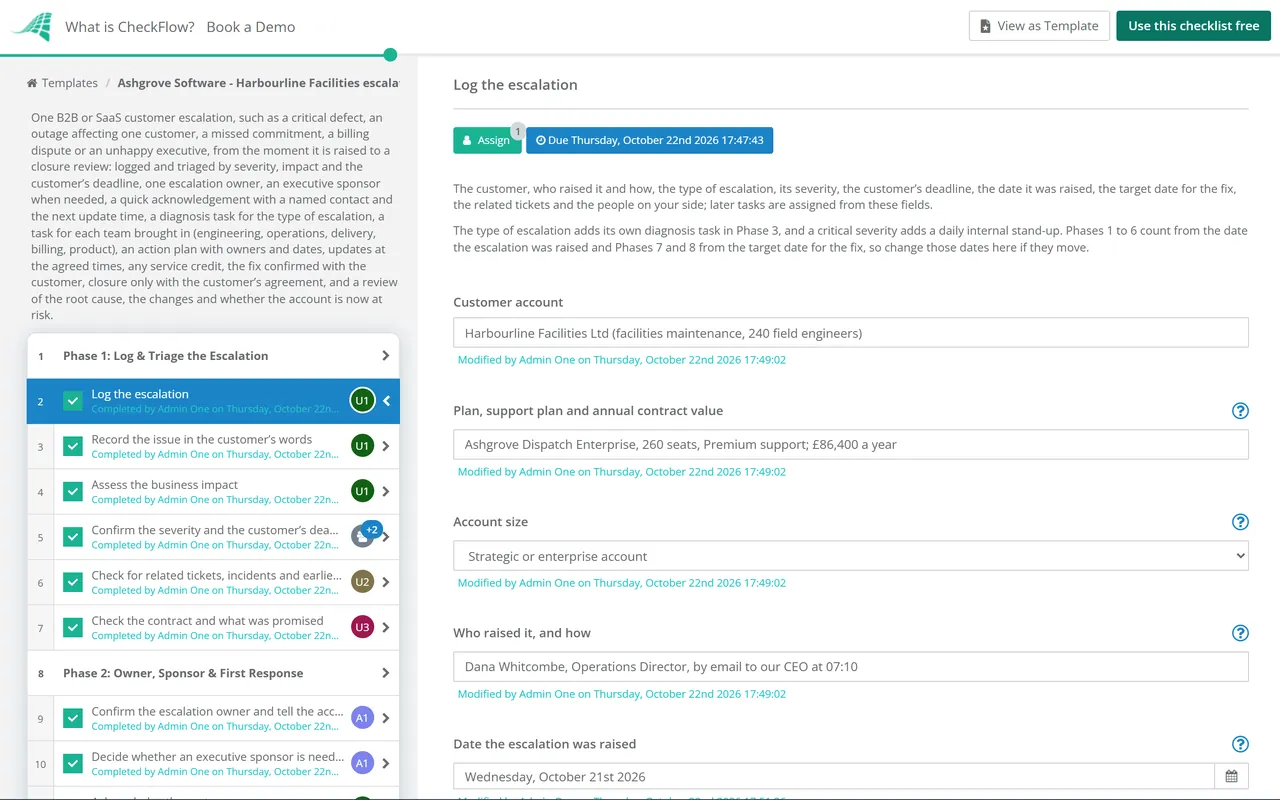
This free customer escalation checklist is for support managers, customer success managers, account managers and escalation managers in B2B and SaaS companies. One run handles one escalation for one customer: a critical defect, an outage on their account, a missed commitment, a billing dispute or an unhappy executive. You log it and triage it by severity, business impact and the customer’s own deadline, name one escalation owner and decide whether an executive sponsor is needed. The customer gets a quick acknowledgement with a named contact and the time of the next update. The type of escalation adds its own diagnosis task, and each team you need, such as engineering, operations, delivery, billing or product, gets its own task to accept the work. An action plan with owners and dates goes to the customer, updates follow at the times you promised, and the fix is confirmed with the customer. The escalation closes only when the customer agrees, and a closure review records the root cause, what will change and whether the account is now at risk.
A customer escalation is a customer telling you that the normal route has failed them. A critical bug has sat in the queue for a week, the service has been down for their team all morning, a promised delivery date has passed, or their operations director has written to your chief executive. In B2B and SaaS the issue is usually urgent for the customer, it needs more than one team to fix, and several people on your side start replying at once with different answers.
This checklist runs one escalation, from the moment it is raised to a closure review: one owner, a quick acknowledgement, the teams who can fix it, an action plan, updates at the times you promised, and closure only when the customer agrees. It is more than one ticket, which the Support Ticket Response Checklist handles. It is not an incident that affects your service for many customers, which runs through your IT incident management process; an escalation can sit alongside one. And it is not the regulated complaints process a bank or lender must follow, which is the Customer Complaints Handling Checklist. Open an At-Risk Customer (Churn Prevention) Checklist as well when the issue puts the whole account at risk of leaving.
When: every time a customer raises a ticket.
Covers: acknowledgement, triage and priority, investigation, the reply, resolution and closure.
Output: a resolved ticket. The Support Ticket Response Checklist.
When: a customer escalates a critical issue, an outage on their account, a missed commitment, a dispute or a complaint about the service.
Covers: triage, one owner, an executive sponsor when needed, the teams who can fix it, an action plan, regular updates, the fix confirmed with the customer and a closure review.
Output: an issue fixed and closed with the customer’s agreement, and the root cause recorded. This checklist.
When: the account is flagged at risk of leaving or cutting back, at any point in the term.
Covers: the warning signs, the root cause confirmed with the customer, executive outreach, an approved save plan and the outcome.
Output: a saved, downgraded or churned account. The At-Risk Customer (Churn Prevention) Checklist.
Eight phases take one customer escalation from the moment it is raised to the closure review. The type of escalation adds its own diagnosis task, a critical severity adds a daily internal stand-up, and each team you bring in gets its own task to accept the work. An executive sponsor adds a phase of their own when the escalation needs one, and a service credit or goodwill gesture adds a task for finance. The customer’s agreement to close is the gate: nothing after it can be completed until it is recorded. A fix the customer does not accept reopens the plan, and an account now at risk of leaving adds a task to open an at-risk case.
Log the escalation the moment it is raised, in one place. Enter the date it was raised and your target date for the fix: every due date counts in business days from one of them. Triage by severity, business impact and the customer’s own deadline.
One person owns the escalation from start to finish, and the customer hears from them quickly with a named contact and the time of the next update. Decide here whether an executive sponsor is needed.
Find out what is wrong before you promise a fix. The type of escalation chosen on the first task adds one diagnosis task here, assigned to the person who can see the facts.
Choose the teams the fix needs. Each team ticked adds its own task, assigned to its lead with the escalation owner, so every team accepts the work and gives a date rather than hearing about it in a chat thread.
Applies when Phase 2 decides the escalation needs an executive sponsor, for example a critical severity, a strategic account or an executive on the customer’s side. The sponsor speaks to their counterpart and backs the plan with the resources it needs.
Write the plan down, with an owner and a date for every action, and share it with the customer. Then update them at the times you promised, including when there is no news. A service credit or goodwill gesture adds a task for finance.
A fix is only done when the customer says it works. Deliver it, check it in their account, confirm it with them and watch for a recurrence. The customer’s agreement to close is the gate: nothing after it can be completed until it is recorded.
Close the record, then review the escalation while it is fresh: the root cause, what changes so it does not happen again, and whether the account is now at risk of leaving. An account at risk adds a task to open an at-risk case.
The five kinds of escalation most B2B and SaaS teams see, matching the choices on the checklist’s first task. Each one adds its own diagnosis task. The table says who usually needs to be involved, what the first update to the customer should say and the trap to avoid.
| Type of escalation | What it often looks like | Who to bring in | What the first update should say | Watch out for |
|---|---|---|---|---|
| Product defect or bug | A feature broken after a release, wrong results or errors in a key workflow | Engineering, through support, with the steps to reproduce | That the problem is confirmed, who is working on it, any workaround and the next update time | Promising a fix date before engineering has given one |
| Outage or performance problem for this customer | The service down or very slow for this account, or an integration that has stopped | Operations or hosting, and engineering | What is affected, since when, what you are doing now and when you will update next | Other customers affected: run your incident process too, and keep this customer informed from it |
| Missed commitment | A delivery date, a promised feature, a migration or a service level missed | The account owner, delivery and whoever made the promise | That you know what was promised and are finding out what went wrong | Making a new promise before you know you can keep it |
| Billing or contract dispute | An invoice the customer says is wrong, a renewal price or a credit they expected | Billing and finance, and the account owner | That the invoice is under review and reminders are paused, and when you will come back | Payment reminders still going out while the dispute is open |
| Complaint about the service or the relationship | A senior person unhappy with response times, attitude or a run of problems | The account owner, the escalation manager and often an executive sponsor | That a named senior person has heard them and when they will call | Treating a pattern of problems as one ticket |
Set your own severity levels and update times. There is no single rule for how quickly an escalation must be answered or how often the customer must hear from you. Write down your own targets for each severity, such as how soon the acknowledgement goes out and how often a critical escalation is updated, and check the contract, which may set response times of its own. Record what you promised on the checklist and keep to it: an update at the promised time that says there is no news yet is still worth sending.
Close it with the customer, not for them. A fix your team has released is not the end of an escalation. Check it in the customer’s account, ask the person who raised it to confirm it works, and watch for a recurrence for a period you agree with them. In this template the customer’s agreement to close is the gate, and the closure review that follows asks whether the account is now at risk.
The first task names the escalation owner, the manager and every team lead who might be needed, and every later task is assigned from those fields. The type of escalation adds its own diagnosis task and each team ticked gets a task of its own, so engineering, finance or delivery accept the work on the record. Due dates count in business days from the day the escalation was raised and, for the last phases, from the target date for the fix.
The customer’s agreement to close halts the checklist: the record cannot be closed and the review cannot be completed until it is recorded. A fix the customer does not accept adds a task to reopen the plan. See how tasks that halt a checklist work.
The Reports Grid shows each open escalation and how far it has got, and the Tasks Grid shows each owner and team lead what is due today. The impact, the action plan, the update log and the root cause sit on the tasks they belong to. See analytics and reporting.
CheckFlow does not replace your help desk, your status page or your CRM. Tickets stay in the help desk and outages in your incident tooling. CheckFlow runs the steps for every escalation in the same order, with an owner and a date for each and a record of who did what and when.
This template runs one customer escalation. Answer everyday tickets with the Support Ticket Response Checklist, run an outage that affects many customers with the IT Incident Management Process Checklist and review it afterwards with the Incident Postmortem Template, and dig into a cause that keeps coming back with the Root Cause Analysis (8D) Checklist. When the escalation puts the whole account at risk of leaving, open an At-Risk Customer (Churn Prevention) Checklist, and review the account’s goals at the next quarterly business review.
At-Risk Customer (Churn Prevention) Checklist
Support Ticket Response Checklist
IT Incident Management Process Checklist
Customer Complaints Handling Checklist

Quarterly Business Review (QBR) Checklist
Describe the process in a sentence and the AI checklist generator drafts the phases and tasks for you.
It is the set of steps a company follows when a customer’s issue needs more than the normal support route: a critical defect, an outage on their account, a missed commitment, a dispute or a complaint from a senior person. A typical process logs and triages the issue, names one owner, acknowledges the customer quickly, brings in the teams who can fix it, agrees an action plan, updates the customer at set times, confirms the fix with them and reviews the root cause. This template runs those steps for one escalation.
When the customer asks for it, when the impact is serious, such as people unable to work or a deadline at risk, when the normal ticket route has not solved it in the time promised, or when the fix needs teams beyond support. Many teams also treat any issue raised by a customer executive with your own executives as an escalation. Write your own triggers down, so everyone escalates the same things.
One named person, from the first acknowledgement to closure. It is often a senior support engineer, an escalation manager or the customer success manager, depending on the type of issue. The owner does not have to fix everything; they keep the action plan, chase the teams, send every update and are the one name the customer deals with. A manager oversees it and settles conflicts between teams.
When the severity is critical, when the account is large enough that losing it matters to the business, or when an executive on the customer’s side is involved. A sponsor can acknowledge the problem at the level the customer expects and commit resources the escalation owner cannot. Brief them first on the issue, the cause and what not to offer. In this template the decision is a task in Phase 2, and a yes adds the sponsor’s steps.
As often as you agreed with them, and at the times you promised. There is no single standard: many teams update critical escalations at least once a working day and less urgent ones less often, and some contracts set response times. Agree the rhythm, the channel and who gets the updates early, and send an update at the promised time even when there is no news yet. The template keeps an update log on the task.
Every action needed to fix the issue and to help the customer in the meantime, each with one owner, a due date and a status; anything you need from the customer, such as access or test data; the target date for the fix; and the dates you will update them. Check it with the escalation manager before it goes to the customer, so nothing in it has been promised without the team that has to deliver it.
When the fix has been checked in the customer’s account, the person who raised the issue has confirmed it works, any agreed monitoring period has passed without a recurrence and the customer agrees in writing that it can be closed. Then close the tickets, record the root cause and the changes that stop it happening again, and ask whether the account is now at risk of leaving.
A ticket is one request, handled by support with the Support Ticket Response Checklist. An incident is a problem with your service, often affecting many customers, handled with your incident management process. An escalation is about one customer and their experience: it can start from a ticket or an incident, and it adds an owner, the other teams, an action plan, regular updates and closure the customer agrees to.
14-day free trial, no card required. The Business plan is $10 per user per month after the trial. Full details at checkflow.io/pricing.
14-day free trial, no credit cardFull refund in your first 30 daysUS hosting, EU on request