
Restore service ASAP
Goal: Restore service as fast as possible.
Timeline: Hours.
Output: Service restored (via fix or workaround).
Leads to: Problem management (if root cause unresolved) and change management (if a fix requires a controlled change).
When a critical service goes down, the clock is running in multiple directions simultaneously: against the SLA, against the business impact accumulating with every minute of downtime, and against the patience of stakeholders and users who want to know when the system will be back. The teams that recover fastest are not the ones who work hardest in the moment — they are the ones who have a defined incident management process that starts the moment detection occurs: immediately assigning an incident commander, immediately setting the severity level, immediately establishing the communication channel, and systematically working through diagnosis and resolution without duplicating effort or chasing information that should already be in one place. A structured incident management process is not bureaucracy under pressure — it is the structure that removes the chaos from pressure. This free checklist gives IT managers, service desk teams, and SRE and NOC teams a structured framework for the full ITIL-aligned incident management lifecycle.
In ITIL, an incident is any unplanned interruption or degradation of an IT service. Incident management’s goal is to restore normal service as quickly as possible — not to find the root cause, but to stop the bleeding. The priority is speed, not completeness of understanding. A workaround that restores service is a valid incident resolution even if the underlying cause is not yet understood.
Problem management is the separate process that investigates root causes — of individual serious incidents and of recurring patterns of incidents. A problem is the underlying cause of one or more incidents. Problem management takes longer, requires deeper investigation, and produces permanent fixes rather than workarounds. Keeping these two processes separate ensures that the pressure to resolve a live incident does not prevent the thorough root cause investigation that prevents the next one.
Goal: Restore service as fast as possible.
Timeline: Hours.
Output: Service restored (via fix or workaround).
Leads to: Problem management (if root cause unresolved) and change management (if a fix requires a controlled change).
Goal: Find and permanently fix root cause.
Timeline: Days to weeks.
Output: Permanent fix or known error.
Leads to: Change management for implementing the permanent fix.
This checklist covers the full ITIL incident lifecycle in six phases — from detection through to post-incident review and close.
Every IT incident starts with detection — either from monitoring systems that catch the issue before users do, or from users who report it first. Proactive detection is faster. Consistent logging of every incident is non-negotiable.
The post-incident review is where incidents become learning. Organisations that skip PIRs are organisations that will see the same incident again. PIRs are not blame exercises — they are system improvement exercises.
Definition: Complete service outage affecting all users of a business-critical system; or a major security incident (ransomware, data breach, significant unauthorised access).
Response: Immediate — Major Incident Manager assigned, response team convened, senior management notified, status updates every 30 minutes. Resolution target: 4 hours or per SLA.
Definition: Significant degradation or service loss affecting multiple users; or outage of a non-critical but widely used system.
Response: Within 1 hour — Tier 2 assigned, affected users notified, manager informed. Resolution target: 8 hours or per SLA.
Definition: Single user or small group affected; workaround available; limited business impact.
Response: Within 4 hours — standard Tier 1/2 assignment. Resolution target: 1 business day.
Definition: Monitoring alert, minor issue, or potential problem not yet impacting service.
Response: Within 1 business day. Resolution target: 3–5 business days.
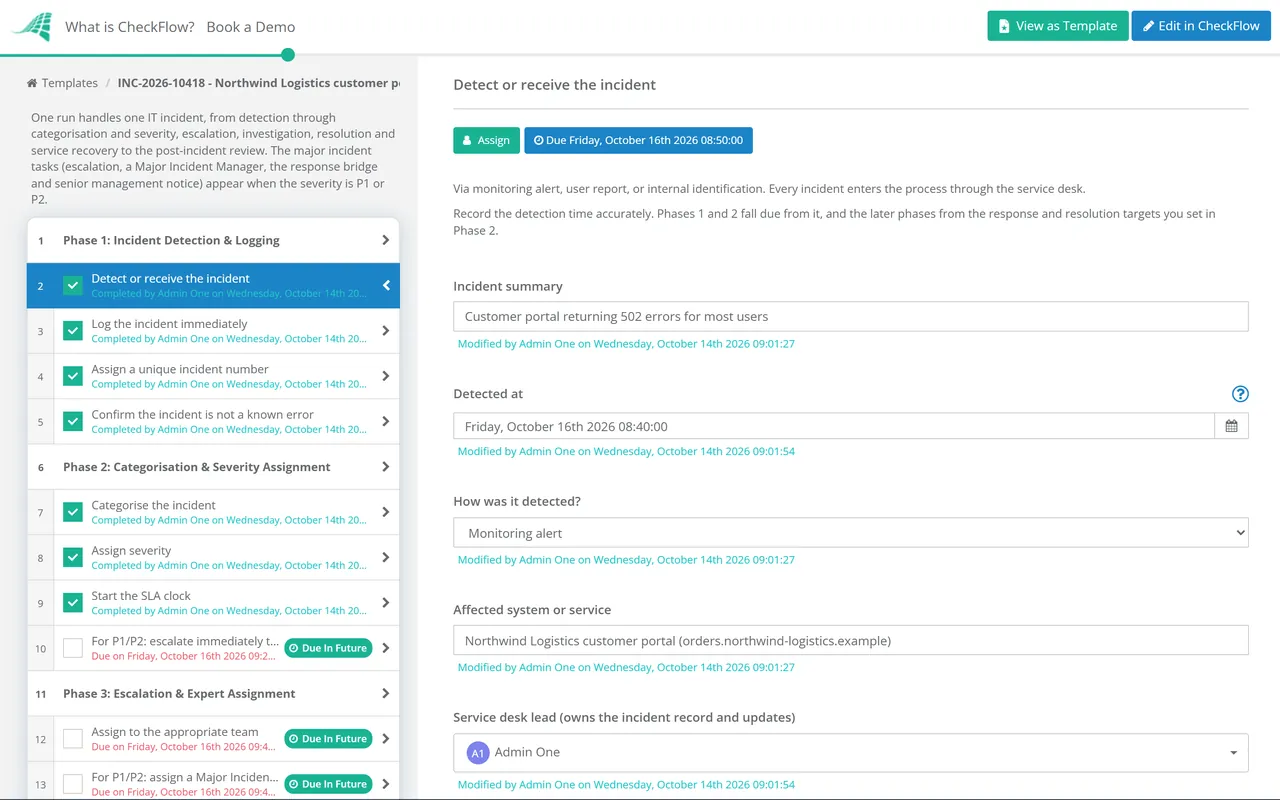
The most chaotic minutes in incident management are the first ones — when the severity is not yet clear, the right people have not yet been engaged, and everyone is waiting for someone to take charge. CheckFlow’s incident management checklist makes the first steps explicit: log, categorise, assign severity, escalate for P1/P2, assign a Major Incident Manager, start the communication cycle. Structure replaces chaos in the first five minutes.
Stakeholder communication during an incident is the task most commonly dropped under pressure — the team is focused on resolution and stops sending updates. CheckFlow assigns stakeholder communication tasks at defined intervals (every 30 minutes for P1) as required steps in the workflow. The person responsible receives a reminder when the next update is due. Stakeholders are informed whether or not the technical team has good news.
A PIR that produces action items that are never implemented is a PIR that produced a false sense of improvement. CheckFlow’s PIR phase assigns each action item to a named owner with a deadline. The status of every PIR action is visible until it is marked complete. The learning from each incident is tracked through to implementation.
Major incidents that cannot be resolved within the incident management process may require DR activation. CheckFlow’s Disaster Recovery Audit Checklist covers the DR capability assessment that determines whether recovery options are available. See the Disaster Recovery Audit Checklist →
Incidents caused by or investigated through IT changes require connection to the change management record. CheckFlow’s IT Change Management Process Template covers the controlled change process that prevents change-induced incidents. See the IT Change Management Template →
When an incident turns out to be a security breach, such as a compromised account, malware or data exposure, restoring the service is only part of the job. The response also has to contain the attacker, preserve evidence and meet notification deadlines. CheckFlow’s Cybersecurity Incident Response Checklist follows NIST SP 800-61 Rev. 3 for that work. See the Cybersecurity Incident Response Checklist →
Incident Postmortem Template

Problem Management Checklist
On-Call Handover Checklist
IT Change Management Checklist

Monitoring & Alerting Setup Checklist
Describe the process in a sentence and the AI checklist generator drafts the phases and tasks for you.
IT incident management is the structured process for responding to and resolving unplanned IT service disruptions — any event that interrupts or degrades a service and affects users. The goal of incident management is to restore normal service operation as quickly as possible, minimising the business impact of the disruption. The ITIL incident management lifecycle covers detection and logging, categorisation and severity assignment, escalation and assignment, investigation and diagnosis, resolution and recovery confirmation, and post-incident review. Incident management is explicitly not root cause analysis — that is the role of the separate problem management practice. Incident management prioritises speed of recovery; problem management prioritises depth of understanding.
A major incident is a P1 or SEV-1 incident — a complete outage of a business-critical service, a significant security event, or any incident with substantial or immediate business impact. Major incidents require a dedicated, intensified response: a named Major Incident Manager who owns the response end-to-end, an immediate response team convened on a dedicated bridge or channel, escalated communication frequency (every 30 minutes to stakeholders), and a mandatory PIR within 24–48 hours of resolution. Standard incidents (P2–P4) follow the same lifecycle but with less escalation intensity, lower communication frequency, and lighter-touch PIR requirements.
A post-incident review (PIR), also called a post-mortem or after-action review, is a structured debrief conducted after a significant incident — typically within 24 hours for P1, 72 hours for P2. Its purpose is to reconstruct the timeline, identify contributing factors, and define specific improvements. Effective PIRs are blameless — they focus on systems and processes rather than individuals, operate from the principle that people make rational decisions with the information available to them at the time, and produce action items rather than conclusions. Organisations that conduct consistent, high-quality PIRs see fewer repeat incidents over time; those that skip PIRs see the same incident patterns recur.
Mean Time to Resolve (MTTR) is the average time from incident detection to confirmed service restoration. A well-structured incident management process reduces MTTR in three ways: faster detection (monitoring that catches incidents before users report them reduces the time between failure and response beginning), faster initial escalation (a clear severity framework and immediate P1/P2 escalation ensures the right expertise is engaged sooner), and reduced diagnosis time (a known error database, structured investigation, and immediate access to the recent change log significantly reduces diagnosis time compared to ad hoc investigation). MTTR trends over time — improving or worsening — are the most useful indicator of incident management effectiveness.
14-day free trial, no card required. The Business plan is $10 per user per month after the trial. Full details at checkflow.io/pricing.
14-day free trial, no credit cardFull refund in your first 30 daysUS hosting, EU on request