Support Ticket Response Checklist Template

A structured ticket response process — from the moment a ticket opens to the moment the user confirms it closed — with every step timed, every communication logged, and every resolution documented.

The quality of an IT support experience is not primarily determined by how technically skilled the team is. It is determined by how quickly the user was acknowledged, whether they received updates when expected, whether they felt heard during diagnosis, and whether the resolution actually fixed what they reported. Research consistently shows that users rate support experiences much lower when communication is poor — even when the technical resolution was correct — and much higher when communication is good, even when resolution took time. A structured ticket response process addresses both: it enforces the technical steps that produce accurate resolution, and the communication steps that produce a positive user experience. This free support ticket response checklist gives service desk teams, IT support managers, and MSP service delivery teams a structured workflow for every ticket, every priority level, every time.

Use This Template Free See Live Example
No Credit Card Required

Support Ticket Priority Levels — and What Each One Requires

P1 / Critical

Complete service outage or major security incident

Definition: Complete service outage, major security incident, or issue affecting all users of a business-critical system.

Examples: Email server down for all users; payment system offline; ransomware detected.

Response target: Immediate / within 15 minutes.

Resolution target: Within 4 hours.

Communication: Immediate acknowledgement; updates every 30 minutes until resolved; senior management notification.

P2 / High

Significant service degradation affecting multiple users

Definition: Significant service degradation or issue affecting multiple users or a critical individual user.

Examples: VPN not connecting for the sales team; a director cannot access critical files.

Response target: Within 1 hour.

Resolution target: Within 8 hours.

Communication: Acknowledgement within 1 hour; updates every 2 hours; manager notification.

P3 / Medium

Single user affected, workaround available

Definition: Single user affected; workaround available; limited business impact.

Examples: Laptop running slowly; printer on one floor not working; software feature not behaving as expected.

Response target: Within 4 hours.

Resolution target: Within 1 business day.

Communication: Acknowledgement within 4 hours; update by next business day if not resolved.

P4 / Low

Service request or query with no immediate impact

Definition: Service request, how-to query, or issue with no immediate business impact.

Examples: New software installation request; password change request; help with a feature.

Response target: Within 1 business day.

Resolution target: Within 3–5 business days.

Communication: Acknowledgement within 1 business day; update before resolution target.

These are indicative targets. Your organisation’s SLA should define specific commitments for each priority level, aligned with your service hours and capacity.

What the Support Ticket Response Checklist Covers

This checklist covers the full ticket lifecycle in six phases — from automated receipt through to confirmed closure and post-ticket review. Run it as the standard process for every ticket at every priority level.

Phase 1

Phase 1: Ticket Receipt & Automated Acknowledgement

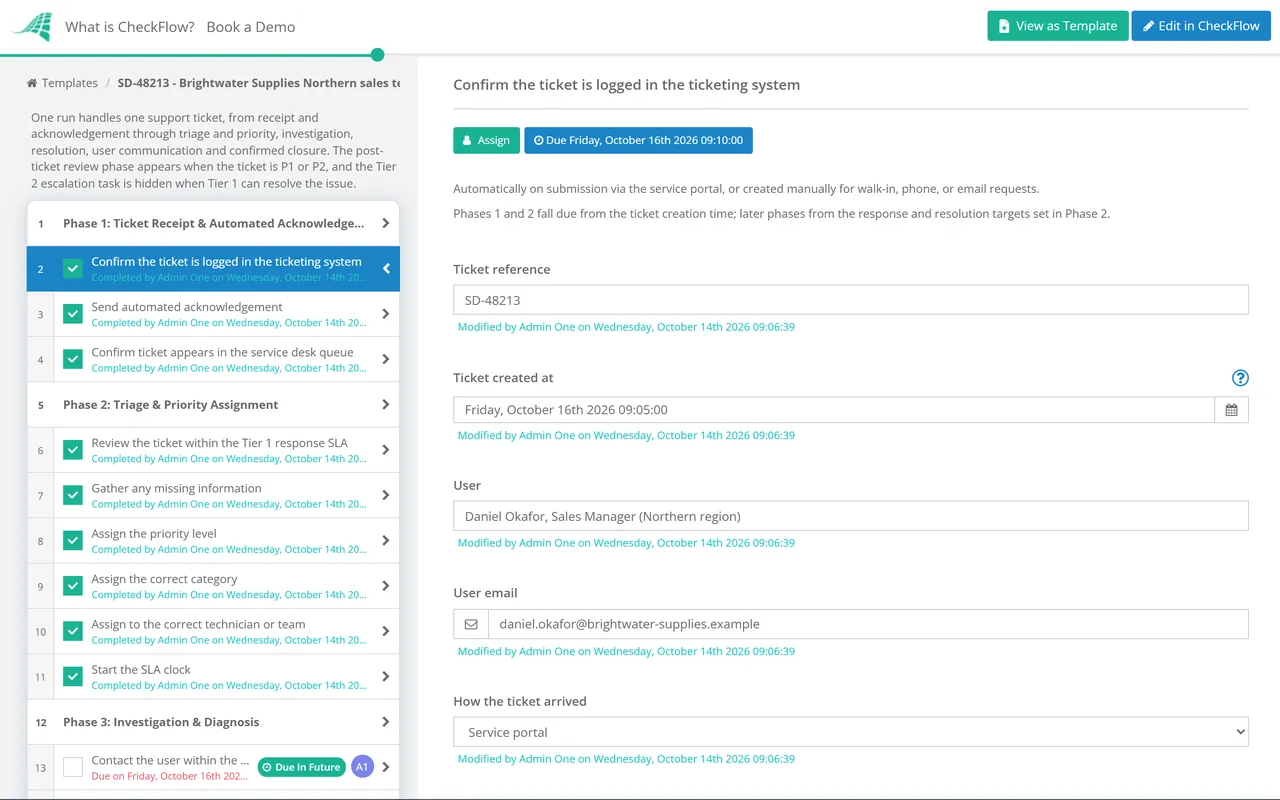
  • Confirm the ticket is logged in the ticketing system — automatically on submission via the service portal, or created manually for walk-in, phone, or email requests
  • Send automated acknowledgement — within minutes of ticket creation; includes ticket reference number and expected initial response time
  • Confirm ticket appears in the service desk queue — visible to the Tier 1 team for triage
Phase 2

Phase 2: Triage & Priority Assignment

Priority assignment is the highest-leverage step in the ticket response process. Assign too low and a critical issue waits. Assign too high and low-priority work crowds out genuine emergencies.

  • Review the ticket within the Tier 1 response SLA — read the full description; do not triage from the subject line alone
  • Gather any missing information — contact the user if the ticket lacks sufficient detail to diagnose or prioritise
  • Assign the priority level — P1–P4 based on impact and urgency; not based on how easy or difficult the resolution will be
  • Assign the correct category — hardware, software, network, access, service request; required for routing and reporting
  • Assign to the correct technician or team — based on category, priority, and workload; confirm the assignee is available and aware
  • Start the SLA clock — response and resolution targets set and visible to the assignee
Phase 3

Phase 3: Investigation & Diagnosis

  • Contact the user within the priority-appropriate response target — personalised and specific, not a generic acknowledgement
  • Gather diagnostic information — error messages, screenshots, event logs, recent changes, affected systems, and any steps already taken by the user
  • Check the knowledge base — for a documented solution matching this category and symptom; apply the known fix before attempting novel diagnosis
  • Document investigation steps in the ticket — every action taken, every test performed, and every hypothesis tested; in real time, not retrospectively
  • Identify the root cause — or the most likely cause; distinguish between treating a symptom and resolving the underlying issue
  • Escalate to Tier 2 if not resolvable at Tier 1 within the SLA — with full investigation notes; notify the user of escalation
Phase 4

Phase 4: Resolution & Workaround Provision

  • Apply the resolution — or provide a workaround where full resolution requires scheduled maintenance or vendor involvement
  • Document the resolution — exact steps taken, any configuration changes made, and the root cause confirmed; in structured fields in the ticket
  • Test that the resolution works — do not close as resolved until the fix is confirmed to have worked; ideally confirm with the user or test in the affected environment
  • Identify whether the issue is likely to recur — root cause permanently fixed, or is a workaround applied? Flag recurring-risk issues for problem management
  • Update the knowledge base — if this resolution should be available to Tier 1 for future similar tickets; create or update the relevant article
Phase 5

Phase 5: Resolution Communication & Ticket Closure

  • Notify the user of the resolution — specifically: what the issue was, what was done to fix it, and any actions the user should take
  • Ask the user to confirm the issue is resolved — before closing; “marking as resolved — please confirm within 48 hours or the ticket will auto-close”
  • Send the CSAT survey — for all P1 and P2 tickets and a sample of P3/P4; triggered on closure
  • Close the ticket — all fields complete; root cause documented; resolution documented; time stamps accurate
  • Review for SLA compliance — was the ticket resolved within the committed SLA? If not, document the reason for the breach
Phase 6

Phase 6: Post-Ticket Review for High-Priority Incidents

Every P1 and P2 ticket deserves a brief post-closure review — what happened, why it happened, and what can prevent recurrence. Not a blame exercise, a learning exercise.

  • Conduct a post-resolution review — within 24 hours for P1; within 48 hours for P2; brief but structured
  • Document: timeline, root cause, business impact, resolution steps, and preventive actions
  • Identify any change or problem management actions required — to prevent recurrence
  • Brief affected stakeholders — business owners, management, or customers who need to know how the incident was resolved and what has changed
  • Log in the known error database — if the root cause is a known defect awaiting permanent fix

The Communication Standards That Determine Support Satisfaction

Five rules that separate IT support experiences users remember positively from ones they remember negatively.

Rule 1

Always acknowledge before you diagnose

The user needs to know their ticket has been seen. An acknowledgement that says “we’ve received your request about [specific issue] and a technician will be in touch within X hours” is fundamentally different from a generic auto-reply.

Rule 2

Update at every SLA checkpoint — even if nothing has changed

“We’re still investigating this issue and expect to have an update by [time]” is a communication. Silence is not.

Rule 3

Never close a ticket without explicit user confirmation

A technician who believes they have fixed an issue is not the same as a user who confirms it is fixed. Always ask the user to confirm before closing.

Rule 4

Explain what you did, not just that you did it

“I’ve resolved the issue” tells the user nothing. “Your VPN was failing because the network certificate had expired — I’ve renewed it and your connection should work normally” gives them context and builds confidence.

Rule 5

Be specific about timelines

“I’ll look into this soon” is not a commitment. “I’ll have an update for you by 3pm today” is a commitment.

Why Use CheckFlow for Ticket Response?

1

SLA-driven task timing for every ticket

CheckFlow’s ticket response checklist assigns each task a deadline based on the ticket’s priority level — the acknowledgement task is due within 15 minutes for P1, the response task within 1 hour. When a task deadline is approaching without completion, CheckFlow alerts the assignee and their manager. SLA compliance becomes a structural outcome, not a hope.
2

Communication tasks embedded as required steps

The most common ticket quality failure is not a technical one — it is a communication one. CheckFlow makes user notification tasks required steps at each phase of the ticket workflow. The investigation cannot be marked complete without a user contact task. The resolution cannot be marked complete without a notification task. Communication quality is built into the process.

3

A complete, searchable ticket record for every resolution

Every ticket processed through CheckFlow has a complete, timestamped audit trail — what was investigated, what was tried, what fixed it, and what the user confirmed. When a user raises the same issue three months later, the previous resolution is immediately accessible. When an audit asks for evidence of SLA compliance, the data is there.

Support ticket response is the operational process for individual tickets. CheckFlow’s IT Support Template covers the broader service desk framework — structure, staffing, metrics, and continuous improvement. See the IT Support Template →

When a support ticket reveals a potential major incident — service outage, widespread failure, or security event — CheckFlow’s Incident Management Process Template covers the structured escalation to major incident response. See the Incident Management Process Template →

Frequently Asked Questions

What should a support ticket response process include?

+

A support ticket response process covers six stages: ticket receipt and automated acknowledgement (every ticket receives an immediate confirmation with a reference number), triage and priority assignment (reviewing the full issue, gathering missing information, and assigning a P1–P4 priority based on impact and urgency), investigation and diagnosis (contacting the user within the priority SLA, gathering diagnostics, checking the knowledge base, and documenting every step), resolution (applying the fix or workaround, testing it works, and updating the knowledge base), resolution communication and ticket closure (notifying the user of what was done, confirming the issue is resolved before closing, and triggering the CSAT survey), and post-ticket review for P1/P2 (structured debrief within 24–48 hours identifying root cause and preventive actions).

What is MTTR and how is it measured?

+

Mean Time to Resolve (MTTR) is the average time from when a ticket is created to when it is confirmed resolved. It is one of the most commonly tracked service desk efficiency metrics. MTTR should be tracked by priority level (P1 MTTR is more important than overall MTTR), by category (which types of issue take longest), and by team or technician (to identify where training or knowledge base improvements are needed). Trend analysis — whether MTTR is improving or deteriorating over time — is more valuable than any single month’s number. An MTTR that is improving indicates that process and knowledge base improvements are working.

What is the difference between response time and resolution time in SLAs?

+

Response time (also called First Response Time, FRT) is the time between ticket creation and the first human contact from a technician — when the user first knows their ticket is being looked at. Resolution time is the total time from ticket creation to confirmed resolution. Both are important and should be tracked separately. Users notice response time more immediately — a ticket that receives a quick initial response builds confidence even if resolution takes longer. An SLA that commits only to resolution time without a response time commitment may meet its technical target while delivering a poor user experience.

How do you reduce P1/P2 ticket volume?

+

High volumes of P1 and P2 tickets typically indicate underlying stability or change management problems rather than support capacity problems. The most effective interventions are: problem management (investigating and permanently resolving root causes of recurring P1/P2 incidents), change management (ensuring changes are properly tested and rolled back when they cause incidents), proactive monitoring (detecting potential P1/P2 conditions before they reach users), and knowledge management (ensuring Tier 1 can handle issues that are currently escalating unnecessarily).

Is CheckFlow free for this template?

+

14-day free trial, no card required. The Business plan is $10 per user per month after the trial. Full details at checkflow.io/pricing.

Resolve Every Ticket Consistently — From Acknowledgement to Confirmed Close

Free trial — no credit card required.