Responsive Search Ads Checklist Template

Up to 15 headlines. Four descriptions. Thousands of possible combinations. Google’s AI finds the best one for each search — but only if you give it the right variety and quality of inputs to work with.

Responsive Search Ads have been Google’s default search ad format since 2022. The format is powerful: rather than writing one static ad, advertisers provide up to 15 headlines and four descriptions, and Google’s machine learning tests different combinations to find what performs best for each individual search query. The result, when done well, is ads that are more relevant to more searches than any manually written variant could be. But the quality of what Google can optimise is entirely dependent on the quality of what you give it. Fifteen headlines that all say the same thing in different words give Google no variation to test. Headlines that exceed 30 characters get truncated and look broken. Descriptions that repeat the same value proposition provide no differentiation. Ads without keywords in the headlines lose relevance. A structured RSA creation process addresses all of these — ensuring every headline and description is distinct, keyword-relevant, and following the ad structure that produces “Good” or “Excellent” Ad Strength — which Google data shows produces 15% more clicks and conversions than “Poor” Ad Strength. This free checklist gives PPC managers and Google Ads practitioners a structured framework for creating, reviewing, and optimising RSAs.

Use This Template Free See Live Example
No Credit Card Required

RSA Format Specifications — What You Can and Cannot Do

Element Limit Recommendation What Google shows
Headlines Max 15 / 30 chars each Write 10+ covering brand, features, benefits, social proof, and CTA 2–3 headlines per impression
Descriptions Max 4 / 90 chars each Use all 4; cover different themes (benefit, proof, process, CTA) 1–2 descriptions per impression
Pinning Any headline/description can be pinned to Position 1, 2, or 3 Maximum 2–3 pins per RSA; use only for legal/compliance requirements Pinned elements always appear in their assigned position
Ad Strength target “Good” or “Excellent” Excellent = 15% more clicks and conversions on average vs Poor
RSAs per ad group Max 3 At least 2 with Good/Excellent Ad Strength Adding a 2nd RSA produces 6.6% more conversions at similar CPA

What the Responsive Search Ads Checklist Covers

Seven phases from campaign structure review through headline and description writing, Ad Strength assessment, pinning strategy, asset setup, and ongoing optimisation.

Phase 1

Phase 1: Campaign & Ad Group Structure Review

RSAs are most effective when ad groups have tightly themed keyword sets. An ad group covering ten unrelated keywords cannot be served by a single RSA that is relevant to all of them.

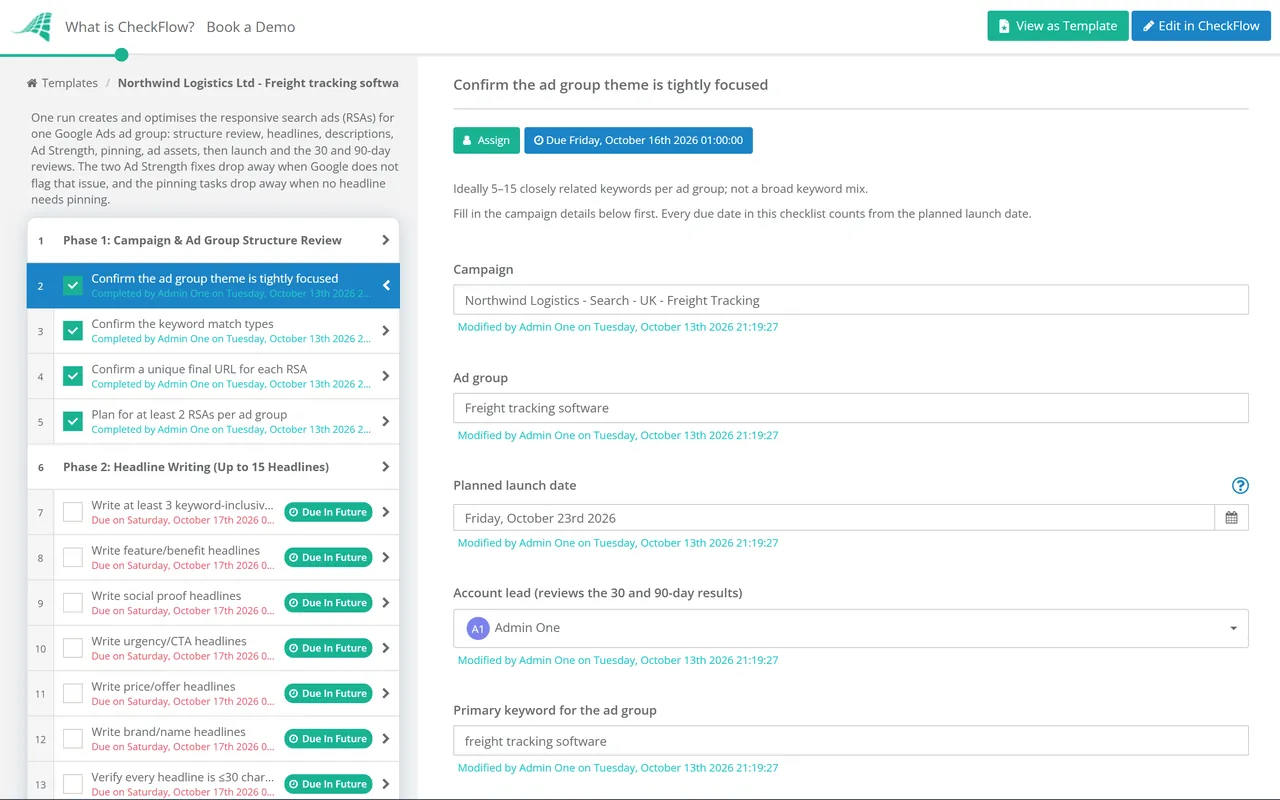
  • Confirm the ad group theme is tightly focused — ideally 5–15 closely related keywords per ad group; not a broad keyword mix
  • Confirm the keyword match types — broad match with Smart Bidding, phrase match, or exact match; match type strategy confirmed before writing ad copy
  • Confirm a unique final URL for each RSA — Google recommends each RSA has a unique landing page URL matched to the ad group theme
  • Plan for at least 2 RSAs per ad group — Google data shows adding a 2nd RSA produces 6.6% more conversions at similar CPA; each RSA should have a different angle or emphasis
Phase 2

Phase 2: Headline Writing (Up to 15 Headlines)

Every headline must be under 30 characters. Every headline must make sense in combination with any other two headlines — they are served in random combinations. Every headline should be distinct from the others.

  • Write at least 3 keyword-inclusive headlines — that naturally include the primary keyword for the ad group; this signals relevance to Google and to the searcher
  • Write feature/benefit headlines — 2–3 headlines describing a specific product feature or customer benefit; specific, not generic
  • Write social proof headlines — customer count, review rating, years of experience, or specific results; credibility signals that build trust
  • Write urgency/CTA headlines — “Try Free for 14 Days”, “Start Today”, “Free Trial — No Card Required”; action-oriented
  • Write price/offer headlines — if pricing is competitive or there is a specific offer; transparent pricing reduces wasted clicks
  • Write brand/name headlines — at least one headline that includes the brand name (consider pinning to position 1)
  • Verify every headline is ≤30 characters — count carefully; truncated headlines look broken and penalise Quality Score
  • Verify no two headlines are the same or near-identical — variety is what enables optimisation
  • Verify every headline makes sense as a standalone phrase — headlines are served in random combinations; each must be grammatically coherent
Phase 3

Phase 3: Description Writing (Up to 4 Descriptions)

  • Write 4 descriptions — use all available description slots; never leave descriptions empty
  • Each description must be ≤90 characters — including spaces; verify before submitting
  • Each description should expand on a different theme — benefit, social proof, process, CTA; not the same message repeated four ways
  • Include at least one strong call to action — “Start your free trial today”, “See how it works in minutes”; make the next step explicit
  • Include keywords naturally in at least one description — for relevance signal and bold highlighting when matching the search query
  • Verify descriptions work with multiple headline combinations — the description will be served with any three-headline combination; it must be coherent alongside any of them
Phase 4

Phase 4: Ad Strength Assessment & Improvement

Ad Strength is Google’s assessment of whether your RSA follows best practices — not a direct determinant of ad rank. But improving from “Poor” to “Excellent” produces 15% more clicks and conversions on average.

  • Check the Ad Strength rating — in the Google Ads editor or interface; aim for “Good” or “Excellent”
  • Review the specific improvement suggestions — Google provides specific reasons for low Ad Strength; add more unique headlines, include keywords in headlines, add more distinct descriptions
  • Improve headline uniqueness if flagged — add headlines covering categories not yet represented
  • Add keywords to headlines if flagged — at least 3–5 headlines should include the ad group’s primary keyword(s)
Phase 5

Phase 5: Pinning Strategy Review

  • Identify if any headlines require pinning — legal disclaimer must appear, brand name must always be visible, or specific compliance requirement
  • Pin sparingly — maximum 2–3 pins per RSA; every pinned headline reduces the number of combinations Google can test
  • Pin to a position, not “always show” — “Pin to position 1” rather than “Must be shown” where possible; allows other headlines to serve in that position on some impressions
  • If pinning position 1 — provide at least 2–3 headlines pinned to that position; prevents one headline from dominating all impressions
Phase 6

Phase 6: Ad Assets (Extensions)

Ad assets expand the ad and improve click-through rate without additional cost per click. Google recommends using all relevant asset types. Assets are especially important for RSAs because they provide additional context that headlines and descriptions cannot.

  • Add sitelink assets — 2–4 additional links to specific pages (pricing, features, case studies, free trial); with descriptions
  • Add callout assets — short phrases highlighting features or benefits not in the main ad (“No credit card required”, “24/7 support”, “GDPR compliant”)
  • Add structured snippets — for lists of features, service types, or product categories
  • Add image assets — if eligible; high-quality images matching the ad theme
  • Add price assets — if pricing tiers are a differentiator; shows prices directly in the SERP
  • Add lead form or call assets — where phone or form conversion is a campaign goal
Phase 7

Phase 7: Launch, Monitoring & Performance Optimisation

  • Submit the RSA for review — allow 1–2 business days for Google’s approval process
  • Monitor asset performance after launch — after sufficient impressions (typically 2–4 weeks), check asset performance ratings (Low/Learning/Good/Best) in the asset reporting view
  • Replace or rewrite “Low” rated assets — “Low” rated headlines and descriptions are underperforming; test a new angle, benefit, or message
  • Monitor Quality Score — the three components: expected CTR, ad relevance, and landing page experience; each should be “Above average”
  • Review search terms report — are the actual search queries relevant? Add negatives for irrelevant searches
  • Review at 30 and 90 days — sufficient data for optimisation decisions; do not make changes based on less than 30 days of data

This checklist is available as a free, runnable template in CheckFlow — with headline and description review tasks, Ad Strength assessment, asset confirmation, and 30/90-day optimisation reviews scheduled automatically.

Use This Template Free

Ad Strength Ratings — What Google Is Telling You

Incomplete

Incomplete

Not enough headlines or descriptions entered to run the ad. Must be completed before the ad can serve. Minimum: 3 headlines and 2 descriptions to save.

Poor

Poor

Below best-practice threshold. Headlines lack variety, keywords not included, or descriptions are too similar. Likely means fewer combinations are viable. Act on Google’s specific improvement suggestions.

Good

Good

Meeting most best practices. Good variety in headlines and descriptions; keywords included. A viable baseline. Continue optimising asset performance ratings over time.

Excellent

Excellent

Following all best practices. Maximum variety, keyword coverage, distinct themes. Associated with 15% more clicks and conversions than “Poor” on average.

Ad Strength does not directly affect your bid auction eligibility or ad rank. A “Poor” RSA can still rank and convert. But the data shows Excellent Ad Strength is correlated with better performance — because more variety means Google can serve more relevant ads to more queries.

Why Run RSA Creation in CheckFlow?

1

A consistent RSA creation process for every ad group

RSA quality varies enormously across a large account with multiple ad groups and campaign managers — some ad groups have excellent RSAs with 15 distinct headlines; others have 6 nearly identical ones. CheckFlow’s RSA checklist runs the same structured process for every ad group: keyword-relevant headlines, distinct descriptions, Ad Strength reviewed, pinning audited, and assets confirmed.

2

Optimisation reviews scheduled at the right intervals

RSA optimisation decisions made before sufficient data has accumulated produce noise, not signal. CheckFlow’s recurring checklist schedules the 30-day and 90-day optimisation reviews automatically — ensuring asset performance ratings are checked when there is enough data to act on them, and “Low” rated assets are replaced on a consistent cadence.

3

A documented RSA record for account audits

When a PPC agency or in-house team audits a Google Ads account, the history of RSA iterations — what was tested, what was changed, and why — is as valuable as the current performance data. Every RSA creation and optimisation task completed through CheckFlow is timestamped and attributed to the responsible team member.

RSAs work in conjunction with keyword strategy — the ad groups that perform best are built around tightly themed keyword clusters. CheckFlow’s Keyword Strategy Checklist covers the keyword research process that informs RSA structure. See the Keyword Strategy Checklist →

Ad copy consistency with brand voice is a quality consideration for RSA headline writing. CheckFlow’s Brand Development Checklist covers the brand voice and messaging framework that RSA copy should reflect. See the Brand Development Checklist →

Frequently Asked Questions

What are responsive search ads and how do they work?

+

Responsive Search Ads (RSAs) are Google Ads’ default search ad format, in which advertisers provide up to 15 headlines (30 characters each) and 4 descriptions (90 characters each), and Google’s machine learning algorithm tests different combinations to find the most effective ad for each individual search query. Rather than manually writing and A/B testing multiple ad variants, RSAs allow Google to automatically optimise across up to 43,680 possible headline and description combinations. Over time, Google identifies which headlines and descriptions perform best together for specific query types and serves those combinations most frequently.

How many RSAs should I have per ad group?

+

Google recommends at least 2 RSAs per ad group with “Good” or “Excellent” Ad Strength. Google’s data shows that advertisers who add a second RSA to an ad group (from 1 to 2) see a 6.6% increase in conversions at a similar cost per conversion. The maximum is 3 RSAs per ad group. Each RSA should have a different angle or emphasis — for example, one RSA focused on features and benefits, one on pricing and social proof — so that they serve different combinations and test different messages rather than duplicating each other.

What is pinning in RSAs and when should it be used?

+

Pinning in RSAs locks a specific headline or description to always appear in a specific position — Position 1 (leftmost headline), Position 2, or Position 3 — or to always appear somewhere in the ad. Pinning should be used sparingly and only when there is a genuine requirement for a specific element to always appear — brand name visibility, legally required disclosure, or compliance requirement. Excessive pinning (more than 2–3 headlines) significantly reduces the number of valid combinations Google can serve, undermining the optimisation benefit of the RSA format. When pinning is necessary, pin multiple headlines to the same position so Google can still rotate between them.

What is Ad Strength and how does it affect performance?

+

Ad Strength is Google’s feedback metric rating how well an RSA follows best practices for variety, keyword inclusion, and distinctiveness of assets — rated as Incomplete, Poor, Good, or Excellent. It does not directly affect ad rank or serving eligibility, but it correlates with performance: advertisers who improve Ad Strength from “Poor” to “Excellent” see 15% more clicks and conversions on average. Ad Strength is not the same as actual performance data — an RSA with “Good” Ad Strength that converts well should not be altered purely to achieve “Excellent”; actual conversion performance is the primary success metric.

Is CheckFlow free to use for this template?

+

You can start a free 14-day trial with no credit card required, giving you full access to all features including this template. The Business plan is $10 per user per month after the trial. Full details at checkflow.io/pricing.

Build RSAs That Give Google’s AI the Variety It Needs to Win Every Auction

Free trial — no credit card required.