Legal Request Intake & Triage Checklist (In-House) Template

Requests reach legal by email, chat and a word in the corridor. Without a front door, nobody can say what is open, who owns it, when it is due or why a simple question went to outside counsel.

Last reviewed: November 2026

Printed from checkflow.io/templates/legal-contract-management/legal-request-intake-triage-checklist

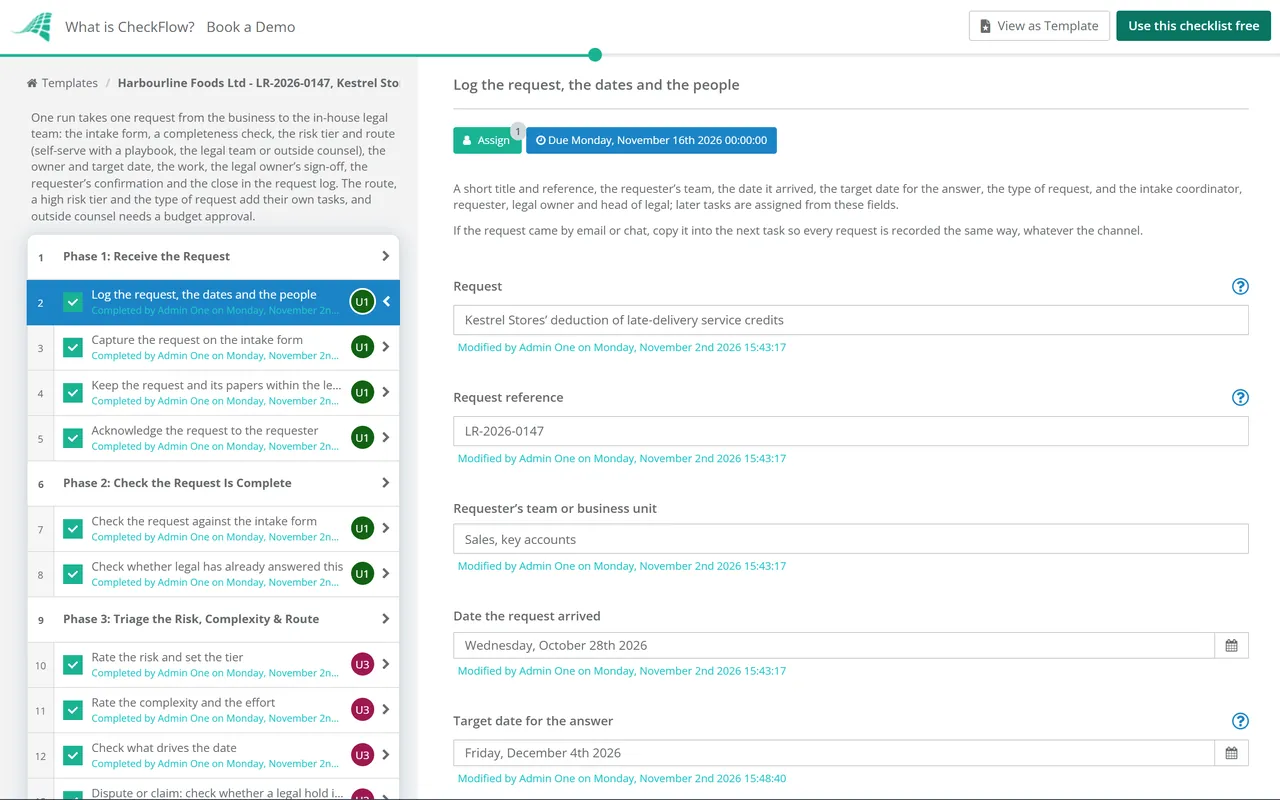
This free legal request intake checklist runs one request from the business to an in-house legal team, from intake to the day it is closed in the request log. It is for general counsel, in-house lawyers and legal operations teams. The intake coordinator logs the request and checks it is complete. The head of legal rates the risk and complexity, sets a low, medium or high tier and chooses the route: self-serve with a playbook, the legal team, or outside counsel with a budget approval. The request gets a confirmed owner, an agreed scope and target date, and a line in the log. Then the work is done, the legal owner signs off the answer, the requester confirms it meets the need, and the request is closed with its time and cost. A contract or NDA is handed to the Contract Review & Approval Checklist, and a dispute adds a check for a legal hold.

Risk Tiers, Routes and Request Types

Risk tiers and routes

These tiers and routes are this template’s choices, a starting point for your own triage rules. Write down which requests may be self-served and which always come to a lawyer, and put that in the playbook and in the tooltip on the triage task.

Tier What it looks like Route this template suggests What the tier adds
LowA standard question or document the playbook covers, little money at stake, no dispute and no personal dataSelf-serve with a playbook, or a quick answer from the legal teamNothing extra
MediumA real decision for the business, some money or regulatory exposure, or a document outside the playbookThe legal teamNothing extra
HighA dispute or claim, significant money, a regulator, sensitive personal data, reputation, or a precedentThe legal team, or outside counsel where the team lacks the knowledge or the timeAn update plan for the business and a second lawyer’s review before sign-off

Where each type of request goes

The type chosen on the first task adds one task, so requests that have their own process are handed to it early.

Type of request What the checklist adds Where the work runs
Contract or NDAA hand-over task in Phase 5Contract Review & Approval Checklist or NDA Processing Workflow Checklist
Dispute, claim or threatened claimA legal hold check in Phase 3This checklist, with the Legal Hold Checklist started the same day if information needs preserving
Personal data or privacyA check for a breach or a subject access request in Phase 3This checklist, or the Data Breach Response Checklist or DSAR Response Checklist, which have their own time limits
Regulatory or compliance questionA task for the regulator’s dates and contacts in Phase 3This checklist
Advice, employment, corporate, intellectual property or something elseNothing extraThis checklist

Everything on this page is practice, not law. Deadlines that do apply, such as a court’s, a regulator’s or a contract’s, belong in “Check what drives the date” in Phase 3.

AI generator

Didn’t find what you need? Describe it.

Describe the process in a sentence and the AI checklist generator drafts the phases and tasks for you.

Frequently Asked Questions

What is legal request intake?

Legal request intake is how an in-house legal team receives work from the rest of the business. One channel, such as a short form, collects every request with its facts, documents and date. A triage step then decides how much risk the request carries and who should handle it, and a log records each request from arrival to close. This template runs one request through those steps.

What should an in-house legal intake form ask for?

Enough to triage without a meeting: what the requester wants legal to do, the background and the decision it supports, the other parties, the money or risk involved, the documents they have, and the date they need an answer with the reason for it. This template records those answers on its first two tasks, and checks them before triage so a request with gaps is sent back once, not chased piece by piece.

How do you triage a legal request?

Rate the risk and the complexity, then choose a route. This template rates six factors (money, regulatory exposure, a dispute, personal data, reputation and precedent), sets a low, medium or high tier, and records the complexity and the estimated hours. The head of legal then picks self-serve with a playbook, the legal team or outside counsel. The factors and tiers are the template’s choices, so change them to match your own rules.

Which requests can the business handle with a playbook?

Low-risk, repeated requests where the legal team has already decided the answer: a standard template, approved clauses, or a guidance note with clear limits. The playbook says what the requester may do alone and when to come back to legal. In this template the self-serve route sends the playbook, the requester completes the work within it, and the legal owner still checks the result before signing it off.

When should a request go to outside counsel?

When the team lacks the specialist knowledge, the time or the local presence, or when a dispute or a regulator needs a firm’s involvement. This template asks the chosen firm for a scope and a fee estimate first, and the head of legal approves the budget before anyone is instructed. The instruction and the papers go from the legal team, and the firm’s advice and bills are reviewed against the scope and the budget.

Why route requests through the legal team?

So every request is seen, owned and answered once, and so the legal team controls how its advice is given, kept and shared. Privilege is one reason: whether a communication is privileged is a question for the lawyers, so requests and advice belong in the channels the legal team sets up, not in group chats and shared drives. This template keeps the request and its papers in the legal team’s own space from the first day.

How is this different from Legal Case Intake?

The Legal Case Intake Process Checklist is for a law firm opening a matter for a client, with conflict checks, anti-money laundering checks and engagement terms. This template is for an in-house team answering its own business, so it has no conflict check or engagement letter. It adds what in-house teams need instead: self-serve routes, outside counsel budgets, the requester’s confirmation and a request log.

What should a legal request log record?

For each request: the reference, the requester and team, the type, the risk tier, the route, the owner, the dates it arrived, was due and was closed, the outcome, and the time and cost. With those, the team can see what is open, how long requests take and where outside counsel spend goes. In CheckFlow the Reports Grid lists every run of this checklist with its answers, so it can serve as the log.

Is CheckFlow free for this template?

14-day free trial, no card required. The Business plan is $10 per user per month after the trial. Full details at checkflow.io/pricing.

Give Every Legal Request a Front Door

Free trial — no credit card required.

14-day free trial, no credit cardFull refund in your first 30 daysUS hosting, EU on request