IT Asset Management Checklist Template

An asset register is accurate on the day it is built. After that, every laptop swapped at the service desk, every SaaS seat bought on a card and every lease that rolls over unnoticed makes it a little less true, until an audit or a licence review measures the gap.

IT asset management (ITAM) is not a one-off inventory. It is a cycle: find what is really out there, compare it with what the register says, fix the difference, and keep purchases, assignments, licences and contracts in step. This free IT asset management checklist gives IT managers, asset managers and service desk leads a monthly routine for hardware and software. It covers discovery reconciliation, goods-in and tagging, assignments and returns, licence compliance and reclaim, and a 90-day look-ahead at renewals, warranties and leases. A quarterly audit phase appears at each quarter end. Every run ends with a small set of KPIs and a signed-off register that finance, security and auditors can rely on.

Use This Template Free See Live Example
No Credit Card Required

Discovery Data vs the Asset Register: What Each One Knows

Discovery tools, endpoint management and SaaS admin consoles show what is connected and in use right now. They do not know what you paid, which contract it sits under, who signed for it or when the lease ends. The register knows all of that, but only what people remembered to record. ITAM happens in the gap between the two. A device seen on the network but missing from the register is either unrecorded or unauthorised. A register entry nobody has seen for a month is in a drawer, lost, stolen or waiting for disposal, and each answer leads somewhere different.

ITIL 4 frames the IT asset management practice as planning and managing the full lifecycle of IT assets to maximise value, control costs and manage risk. ISO/IEC 19770-1:2017 sets the requirements for running that as a management system, including core data management, licence management, internal audit and management review. This checklist is the operating rhythm inside that system. The end of the lifecycle is a separate process: once a device is marked for disposal it moves to the IT Asset Disposal (ITAD) Checklist, and returns to the register only as a closed record with a certificate reference.

Discovery and management tools

Know what is connected

Sources: network discovery, endpoint management, SaaS admin consoles, DHCP logs.

Answers: is it online, what is installed, who used it last.

Blind spots: cost, contract, accountable owner, and anything switched off or in a cupboard.
The asset register

Knows what you own and why

Holds: asset tag, serial, owner, cost centre, purchase date, warranty and lease end, licence entitlements.

Answers: who is accountable, what it cost, when to renew, return or replace.

Blind spots: anything nobody told it about.

What the IT Asset Management Checklist Covers

Six phases run every month. A seventh, the quarterly audit, switches on at each quarter end.

Phase 1

Phase 1: Reconcile Discovery Against the Register

Assign this phase to the asset manager. It produces the exception list the rest of the month works through.

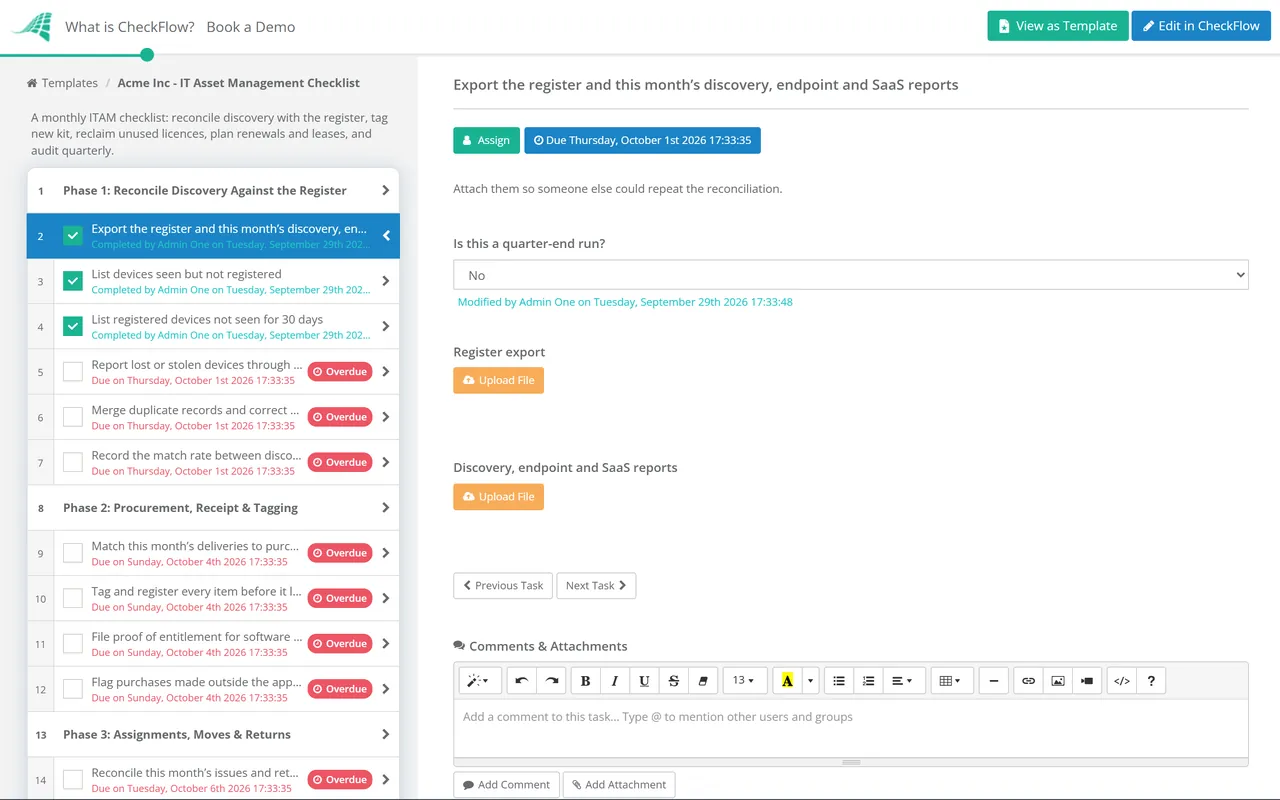
  • Export the register and this month’s discovery, endpoint and SaaS reports — attach them so someone else could repeat the reconciliation
  • List devices seen but not registered — confirm the weekly unauthorised-device process caught them, then register or remove each one
  • List registered devices not seen for 30 days — ask each recorded owner whether the device is in use, in storage, lost or awaiting disposal
  • Report lost or stolen devices through the security incident process — the register records the incident reference, not just a status change
  • Merge duplicate records and correct mismatched serials — one physical device, one record
  • Record the match rate between discovery and the register — the headline accuracy figure for the monthly report
Phase 2

Phase 2: Procurement, Receipt & Tagging

  • Match this month’s deliveries to purchase orders — record serials at goods-in, not at first login
  • Tag and register every item before it leaves stores — owner, cost centre, supplier, purchase date, warranty end and order reference
  • File proof of entitlement for software bought this month — licence agreements and order confirmations, not just the invoice
  • Flag purchases made outside the approved route — card-paid SaaS and kit bought on expenses, each with an owner asked to regularise it
Phase 3

Phase 3: Assignments, Moves & Returns

  • Reconcile this month’s issues and returns — every issued device has a named user and a recorded acceptance
  • Check this month’s leavers against returned equipment — chase anything outstanding through the line manager
  • Triage returned devices — reissue, repair, hold as a spare, or mark for disposal and hand to the disposal process
  • Check loan equipment is back by its due date — extend or recall, and update the record either way
  • Compare spare stock with supplier lead times — reorder before the service desk runs out, not after
Phase 4

Phase 4: Software Licence Compliance & Reclaim

Tasks 3 and 4 appear only when the review finds unused seats.

  • Compare deployments and assigned seats with entitlements for each key product — record the position as surplus, compliant or short
  • Identify seats unused beyond your threshold, for example 60 or 90 days — list them by product with the monthly cost
  • Confirm reclaim with each user’s manager — then remove the assignment and return the seat to the pool
  • Reduce the licence count at the next renewal — a reclaimed seat that is still billed has saved nothing
  • Review unauthorised and unsupported software — remove it, or record a documented exception with an owner
  • Put any shortfall in front of the budget holder — buy, reduce usage, or accept the audit exposure in writing
Phase 5

Phase 5: Renewals, Warranties & Leases

Tasks 3 and 4 appear only when a lease ends within the next 90 days.

  • List contracts, subscriptions, warranties and leases ending in the next 90 days — each with an owner and a decision date
  • Decide to renew, renegotiate or cancel — using the usage data from Phase 4, before the notice period starts
  • Recall devices on leases that are ending — allow for the lessor’s return window and the replacement lead time
  • Check the lease’s return conditions — condition grading, accessories and the data sanitisation the lessor requires
  • Plan replacements for kit out of warranty or near the end of vendor support — feed the list into next year’s refresh budget
Phase 6

Phase 6: Report & Sign Off

  • Report the month’s KPIs — register match rate, assets without an owner, overdue returns, licence spend reclaimed and renewals decided on time
  • Update the exceptions log — carry forward anything unresolved with an owner and a date
  • Send the summary to IT leadership and finance — and attach it to the checklist as the record
  • Sign off the month’s reconciliation — the asset manager’s sign-off is the evidence the register was reviewed
Phase 7 — Quarterly Only

Phase 7: Quarterly Asset Audit

Shown only when the run is marked as a quarter-end review. The other eight months stay short.

  • Run a floor-to-book check — walk a sample of desks, stores and comms rooms and confirm every device found is in the register
  • Run a book-to-floor check — pick a sample of register entries and physically locate each one
  • Review the full hardware and software inventories — CIS Controls v8.1 sets every six months as the minimum
  • Review the risks attached to high-value and high-sensitivity assets — and record that the review took place
  • Report quarterly trends to the ITAM owner — the input to the annual management review

The ITAM Cadence at a Glance

Not everything belongs in the monthly run. Some checks need to happen weekly in operations, and some only make sense a few times a year. The matrix shows where each activity sits, who usually owns it and the reference behind it. Where a reference sets a minimum, many teams go faster.

Activity Cadence Typical owner Reference
Deal with unauthorised devices on the networkWeeklyService desk or security operationsCIS Controls v8.1, Safeguard 1.2
Check software support status and remove unauthorised softwareMonthlyAsset manager with IT operationsCIS Safeguards 2.2 and 2.3
Reconcile discovery with the registerMonthlyAsset managerPhase 1
Licence position and reclaimMonthly for key productsSoftware asset managerISO/IEC 19770-1, clause 8.4
Renewal, warranty and lease look-aheadMonthly, 90 days aheadContract ownersPhase 5
Floor-to-book and book-to-floor checksQuarterly, sampledAsset manager plus a second personICO data protection audit framework (periodic physical checks)
Full hardware and software inventory reviewAt least every six monthsITAM ownerCIS Safeguards 1.1 and 2.1
Internal audit and management review of the ITAM systemAt planned intervals, usually yearlyITAM owner and IT leadershipISO/IEC 19770-1, clauses 9.2 and 9.3

If you hold ISO/IEC 27001:2022 certification, the same runs double as evidence for two Annex A controls: 5.9, an inventory of information and associated assets with named owners, which Phases 1 and 2 keep current; and 5.11, return of assets when people leave or change role, which Phase 3 checks every month.

Why Run IT Asset Management in CheckFlow?

1

The month starts without anyone remembering

A monthly schedule creates the run on the first working day, with dynamic due dates so reconciliation finishes before the renewal look-ahead needs its numbers. One yes/no answer at the start switches on the quarterly audit phase.

2

Your product list fills the licence review

Keep key software products, entitlement counts and renewal dates in a data set that fills the licence and renewal tasks. A discovery script can write its exceptions into the run through the REST API or Zapier instead of someone copying them by hand.

3

A year of evidence in twelve runs

Every task records who completed it and when, with exports, KPI summaries and audit samples attached. When an auditor or a software vendor asks how you know the register is right, you show twelve monthly reconciliations and four quarterly audits.

ITAM only works if the cycle actually runs every month. CheckFlow’s recurring checklist software explains how schedules, assignments and due dates keep a monthly process on track when the person who set it up is on leave.

Kit enters the register through the IT Equipment Request Process Checklist and leaves a user’s hands through the Employee Offboarding Checklist. Devices that discovery shows are behind on updates belong in the Patch Management Checklist.

Frequently Asked Questions

What is IT asset management?

+

IT asset management (ITAM) is the practice of tracking and managing hardware, software and related contracts across their whole lifecycle, from purchase to disposal. It answers four questions at any point: what you own, where it is, who is responsible for it and what it costs. In practice it is a recurring cycle of reconciliation, licence review, renewal decisions and audit, rather than a one-off inventory project.

What should an IT asset register include?

+

For hardware: asset tag, serial number, make and model, assigned user, accountable owner, department or cost centre, location, purchase date, supplier, warranty end and, for leased kit, the lease end date. CIS Safeguard 1.1 adds network and hardware addresses, machine name and whether the device is approved to connect. For software, CIS Safeguard 2.1 lists title, publisher, install date and business purpose, plus version and licence count where appropriate.

How often should IT assets be audited?

+

Reconcile monthly and audit physically at least quarterly. CIS Controls v8.1 asks for the full hardware and software inventories to be reviewed at least every six months and for unauthorised devices to be dealt with weekly. A sampled floor-to-book and book-to-floor check each quarter catches devices that never touch the network, such as spares in a cupboard, which discovery tools cannot see.

What is the difference between ITAM and a CMDB?

+

A CMDB records configuration items and how they relate to each other, so change and incident teams can see what a failure or a change will affect. An ITAM register records the financial and contractual side: cost, ownership, entitlements, warranties and leases. Many items appear in both, and the two should share identifiers, but they answer different questions. A spare laptop in stores matters to ITAM long before it matters to the CMDB.

How do you reclaim unused software licences?

+

Set a threshold, such as no use in 60 or 90 days, and pull the list of seats that cross it each month. Confirm with the user’s manager before removing anything, because some tools are used seasonally. Then remove the assignment and, most importantly, reduce the count at the next renewal. A seat returned to the pool saves money only if you stop buying it.

Does ISO 27001 require an asset inventory?

+

Yes, where the control applies to your risk treatment. ISO/IEC 27001:2022 Annex A 5.9 calls for an inventory of information and other associated assets, including owners, that is kept up to date, and 5.11 covers the return of assets when employment or a contract changes or ends. A monthly reconciliation with sign-off is a straightforward way to show an auditor the inventory is maintained, not just created.

Is CheckFlow free for this template?

+

14-day free trial, no card required. The Business plan is $10 per user per month after the trial. Full details at checkflow.io/pricing.

A Register You Can Trust at Every Audit, Not Just the Week Before

Free trial — no credit card required.