Patch Management Checklist Template

Most patching gaps are not missed updates. They are the server nobody put in a deployment ring, the exception granted in March and never reviewed, and the compliance report that counted devices that were online rather than devices that were patched.

Your deployment tool installs the updates. It does not decide which ones matter this month, prove they were tested, record who approved the rollout or chase the servers that were switched off on the night. This free patch management checklist runs the monthly cycle around the tool for IT operations teams, MSPs and security leads. It covers release intake, risk-based prioritisation, a test and pilot ring, change approval, staged deployment and independent verification, and ends with a signed report and an exception register with expiry dates. When an actively exploited vulnerability cannot wait, one answer switches the checklist to an emergency out-of-band path.

Use This Template Free See Live Example
No Credit Card Required

Routine Patching and Emergency Patching Need Different Plans

NIST SP 800-40 Rev. 4 treats patching as preventive maintenance and asks organisations to plan for four situations: routine patching, emergency patching, emergency mitigation when no patch exists yet, and assets that cannot be patched at all. It also recommends grouping assets with similar needs into maintenance groups, each with its own plan and deadlines. That is the backbone of this checklist: a patch’s deadline comes from its group’s plan, not from whoever is on shift. The emergency path exists so that a critical fix released on a Thursday does not wait three weeks for the next window, and so that speed does not cost you the record of what changed.

Routine cycle

The monthly release, planned and staged

Trigger: Microsoft’s security release on the second Tuesday of each month, plus the distribution, application and firmware updates published since the last cycle.

Testing: a test ring, then a pilot ring that soaks for days before production.

Approval: usually a pre-approved standard change with booked windows.

Output: a verified compliance report and a reviewed exception register.
Emergency out-of-band

An exploited flaw that cannot wait

Trigger: a CVE added to CISA’s Known Exploited Vulnerabilities catalog that affects your systems, a vendor out-of-band release or evidence of exploitation.

Testing: a canary group for hours rather than days, as NIST suggests.

Approval: an emergency change, recorded even when approval is retrospective.

Output: exposed systems patched or mitigated and checked for compromise.

What the Patch Management Checklist Covers

Six phases take a routine cycle from release intake to a signed report. Marking the cycle as an emergency swaps the test and approval phases for a compressed out-of-band path.

Phase 1

Phase 1: Intake & Scope

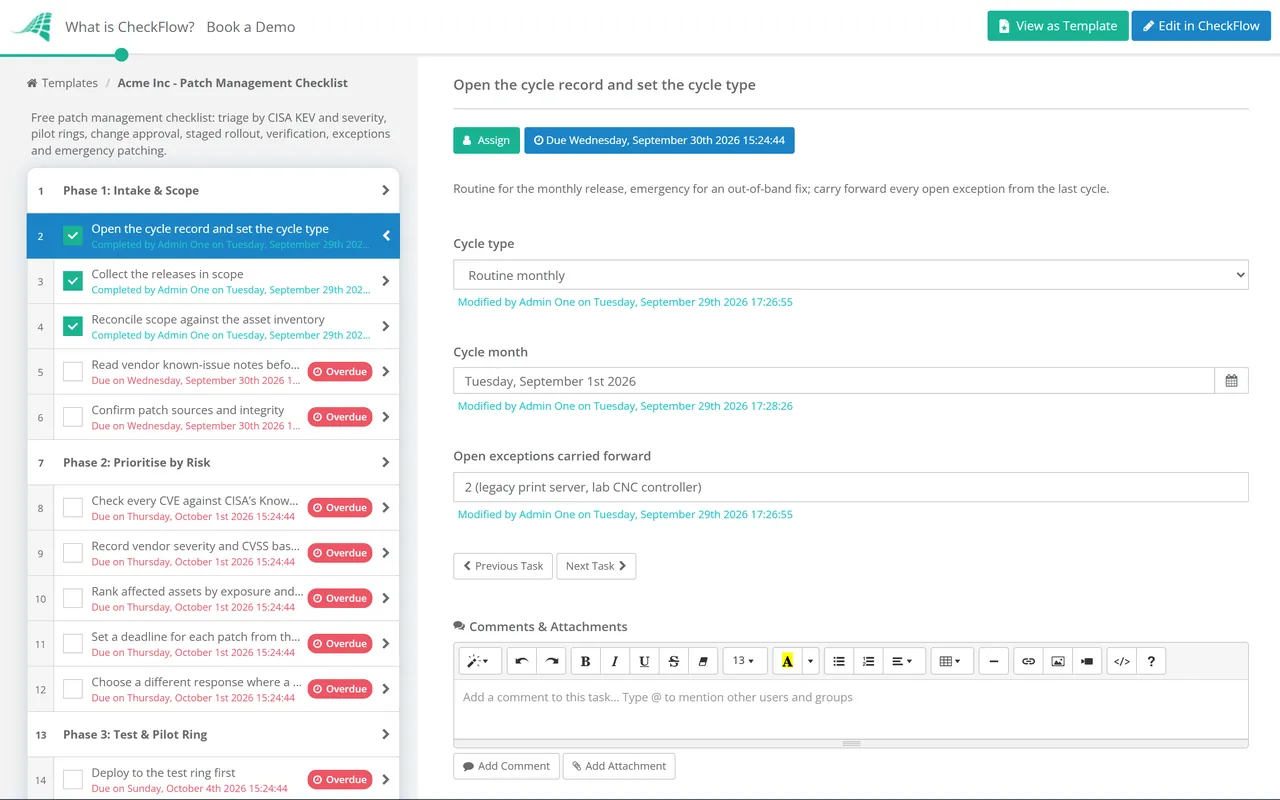
The cycle type chosen here drives the rest of the checklist. Emergency hides Phases 3 and 4 and shows Phase 7.

  • Open the cycle record and set the cycle type — routine for the monthly release, emergency for an out-of-band fix; carry forward every open exception from the last cycle
  • Collect the releases in scope — the Microsoft monthly release plus Linux, hypervisor, database, third-party application and firmware updates
  • Reconcile scope against the asset inventory — every server and endpoint must sit in a maintenance group and a deployment ring, because an unassigned asset is one that never gets patched
  • Read vendor known-issue notes before approving anything — release health pages and distribution errata often flag a faulty update within the first day
  • Confirm patch sources and integrity — packages come from the vendor catalogue or your internal repository, with signatures or hashes checked before testing
Phase 2

Phase 2: Prioritise by Risk

  • Check every CVE against CISA’s Known Exploited Vulnerabilities catalog — a listed CVE is being exploited now, whatever its CVSS score says
  • Record vendor severity and CVSS base score — Microsoft rates Critical, Important, Moderate or Low; a CVSS v3 score of 7.0 or above is the Cyber Essentials line for installation within 14 days
  • Rank affected assets by exposure and importance — internet-facing services, VPN and remote access gateways, identity systems and hypervisors go first
  • Set a deadline for each patch from the maintenance plan — the plan decides whether a fix is due in days or by the end of the cycle
  • Choose a different response where a patch is not the answer — mitigate, isolate or accept the risk, with a named approver and a review date
Phase 3

Phase 3: Test & Pilot Ring

Hidden for emergency cycles. If the pilot result is recorded as Fail, the last two tasks appear.

  • Deploy to the test ring first — non-production copies of each maintenance group, with at least one server of every role
  • Run smoke tests for each server role — services start, users can log in, cluster roles fail over, and backup and monitoring agents still report
  • Promote to the pilot ring — IT’s own devices and a small set of production servers whose owners will report problems
  • Hold the pilot for the agreed soak period and record the result — pass, or fail with the symptom and the patch responsible
  • Pull the failing patch from the wider rings — pause or decline it in the deployment tool and tell the owners of the pilot servers
  • Apply an interim mitigation and open a vendor case — track the fix date so the patch re-enters the next cycle instead of dropping out of sight
Phase 4

Phase 4: Approve & Schedule

Hidden for emergency cycles, which use the emergency change task in Phase 7.

  • Raise the change record for the cycle — routine cycles usually run as a pre-approved standard change; firmware and major version upgrades usually do not
  • Book maintenance windows per ring and per service — check freeze periods, month-end processing and business events first
  • Confirm the rollback route for each server role — snapshot, uninstall or restore point, and who has authority to use it
  • Notify service owners and the service desk — what restarts when, and what users will notice
  • Record the approval — who approved it and the deadline each ring must meet
Phase 5

Phase 5: Staged Deployment

  • Deploy ring by ring — the next ring starts only after the previous one is confirmed healthy
  • Patch clustered and paired servers one node at a time — drain, patch, restart and confirm the node has rejoined before touching its partner
  • Watch monitoring during and after each window — service checks, error rates and new service desk tickets against the deployment timeline
  • Chase servers with a pending restart — an update that is installed but not active leaves the server exposed
  • Enforce installation once the grace period ends — devices whose users deferred updates are patched on the plan’s deadline, not theirs
Phase 6

Phase 6: Verify, Report & Handle Exceptions

If any asset missed its deadline, the exception task appears. The cycle is not signed off until every exception has an owner.

  • Verify installation from an independent source — rescan with the vulnerability scanner instead of trusting the deployment tool’s success count
  • Reconcile verified results against the cycle scope — list every asset that is missing, offline or failed
  • Record an exception for each asset not patched by its deadline — owner, reason, compensating control, expiry date and approver
  • Review exceptions carried from earlier cycles — renew each with fresh approval or escalate the ones that have outlived their reason
  • Produce the compliance report — by maintenance group and severity, with time to patch, not one estate-wide percentage
  • Sign off the cycle — the patch owner confirms scope, results and exceptions, with the report attached as evidence
Phase 7 — Emergency Only

Phase 7: Emergency Out-of-Band Path

Shown only when the cycle type is Emergency. It replaces Phases 3 and 4; intake, prioritisation, deployment and verification still run, on a compressed timetable.

  • Declare the emergency and name one coordinator — record the trigger: a KEV listing, a vendor out-of-band release or evidence of exploitation
  • Identify every affected asset now — internet-facing systems first, from the inventory and a targeted scan
  • Apply a mitigation if the patch is not ready — disable the vulnerable feature, block the port or isolate the host, and set a removal date
  • Test on a small canary group for hours, not days — confirm the patch installs cleanly and the service survives a restart
  • Obtain emergency change approval — from the approver the change policy names, before deployment or retrospectively within the policy’s window
  • Check exposed hosts for signs of compromise — patching does not remove an attacker already inside; hand findings to incident response
  • Remove temporary mitigations once the patch is verified — a mitigation left in place becomes undocumented configuration

Setting Patch Deadlines: A Sample Maintenance Plan

Phase 2 only works if deadlines are agreed before the cycle starts. The targets below are illustrative: set your own from your risk appetite and any scheme you are certified against, and write them into the plan so nobody negotiates them patch by patch.

Trigger Example target Path in the checklist Reference point
KEV-listed CVE on an internet-facing systemPatch or mitigate within 72 hoursEmergency, Phase 7BOD 26-04 sets 3 days plus forensic triage for the highest-risk federal cases
KEV-listed CVE on an internal systemWithin 14 daysRoutine, or emergency if exploitation spreadsActive exploitation is the strongest signal CISA publishes
Vendor critical or high, or CVSS v3 7.0 and aboveWithin 14 days of releaseRoutine, first production ringCyber Essentials requirement for in-scope software
Medium and low severity updatesWithin the monthly cycleRoutine, all ringsCIS Controls v8.1 Safeguards 7.3 and 7.4: monthly or more often
Firmware, BIOS and hypervisor updatesNext planned window, unless a security bulletin raises the priorityRoutine, normal changePlan around host evacuation and vendor support matrices
No patch available, or asset cannot be patchedCompensating control in place, reviewed every cycleException, Phase 6NIST SP 800-40 Rev. 4: track and regularly review all exceptions

For US federal agencies the rules changed in 2026. CISA’s Binding Operational Directive 22-01, which gave agencies two weeks to fix most newly listed KEV vulnerabilities, was revoked on 10 June 2026 by BOD 26-04. The new directive sets timelines of 3, 14 or 60 calendar days, or a fix at the next major upgrade, depending on four factors: whether the asset is publicly exposed, whether the CVE is in the KEV catalog, whether exploitation can be automated and how much control an attacker gains. Private organisations are not bound by it, but the four questions make a sound triage rule.

For the rest of the queue, FIRST’s Exploit Prediction Scoring System (EPSS) publishes a daily estimate of the probability that each CVE will be exploited in the next 30 days. For ISO/IEC 27001:2022, the evidence from Phases 2 and 6 supports Annex A control 8.8, management of technical vulnerabilities.

Why Run Your Patch Cycle in CheckFlow?

1

Every ring has a deadline from day one

A recurring schedule opens the cycle the day after the monthly release, and dynamic due dates count each phase forward from that start. The pilot, each production ring and the report carry a date before anyone touches a server, so a slipping cycle shows up as overdue tasks.

2

One template for routine and emergency

Conditional logic reads the cycle type and the pilot result. An emergency hides the multi-day soak and the standard change tasks and shows the out-of-band path. A failed pilot adds the hold and mitigation tasks.

3

Exceptions that expire

Each unpatched asset is a row in a table inside the exception task, with owner, reason, compensating control and expiry date. Scan reports and change approvals attach to the task they prove, and the activity trail records who signed off each cycle and when, ready for the auditor.

CheckFlow does not install patches, and it does not replace your deployment or RMM tool. It runs the decisions, approvals and evidence around that tool. Our guide to recurring compliance checklists for IT teams explains why monthly patch verification is the check auditors ask about most, and how it sits alongside access reviews and backup checks in one compliance calendar.

The Server Maintenance Checklist covers the routine health of running servers and simply confirms that this cycle was signed off. Firmware upgrades that need a normal change can go through the IT Change Management Checklist, and new servers should join a maintenance group at build time through the Server Setup & Provisioning Checklist.

Frequently Asked Questions

What should a patch management checklist include?

+

It should follow the life of a patch cycle: collecting releases and reconciling them against the asset inventory, prioritising by exploitation and exposure, testing on a small ring, approving the change, deploying in stages, then verifying independently and recording exceptions. It also needs an emergency path for fixes that cannot wait. A checklist that stops at “deploy updates” misses the part auditors and attackers both care about: the servers left behind.

How often should servers be patched?

+

At least monthly, with faster deadlines for the fixes that matter most. CIS Controls v8.1 Safeguards 7.3 and 7.4 call for operating system and application updates through automated patch management monthly or more often. The UK Cyber Essentials scheme requires updates that fix critical or high-risk vulnerabilities to be installed within 14 days of release. An exploited flaw on an internet-facing server justifies an emergency change within days.

How do you prioritise which patches to deploy first?

+

Start with evidence of exploitation, then exposure, then severity. A CVE in CISA’s Known Exploited Vulnerabilities catalog is being used by attackers now, so it outranks a higher CVSS score that nobody is exploiting. Internet-facing services, remote access and identity systems come before internal file servers. Vendor severity, CVSS and EPSS scores then order the rest.

What is the difference between patch management and vulnerability management?

+

Vulnerability management is the wider programme: finding weaknesses, assessing the risk and deciding a response. Patch management is the most common response: acquiring, testing, deploying and verifying vendor updates. Some vulnerabilities are handled without a patch, through configuration changes, isolation or an accepted risk, which is why this checklist records a response for every item.

What should you do when a patch fails testing?

+

Pause or decline the patch in the deployment tool so later rings do not receive it, and tell the owners of the pilot servers. Then put an interim mitigation in place for the vulnerability it fixes, open a vendor case and record a date to try again. The worst outcome is a failed patch that quietly drops out of every future cycle.

Is CheckFlow free for this template?

+

14-day free trial, no card required. The Business plan is $10 per user per month after the trial. Full details at checkflow.io/pricing.

Every Patch Cycle Verified, Every Exception Owned

Free trial — no credit card required.