The same cycle for every client
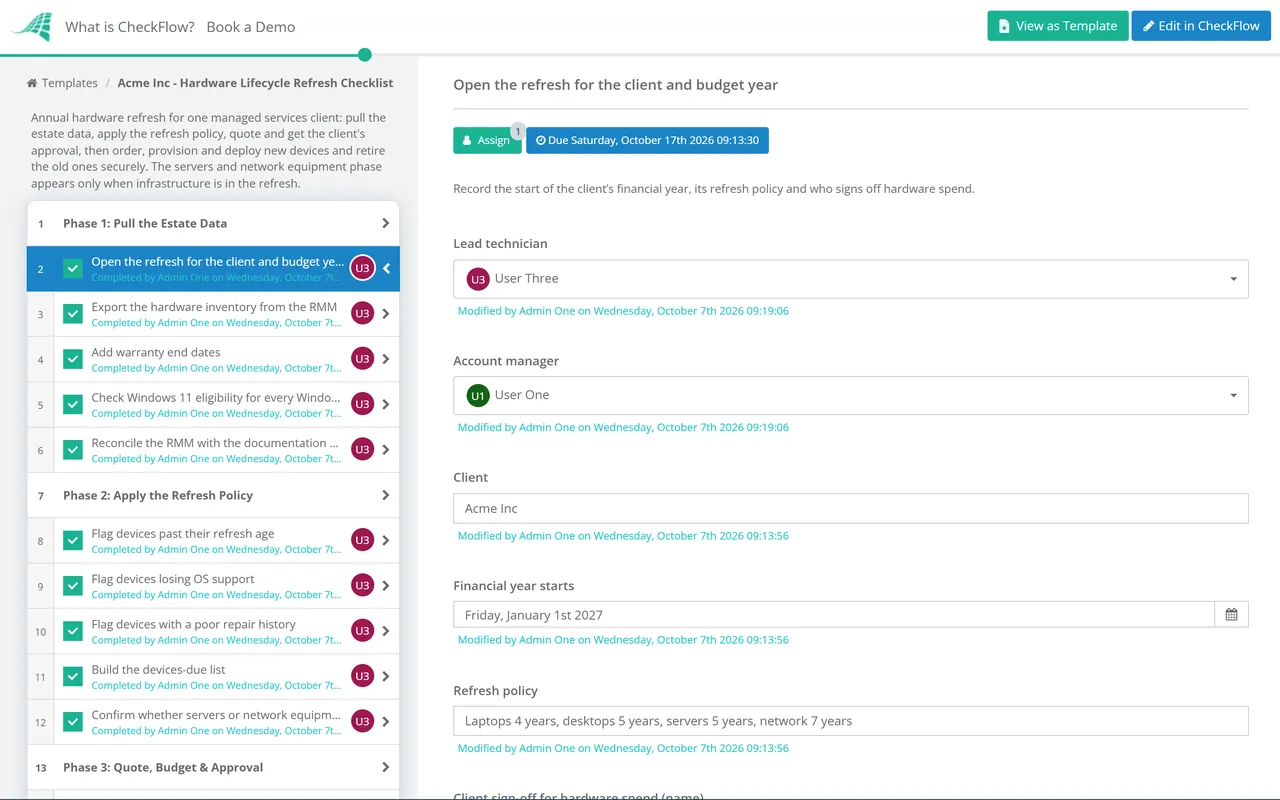
A recurring schedule opens each client’s refresh a few months before its budget year, assigned to the account manager and the lead technician.
Most MSP clients replace hardware the same way: something breaks, a ticket goes in, a quote goes out and a user works on a borrowed machine for a week. It is the most expensive way to buy a laptop, and it leaves a mix of models and warranty dates nobody planned. This free hardware lifecycle refresh checklist gives vCIOs, account managers and technicians an annual cycle for each client instead. It pulls age, warranty, operating system support and Windows 11 eligibility from the RMM, applies the client’s refresh policy, and turns the result into a priced list in the client’s budget year. Nothing is ordered until the client’s written approval is attached. New devices are provisioned through Windows Autopilot and Intune or your standard image, users are migrated, and old devices are deregistered, sanitised and removed from billing. When servers or network equipment are in the refresh, a conditional phase adds the maintenance window, rollback plan and post-cutover checks.
Four processes touch a client’s hardware, and this page covers only one of them. The IT Asset Management Checklist keeps the register accurate month by month. The IT Asset Disposal (ITAD) Checklist takes a batch of retired devices through sanitisation and certificates. The Operating System Upgrade Rollout Checklist moves devices that can stay to a new OS version. The refresh cycle is the decision in the middle: once a year, for one client, which devices are replaced, at what cost, in which budget period, and how the swap is done without losing anyone’s data.
It is also where the vCIO’s plan becomes a purchase order. The vCIO Technology Roadmap Review Checklist sets the multi-year budget line for hardware. This checklist fills that line with serial numbers, and its last phase updates the agreement’s device counts so the MSP Billing Reconciliation Checklist isn’t left to discover the change a quarter later.
Windows 10 makes the 2026 cycle unusual. Microsoft ended support on 14 October 2025, so every Windows 10 device still in a client’s estate this autumn needs an explicit choice: upgrade, replace, or pay for another year of Extended Security Updates (ESU).
Trigger: a ticket from a user who can’t work.
Price: whatever is in stock this week, often at short notice.
Budget: a surprise invoice the client didn’t plan for.
Old device: left in a drawer, still in the RMM and still billed.

Trigger: age, warranty and OS support dates from the RMM.
Price: standard models, quoted and ordered in a batch.
Budget: agreed in advance and split across the client’s year.
Old device: deregistered, sanitised, certified and removed from billing.
Seven phases take one client from inventory export to updated billing. Phase 6 appears only when servers or network equipment are in the refresh.
Run it two or three months before the client sets its budget.
Shown only when servers or network equipment are in the refresh. A laptop-only refresh goes straight to Phase 7.
No standard sets how long a laptop should last. The cycles below are common practice among MSPs and in-house teams, and the right one for a client depends on how the devices are used, what the warranty covers and what the client can afford. Agree a policy once and write it into the client’s documentation.
| Device class | Common refresh cycle | What brings it forward |
|---|---|---|
| Laptops | 3 to 5 years | Warranty ending, battery wear, heavy travel, or a processor not supported by Windows 11 |
| Desktops | 4 to 6 years | Windows 11 ineligibility, repeated disk or power faults, a role that now needs more memory |
| Servers | 5 to 7 years | The operating system reaching end of extended support, warranty or parts no longer available, capacity |
| Switches, firewalls and access points | 5 to 7 years | No further firmware or security updates from the manufacturer, a licence that can’t be renewed, bandwidth |
| Phones and tablets | 2 to 4 years | The device no longer receiving operating system updates |
Warranty is usually the cleanest trigger, because out-of-warranty repairs are slow to source and hard to price into a fixed fee. For servers, check the operating system as well as the hardware: Windows Server 2016 reaches the end of extended support in January 2027, so any 2016 server still running in a client estate this autumn belongs on the devices-due list or in a migration plan.
Windows 10 support ended on 14 October 2025, and the first year of commercial ESU is now running out. Every Windows 10 device on the inventory should leave Phase 2 with one of these decisions recorded against it:
Microsoft has extended its consumer ESU programme to 12 October 2027, but that programme is aimed at individuals. Business devices are covered through Microsoft’s commercial ESU offer, for up to three years after end of support.
A recurring schedule opens each client’s refresh a few months before its budget year, assigned to the account manager and the lead technician.
The approval task halts the order until the account manager has attached the client’s written approval and answered Approved. The quote, the approval and the delivery check sit on one record, so a disputed invoice is settled in minutes.
One answer in Phase 2 decides whether conditional logic adds the server and network phase. A laptop refresh stays short, and a firewall swap can’t skip its rollback plan.
Hardware refresh touches sales, service and billing at once, which is why the MSP process management guide recommends standardising it. CheckFlow for MSPs runs it alongside onboarding, QBRs and renewals for every client.
Server cutovers should go through your change process: the Server Decommissioning Checklist retires the old server once the new one is live, and the refresh feeds the hardware section of the MSP QBR Checklist. Retired devices leave through the ITAD checklist, which follows NIST SP 800-88 Rev. 2, published in September 2025 to replace Rev. 1.
There is no fixed rule. Common practice is three to five years for laptops, four to six for desktops and five to seven for servers and network equipment, adjusted for how hard the devices are used and how long the warranty runs. Many MSPs tie the cycle to the warranty they sell with the device. Agree the policy with the client, write it down and review the whole estate against it once a year.
For one year, ESU is usually cheaper than a new device: the commercial first-year price was $61 per device. It doubles each year, though, and it is cumulative, so a device joining in year two pays for year one as well. ESU also only delivers security updates, not fixes or support. Use it as a bridge for devices that genuinely can’t move yet, with a named reason and a replacement date in the next refresh.
Most agreements treat new-device setup and data migration as project work, quoted per device alongside the hardware, rather than as part of the monthly fee. Whichever model you use, put the labour in the refresh quote so the client approves it with the hardware, and log the time against the refresh project in the PSA.
They can, if the client agrees, but treat the device like any other disposal. Sanitise it, deregister it from Intune and Windows Autopilot so it doesn’t try to enrol back into the client’s tenant, remove the asset tag and record the sale or gift and its value. Remove company-licensed software first.
Remove the old device from the RMM, EDR and backup as part of the refresh, not as a separate tidy-up task weeks later, then update the agreement’s device count in the PSA the same day. The monthly billing reconciliation should then find nothing to correct. Phase 7 does both before the checklist can close, so a replaced laptop never sits in the RMM for months.
14-day free trial, no card required. The Business plan is $10 per user per month after the trial. Full details at checkflow.io/pricing.