Sponsor Licence Compliance Checklist

Hold a UK sponsor licence? Check the licence and its Key Personnel, every sponsored worker’s records, job and pay, your certificates and your reports on the SMS, then log the findings and have the Authorising Officer sign off the review.

Last reviewed: November 2026

Printed from checkflow.io/templates/human-resources/sponsor-licence-compliance-checklist

This free sponsor licence compliance checklist is for HR teams and Authorising Officers at UK organisations that hold a licence to sponsor workers on the Worker and Temporary Worker routes, such as Skilled Worker. One run is one compliance review, quarterly or before a Home Office visit, counted forward from a start date you choose. It follows the Home Office’s guidance for sponsors as published on GOV.UK and read on 24 November 2026, with each check tied to its paragraph. It checks the licence details and rating, the Authorising Officer, Key Contact and SMS Users, including the Level 2 User changes due by 8 March 2027. It then checks every sponsored worker’s file against Appendix D, whether their real job, place of work and pay still match their certificate of sponsorship, the certificates and the immigration skills charge, and every change reported on the SMS. Salary shortfalls and missed reports add the tasks to put them right. Findings go into one log with owners and dates, and the Authorising Officer signs off the review. It does not give legal or immigration advice.

What the Sponsor Licence Compliance Checklist Covers

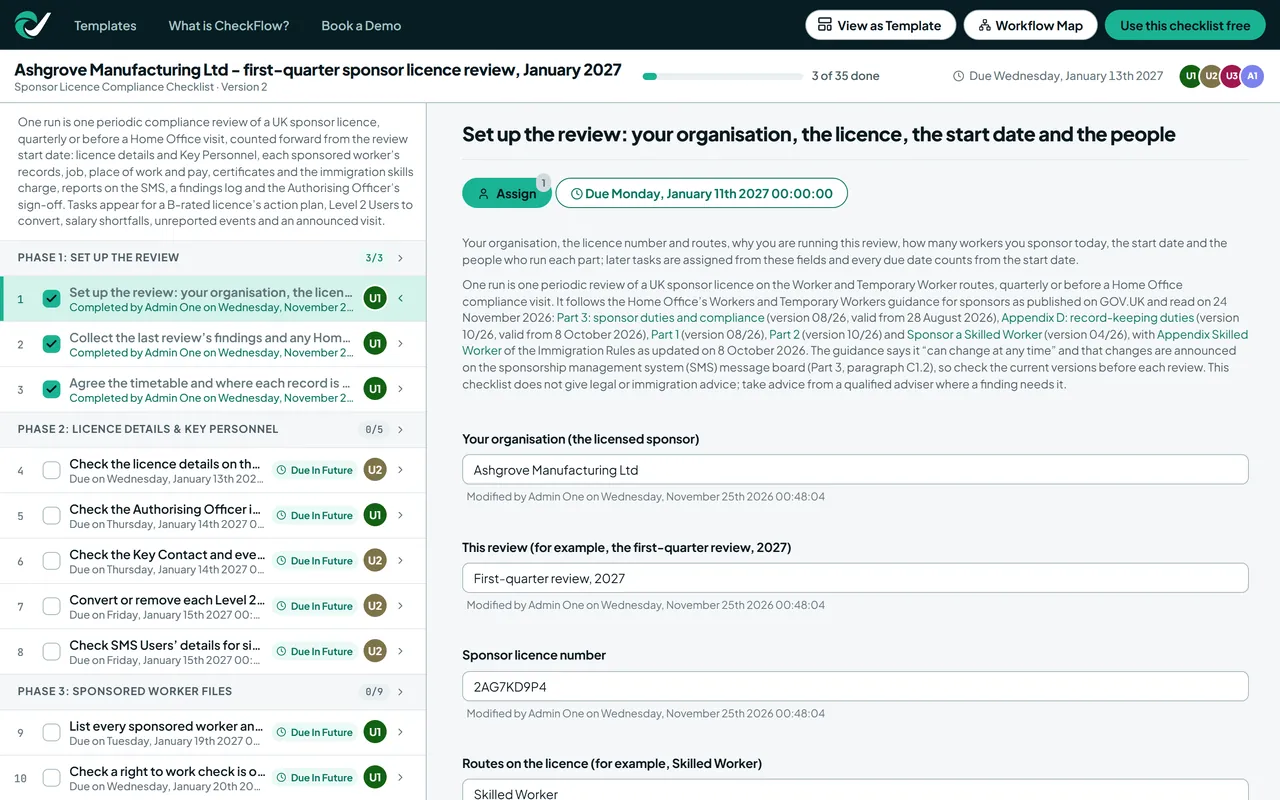
Nine phases take one review of a UK sponsor licence from set-up to the next review. The first task records the review start date, which sets every due date, and the people who run each part. The licence and its Key Personnel come first, then every sponsored worker’s file, their job, place of work and pay, the certificates and the immigration skills charge, and the reports on the sponsorship management system (SMS). Tasks appear when they are needed: an action plan check for a B-rated licence, Level 2 Users to convert, salary shortfalls to put right, missed reports to make and an announced Home Office visit to prepare for. The sign-off in Phase 8 is assigned to the Authorising Officer, and nothing after it can be completed until they sign off.

  1. Phase 1

    Phase 1: Set Up the Review

    3 tasks

    Owned by the HR lead. Enter the review start date on the first task: every due date counts forward from it in working days. Say why you are running the review: an announced Home Office visit adds a preparation task in Phase 7.

    • Set up the review: your organisation, the licence, the start date and the people — your organisation, the licence number and routes, why you are running this review, how many workers you sponsor today, the start date and the people who run each part; later tasks are assigned from these fields and every due date counts from the start date
    • Collect the last review’s findings and any Home Office messages since — the findings and open actions from the last review, any letters or emails from the Home Office, and the messages posted on the SMS message board since then
    • Agree the timetable and where each record is kept — the dates for each phase, who holds each record (HR files, payroll, the SMS) and how workers’ personal data is protected while it is reviewed
  2. Phase 2

    Phase 2: Licence Details & Key Personnel

    6 tasks

    Owned by the Level 1 User, who can see the licence on the SMS, with the HR lead. Check the licence and the people on it before you check the workers. A B-rating adds the action plan task, and any Level 2 User still on the licence adds the task to convert or remove them.

    • Check the licence details on the SMS against your records — your organisation’s name, addresses, branches, routes and rating as the SMS shows them, checked against your own records and the public register of licensed sponsors
    • Check every step of the action plan is on track — each step of the Home Office action plan, its owner and date, and evidence that it is done
    • Check the Authorising Officer is still the right person — that the Authorising Officer is still a paid member of staff or office holder and the most senior person responsible for recruiting sponsored workers and meeting the sponsor duties, and how they check the SMS Users’ work
    • Check the Key Contact and every Level 1 User — the Key Contact and each SMS User on the licence: still in post and still eligible, at least one Level 1 User who meets the employee and settled worker requirements, and the accounts of anyone who has left removed
    • Convert or remove each Level 2 User before 8 March 2027 — each Level 2 User still on the licence either converted to a Level 1 User, where they are eligible and still need access, or deactivated
    • Check SMS Users’ details for sign-in codes and inactive accounts — each SMS User’s mobile number, date of birth and email address recorded correctly for multi-factor authentication, and every user who has not signed in for 12 months either signed in and checked or removed
  3. Phase 3

    Phase 3: Sponsored Worker Files

    9 tasks

    Owned by the HR lead. List every sponsored worker, then check each file against Appendix D. Note each gap as you go: the findings log in Phase 7 collects them.

    • List every sponsored worker and match the SMS to your HR records — every worker you sponsor, from the certificates of sponsorship on the SMS, matched to HR and payroll records, with their route, occupation code, certificate reference and the date their permission ends
    • Check a right to work check is on file for each worker — evidence of a right to work check on each worker’s file, made before they started work and in the way the employer’s guide required at the time
    • Check date of entry evidence for workers who came in on a visa you sponsored — for each worker whose permission came from entry clearance you sponsored, evidence that they entered the UK within the visa’s validity, kept as Appendix D describes
    • Check the recruitment evidence for each worker — how each worker was recruited: the advert and where it ran, the number of applicants and of people shortlisted, and one more record of how the worker was chosen, or how they were identified if the role was not advertised
    • Check the job description, qualifications and any registration for each worker — a detailed job description with the skills, qualifications and experience the job needs, copies of the worker’s qualifications or references, and any registration or accreditation the job legally requires
    • Check each worker’s contract or written statement is on file — a contract of employment or for services, or a written statement of employment particulars, showing both parties’ names and signatures, the start and end dates, the job, the hours and the pay
    • Check contact details, National Insurance numbers and absence records — an up-to-date history of each worker’s UK address, personal email and phone number, a copy of their National Insurance number unless they are exempt, and a record of their absences
    • Check DBS checks, and that workers were told their employment rights — a DBS check on file where the role requires one, and evidence that each worker was given information about their employment rights in the UK
    • Check when each worker’s permission ends and plan any extension — each worker whose permission ends in the next six months, and whether you will assign a new certificate for an extension or stop sponsoring them
  4. Phase 4

    Phase 4: Jobs, Places of Work & Pay

    7 tasks

    Owned by the HR lead with the payroll contact. Check each worker’s real job, place of work and pay against their certificate. Any worker paid below the required salary adds the task to put it right.

    • Check each worker’s actual job matches their certificate of sponsorship — each worker’s day-to-day duties, job title and hours, checked with their manager against the occupation code and job description on their certificate
    • Check each worker’s normal place of work and any home working — each worker’s normal work location, branch or client site checked against their certificate, and anyone now working entirely from home
    • Collect payslips and payment records for every sponsored worker — each worker’s payslips for the period, showing their name, National Insurance number, tax code, allowances and deductions, with evidence of each payment into their own bank account
    • Check each worker is paid at least the salary their route requires — each worker’s guaranteed basic pay, counted up to 48 hours a week and without allowances, overtime or bonuses, compared with the salary on their certificate and with the threshold and going rate that apply to them
    • Put right each salary shortfall — for each worker paid below the required salary, the reason, the pay corrected and any arrears paid, any reduction reported on the SMS, and the advice taken
    • Check minimum wage, working time and pension enrolment for sponsored workers — the National Minimum Wage, the Working Time Regulations and pension enrolment applied to each sponsored worker, as for any other employee
    • Check no sponsorship costs were passed on to workers — no immigration skills charge, licence or certificate fee, or other cost the guidance says a sponsor must bear, recovered from a worker through pay, deductions, loans or repayment clauses
  5. Phase 5

    Phase 5: Certificates, Fees & Registrations

    3 tasks

    Owned by the Level 1 User with the HR lead. Check the certificate allocation, any certificates not yet used and the immigration skills charge, and that the business still holds the registrations it needs.

    • Check the certificate allocation and any certificates not yet used — the Undefined certificates left in this CoS year, each certificate assigned but not yet used in an application, and whether any should be withdrawn
    • Check the immigration skills charge was paid at the right rate — the charge paid on each certificate assigned since the last review, at the small or large rate for your organisation’s size on the day it was assigned and for the full period on the certificate
    • Check the registrations and licences your business needs are current — any registration, licence or planning permission your business needs to operate at its address, and any registration a sponsored worker’s job needs, still in force
  6. Phase 6

    Phase 6: Reports on the SMS

    7 tasks

    Owned by the Level 1 User. Check that every change found in this review was reported on the SMS on time. If any reportable event has not been reported, the late-report task appears.

    • Check absences without permission and long unpaid leave were reported — each sponsored worker absent without permission for more than 10 consecutive working days, and each absent without pay or on reduced pay for more than four weeks in total in the calendar year, reported on time
    • Check changes to workers’ jobs, pay and places of work were reported — the changes of job title, duties or role, promotions, pay reductions and changes of normal work location found in Phase 4, each reported within 10 working days
    • Check late starters and leavers were reported — workers who did not start within 28 days, and every worker you stopped sponsoring (resigned, dismissed, made redundant, contract ended early, required registration withdrawn, settlement granted), reported with their last contact details
    • Check changes to your organisation were reported — changes to your organisation’s name, addresses, branches, structure, size, ownership, Key Personnel and registrations, and any relevant conviction, reported on the SMS
    • Check whether any worker may have breached their conditions of stay — any sign that a sponsored worker is breaching their conditions, for example doing work their permission does not allow, reported as soon as reasonably practicable
    • Count the reportable events that have not been reported — every worker or organisation change found in this review that should have been reported on the SMS and has not been
    • Report each missed event on the SMS now — each unreported event reported on the SMS, with the date it happened, the date it was reported and any supporting documents sent
  7. Phase 7

    Phase 7: Findings & Visit Readiness

    4 tasks

    Owned by the HR lead. Put every gap found into one log with an owner and a date, and prepare a short summary for the Authorising Officer. An announced visit adds a preparation task.

    • Log every finding with an owner and a date — every gap found in Phases 2 to 6 and any action still open from the last review, each with the duty it concerns, an owner and a date to fix it
    • Prepare for the Home Office compliance visit or check — who will meet the compliance officers, the records they may ask to see, the sponsored workers and recruiting staff they may want to speak to, and any third-party sites where sponsored workers work
    • Prepare the review summary for the Authorising Officer — a short summary of what was checked, the findings and late reports, and the actions with owners and dates
    • Do the further work the Authorising Officer asked for — the further checks or fixes the Authorising Officer asked for before they will sign off, done and added to the findings log
  8. Phase 8

    Phase 8: Authorising Officer Sign-Off

    1 task

    Assigned to the Authorising Officer only. Nothing after this task can be completed until they sign off, and Phase 9 appears only on Signed off. Not signed off shows a task in Phase 7 for the further work.

    • Authorising Officer: sign off the review — the Authorising Officer’s decision that the review is complete and every finding has an owner and a date, or what is still needed first
  9. Phase 9

    Phase 9: Close the Review & Plan the Next

    4 tasks

    Applies only when the Authorising Officer chooses Signed off. Owned by the HR lead. Give each action to its owner, keep the review record with your sponsor records, set the next review and check the actions are done.

    • Give each action to its owner with its date — every action in the findings log sent to its owner with its date, and any that need the Authorising Officer or a Level 1 User flagged to them
    • Keep the review record with your sponsor records — the summary, the findings log and the evidence gathered, kept where you can give them to the Home Office on request
    • Set the next review start date — the start date for the next review and anything to cover then, such as changes to the guidance or new routes or sites
    • Check every action from this review is done — each action in the findings log checked with its owner, with any still open carried to the next review

Why Run Sponsor Licence Reviews in CheckFlow?

1

Every sponsor duty in one review

The licence, its Key Personnel, every worker’s file, job, place of work and pay, the certificates and the reports on the SMS are checked in the same order each time, with each check tied to the paragraph of the guidance it comes from.

2

Gaps turn into tasks

Enter how many workers are paid below the required salary or how many events were never reported, and the task to put them right appears. A B-rating adds the action plan check, and an announced visit adds the preparation task.

3

The Authorising Officer signs off

The review goes to the Authorising Officer named on the first task, and the checklist halts there. Not signed off shows a task for the further work before the sign-off, and the close-out phase appears only once the review is signed off.

CheckFlow does not give legal or immigration advice, connect to the sponsorship management system or report anything to the Home Office for you: those stay with your Level 1 Users and your advisers. CheckFlow makes sure every check is done in order, by the right person, with a record of what was found and decided. Track every review in the Reports Grid.

Run each new starter’s check with the Right to Work Check Checklist (UK), a sponsored worker’s move to a new role with the Internal Transfer Checklist or to a new site with the Employee Relocation Checklist, and the wider pay controls with the Payroll Audit Checklist.

AI generator

Didn’t find what you need? Describe it.

Describe the process in a sentence and the AI checklist generator drafts the phases and tasks for you.

Frequently Asked Questions

What should a sponsor licence compliance checklist include?

The licence details and rating, the Authorising Officer, Key Contact and SMS Users, each sponsored worker’s records against Appendix D, whether each worker’s real job, place of work and pay match their certificate, the certificate allocation and immigration skills charge, every change reported on the SMS on time, and a findings log with owners and dates. This template ends with the Authorising Officer’s sign-off and a date for the next review.

What are a sponsor licence holder’s main duties?

Part 3 of the Home Office guidance lists five main kinds: reporting duties, record-keeping duties, complying with immigration law and all parts of the sponsor guidance, complying with wider UK law such as employment law, and not behaving in a way that is not conducive to the public good. In practice that means reporting changes on time, keeping the Appendix D records, sponsoring only eligible roles, paying the required salary and co-operating with compliance checks.

Which changes does a sponsor have to report, and how quickly?

Most changes to a sponsored worker’s circumstances are reported on the SMS within 10 working days: absence without permission for more than 10 consecutive working days, more than four weeks’ unpaid leave in a calendar year, a pay cut, a job change within the same occupation code (a bigger change needs a new application), a new normal work location, a late start and a worker you stop sponsoring. Most organisation changes are reported within 20 working days, and a suspected breach of conditions as soon as reasonably practicable.

What records must a sponsor keep for each sponsored worker?

Appendix D lists them: evidence of the right to work check and, where relevant, the date of entry, how the worker was recruited, payslips and payment records, the contract, the value of any allowances, the job description and qualifications, the National Insurance number, a history of contact details, any DBS check the role needs, absence records and evidence of employment rights information. Keep them while you sponsor the worker and until one year after sponsorship ends, or until a compliance officer has examined and approved them if that is sooner.

What happens during a Home Office compliance visit?

A compliance check can be a request for documents, an on-site visit, a digital check by video, or checks with HMRC and other departments, and visits can be announced or unannounced. Officers may verify what you told the Home Office, interview you, your sponsored workers and staff who recruit them, inspect records against Appendix D and check other workers for illegal working. They do not give their assessment on the day; you get the outcome in writing.

Does a UK sponsor licence still need renewing?

Not on most routes. The Home Office removed the requirement to renew a sponsor licence every four years on 6 April 2024, so a licence stays valid until you surrender it or it is revoked. Licences on the UK Expansion Worker and Scale-up routes still last for a maximum of four years. The certificate of sponsorship allocation is still renewed each year.

How much must a sponsored Skilled Worker be paid?

For most certificates assigned since 22 July 2025, at least £41,700 a year and the going rate for the occupation code, whichever is higher. Lower thresholds apply for a relevant PhD, a job on the Immigration Salary List, new entrants, listed health and education jobs and some workers first sponsored before 4 April 2024. Only guaranteed basic pay for up to 48 hours a week counts; allowances, overtime and bonuses do not. Check Appendix Skilled Worker for each worker’s option.

What is changing for Level 2 Users and SMS sign-in?

Since 9 September 2026 no new Level 2 Users can be appointed, and each existing one must be converted to a Level 1 User, if eligible, or deactivated by 8 March 2027. Multi-factor authentication for SMS Users began on 3 September 2026, with a one-time passcode sent by text or email, so each user’s mobile number, email address and date of birth must be correct. An account not used for 12 months is deactivated if its user does not sign in within three months of the Home Office contacting you.

How much is the immigration skills charge?

For a certificate assigned on or after 16 December 2025, a small or charitable sponsor pays £480 for the first 12 months and £240 for each further six months; every other sponsor pays £1,320 and £660. The charge is paid when you assign the certificate, some workers and occupations are exempt, and you must never pass it on to the worker.

Is CheckFlow free for this template?

14-day free trial, no card required. The Business plan is $10 per user per month after the trial. Full details at checkflow.io/pricing.

Run Every Sponsor Licence Review the Same Way

Free trial — no credit card required.

14-day free trial, no credit cardFull refund in your first 30 daysUS hosting, EU on request