Internal Transfer & Role Change (Mover) Checklist

Joiners get a full onboarding process and leavers get an offboarding one. People who move between roles often get an email to IT, and keep everything they had before.

An internal transfer looks simple because the employee already exists in every system. That is exactly why it goes wrong. Pay and title change in the HR system, but nobody removes the old team’s file shares, the finance approval limit or the admin account from three roles ago. Meanwhile the new manager waits a fortnight for access to the tools the job needs. This free internal transfer checklist treats a move as what it is: a small leaver process and a small joiner process on the same day. It covers the approval, the new terms, the access changes, the handover, any relocation and the first 90 days in the new role, for UK and US employers.

Use This Template Free See Live Example
No Credit Card Required

Why the Mover Is the Weak Link in Joiner-Mover-Leaver

Access is added, rarely taken away. When someone joins, IT builds their access from a request. When they leave, an offboarding process removes it. When they move, the new access is requested because the employee chases it, and the old access stays because nobody chases that. After a few moves, a long-serving employee can hold the combined rights of every role they have had. Security teams call this privilege creep. It is how a sales manager ends up able to approve the supplier payments they used to process.

The fix is to change access on a date, not on request. Set an effective date when the move is approved. New-role access is ready for that morning, and old-role access ends that day, apart from any short handover access agreed with an end date. NIST’s security controls for account management and personnel transfer make the same point: when someone is reassigned, review their access and change it to match the new duties.

The terms change too, and the paperwork differs by country. A move can change pay, hours, location, overtime eligibility and the tax state. In the US it does not need a new Form I-9, but in either country it may affect a sponsored visa. Moves also happen for different reasons: a promotion, a lateral move, a secondment or redeployment into a vacancy instead of a redundancy, which the Redundancy & Layoff Process Checklist covers from the other side.

United Kingdom

Agree the change, then put it in writing

Agreement: changes to contract terms need the employee’s agreement, unless the contract already allows them.

Written statement: under section 4 of the Employment Rights Act 1996, written details of changed particulars, no later than one month after the change.

Relocation: qualifying relocation costs up to £8,000 can be paid free of tax and National Insurance.

Sponsored workers: a Skilled Worker moving to a different occupation code needs a new visa application, and other role changes are reported to the Home Office within 10 working days.

United States

Check status, tax and the I-9

Overtime: re-check FLSA exempt status, since the new role must pass both the salary level and the duties test.

Tax: if the work state changes, so can state income tax withholding and unemployment registration.

Form I-9: no new form for a transfer within the same employer; reverify only if work authorisation is expiring.

Visas: an H-1B move outside the approved work area may need an amended petition before the move.

What the Internal Transfer Checklist Covers

Six phases from the request to the 90-day review. The relocation phase appears only when the work location changes, and UK or US tasks follow the jurisdiction chosen on the first task.

Phase 1

Phase 1: Request & Approval

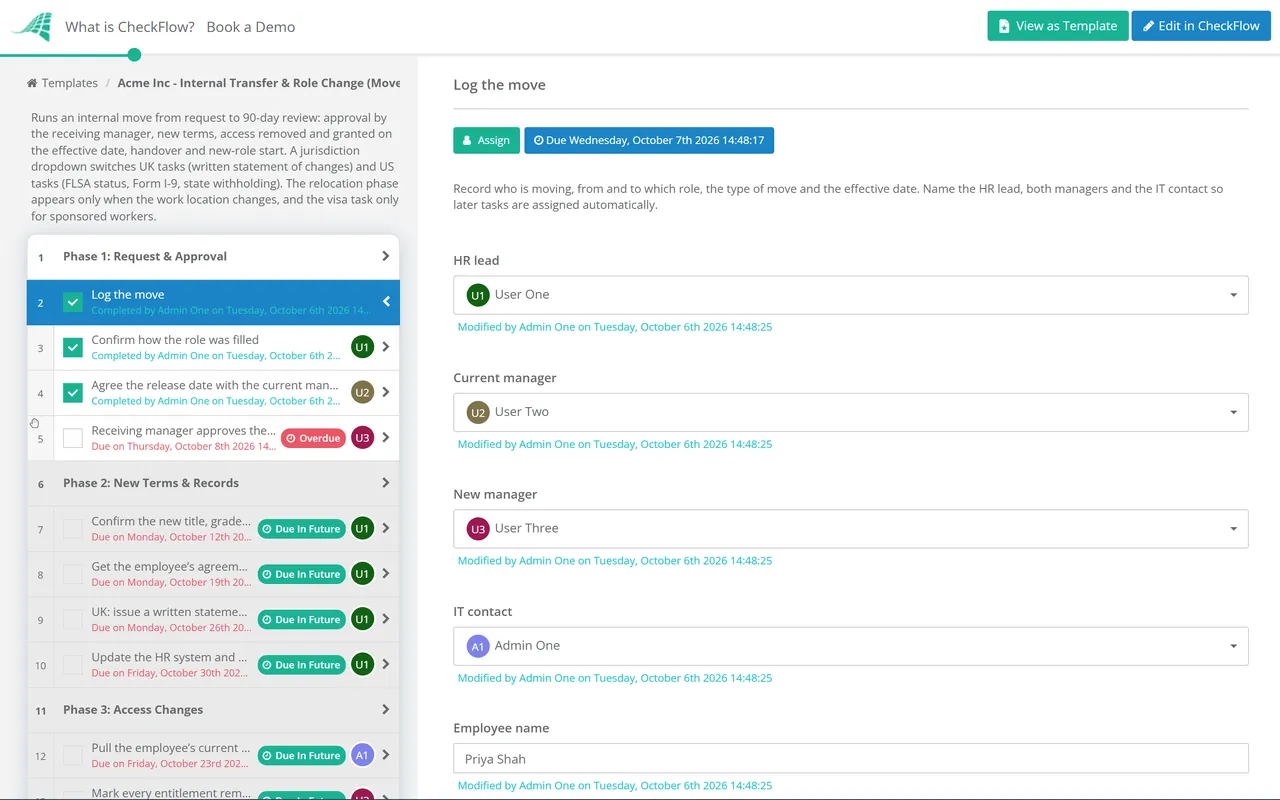
  • Log the move — employee, current and new role, effective date, and whether the location or manager changes
  • Confirm how the role was filled — internal advert, redeployment or direct appointment, and that the process was fair
  • Agree the release date with the current manager
  • Check visa sponsorship before the move is announced — UK Skilled Worker or US H-1B
  • Receiving manager approves the move and the budget
Phase 2

Phase 2: New Terms & Records

  • Confirm the new title, grade, pay, hours, reporting line and cost centre
  • Get the employee’s agreement to the new terms
  • UK: issue a written statement of the changes — no later than one month after the change
  • US: review FLSA exempt status — salary level and the duties of the new role
  • US: keep the existing Form I-9 — a transfer within the same employer is not a new hire
  • Update the HR system and payroll from the effective date
Phase 3

Phase 3: Access Changes

The phase that prevents privilege creep. Due dates are set from the effective date, so access changes on the day of the move.

  • Pull the employee’s current access list — from the identity system and each system owner
  • Mark every entitlement remove, keep or add — the old and new managers decide together
  • Request new-role access from the role’s standard profile — approved by each system owner
  • Remove old-role access on the effective date — handover access only with an end date
  • Review privileged, shared and financial access separately — admin rights, shared mailboxes, approval limits
  • Record the before-and-after access list for the next user access review
Phase 4

Phase 4: Handover

  • Write a handover note — open work, deadlines, contacts and where things are kept
  • Reassign approvals, recurring tasks and system ownership
  • Move shared documents and reports to a new owner
  • Update org charts, distribution lists and delegated authorities
  • Tell clients and colleagues who now covers what
Phase 5 — If Location Changes

Phase 5: Relocation

Shown only when the move changes the employee’s work location.

  • Agree the relocation package and dates in writing
  • UK: check which costs fall within the £8,000 relocation exemption
  • US: pay moving reimbursements through payroll as wages
  • US: set up withholding for the new work state — register there first if needed
  • Arrange the workspace, equipment and building access at the new site
Phase 6

Phase 6: New-Role Start & Reviews

  • Hold a welcome meeting with the new manager — role, priorities and how the team works
  • Set 30, 60 and 90-day objectives
  • Complete role-specific training and certifications
  • 30-day review — old access gone, new access right, early concerns raised
  • 90-day review — confirm the employee is settled, or agree extra support

The Access-Change Matrix

Phase 3 asks the old and new managers to sort every entitlement into remove, keep or add. The matrix below is a starting point by system type. The “review” column lists what is easy to miss: access that does not look like access, or that sits outside single sign-on.

System type Remove Keep Add Review
Directory groups and SSO rolesOld team and old role groupsCompany-wide groupsNew team and new role groupsNested groups that grant more than their name suggests
Email and shared mailboxesOld team lists and shared mailboxesPersonal mailboxNew team lists and mailboxesDelegate, send-as and calendar rights
File shares and document sitesOld team sites, after the handover windowPersonal filesNew team sitesFiles the employee owns that the old team still needs
Business applicationsOld-role roles and licencesBasic user access, if both roles use itNew-role role and licenceSegregation-of-duties conflicts between old and new rights
Finance approvalsOld approval limits and bank signatory rightsExpense claimsNew limits, only if the role needs themApproval chains still routed to the employee
Privileged and admin accountsAll, unless the new role needs them—A separate admin account, if requiredStanding admin rights that could be time-limited
Physical accessOld site or restricted areasGeneral building entryNew site or areasOut-of-hours access
Tools outside SSOOld-role SaaS accountsCompany-wide toolsNew-role toolsAccounts created with a work email that IT does not manage

Two rules make the matrix work. First, the old manager signs off the removals and the new manager signs off the additions, because each knows only one side of the job. Second, the before-and-after list is kept, so that the next user access review can check that what was agreed actually happened. If your organisation reviews access once a year, a move that went wrong can sit unnoticed for up to twelve months. The 30-day review in Phase 6 catches it sooner.

The “add” column works best when each role has a standard access profile: the groups, applications and permission levels that anyone in that role needs. Without one, IT is often asked to give the mover “the same access as Sam”, which copies everything Sam has collected over the years, including rights that belong to Sam’s previous jobs. Building profiles for your most common roles takes an afternoon per team, and it makes joiners faster as well as movers. Where a role has no profile yet, ask the new manager to list what the job needs, and have each system owner approve it.

Handover access is the most common exception. If the employee needs read access to the old team’s site for two weeks to finish handing over, grant it as a named exception with an end date, and make removing it a task with its own due date. An exception without an end date is how privilege creep starts.

Why Run Internal Transfers in CheckFlow?

1

One date drives the move

The effective date entered on the first task sets the due dates for the new terms, the access changes, the handover and the 30 and 90-day reviews. Access is removed on the day of the move because that task is due on the day of the move.

2

HR and IT on one checklist

HR owns the terms, IT owns the access and the managers own the handover. Each task is assigned to the right person, the move is an approval that halts the checklist until the receiving manager signs off, and relocation tasks appear only when the location changes.

3

Evidence for the access review

The remove, keep and add list is recorded on the checklist, with an audit trail of who removed what and when. When auditors or the next access review ask how a mover’s rights were changed, the answer is already written down.

Moves sit between onboarding and offboarding in the employee lifecycle. CheckFlow’s HR checklist software runs joiners, movers and leavers from templates, with assignments, approvals and due dates shared between HR, IT and line managers.

The new-role half of a move is a small onboarding. CheckFlow’s IT onboarding checklist software shows how IT teams provision accounts and devices from a role profile, and the User Access Review Checklist confirms the result at the next periodic review.

Frequently Asked Questions

What is a mover in joiner-mover-leaver?

+

Joiner-mover-leaver, or JML, describes the three points in employment where access and records must change. A joiner starts, a leaver goes, and a mover changes role, team, manager or location while staying employed. Movers are the hardest of the three to control, because nothing forces old access to be removed. A mover process changes access on the effective date and records what was removed, kept and added.

Does an internal transfer need a new Form I-9?

+

No. USCIS treats an employee who transfers to another location of the same employer, or who is promoted, demoted or given a raise, as continuing in employment, so no new Form I-9 is needed. Where the transfer is between distinct units of the same employer, the existing form can be transferred to the receiving unit. Reverification is still needed if the employee’s work authorisation is expiring. See I-9 Central on continuing employment.

Do we need to confirm a UK employee’s new terms in writing?

+

Yes. Section 4 of the Employment Rights Act 1996 requires a written statement of any change to the particulars in the employee’s written statement, at the earliest opportunity and no later than one month after the change. If the change means working outside the UK for more than a month, it is due before they leave. The change itself should be agreed first; Acas guidance on changing a contract explains how.

When should old access be removed?

+

On the effective date of the move. If the employee needs some old access to finish a handover, grant it as a named exception with an end date and a task to remove it. Waiting until the next periodic access review leaves the employee with two roles’ worth of rights for months, which is how segregation-of-duties conflicts appear.

Can a role change affect overtime eligibility in the US?

+

Yes, in either direction. Exempt status under the Fair Labor Standards Act depends on both the salary and the duties of the job. The Department of Labor currently applies a minimum salary of $684 a week for the executive, administrative and professional exemptions, after a court vacated the 2024 rule. A move into a role with different duties, or onto lower pay, can make an exempt employee non-exempt. Some states set a higher bar. California, for example, requires a salary of at least twice the state minimum wage for full-time work, which is $70,304 a year in 2026.

What changes when an employee moves to another state?

+

State income tax withholding generally follows where the work is done, so payroll may need a new state registration, a new state withholding form from the employee and a new unemployment insurance account. Local taxes, paid leave laws and final-pay rules can change too. Moving expense reimbursements are taxable wages for most employees, and the exclusion that once applied has now been removed permanently for everyone except the armed forces and the intelligence community. Ask your payroll provider or a tax adviser before the effective date.

Is CheckFlow free for this template?

+

14-day free trial, no card required. The Business plan is $10 per user per month after the trial. Full details at checkflow.io/pricing.

Move People Without Moving Their Old Access With Them

Free trial — no credit card required.