Right to Work Check Checklist (UK)

A right to work check only protects you if it is done the prescribed way, before the first day of work. A photocopy taken on day three or a screenshot of the worker’s own status page leaves you with no defence, and checking only the people who “seem foreign” is unlawful discrimination.

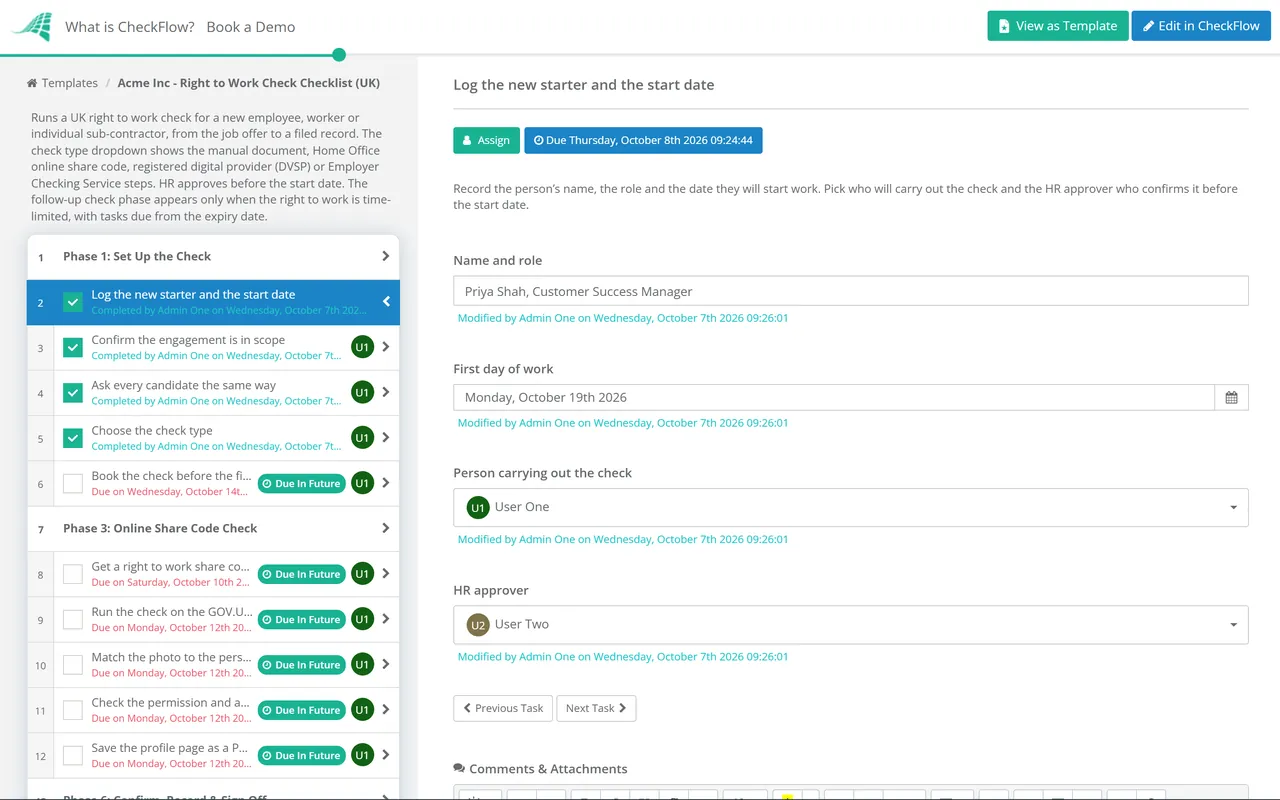
This free right to work check checklist takes each new starter from the job offer to a filed, dated record. It asks every candidate the same question, shows only the steps for the check you are using (manual documents, the Home Office online share code service, a registered digital provider or the Employer Checking Service), asks HR to confirm the check before the start date, and sets up the follow-up check for anyone whose permission runs out. It is built on the Home Office guidance in force from 1 October 2026, when the rules widened to cover workers and individual sub-contractors as well as employees. It is UK-specific by design. US employers verify employment eligibility on Form I-9 instead: see the Form I-9 & E-Verify Compliance Checklist.

Use This Template Free See Live Example
No Credit Card Required

Last reviewed: October 2026

Why Right to Work Checks Go Wrong

The check is simple. The timing and the record are where it fails. Every employer in the UK has a duty to prevent illegal working. If you carry out a check exactly as the Home Office prescribes, before the person starts, you have a “statutory excuse”: a defence against a civil penalty if it later turns out they had no right to do the work. Miss a step, check after the start date, or fail to keep the copy, and the excuse is gone even if you saw the right document.

The documents have changed. The Home Office stopped issuing Biometric Residence Permits on 31 October 2024 and moved to eVisas, an online record of a person’s immigration status. Someone with an eVisa can only prove their right to work through the online service with a share code, and a manual look at an expired BRP is not an acceptable check. Older onboarding packs that still ask for “passport or BRP” are out of date.

Who must be checked has changed too. From 1 October 2026 the Border Security, Asylum and Immigration Act 2025 extends the scheme beyond employees. The Home Office published a rewritten Employer’s guide to right to work checks dated 1 October 2026, alongside an updated code of practice on preventing illegal working and a new code on avoiding unlawful discrimination.

From 1 October 2026

Who now needs a check

  • Employees, as before
  • People engaged under a worker’s contract, such as casual staff supplied by an employment business
  • Individual sub-contractors, such as couriers working through a delivery app
  • Service providers matched with customers by an online matching service
  • Not genuinely independent businesses contracting directly with their own customers

For the new groups, penalties apply only where the engagement began on or after 1 October 2026. There is no general grace period.


Unchanged

What a statutory excuse needs

  • One of the prescribed check types, done before work starts
  • A check of the person, not just the document: photo, date of birth and identity
  • A clear copy, with the date the check was made
  • Copies kept for the whole engagement and two years after
  • A follow-up check before any time-limited permission ends

The rules apply across England, Scotland, Wales and Northern Ireland.

The stakes are high. The Home Office guide puts the civil penalty at up to £60,000 per illegal worker, and knowingly employing someone without the right to work is a criminal offence. Discrimination is the other risk: checking only the people you assume are migrants is unlawful. This template turns the Home Office guidance into process steps; it is not legal advice. If your model involves labour supply chains, platforms or substitution clauses, where the new “extended liability” rules can apply, take advice from an employment or immigration lawyer on your specific arrangements.

What the Right to Work Check Checklist Covers

Seven phases. The check type chosen in Phase 1 shows one of Phases 2 to 5, and the follow-up phase appears only when the person’s permission is time-limited.

Phase 1

Phase 1: Set Up the Check

  • Log the new starter and the start date — and pick the checker and the HR approver
  • Confirm the engagement is in scope — employee, worker, individual sub-contractor or matched service provider
  • Ask every candidate the same way — British and Irish citizens included
  • Choose the check type — set by the person’s nationality and status
  • Book the check before the first day of work
Phase 2 — If Manual

Phase 2: Manual Document Check

Shown when the check type is a manual document check.

  • Obtain original documents from List A or List B
  • Check the documents with the holder present — in person or by live video, originals in your hands
  • Check photos, dates of birth, expiry dates and work restrictions
  • Explain any difference in names — marriage certificate, deed poll or similar
  • Copy each document and record the date of the check
Phase 3 — If Online

Phase 3: Online Share Code Check

Shown when the check type is the Home Office online check. Required for anyone with an eVisa.

  • Get a right to work share code — nine characters, starting with W
  • Run the check on the GOV.UK employer service — share code, date of birth and your full business name
  • Match the photo to the person — in person, by video call or by registered facial recognition
  • Check the permission and any work restrictions — hours, type of work and expiry date
  • Save the profile page as a PDF or HTML file
Phase 4 — If Digital

Phase 4: Digital Check via a Registered Provider

Shown when the check type is a digital verification service provider. For British and Irish passports and Irish passport cards.

  • Choose a provider on the OfDIA register — certified for right to work checks
  • Offer a manual check to anyone who prefers one
  • Get the provider’s check output — with every required field
  • Confirm the photo and details match the person
  • Store the output and any facial comparison
Phase 5 — If ECS

Phase 5: Employer Checking Service

Shown when the Home Office has to verify the right to work, for example during a pending application or appeal.

  • Record why the ECS is needed — pending application, appeal, ARC, paper Certificate of Application or other case
  • Note when the application or appeal was made
  • Tell the person you are checking with the Home Office
  • Submit the ECS request — the Home Office aims to reply within five working days
  • Keep the Positive Verification Notice — it gives a six-month excuse
Phase 6

Phase 6: Confirm, Record & Sign Off

  • Confirm the role fits any work restrictions — hours, type of work, student term dates
  • Record whether permission is time-limited — and the expiry date
  • HR confirms the check before the start date — no start without it
  • File the evidence securely — for the engagement plus two years, then destroy it
  • Report any false document to the Home Office
Phase 7 — If Time-Limited

Phase 7: Follow-Up Check

Shown when the person’s permission to work has an expiry date.

  • Ask for new evidence well before the expiry date
  • Repeat the check on or before the expiry date — any prescribed method
  • Use the ECS if an in-time application is pending — within the 28-day grace period
  • File the new check and set the next follow-up date
  • Stop the work if no right to work is confirmed — and take HR advice

Which Check, for Whom, and for How Long

You cannot insist on one method for everyone, but you also cannot pick freely. The person’s nationality and immigration status decide which checks are open to them, and the result decides how long your statutory excuse lasts. Use this table when choosing the check type in Phase 1.

The person has Check to use Statutory excuse Follow-up
A British passportManual (List A, current or expired) or a registered digital providerContinuousNone
An Irish passport or passport cardManual (List A, current or expired) or a registered digital providerContinuousNone
No passport, but a UK birth certificateManual: the birth or adoption certificate plus an official document showing their permanent National Insurance numberContinuousNone
An eVisa with settled status or indefinite leaveOnline share code check onlyContinuousNone
EU Settlement Scheme pre-settled statusOnline share code checkLasts without a repeat checkNone required
An eVisa with time-limited permissionOnline share code check onlyUntil the permission expiresOn or before the expiry date
Only an expired BRPOnline share code check; the card itself is not acceptableAs the online result showsAs the online result shows
A pending in-time application or appealOnline check if they can get a share code, otherwise the ECSSix monthsBefore the six months end
An Application Registration Card allowing workECS, for a Positive Verification NoticeSix months from the noticeBefore the six months end
Common mistakes

Checks that give no excuse

  • Looking at a scanned copy or a document held up to a webcam you do not hold
  • Viewing the worker’s own status page or a printout instead of running the employer check
  • Accepting a share code that starts with R or S; those are for renting and other services
  • Using an unregistered provider, or one not certified for right to work checks
  • Writing a bare date on a copy instead of recording when the check was made
  • Letting someone start “while the check comes through”
Avoiding discrimination

What the code of practice expects

  • Check everyone at the same stage, British citizens included
  • Ask about immigration status only to learn about limits on hours or type of work
  • Do not treat someone worse for having time-limited permission or an eVisa
  • Do not insist on a digital check, except the online check for eVisa holders
  • Use the ECS when it applies, rather than turning the person away
  • Keep the job open as long as you reasonably can while they prove their status

Why Run Right to Work Checks in CheckFlow?

1

Only the steps for this check

One dropdown picks the check type and shows the manual, online, digital provider or ECS steps, nothing else. Each task carries its own instructions, so a hiring manager doing their first check follows the same route as HR.

2

A sign-off before day one

Due dates count back from the start date. The HR confirmation is an approval task assigned to the approver picked at the start, and the checklist halts until it is approved, so nobody starts on an unchecked promise.

3

Follow-ups that do not slip

When permission is time-limited, the follow-up tasks fall due from the recorded expiry date. Copies are uploaded to the task they belong to, and the audit trail shows who checked what and when, which is the evidence the Home Office asks for.

The right to work check is one step between the offer and the first day. CheckFlow’s HR checklist software runs recruitment, onboarding, reviews and departures from templates, with assignments, due dates and approvals shared between HR and line managers.

Run the check alongside the Pre-Employment Background Check Checklist and the New Hire Preboarding Checklist, so the conditions of the offer are cleared before the start date.

Frequently Asked Questions

When should a right to work check be done?

+

Before the person starts work. A statutory excuse is only established if the prescribed check is completed before employment begins, so a check on the first morning is cutting it fine and a check in the first week is too late. Many employers make the job offer conditional on the check and run it as soon as the offer is accepted. Whatever stage you choose, check every candidate at that stage in the same way, including British citizens, so nobody is singled out.

Can we still accept a Biometric Residence Permit?

+

No. The Home Office stopped issuing BRPs on 31 October 2024 and replaced them with eVisas. Looking at an expired BRP is not an acceptable check, and anyone with an eVisa can only prove their right to work through the Home Office online service. Ask for a right to work share code, which starts with W and lasts 90 days, then run the check yourself on the GOV.UK employer service with their date of birth. British and Irish citizens cannot get a share code, so use their passport, Irish passport card or another List A document instead.

Do gig workers, casual workers and contractors need right to work checks now?

+

Many do, from 1 October 2026. Section 48 of the Border Security, Asylum and Immigration Act 2025 extends the scheme to people engaged under a worker’s contract, individual sub-contractors and service providers found through online matching services. It also creates “extended liability” for some contractors in a supply chain, platforms and employers whose contracts allow substitution. The change is not retrospective: what counts is whether the arrangement was entered into on or after 1 October 2026. Genuinely independent businesses that contract directly with their own customers remain outside the scheme.

How long do we keep copies of right to work checks?

+

For as long as the person works for you and for two years afterwards, then destroy them securely. Keep a clear copy of each check, with a record of the date the check was made, and be able to produce it quickly if the Home Office asks. For online checks, keep the PDF or HTML profile page; for digital provider checks, keep the provider’s output and any facial comparison.

What is the penalty for employing someone without the right to work?

+

Without a statutory excuse, a civil penalty of up to £60,000 per illegal worker. Under the Home Office code of practice the starting point is £45,000 per worker for a first breach and £60,000 for a repeat breach within three years, reduced by £5,000 each for reporting the worker first and for co-operating with the investigation. Knowingly employing an illegal worker is also a criminal offence. A penalty can also affect your ability to sponsor migrant workers and to hold some licences, and penalised employers may be named on GOV.UK.

Is CheckFlow free for this template?

+

14-day free trial, no card required. The Business plan is $10 per user per month after the trial. Full details at checkflow.io/pricing.

Check Every New Starter the Same Way, Before Day One

Free trial — no credit card required.