Lost or Stolen Device Response Checklist Template

A laptop, phone or tablet has gone missing? Lock it, cut off access and wipe it within hours, confirm the encryption, record the breach decision within two days, and close the asset record with the incident reference.

Last reviewed: November 2026

Printed from checkflow.io/templates/cybersecurity/lost-or-stolen-device-response-checklist

This free lost or stolen device response checklist is for IT, security and privacy teams responding to one reported lost or stolen laptop, phone or tablet used for work, whether the organisation owns it or it is the user’s own device. One run starts from the date and time the loss was reported. It takes the last-seen details, finds the asset record, locks the device, revokes the user’s sessions and resets their password and sign-in methods, blocks the device, checks its location and sends a remote wipe, all within hours. It confirms the encryption status and what data the device held, and the DPO or privacy lead records a breach decision within two days, with notes on UK GDPR, HIPAA and US state rules and a hand-off to the Data Breach Response checklist where the breach must, or may need to, be reported. A theft is reported to the police, a lost device is checked with lost property, the user gets a replacement and the insurance claim is made. After a recovery window the device is checked or written off, a lessons-learned review is held, and a named person signs off before the asset register entry is closed with the incident reference.

Lost Device Response, Data Breach Response or Asset Management?

This checklist runs the response to one reported lost or stolen laptop, phone or tablet used for work: the lock, the cut-off of access, the wipe, the encryption and data checks, a recorded breach decision, the police report or lost-property check, the replacement and insurance claim, and the close-out of the asset record. Its first tasks fall due within hours of the report.

Where personal data is at risk and the breach must, or may need to, be reported, the Data Breach Response Checklist takes over the notifications, and this checklist carries on with the device. An attack or incident wider than one device runs in the Cybersecurity Incident Response Checklist. The register itself is kept with the IT Asset Management Checklist, and the remote lock and wipe are set up with the Mobile Device Management (MDM) Enrollment Checklist. A device that a leaver has not given back belongs in the Employee Offboarding Checklist and the IT Offboarding Checklist, and the rules users follow when working away from the office are in the Remote Work Security Checklist.

This checklist

One lost or stolen device

Covers: the report, lock, sessions and sign-in methods, location, wipe, encryption, the data on the device, the breach decision, the police or lost property, the replacement, the insurance claim, the recovery window, lessons learned and the close-out.

Planned around: the date and time the loss was reported.

Output: a device that can no longer reach your systems, a recorded decision, and a closed asset record.

Personal data at risk

Data breach response

Covers: the risk to individuals, notifying regulators, partners and the people affected, and the breach register.

Planned around: the notification deadlines that apply.

Output: every notification made on time. This checklist hands it a breach that must, or may need to, be reported.

The register

IT asset management

Covers: the asset register, assignments, moves and returns, licences, renewals and the quarterly audit.

Planned around: a regular cycle.

Output: an accurate register. This checklist closes one device’s entry in it with the incident reference.

What the Lost or Stolen Device Response Checklist Covers

Eight phases take one device from the report to the closed asset record, about four weeks later. The first task records when the loss was reported: the lock, the access steps and the wipe fall due within hours of it, counted in calendar hours so they fall at weekends too, the breach decision within two days, and the rest in working days. The answers on the first task add a SIM task for a phone or tablet, a police report for a theft, a lost-property check for a lost device, and the replacement and insurance claim or a personal device’s next steps. The close-out sign-off in Phase 8 is assigned to one person, and nothing after it can be completed until they do.

  1. Phase 1

    Phase 1: Take the Report

    4 tasks

    Owned by the IT lead. Enter the date and time the loss was reported on the first task: the first tasks fall due within hours of it, the breach decision within two days and the close-out about four weeks later. Say what the device is, whether it was lost or stolen and who owns it, and the tasks for that case appear.

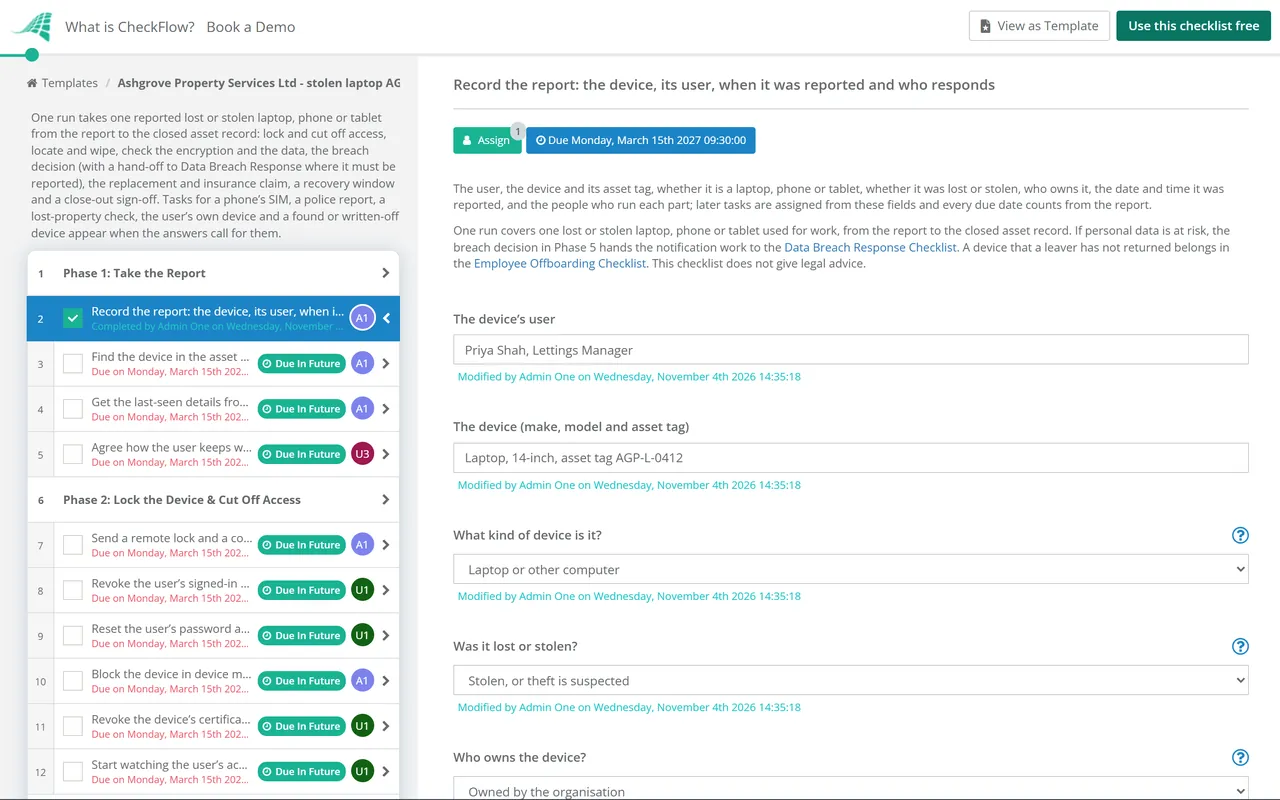
    • Record the report: the device, its user, when it was reported and who responds — the user, the device and its asset tag, whether it is a laptop, phone or tablet, whether it was lost or stolen, who owns it, the date and time it was reported, and the people who run each part; later tasks are assigned from these fields and every due date counts from the report
    • Find the device in the asset register and the device management console — the serial number, the assigned user, when it last checked in, the encryption status the console reports, and whether it is enrolled so that it can be locked and wiped remotely
    • Get the last-seen details from the user — when and where the device was last seen, how it was lost or taken, whether it was locked or switched off, and whether a password, PIN or recovery key was kept with it
    • Agree how the user keeps working today — a loan device or another way to work arranged, and anyone the user needs to warn about missed calls or messages
  2. Phase 2

    Phase 2: Lock the Device & Cut Off Access

    7 tasks

    Due in the first hours after the report, counted in calendar hours, so they fall at weekends too. Lock the device, end the user’s sessions, reset their password and sign-in methods, and stop the device getting new access.

    • Send a remote lock and a contact message to the device — a lock command from the device management console or the platform’s find-my-device service, with a message giving a number to call if it is found, and the time it was sent
    • Revoke the user’s signed-in sessions — every session and refresh token in the identity provider and the main cloud apps ended, so the device has to sign in again
    • Reset the user’s password and remove the device from their sign-in methods — a new password set with the user, the lost phone or its authenticator app removed as a sign-in method, and a new method registered on another device
    • Block the device in device management and conditional access — the device marked lost or non-compliant and disabled in the directory, so that it cannot get new access even if someone signs in on it
    • Ask the mobile network to suspend the SIM — the SIM or eSIM suspended so that calls, texts and sign-in codes sent to the number cannot be used, a replacement SIM ordered, and the network asked whether it can also block the handset
    • Revoke the device’s certificates, VPN access and stored keys — device certificates, VPN profiles, Wi-Fi certificates, SSH keys and API tokens held on the device revoked or rotated
    • Start watching the user’s accounts and the device for activity — alerts on sign-ins from the device or the user’s accounts, new mailbox rules and large downloads, kept on until the close-out
  3. Phase 3

    Phase 3: Locate, Wipe & Report

    5 tasks

    Check where the device last reported from, decide whether to wipe it now, send the wipe and record its status, and report a theft to the police the same day. A lost device gets a lost-property check instead.

    • Check where the device last reported its location — the last location from the device management console or the platform’s find-my-device service, if it has one, recorded with its time
    • Decide whether to wipe the device now — wipe now unless there is a clear reason to wait, such as a lost device in a known, safe place that will be collected within hours; the reason is recorded either way
    • Send the remote wipe and record its status — the wipe command and the time it was sent, and the status the console shows when this task is completed
    • Report the theft to the police and record the crime reference — the theft reported where it happened, with the serial number and the last-seen details, and the crime reference kept for the insurer and the incident record
    • Check lost property where the device was last seen — the transport operator, venue, hotel or taxi firm asked, with the asset tag or serial number to identify it
  4. Phase 4

    Phase 4: Check the Encryption & the Data

    5 tasks

    The breach decision rests on two facts: whether the data on the device was protected by encryption whose key was not with it, and what personal data the device held or could reach. Find both within the first day.

    • Confirm the device was encrypted, and that the key was not with it — the encryption status from the device management console or the build record, where the recovery key is kept, and the user’s answers about the lock and any password kept with it
    • List the data the device held or could reach — files stored on it, synced folders, cached email, apps that stay signed in and any removable media with it; for each, whether it includes personal data, roughly how many people, and any special category or health data
    • Check for any sign the device has been used since it went missing — sign-ins from the device, check-ins, file access and mailbox activity after the last-seen time, from the logs of the identity provider, device management and the main apps
    • Change the passwords and keys that were saved on the device — shared account passwords, saved browser passwords, password manager sessions and any key or code kept in a file on it, changed by their owners
    • Give the DPO or privacy lead the facts for the breach decision — what the device held, the encryption status, whether the key was with it, the lock and wipe status, any sign of use, and whether a police report was made
  5. Phase 5

    Phase 5: Make the Breach Decision

    3 tasks

    The DPO or privacy lead decides, within two days of the report, whether this is a personal data breach and whether it must be reported. One that must, or may need to, be reported goes to the Data Breach Response checklist, which takes over the notifications. Every decision is recorded.

    • Decide whether this is a personal data breach and whether it must be reported — a decision, with reasons, on whether personal data was at risk and whether the breach must or may need to be reported to a regulator or to the people affected
    • Start the Data Breach Response checklist and hand the breach over — a Data Breach Response checklist started with the facts gathered here, its name or reference recorded here, and the person who will make each notification named
    • Record the incident and the decision in the breach or incident log — the facts, the effects and the action taken, recorded whatever the decision, with a link to this checklist
  6. Phase 6

    Phase 6: Replace the Device & Claim

    5 tasks

    Get the user working again on a replacement, and start the insurance claim for a device the organisation owns. The user’s own device gets agreed next steps instead.

    • Issue a replacement device — a replacement from stock or ordered, built and enrolled in device management, and recorded against the user in the asset register
    • Agree the next steps for the personal device with the user — confirmation that the work data has been removed, the user’s own report to their network and insurer, and how a new personal device is enrolled before it is used for work
    • Get the user working on the new device — sign-in on the new device with new sign-in methods, the user’s files and apps restored from the cloud or a backup, and a check that the old device no longer appears in their account
    • Make the insurance claim, if the device is insured — the claim made on the organisation’s policy or the device’s cover, with the crime reference for a theft, the asset record and the purchase details
    • Go over keeping the new device safe with the user — where it is kept when travelling, locking it whenever it is left, never keeping a password or PIN with it, and reporting a loss straight away
  7. Phase 7

    Phase 7: Wait for Recovery & Write Off

    4 tasks

    This template allows 14 working days, about three weeks, for the device to turn up. Then record whether it was found: a found device is checked before it is used again, and a missing one is written off. The insurer’s outcome follows for a device the organisation owns.

    • Check whether the device has been found — at the end of the recovery window, whether the device has been returned, handed in or recovered by the police
    • Check the found device before it is used again — the serial number matched to the register, its condition and any sign of tampering recorded, and the device wiped and rebuilt before it goes back into use
    • Write the device off — the wipe status confirmed or recorded as never completed, the device removed from device management and from licence counts, and the write-off recorded for finance. For the user’s own device, remove it from device management only: there is nothing to write off in the register or for finance
    • Record the insurer’s outcome — whether the claim was paid, refused or is still open, any amount, and anything the insurer asked for
  8. Phase 8

    Phase 8: Learn & Close

    5 tasks

    Review what happened, then the close-out sign-off: only the person named on the first task can complete it, and nothing after it can be completed until they do. The asset register entry and the incident record are closed after it.

    • Hold the lessons-learned review — what happened, how quickly each step was done, which controls worked (encryption, device management, sign-in methods) and which did not, and the actions agreed with owners and dates
    • Finish the actions still open before close-out — each open action named at the sign-off finished, or given an owner and a date; then change the sign-off’s decision to Ready to close and complete it
    • Sign off the incident close-out — the device locked and wiped or written off, access revoked, the breach decision made and recorded, the police and insurance references kept, and the lessons-learned actions owned
    • Close the asset register entry with the incident reference — the device’s status set to found, lost, stolen or written off, with the incident reference, the crime and claim references and the replacement device recorded
    • Close the incident record and keep the evidence — the timeline, the decisions and the evidence (lock and wipe records, encryption evidence, the crime and claim references, the log entry) filed and kept for as long as your retention policy says

Breach Rules for a Lost Device, and Where to Report a Theft

What the breach rules say

The breach decision in Phase 5 shows a short note for each rule ticked in Phase 4. Where a breach must, or may need to, be reported, the Data Breach Response checklist takes over the notifications.

Rule Who is told When Where encryption matters Source
UK GDPR: the regulatorThe Information Commission (still known as the ICO), unless the breach is unlikely to result in a risk to people’s rights and freedoms.Without undue delay and, where feasible, not later than 72 hours after becoming aware of the breach; a later notice gives reasons for the delay.Article 33 has no encryption exception; encryption is part of judging the risk.Article 33
UK GDPR: the people affectedEach person affected, where the breach is likely to result in a high risk to their rights and freedoms.Without undue delay.Not required where measures such as encryption made the data unintelligible to anyone not authorised to access it.Article 34, including 34(3)(a)
UK GDPR: the recordNo one: the controller documents it.For every personal data breach, reported or not.Recorded either way.Article 33(5)
HIPAA: the people affectedEach person whose unsecured protected health information was, or is reasonably believed to have been, accessed, acquired, used or disclosed.Without unreasonable delay and no later than 60 calendar days after discovery.Information encrypted as HHS’s guidance specifies, with the key not breached, is not unsecured, so the notification rules do not apply to it.45 CFR 164.402 and 164.404; HHS guidance
HIPAA: HHSThe Secretary of HHS.At the same time as the people affected for 500 or more; within 60 days after the end of the calendar year for fewer.As above.45 CFR 164.408
HIPAA: the mediaProminent media serving the state or jurisdiction.Where more than 500 residents of a state or jurisdiction are affected, within the same 60 days.As above.45 CFR 164.406
HIPAA: a business associateThe covered entity.Without unreasonable delay and no later than 60 calendar days after discovery.As above.45 CFR 164.410
US state lawsAs each state’s law says.As each state’s law says.Each state decides for itself.The law of each state where affected people live

Reporting a theft

The police report task appears when the device was stolen, or when that is not known yet.

Where How to report a theft Source
UKTo the force where it happened, online where that force allows it (police.uk shows how) or by calling 101; 999 if the theft is happening now or someone is in danger.police.uk, Contact us
England, Wales and Northern IrelandFraud or a cyber attack that follows, such as someone using the device’s accounts: Report Fraud, which replaced Action Fraud. A business, charity or organisation under a cyber attack calls 0300 123 2040 straight away.reportfraud.police.uk
ScotlandReport Fraud says to report via 101.reportfraud.police.uk
USThe local law enforcement agency where the theft happened, online or on its non-emergency line; 911 in an emergency.USA.gov, How to report a crime

Where this comes from. Articles 33 and 34 of the UK GDPR on legislation.gov.uk, read on 4 November 2026: since 30 September 2026 they name the Information Commission, which replaced the Information Commissioner under the Data (Use and Access) Act 2025, while the ICO’s personal data breach guide still uses the ICO’s name and lists lost or stolen devices holding personal data as one kind of breach. The HIPAA Breach Notification Rule (45 CFR 164.400 to 164.414, read on Cornell LII) and HHS’s guidance on securing health information (last reviewed July 2013). police.uk, Report Fraud and USA.gov for reporting a theft. This checklist does not give legal advice; take advice on your own case.

Why Run Lost Device Responses in CheckFlow?

1

The first steps due within hours

The lock, the session and password resets, the device block and the wipe fall due within hours of the report, counted in calendar hours, so a loss on a Friday evening is not left until Monday. Every task is assigned from the people named on the first task, so each step has an owner from the start.

2

A breach decision recorded every time

The encryption status, whether the key was with the device and what data it held come first, then the DPO or privacy lead records a decision with reasons within two days. Notes show the UK GDPR, HIPAA or US state rules you tick. A breach that must, or may need to, be reported goes to the Data Breach Response checklist, and every decision goes in the log.

3

Only the tasks for this device

A phone or tablet gets the SIM task, a theft gets the police report, a lost device gets the lost-property check, and the user’s own device gets a note on wiping only the work data. A found device is checked before reuse, a missing one is written off, and the close-out sign-off comes before the asset record is closed. Track every open case in the Reports Grid.

CheckFlow does not lock, locate or wipe devices, contact the police or decide whether a breach must be reported: those stay with your IT team, your device management tools and your DPO. CheckFlow makes sure every step is done in order, by the right person, with the record kept.

Run the notifications with the Data Breach Response Checklist, wider incidents with the Cybersecurity Incident Response Checklist, and the register with the IT Asset Management Checklist.

AI generator

Didn’t find what you need? Describe it.

Describe the process in a sentence and the AI checklist generator drafts the phases and tasks for you.

Frequently Asked Questions

What should a lost or stolen device response checklist include?

The report and last-seen details, the asset record, a remote lock, revoked sessions and a password and sign-in method reset, the device blocked, the location and a remote wipe, the encryption status and the data on the device, a recorded breach decision, a police report or lost-property check, the replacement and insurance claim, and the close-out of the asset record. This template covers those steps for one device, with the first tasks due within hours of the report.

Is a lost laptop a personal data breach?

It can be. The ICO’s guide lists computing devices containing personal data being lost or stolen as one kind of personal data breach. Whether it must be reported depends on the risk to the people whose data was on it, and encryption whose key was not with the device is part of that judgement. A device that held no personal data and could reach none is not a personal data breach, but this template still records the incident.

Do you have to report a lost encrypted laptop to the ICO?

Not if the breach is unlikely to result in a risk to people’s rights and freedoms (UK GDPR Article 33). Article 34(3)(a) says telling the people affected is not required where encryption made the data unintelligible to anyone not authorised to access it. Encryption only helps if the key, PIN or password was not with the device or known. Every personal data breach must still be documented, reported or not (Article 33(5)).

Is a lost encrypted phone a HIPAA breach?

HHS’s guidance says health information is secured where it is encrypted as the guidance specifies and the key that could decrypt it has not been breached. The notification rules apply only to unsecured information, so a properly encrypted phone whose key was safe does not trigger them. If the information was not secured, a breach is presumed unless a four-factor risk assessment shows a low probability that it was compromised (45 CFR 164.402).

Should you wipe a lost phone straight away?

This template’s default is to wipe at once, within hours of the report, unless there is a clear reason to wait, such as a phone left in a known, safe place that will be collected within hours. A hold needs a time it ends, and the reason is recorded either way. For the user’s own phone, wipe only the work profile or work account, as your bring your own device policy and the user’s agreement allow.

How do you report a stolen laptop to the police in the UK?

police.uk says a theft can be reported to the local force online, where that force allows it, or by calling 101, and to call 999 if the theft is happening now or someone is in danger. Keep the crime reference for the insurer and the incident record. If the laptop is then used for fraud or a cyber attack, report that to Report Fraud, which replaced Action Fraud for England, Wales and Northern Ireland; in Scotland, Report Fraud says to report via 101.

Who decides whether a lost device has to be reported?

In this template the DPO or privacy lead named on the first task makes the breach decision, and only they can complete it. They decide within two days of the report, using the encryption status, whether the key was with the device, what data it held and any sign of use. A breach that must, or may need to, be reported goes to the Data Breach Response checklist, and every decision is recorded in the log.

What happens if the lost device is found?

Record it on the recovery task in Phase 7, which this template sets 14 working days after the report; complete it earlier if the device turns up. A found device is treated as untrusted: the serial number is matched to the register, its condition and any sign of tampering are recorded, and it is wiped and rebuilt before it goes back into use. The breach decision and its record stay, with the recovery added.

Is CheckFlow free for this template?

14-day free trial, no card required. The Business plan is $10 per user per month after the trial. Full details at checkflow.io/pricing.

Respond to Every Lost or Stolen Device the Same Way

Free trial — no credit card required.

14-day free trial, no credit cardFull refund in your first 30 daysUS hosting, EU on request