Run by the service desk under ITIL
Goal: restore normal service within the agreed service level.
Typical trigger: an outage, slow system or failed component.
Clock: internal SLA targets set by priority.
Main risk: downtime and unhappy users.
Ransomware, a phished administrator account, a cloud storage bucket found open to the internet: each one starts several clocks at once. The attacker’s clock, the regulator’s clock and the business’s patience all run in parallel, and the people handling the incident are usually doing it for the first time this year. This free cybersecurity incident response checklist gives security leads, IT managers and data protection officers a structured path from the first alert to a signed-off closure. It follows the Detect, Respond and Recover functions that NIST SP 800-61 Rev. 3 uses for incident response. Every action is recorded with a name and a time as it happens, evidence handling is built into containment rather than bolted on afterwards, and the notification tasks switch on by themselves when personal data is involved.
Most IT teams already run an ITIL-style incident process, and the IT Incident Management Checklist covers it: log the ticket, set a priority, restore the service as fast as possible, then run a post-incident review. That process is built for outages. Its goal is getting users working again, and a quick reboot or a rollback counts as a win.
A security incident has a different goal and a different enemy. Someone may still be inside the network, watching how you react. Rebooting a compromised server can destroy the memory evidence an investigator needs, and wiping a laptop before anyone has imaged it can leave you unable to tell a regulator what was taken. Legal clocks start running too, often from the moment you become aware of a breach rather than when you finish investigating it. NIST SP 800-61 Rev. 3, published in April 2025, reflects this. It retired the old four-phase life cycle and now frames incident response around the CSF 2.0 Functions, with Detect, Respond and Recover as the response itself and lessons learned feeding continuous improvement.
Goal: restore normal service within the agreed service level.
Typical trigger: an outage, slow system or failed component.
Clock: internal SLA targets set by priority.
Main risk: downtime and unhappy users.
Goal: contain the attacker, preserve evidence, recover safely and meet legal duties.
Typical trigger: malware, account takeover, data exposure or exfiltration.
Clock: regulatory and contractual deadlines, some measured in hours.
Main risk: data loss, re-entry, fines and a poorly evidenced response.
Six phases take an incident from the first report to closure. The notification phase adapts to two answers recorded during triage.
Owned by the on-call security analyst. The answers to tasks 3 and 4 decide which later tasks appear.
Task 5 appears only when Phase 1 rates the incident high or critical.
Assigned to the DPO or legal counsel. Tasks 1 and 2 switch on when Phase 1 records personal data as involved or not yet known. Task 4 switches on for high and critical incidents.
The closure sign-off is assigned to the head of security or CISO by name.
Auditors and regulators ask the same question in different words: can you show that incidents are handled by a defined process and that you learn from them? The table maps the main references to the phase that produces the evidence. Which rules apply depends on your sector, location and customers, so treat the table as a starting point, not legal or audit advice.
| Framework | Reference | What it expects | Evidenced in |
|---|---|---|---|
| NIST SP 800-61 Rev. 3 (April 2025) | RS.MA, RS.AN | Incidents are triaged, categorised, prioritised and escalated; investigation actions and incident data are recorded with integrity preserved | Phases 1–3 |
| NIST SP 800-61 Rev. 3 | RS.MI, RC.RP | Incidents are contained and eradicated; backups are checked before restoration and the end of recovery is declared against criteria | Phases 2–4 |
| ISO/IEC 27001:2022 | A.5.24–A.5.28 | Incident management is planned; events are assessed; incidents are handled to procedure; lessons are learned; evidence is collected and preserved | Phases 1–3, 6 |
| SOC 2 (2017 TSC, revised points of focus 2022) | CC7.3–CC7.5 | Security events are evaluated; incidents are handled through a defined response programme; recovery activities are carried out | Phases 1–4, 6 |
| PCI DSS v4.0.1 | 12.10.1, 12.10.6 | An incident response plan is ready to activate, covering roles, communications and legal reporting; the plan is updated from lessons learned | Phases 5–6 |
| GDPR / UK GDPR | Art. 33 and 34 | Notify the supervisory authority within 72 hours where feasible; tell individuals when risk is high; document every breach | Phase 5 |
| NIS2 Directive (EU) 2022/2555 | Art. 23 | For significant incidents: early warning within 24 hours, notification within 72 hours, final report within one month | Phase 5 |
| SEC (US registrants) | Form 8-K Item 1.05 | Disclose a material incident within four business days of the materiality determination | Phase 5 |
| CIS Controls v8.1 | 17.8, 17.9 | Post-incident reviews; documented thresholds that separate an incident from an event | Phases 1 and 6 |
Two changes are worth watching. In the UK, the Cyber Security and Resilience Bill was still before Parliament in September 2026; as drafted, it would require regulated organisations to send an initial notice within 24 hours and a fuller report within 72. In the US, industry groups have petitioned the SEC to rescind Item 1.05, but the requirement remained in force as of September 2026. The checklist’s Phase 5 tasks can be edited as either position changes. The wider programmes behind these obligations have their own templates: the SOC 2 Readiness Checklist, the PCI DSS 4.0 Compliance Checklist, the NIS2 Compliance Checklist and the NIST CSF 2.0 Checklist.
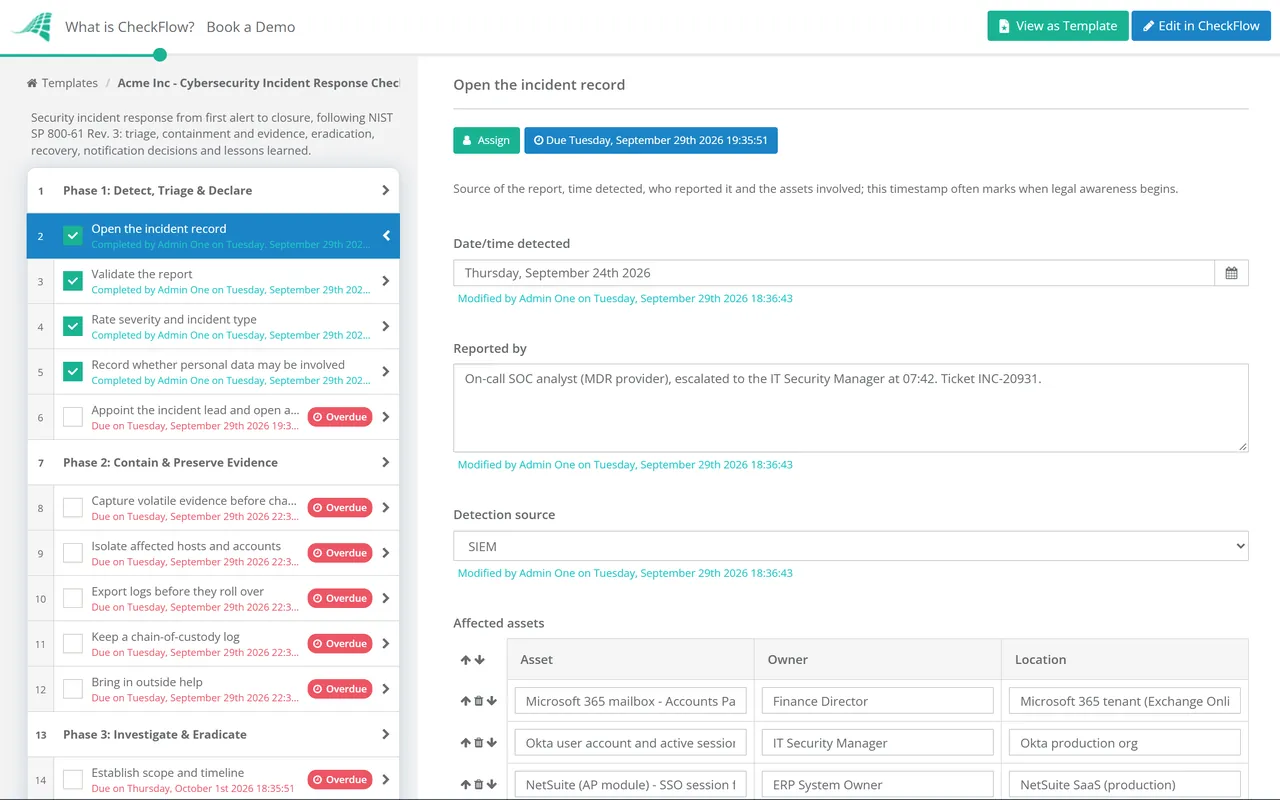
Conditional logic reads the answers from Phase 1. Record that personal data may be involved and the breach notification tasks appear for the DPO; rate the incident critical and the materiality task appears. A low-severity malware case stays short, without anyone deleting steps by hand.
Each completed task carries the name of the person and the time, so the audit trail doubles as the incident timeline. Log exports, hash values and screenshots are attached to the task they support, and comments capture the decisions made on the call.
Recovery needs approval from the incident lead and the system owner, and closure needs the head of security. Dashboards show every open incident and overdue action, so improvement tasks from the lessons-learned review do not quietly disappear.
CheckFlow is not an EDR, SIEM or forensics tool, and it does not detect attacks. It runs the human side of the response around those tools: who does what, what was decided and when. The checklist can be started by hand or by your own integration through the CheckFlow API. A plan you have never rehearsed will fail in predictable places, so pair it with the Incident Response Tabletop Exercise Checklist and test it at least once a year.
Incident handling is one of the controls SOC 2 auditors test most closely; our SOC 2 compliance checklist guide shows where CC7 fits in the wider audit. For the recurring reviews that sit around incident response, CheckFlow’s compliance checklist software keeps owners, evidence and approvals in one place.
Three scenarios have their own sub-playbooks, started from this incident record once the type is clear: the Ransomware Response Checklist for encryption and extortion, the Phishing Incident Response Checklist for a reported email, and the Data Breach Response Checklist for the legal and notification work when personal data is involved.
Recovery relies on backups you have already proven, which is what the Backup Verification & Restore Test Checklist is for, and restoring in business priority order is rehearsed in the Business Continuity Plan Testing Checklist. For outages that were not attacks, the Incident Postmortem Template runs the same kind of blameless review as Phase 6.
Describe the process in a sentence and the AI checklist generator drafts the phases and tasks for you.
At minimum: how an incident is declared and rated, who leads it, how systems are contained without destroying evidence, how the attacker is removed, how recovery is verified, who decides on notifications, and how lessons feed back into the plan. The part most teams leave out is the record. A checklist is only useful afterwards if it captures who did each step and when, because that record is what an auditor, insurer or regulator will ask for.
Revision 3, published in April 2025, replaced the 2012 Revision 2. It drops the familiar four-phase cycle of preparation, detection and analysis, containment and recovery, and post-incident activity. Instead it is written as a CSF 2.0 Community Profile: Govern, Identify and Protect cover preparation, while Detect, Respond and Recover cover the incident itself. It also treats lessons learned as continuous rather than something that waits until the incident is over. It is less of a step-by-step handbook than Revision 2, which is why many teams pair it with their own checklist.
Under GDPR and UK GDPR it runs from when the controller becomes aware of a personal data breach, not from when the investigation finishes. You do not need every detail to report: the regulation allows information to be provided in phases, and a late report must explain the delay. Breaches that are unlikely to result in a risk to individuals do not need reporting, but they still have to be recorded internally. That is why the checklist asks about personal data during triage, not at the end.
Usually not as a first move. Isolating the device from the network, often through your endpoint tool, stops the spread while keeping memory contents that investigators may need. CISA’s #StopRansomware Guide recommends powering down only when you cannot disconnect a device, because shutting it off loses the evidence held in volatile memory. Whatever you decide, record it in the checklist with the time.
Annual testing is the common baseline. PCI DSS v4.0.1 requirement 12.10.2 requires the plan to be reviewed and tested at least once every 12 months, and CIS Controls v8.1 safeguard 17.7 calls for incident response exercises at least annually. Many organisations also test after a major change, such as a merger, a new cloud platform or a change of security provider. A tabletop exercise is the cheapest way to do it.
14-day free trial, no card required. The Business plan is $10 per user per month after the trial. Full details at checkflow.io/pricing.
14-day free trial, no credit cardFull refund in your first 30 daysUS hosting, EU on request